
Can't connect to NextCloud console
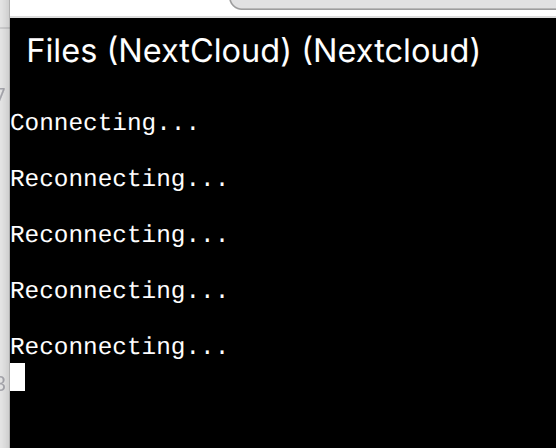
-
Hello @potemkin_ai
The @nextcloud app itself is working as intended?
Did you try to restart the app once?
Are there any errors in the browser web console when this is happening? -
Does this happen only with nextcloud or with other apps too ? Wondering if this is some network error since I think web terminal uses web sockets which is glitchy on some networks .
Also, possible that nextcloud keeps restarting. docker exec will also work for some time and exit in that case.
-
Only with NextCloud and it seems like was working fine...
-
Hey, James. Quite a while ago. Don't you want to figure out the root cause?
I can and certainly will reboot the server one day. -
Hey, James. Quite a while ago. Don't you want to figure out the root cause?
I can and certainly will reboot the server one day.Hello @potemkin_ai
Since this is a rather unique issue, I assume this has something to do with how Cloudron streams this to the browser.
This can be very hard to debug, and I would like to first ensure that a simple reboot does not solve the issue.
If a reboot solves the issue, I can also deduce that this is some docker network issue and can then look deeper into it. -
@potemkin_ai are you seeing anything in the browsers network inspector or console?
@nebulon I do:
terminal-c5ikyfn6.js:6307 WebSocket connection to 'wss://my.server.com/api/v1/apps/e075a2fe-7f7f-40ff-ae12-056766d2780d/exec/d7f60f4a9d5d72e7ced6aaf3d0f035fbe98c397f37690fe99ddcba72b0539d97/startws?tty=true&rows=25&columns=183&access_token=a8uNp2OOgZpy_00xcyYa3gKGGAb8SQGO0B6-Tydok3k' failed: connect @ terminal-c5ikyfn6.js:6307 terminal-c5ikyfn6.js:6322 Socket error. Reconnecting... Event {isTrusted: true, type: 'error', target: WebSocket, currentTarget: WebSocket, eventPhase: 2, …} terminal-c5ikyfn6.js:6317 Socket closed. Reconnecting... -
and that is happening not only for NextCloud actually, I just didn't notice!
-
ok, so just to rule out some more cases. Can you use
cloudron execfor any of those apps, just to see if this may be something between your browser and the Cloudron or a backend issue.Also while trying to access the webterminal or cloudron exec, follow the cloudron logs at
/home/yellowtent/platformdata/logs/box.log -
ok, so just to rule out some more cases. Can you use
cloudron execfor any of those apps, just to see if this may be something between your browser and the Cloudron or a backend issue.Also while trying to access the webterminal or cloudron exec, follow the cloudron logs at
/home/yellowtent/platformdata/logs/box.log@nebulon will do, thanks.
Could you please, tell me - what
cloudron execdoes? Never used it - only using WebUI and ssh command lines on the server, in those rare cases, when got to check something. -
Hello, @james . Thanks!
For anyone wondering of the same - the best way is the following commands - from any other computer, then the server.
npx cloudron login my.precious.com
npx cloudron list
npx cloudron exec --app $id--tty
(no need to install anything globally)
Nothing at the box.log, I'm getting the following error from the cli:
npx cloudron exec --app e085a31f-7f7f-40ff-ae95-056766d2781d --tty
Could not upgrade connection to tcp. http status: 502
And here is the nginx log entries:
IP - - [21/Jan/2026:14:18:03 +0000] "GET /api/v1/apps/e085a31f-7f7f-40ff-ae95-056766d2781d HTTP/2.0" 200 7965 "-" "-"
IP - - [21/Jan/2026:14:18:03 +0000] "POST /api/v1/apps/e085a31f-7f7f-40ff-ae95-056766d2781d/exec HTTP/2.0" 200 78 "-" "-"
The Cloudron is behind a proxy, but I can't see any WebSocket related restrictions.
-
Hello, @james . Thanks!
For anyone wondering of the same - the best way is the following commands - from any other computer, then the server.
npx cloudron login my.precious.com
npx cloudron list
npx cloudron exec --app $id--tty
(no need to install anything globally)
Nothing at the box.log, I'm getting the following error from the cli:
npx cloudron exec --app e085a31f-7f7f-40ff-ae95-056766d2781d --tty
Could not upgrade connection to tcp. http status: 502
And here is the nginx log entries:
IP - - [21/Jan/2026:14:18:03 +0000] "GET /api/v1/apps/e085a31f-7f7f-40ff-ae95-056766d2781d HTTP/2.0" 200 7965 "-" "-"
IP - - [21/Jan/2026:14:18:03 +0000] "POST /api/v1/apps/e085a31f-7f7f-40ff-ae95-056766d2781d/exec HTTP/2.0" 200 78 "-" "-"
The Cloudron is behind a proxy, but I can't see any WebSocket related restrictions.
Hello @potemkin_ai
@potemkin_ai said in Can't connect to NextCloud console:
The Cloudron is behind a proxy
This is a mayor detail which you should have mentioned earlier since it is outside the default Cloudron spectrum.
Is it the whole Cloudron or just Nextcloud?
Please explain in detail what you mean withCloudron is behind a proxy. -
Hello @potemkin_ai
@potemkin_ai said in Can't connect to NextCloud console:
The Cloudron is behind a proxy
This is a mayor detail which you should have mentioned earlier since it is outside the default Cloudron spectrum.
Is it the whole Cloudron or just Nextcloud?
Please explain in detail what you mean withCloudron is behind a proxy.you should have mentioned earlier
@james I wish I was aware that it is the problem!
The whole cloudron is behind a haproxy that does TCP level proxy. From my understanding it should not affect, as it's one level below the HTTP(S) and WebSocket is above HTTPS.
And the console doesn't seem to work for all apps terminals.
Any ideas how to narrow down the root cause?
-
Hello @potemkin_ai
Sorry, but running Cloudron behind a proxy is an advanced setup outside the normal scope.
If you have a Cloudron subscription, feel free to reach out to our support mail support@cloudron.io.
Still, since this is outside the normal scope I can not guarantee any support there. -
J joseph has marked this topic as solved on
-
I do have a subscription. Just yesterday I've figured out the problem is with HTTP 2 protocol that is failing on the hand-over; disabling it on the proxy and leaving with HTTP 1.1 works just fine, as the protocol do the fallback from H2 to WebSocket over HTTP 1.1, which works just fine.
-
 J james has marked this topic as solved on


Hello! It looks like you're interested in this conversation, but you don't have an account yet.
Getting fed up of having to scroll through the same posts each visit? When you register for an account, you'll always come back to exactly where you were before, and choose to be notified of new replies (either via email, or push notification). You'll also be able to save bookmarks and upvote posts to show your appreciation to other community members.
With your input, this post could be even better 💗
Register Login