
Email for pocketbase
-
Hi there!
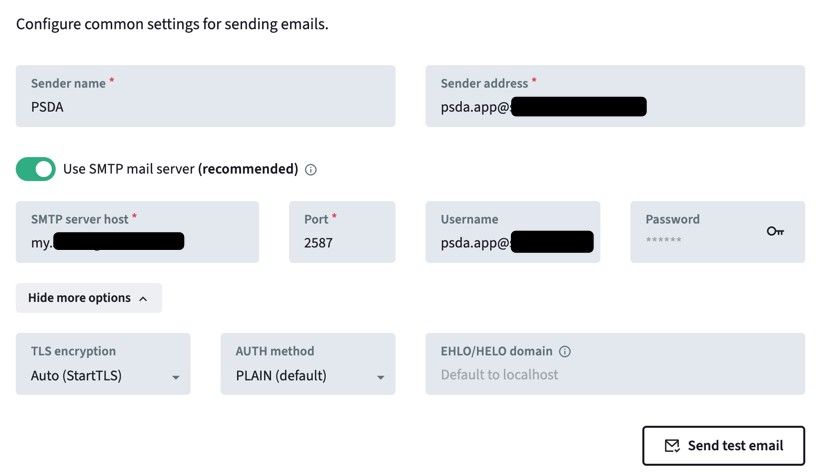
I just confirmed that email works in PocketBase on Cloudron when using STARTTLS on port 2587.
What confused me is that PocketBase’s default SMTP port is 587, but on Cloudron nothing listens on 587, the provided ports are 2525 (plain), 2587 (STARTTLS), and 2465 (SMTPS).
Is the default 587 simply not applicable on Cloudron, or am I misunderstanding how PocketBase is expected to integrate with Cloudron’s mail relay?
Thanks!

-
Hi there!
I just confirmed that email works in PocketBase on Cloudron when using STARTTLS on port 2587.
What confused me is that PocketBase’s default SMTP port is 587, but on Cloudron nothing listens on 587, the provided ports are 2525 (plain), 2587 (STARTTLS), and 2465 (SMTPS).
Is the default 587 simply not applicable on Cloudron, or am I misunderstanding how PocketBase is expected to integrate with Cloudron’s mail relay?
Thanks!
This post is deleted! -
Hello @jesperbllnbm
Due to the way PocketBase is developed it can not connect internally to STARTTLS without the certs.
This works for mosts apps, but some don't like it.
PocketBase is requiring a valid mail server certificate to send email internally, thus 2587 is used. -
Wow such a quick response time! Thanks that cleared it

-
Hi @James - I do have 1 more question. Is it normal that the container restart (stop->start, using the cloudron dashboard) resets the email port? After a restart I am back to 587, is there a way to persist this configuration?
Thanks in advance!
-
 amazing turn around time
 -
Hmm it appears that when sending test email, pocketbase is showing timeout but after a while I do receive the test email in my inbox.
This slow response also make login very slow because pocketbase is trying to sen email alerts. I am not sure where can be the problem.From pocketbase point of view, the email request gave timeout
From user point of view the login time is slow (~30 seconds maybe) -> workround : disable login alerts
But emails do get sent at the end ? At least test emails -
This behaviour is very odd.
Sometimes it sends, sometimes it does not, but always the send test email times out.
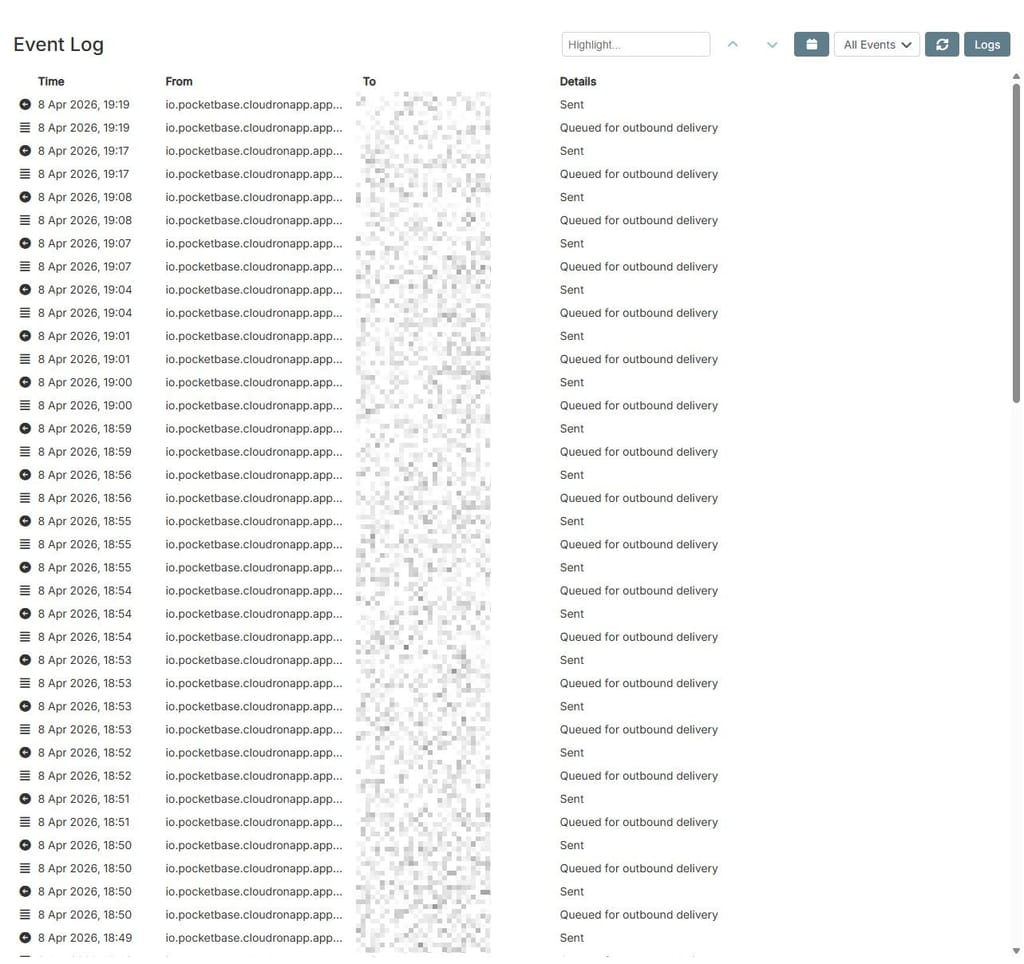
As if there is an internal event / cron handler that does not work correctly and only if you hit the perfect time frame to send a test mail it actually sendsMany times it fails the send test mail only to send the mail after the failed attempt anyway.
I observed this in the mail service logs and the debug log of pocketbase.There must be something going in internally that is creating this issue.
-
Hello @jesperbllnbm
This is/was a very complex issue to figure out.
TL;DR - "fix" or workaround
Renaming your mail domain from
myto e.g.:mailin/#/email-settingswill resolve this issue. (be sure to also update your PTR/rDNS record)Changing the port from
2587to587also works when incoming mails for your Cloudron server is enabled.
Warning, changing just the port in pocketbase will not be permanent, since every app restart will configure2587again.Detailed report
Pocketbase is a golang application.
IfCGO_ENABLED=0is set for the build it will result in Go uses its own built-in resolver.
While designed to mimic the system, it has known edge cases where it might skip /etc/hosts and rely entirely on DNS.Certain hosting providers, like DigitalOcean, will set the name for the server in the
/etc/hostsfile.
So if you name your servermy.cloudron.devDigitalOcean will create a record in the/etc/hostsfile withmy.cloudron.dev 127.0.0.1, which will result into DNS queries asking formy.cloudron.devto answer with127.0.0.1.
If this is not handled by Cloudron certain things would not work.
For example, if you'd use the N8N Cloudron app to run API calls against your own Cloudron server, it would resolvemy.cloudron.devto127.0.0.1and fail.This is why we have a line of code to prevent this issue - https://git.cloudron.io/platform/box/-/blob/v9.1.6/src/docker.js?ref_type=tags#L716
if (manifest.id !== 'com.adguard.home.cloudronapp') containerOptions.HostConfig.ExtraHosts.push(`${dashboardFqdn}:172.18.0.1`);to always resolve the dashboard FQND to
172.18.0.1which is the docker proxy / docker bridge inside the docker containers, except for the AdGuard app.But now, something specific can happen.
The golang mail client requires the mail host to match the mail domain for StartTLS validation.
That is why we have therequiresValidCertificateflag for thesendmailaddon for Cloudron apps to handle apps that need valid certificates for mailing.
WithrequiresValidCertificateset tofalse(the default), theCLOUDRON_MAIL_SMTP_SERVERvariable inside the docker containers will bemailwhich works for most apps.
WithCLOUDRON_MAIL_SMTP_SERVERsettruetheCLOUDRON_MAIL_SMTP_SERVERwill be the mail domain, by defaultmy.DOMAIN.TLDso for memy.cloudron.dev.For pocketbase, Go uses its own built-in resolver, it now resolves
my.cloudron.devnot to172.18.0.1but to the public IPv4/IPv6139.162.188.66/2a01:7e01::2000:3cff:fe7c:9d41and tries to connect with port2587which fails, because port2587is only open internally.
So at some point the failing connection times out and Go's will try to resolvemy.cloudron.devnot with its internal resolver but from the system, which then sends the mail.
This explains why the test mail is sent after some time, even tho it reports a timeout and fail.We are looking deeper into this to find a solution that covers these edge cases to prevent such issues in the future.
The roads of DNS can be a harsh journey to navigate.





Hello! It looks like you're interested in this conversation, but you don't have an account yet.
Getting fed up of having to scroll through the same posts each visit? When you register for an account, you'll always come back to exactly where you were before, and choose to be notified of new replies (either via email, or push notification). You'll also be able to save bookmarks and upvote posts to show your appreciation to other community members.
With your input, this post could be even better 💗
Register Login