
-
Cloudron currently allows to manage SSL certificates per app, but not per domain - could you please, implement that endpoint as well, please?
As Wildcard domains are now becoming a shorter period of life, manual management is quite troublesome.
-
I believe the API is actually there (as I can change the certificate via the Dashboard), but it's not documented? If so - could you possibly share the correct structure, please?
-
I did some reverse engineering - here is the bash, for anyone curious:
DOMAIN="mysuper-domain.com"
TOKEN="bla-bla" #cloudron's token
cd /var/db/acme/certs/*.${DOMAIN}_ecc

CERT=$(awk 'NF {printf "%s\\n", $0}' fullchain.cer)
KEY=$(awk 'NF {printf "%s\\n", $0}' "*.${DOMAIN}.key")

curl -X POST "https://my.${DOMAIN}/api/v1/domains/${DOMAIN}/config" \
  -H "Authorization: Bearer $TOKEN" \
  -H "Content-Type: application/json" \
  -d "{
    \"zoneName\": \"${DOMAIN}\",
    \"provider\": \"manual\",
    \"config\": {},
    \"tlsConfig\": { \"provider\": \"fallback\" },
    \"fallbackCertificate\": { \"cert\": \"${CERT}\", \"key\": \"${KEY}\" }
  }"
verify with
openssl s_client -showcerts -connect IP:443 -servername my.${DOMAIN}.net| less -
Hello @potemkin_ai
You can already configure each domain to not use wildcard.
This is also documented here: https://docs.cloudron.io/domains#certificates- go into your dashboard
- click
Domains - click the
Editbutton next to a domain - click
Advanced settings… - Under
Certificate providerselectLet's Encrypt Prod
or did I misunderstand what you are looking for?
If this is indeed what you need, can we improve something to make this information more accessible? -
 N nebulon moved this topic from Feature Requests on
-
Hey, I'm looking for API to specify a custom wildcard SSL certificate for the whole domain - something, I can currently do via dashboard only.
Cloudron currently offers per app APIs, but not for the domain.
-
Hello @potemkin_ai
Thanks for clarifying.
You can use the following API route to configure that https://docs.cloudron.io/api/set-domain-configAs an example I fetched the API request directly from the dashboard when configuring a domain.
Here is the current config:
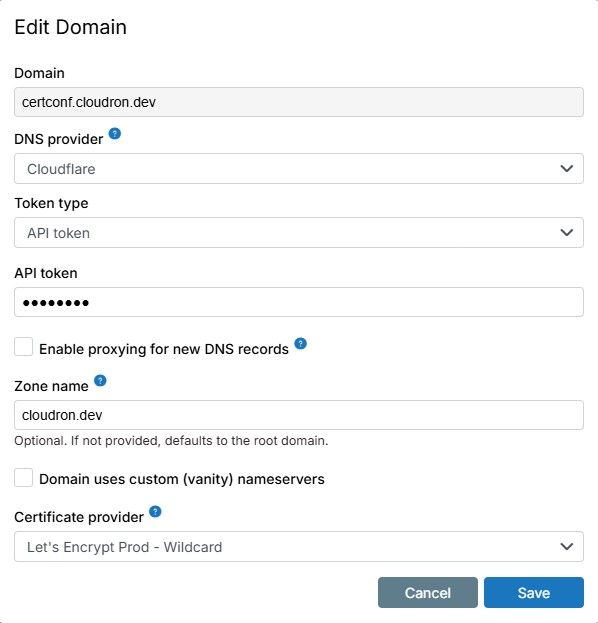
Now I can run:
export CLOUDRON_DOMAIN=cloudron.dev
export CLOUDRON_ACCESS_TOKEN=YOUR_CLOUDRON_ACCESS_TOKEN
export DOMAIN=certconf.cloudron.dev

curl "https://my.${CLOUDRON_DOMAIN}/api/v1/domains/${DOMAIN}/config?access_token=${CLOUDRON_ACCESS_TOKEN}" \
  -H 'content-type: application/json' \
  --data-raw "{\"provider\":\"cloudflare\",\"config\":{\"customNameservers\":false,\"email\":null,\"tokenType\":\"ApiToken\",\"defaultProxyStatus\":false},\"tlsConfig\":{\"provider\":\"letsencrypt-prod\",\"wildcard\":false},\"zoneName\":\"${CLOUDRON_DOMAIN}\"}"
and after sending that curl, the config is:
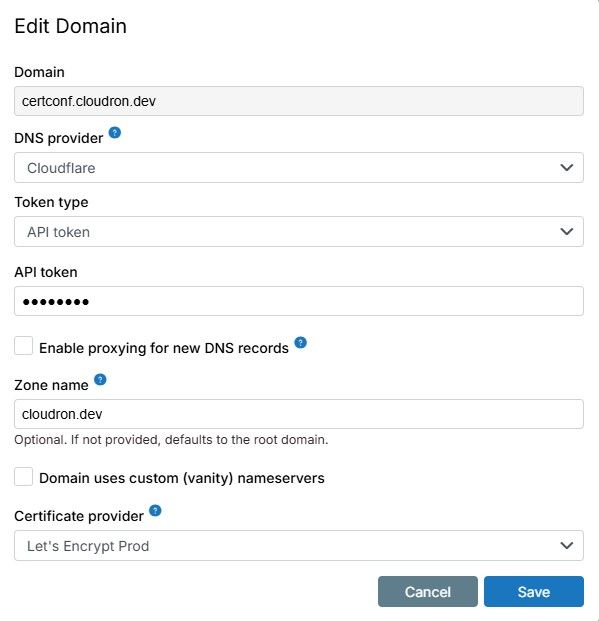
If there are still question, please ask away.
-
Hey @james , it's not what I'm looking for - I need an already issued SSL certificate to be planted into Cloudron, automatically.
The command I've reverse-engineered and provided earlier works, so I stick with it for now. Hopefully, an official stable, documented API to appear soon.


Hello! It looks like you're interested in this conversation, but you don't have an account yet.
Getting fed up of having to scroll through the same posts each visit? When you register for an account, you'll always come back to exactly where you were before, and choose to be notified of new replies (either via email, or push notification). You'll also be able to save bookmarks and upvote posts to show your appreciation to other community members.
With your input, this post could be even better 💗
Register Login