
Emails undeliverable to Yahoo and Outlook - DMARC rejection
-
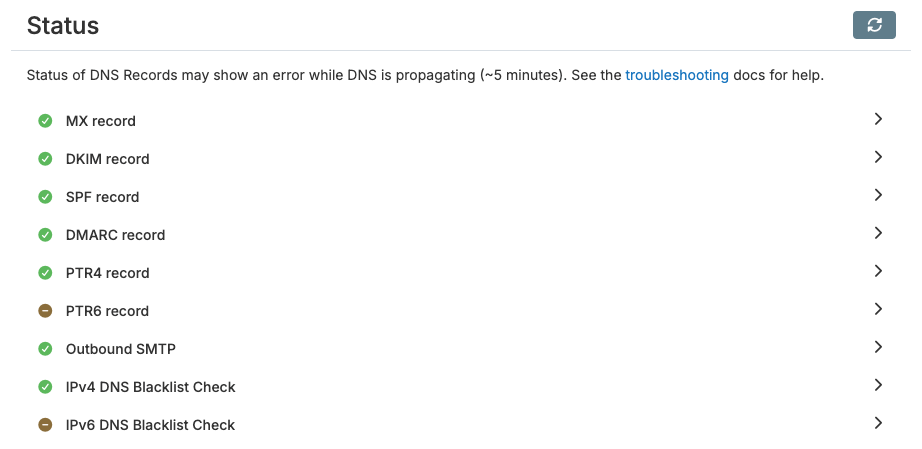
You need to set the reverse IP (PTR) in your VPS provider's network settings and make sure the IPv6 resolves to the mailserver address.
You need to set the reverse IP (PTR) in your VPS provider's network settings and make sure the IPv6 resolves to the mailserver address.
Thanks! It turns out that an IPv6 address is included with my VPS, but it wasn't assigned. Hosting support provided me an address, and now that it's added to Cloudron and a PTR record was set, I have all green checks under email status.
Hopefully this will resolve the DMARC rejections.
Thanks to all for your help.
-
@beardmancer you can also check via https://mail-tester.com/
-
J joseph has marked this topic as solved on
-
@beardmancer you can also check via https://mail-tester.com/
@beardmancer you can also check via https://mail-tester.com/
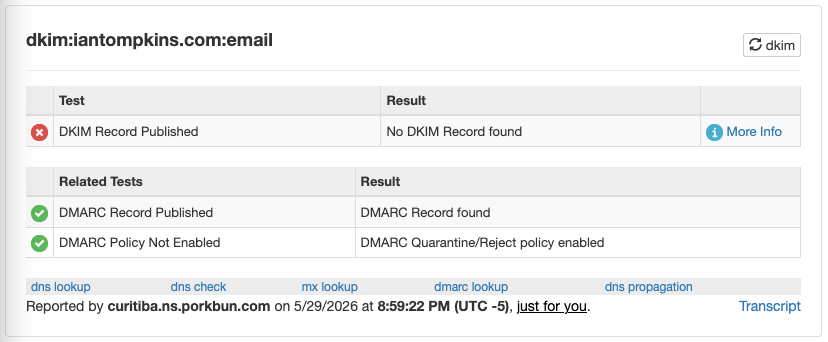
I actually did test it in my original message, and the DKIM and DMARC tests both passed.
-
Okay, I'm at a loss. I tried sending a message today, the same two addresses gave the same DMARC errors. Email > Status is all green checks, https://mail-tester.com gave me 10/10 and https://easydmarc.com seems to indicate that my DMARC is valid.
I'm not sure what to do next. Is there anything else I can do to troubleshoot?
-
Hello @beardmancer
You can contact the mail hoster of the recipient and ask them why this happens with them.Hello @beardmancer
You can contact the mail hoster of the recipient and ask them why this happens with them.@james Sorry for the delayed response, I've been away for a bit and I'm just getting back to this issue.
The two hosts in this case are Yahoo and Microsoft. I don't expect either of these legacy tech giants to pick up the phone, if you know what I mean. Do you know of a way to contact either about this issue? I can't find anything.
Yahoo does have this page about deliverability for reference: https://senders.yahooinc.com/best-practices/
I see two things that may be an issue:
- They say to "Support easy unsubscribe". I'm not sure if this even applies to the emails I send because I'm sending to individuals as an individual, not marketing content using a list. I just did mail-tester.com again and the only yellow check is for "Your message does not contain a List-Unsubscribe header". I suppose this could be a knock against me, but to me it doesn't explain why Yahoo would be rejecting due to the DMARC policy.
- The results of my DMARC record are
v=DMARC1; p=reject; pct=100and Yahoo says it should be "at least"p=none. Doesp=rejectmeet that requirement?
I barely understand most of this, it's new to me. Is there anything else in the Yahoo documentation that I should investigate?
Also, I do have a dummy Yahoo account that I can test send to. So far, everything I send directly to that account has been received without issue. Not sure what to make of this.
-
Hello @beardmancer
In your previous message you did set up IPv6.
I just looked up your IP records and found the following:# lookup PTR of IPv4 dig -x 107.152.33.121 +short @1.1.1.1 my.iantompkins.com. # get A record dig A my.iantompkins.com +short @1.1.1.1 107.152.33.121 # get AAAA record dig AAAA my.iantompkins.com +short @1.1.1.1 # no response - missing! # get MX record dig mx iantompkins.com +short @1.1.1.1 10 my.iantompkins.com.@beardmancer
You still do not have the IPv6 configured for your mail server/domain.
This is most certainly the reason why your mails are beeing rejected. -
Hello @beardmancer
In your previous message you did set up IPv6.
I just looked up your IP records and found the following:# lookup PTR of IPv4 dig -x 107.152.33.121 +short @1.1.1.1 my.iantompkins.com. # get A record dig A my.iantompkins.com +short @1.1.1.1 107.152.33.121 # get AAAA record dig AAAA my.iantompkins.com +short @1.1.1.1 # no response - missing! # get MX record dig mx iantompkins.com +short @1.1.1.1 10 my.iantompkins.com.@beardmancer
You still do not have the IPv6 configured for your mail server/domain.
This is most certainly the reason why your mails are beeing rejected.Hello @beardmancer
In your previous message you did set up IPv6.
I just looked up your IP records and found the following:# lookup PTR of IPv4 dig -x 107.152.33.121 +short @1.1.1.1 my.iantompkins.com. # get A record dig A my.iantompkins.com +short @1.1.1.1 107.152.33.121 # get AAAA record dig AAAA my.iantompkins.com +short @1.1.1.1 # no response - missing! # get MX record dig mx iantompkins.com +short @1.1.1.1 10 my.iantompkins.com.@beardmancer
You still do not have the IPv6 configured for your mail server/domain.
This is most certainly the reason why your mails are beeing rejected.@james This is a surprise to me. On my Cloudron control panel, all the email status checks for this domain are green. Shouldn't this interface flag the issue?
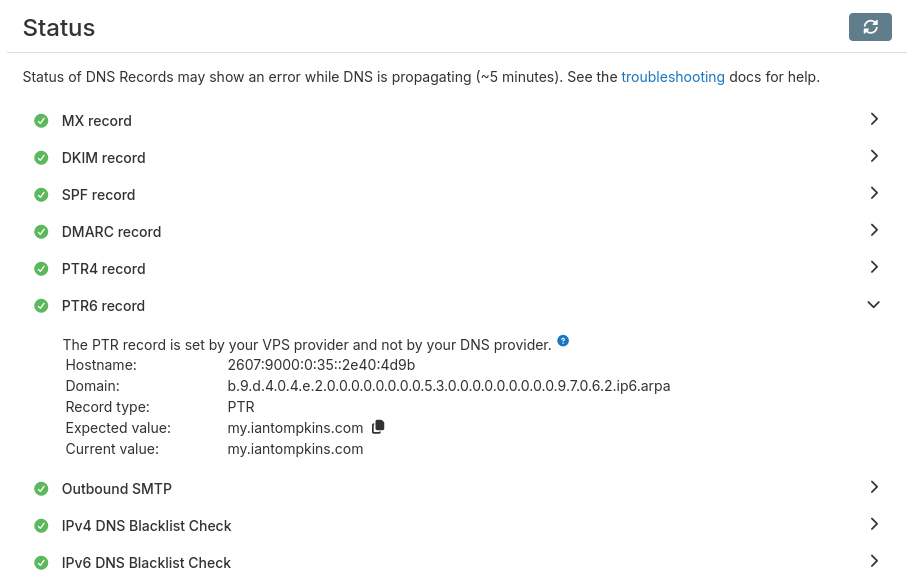
Also, my Cloudron instance is managing my domain via Porkbun API key. Does Cloudron not setup the AAAA record itself? Do I need to do that manually? I don't see anything about that in the documentation.
How should I go about fixing this?
-
Hello @beardmancer
Please go into your Cloudron dashboardDomainssettings.
There you will find theSync DNSsection.
Press theSync DNSbutton and all records should be synchronized.
If you have done so, you can check your Porkbun management UI or inform me so I can run thedigcommands again to validate the DNS records have been set. -
Hello @beardmancer
Please go into your Cloudron dashboardDomainssettings.
There you will find theSync DNSsection.
Press theSync DNSbutton and all records should be synchronized.
If you have done so, you can check your Porkbun management UI or inform me so I can run thedigcommands again to validate the DNS records have been set.Hello @beardmancer
Please go into your Cloudron dashboardDomainssettings.
There you will find theSync DNSsection.
Press theSync DNSbutton and all records should be synchronized.
If you have done so, you can check your Porkbun management UI or inform me so I can run thedigcommands again to validate the DNS records have been set.Thank you for explaining this step. I've done that and I ran the relevant
getcommand locally, it returned what looked like an IPv6 address to me. Hopefully this is resolved; I'll test it with my external contacts at some point this month.

Hello! It looks like you're interested in this conversation, but you don't have an account yet.
Getting fed up of having to scroll through the same posts each visit? When you register for an account, you'll always come back to exactly where you were before, and choose to be notified of new replies (either via email, or push notification). You'll also be able to save bookmarks and upvote posts to show your appreciation to other community members.
With your input, this post could be even better 💗
Register Login