
Cloudron makes it easy to run web apps like WordPress, Nextcloud, GitLab on your server. Find out more or install now.


Skip to content
  • Categories
  • Recent
  • Tags
  • Popular
  • Bookmarks
  • Search
Skins
  • Light
  • Brite
  • Cerulean
  • Cosmo
  • Flatly
  • Journal
  • Litera
  • Lumen
  • Lux
  • Materia
  • Minty
  • Morph
  • Pulse
  • Sandstone
  • Simplex
  • Sketchy
  • Spacelab
  • United
  • Yeti
  • Zephyr
  • Dark
  • Cyborg
  • Darkly
  • Quartz
  • Slate
  • Solar
  • Superhero
  • Vapor

  • Default (No Skin)
  • No Skin
Collapse
Brand Logo

Cloudron Forum

Apps - Status | Demo | Docs | Install
  1. Cloudron Forum
  2. Dolibarr
  3. tcpdf error permission denied cuz invoice job create folder with root permission instead of www-data
tcpdf error permission denied cuz invoice job create folder with root permission instead of www-data

Scheduled Pinned Locked Moved Dolibarr
17 Posts 5 Posters 511 Views 5 Watching
  • Oldest to Newest
  • Newest to Oldest
  • Most Votes
Reply
  • Reply as topic
Log in to reply
This topic has been deleted. Only users with topic management privileges can see it.
  • C Offline
    C Offline
    Crush33
    wrote on last edited by
    #1

    hi

    similar to this : https://forum.cloudron.io/topic/14965/which-user-for-cron-task/8

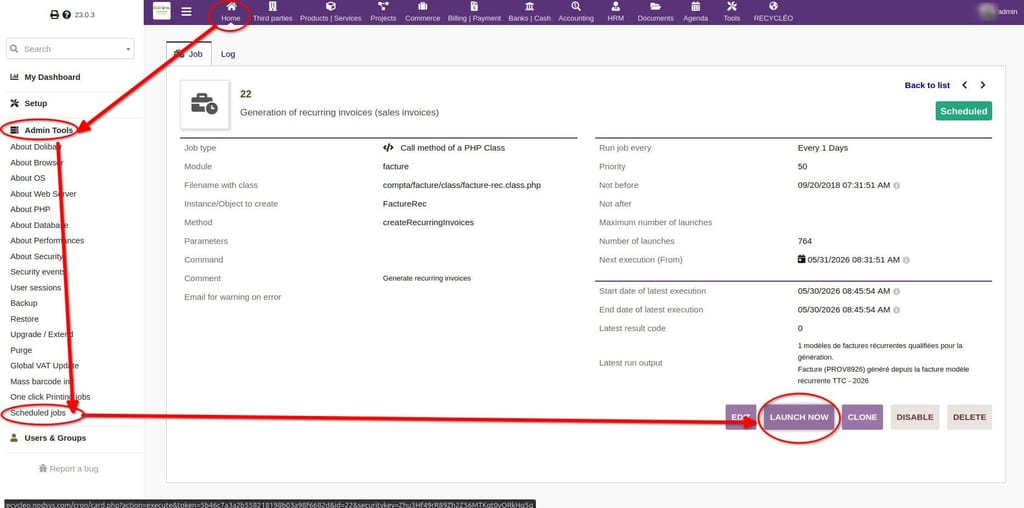
    when I click 'launch now' the job runs and create invoices...
    c7a1a45f-b670-4f66-9673-fd71d4b14961-image.jpeg

    ... but the folder generated are root-owned.
    Then I got an error when I go to the invoice page and try to generate the PDF.
    To fix I need to change the owner of the folder from root to www-data.

    jamesJ 1 Reply Last reply
    2
    • C Crush33

      hi

      similar to this : https://forum.cloudron.io/topic/14965/which-user-for-cron-task/8

      when I click 'launch now' the job runs and create invoices...

      c7a1a45f-b670-4f66-9673-fd71d4b14961-image.jpeg

      ... but the folder generated are root-owned.
      Then I got an error when I go to the invoice page and try to generate the PDF.
      To fix I need to change the owner of the folder from root to www-data.

      jamesJ Offline
      jamesJ Offline
      james
      Staff
      wrote on last edited by
      #2

      Hello @crush33

      @Crush33 said:

      but the folder generated are root-owned

      What folder exactly? Can you give more details so we can reproduce this faster?

      1 Reply Last reply
      1
      • C Offline
        C Offline
        Crush33
        wrote on last edited by
        #3

        folder dolibarr / facture / (PROVXXXX) for example
        this folder is created when invoice is created and contain the generated PDF

        1 Reply Last reply
        0
        • jamesJ Offline
          jamesJ Offline
          james
          Staff
          wrote on last edited by
          #4

          Hello @crush33
          This should have been fixed.
          Are you using the latest version of the Dolibarr app?

          1 Reply Last reply
          1
          • C Offline
            C Offline
            Crush33
            wrote on last edited by
            #5

            yep, on multiple instances.
            Note that I do NOT use cron, I manually click on the button to generate my invoices each month.

            1 Reply Last reply
            1
            • jamesJ Offline
              jamesJ Offline
              james
              Staff
              wrote on last edited by
              #6

              Hello @crush33
              Thanks for the details.

              1 Reply Last reply
              1
              • C Offline
                C Offline
                Crush33
                wrote on last edited by
                #7

                hi, any update here ? thanks for your help

                1 Reply Last reply
                0
                • jamesJ Offline
                  jamesJ Offline
                  james
                  Staff
                  wrote last edited by
                  #8

                  Hello @Crush33
                  Sorry for the delay.
                  I will look into it.

                  1 Reply Last reply
                  0
                  • nebulonN Offline
                    nebulonN Offline
                    nebulon
                    Staff
                    wrote last edited by nebulon
                    #9

                    I was trying to reproduce this on a fresh instance, but I don't seem to even have this menu entry for Scheduled Jobs in the Admin Tools. Are you using any 3rdparty module in dolibarr?

                    Edit: found the module to enable, it is just called "Scheduled Jobs" however running the invoices job does not create any folders here to verify. If you have any more detailed description how to setup such an invoice for manual cron creation, to reproduce the problem, this would help much.

                    1 Reply Last reply
                    1
                    • M Offline
                      M Offline
                      Matth33
                      wrote last edited by
                      #10

                      i'm OP, lost my "crush" account...

                      To produce an invoice you must :

                      1. go to invoice
                      2. create a new one, put some lines of product / service in it
                      3. convert the draft in "template" it's a button down the page next to "validate" / "clone" / "delete", then it will show a new page where you can set up the recurring feature (period, start date, number of iteration etc.). Put daytime minus 1 day to be sure the system see it as "to generate"
                      4. Next go to schedule jobs module then run it, it will see the template you setup earlier as eligible for invoice creation.
                      5. invoice should be created and the folder in /dolibarr/facture/<PROVXXX> should appear with root permission on it
                      1 Reply Last reply
                      1
                      • jamesJ Offline
                        jamesJ Offline
                        james
                        Staff
                        wrote last edited by
                        #11

                        Hello @matth33
                        We can help you recover your original account.
                        If you send me your mail address that you also use for your Cloudron.io account, I can set that mail in your old account.
                        Then you can use Log in with Cloudron.io to access your account.

                        1 Reply Last reply
                        1
                        • M Offline
                          M Offline
                          Matth33
                          wrote last edited by
                          #12

                          hi, any news here ? thanks !

                          jamesJ 1 Reply Last reply
                          1
                          • M Matth33

                            hi, any news here ? thanks !

                            jamesJ Offline
                            jamesJ Offline
                            james
                            Staff
                            wrote last edited by
                            #13

                            Hello @Matth33
                            I am looking into this issue today.

                            1 Reply Last reply
                            0
                            • jamesJ Offline
                              jamesJ Offline
                              james
                              Staff
                              wrote last edited by
                              #14

                              Hello @matth33
                              Sorry it took so long.
                              It was actualy a simple fix and the latest app update fixes this issue.

                              O 1 Reply Last reply
                              1
                              • M Offline
                                M Offline
                                Matth33
                                wrote last edited by Matth33
                                #15

                                yeeeeah !!! thanks a lot 🙂

                                1 Reply Last reply
                                2
                                • jamesJ james

                                  Hello @matth33
                                  Sorry it took so long.
                                  It was actualy a simple fix and the latest app update fixes this issue.

                                  O Offline
                                  O Offline
                                  OskarArdolo
                                  wrote last edited by
                                  #16

                                  @james said:

                                  Hello @matth33
                                  Sorry it took so long.
                                  It was actualy a simple fix and the latest app update fixes this issue.

                                  Hi, I cannot update my dolibarr app because of external modules that are not compatible with latests versions.
                                  Is that possible to share the fix so I can reproduce it manually in my instance please?

                                  Thank you very much.

                                  1 Reply Last reply
                                  0
                                  • jamesJ Offline
                                    jamesJ Offline
                                    james
                                    Staff
                                    wrote last edited by
                                    #17

                                    Hello @oskarardolo
                                    It is possible what with extra effort.
                                    Similar to https://forum.cloudron.io/post/126448

                                    1 Reply Last reply
                                    0

                                    Hello! It looks like you're interested in this conversation, but you don't have an account yet.

                                    Getting fed up of having to scroll through the same posts each visit? When you register for an account, you'll always come back to exactly where you were before, and choose to be notified of new replies (either via email, or push notification). You'll also be able to save bookmarks and upvote posts to show your appreciation to other community members.

                                    With your input, this post could be even better 💗

                                    Register Login
                                    Reply
                                    • Reply as topic
                                    Log in to reply
                                    • Oldest to Newest
                                    • Newest to Oldest
                                    • Most Votes


                                    • Login

                                    • Don't have an account? Register

                                    • Login or register to search.
                                    • First post
                                      Last post
                                    0
                                    • Categories
                                    • Recent
                                    • Tags
                                    • Popular
                                    • Bookmarks
                                    • Search
