Cloudron makes it easy to run web apps like WordPress, Nextcloud, GitLab on your server. Find out more or install now.


Skip to content
  • Categories
  • Recent
  • Tags
  • Popular
  • Bookmarks
  • Search
Skins
  • Light
  • Brite
  • Cerulean
  • Cosmo
  • Flatly
  • Journal
  • Litera
  • Lumen
  • Lux
  • Materia
  • Minty
  • Morph
  • Pulse
  • Sandstone
  • Simplex
  • Sketchy
  • Spacelab
  • United
  • Yeti
  • Zephyr
  • Dark
  • Cyborg
  • Darkly
  • Quartz
  • Slate
  • Solar
  • Superhero
  • Vapor

  • Default (No Skin)
  • No Skin
Collapse
Brand Logo

Cloudron Forum

Apps - Status | Demo | Docs | Install
  1. Cloudron Forum
  2. Support
  3. creating a subdomain to forward to another site

creating a subdomain to forward to another site

Scheduled Pinned Locked Moved Unsolved Support
redirect
7 Posts 3 Posters 127 Views 3 Watching
  • Oldest to Newest
  • Newest to Oldest
  • Most Votes
Reply
  • Reply as topic
Log in to reply
This topic has been deleted. Only users with topic management privileges can see it.
  • M Offline
    M Offline
    MaryMuse
    wrote last edited by joseph
    #1

    Hello,
    I am using Cloudron on a digital ocean droplet.

    I have created a subdomain (support.mydomain.com) and created a CNAME record at Digital Ocean that says support.mydomain.com is an alias of myname.zendesk.com

    Is there something else I need to do within cloudron itself because I get this error when I try to access the subdomain in my browser
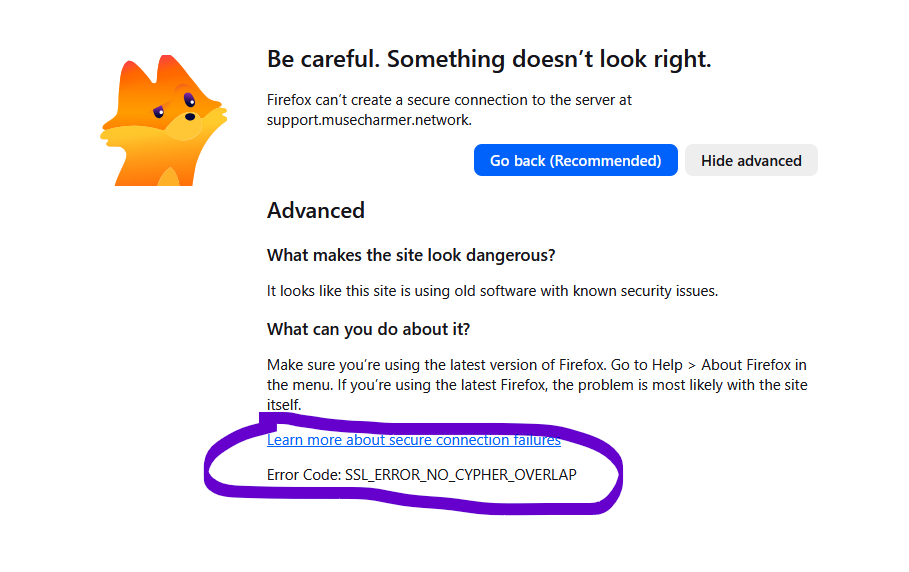
    a firefox error message  where the error code is SSL_Error_No_Cypher_overlap

    Thank you!

    1 Reply Last reply
    1
    • jamesJ Offline
      jamesJ Offline
      james
      Staff
      wrote last edited by
      #2

      Hello @marymuse and welcome to the Cloudron forum

      I am not sure where the CNAME record of zendesk comes from, but when you install cloudron like documented in the installation documentation you first have to access the IP address of your server and set up your domain.

      1 Reply Last reply
      1
      • jamesJ Offline
        jamesJ Offline
        james
        Staff
        wrote last edited by
        #3

        Hello @marymuse
        It would be great to hear from you what you are trying to achieve here.
        I could assume that you are trying to make support.mydomain.com redirect to your zendesk?
        Is that assumption correct?

        1 Reply Last reply
        2
        • M Offline
          M Offline
          MaryMuse
          wrote last edited by
          #4

          Hello,
          Yes, that is correct. I have input the CNAME record into digital ocean but the error message makes me wonder if there isn't something I need to do within cloudron.

          1 Reply Last reply
          0
          • jamesJ Offline
            jamesJ Offline
            james
            Staff
            wrote last edited by
            #5

            Hello @marymuse
            A solution is to remove the CNAME, install surfer at support.mydomain.com and set up redirect with index.html to zendesk

            1 Reply Last reply
            0
            • M Offline
              M Offline
              MaryMuse
              wrote last edited by MaryMuse
              #6

              I'll keep that in mind. Unfortunately I've used up both of my free slots, so can't install another app (not in the budget at this time). Mostly I was wondering if there was something I needed to set in the server, but it sounds like there isn't. Thanks.

              1 Reply Last reply
              0
              • J Offline
                J Offline
                joseph
                Staff
                wrote last edited by
                #7

                @marymuse you can add an external link with zendesk domain maybe. You won't get the your custom subdomain, but you will get an icon on the dashboard ...

                1 Reply Last reply
                1

                Hello! It looks like you're interested in this conversation, but you don't have an account yet.

                Getting fed up of having to scroll through the same posts each visit? When you register for an account, you'll always come back to exactly where you were before, and choose to be notified of new replies (either via email, or push notification). You'll also be able to save bookmarks and upvote posts to show your appreciation to other community members.

                With your input, this post could be even better 💗

                Register Login
                Reply
                • Reply as topic
                Log in to reply
                • Oldest to Newest
                • Newest to Oldest
                • Most Votes


                • Login

                • Don't have an account? Register

                • Login or register to search.
                • First post
                  Last post
                0
                • Categories
                • Recent
                • Tags
                • Popular
                • Bookmarks
                • Search