
Memory allocation to applications
-
- Please include a detailed description of the problem. Include screenshots when applicable.
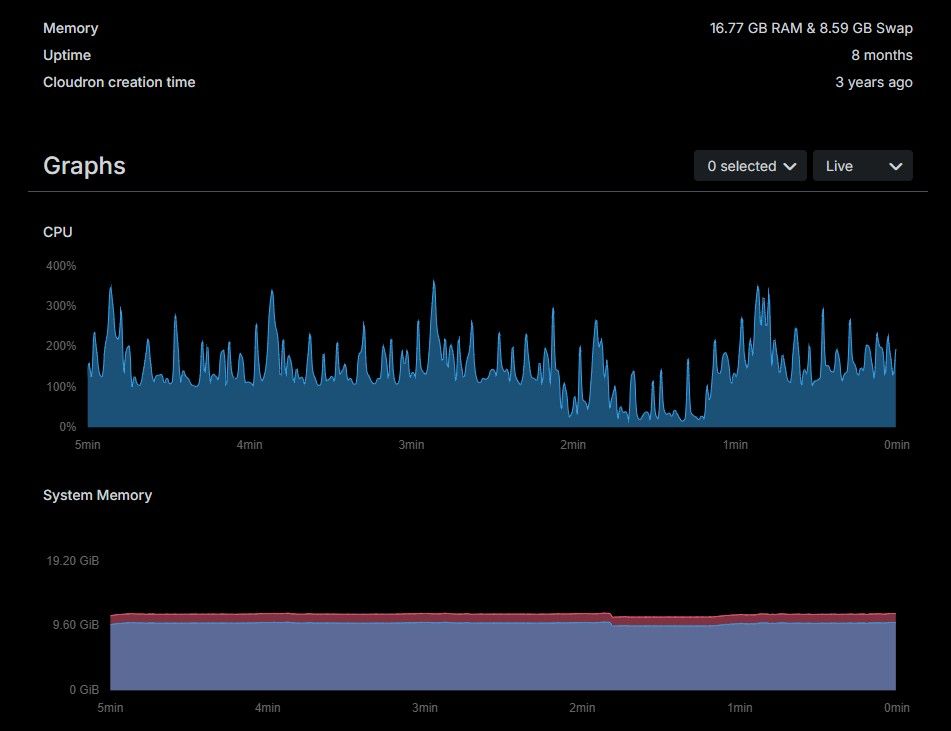
We noticed that the system memory usage doesn't seem to make the most of the available in the VM. For context, we started off with a small vm but eventually upgraded until we reached the current state of 4-Core, 16GB RAM. Is there something we need to perform to ensure that Cloudron is able to maximize the available RAM in the host
-
- Please include a detailed description of the problem. Include screenshots when applicable.
We noticed that the system memory usage doesn't seem to make the most of the available in the VM. For context, we started off with a small vm but eventually upgraded until we reached the current state of 4-Core, 16GB RAM. Is there something we need to perform to ensure that Cloudron is able to maximize the available RAM in the host
@nightowlPH you can already set available RAM in each app's settings. Of course that doesn't mean the apps will actually use all that much, just that they can.
-
Actually we tried that already.. To be honest, to a certain extent, even "oversubscribed" the ram limits in the application vs available on the VM but still sits on what is shown in the screenshot
-
The memory limit is really just the maxiumum upper limit for an app at which it gets restarted. The actual memory used by apps heavily depends on their software stack. Often app use runtimes like nodejs or ruby or such, where those runtimes have their own memory usage behavior. Maybe the server just does not have enough apps installed to with enough usage to exhaust that?
-
@nebulon I see your point sir. However, I'm just puzzled on seeing a "plateau" for the memory usage graph. Shouldn't that show peaks and valleys if there was no memory contention? Maybe my train of thought is wrong. Appreciated if you can further enlighten me on this matter.
-
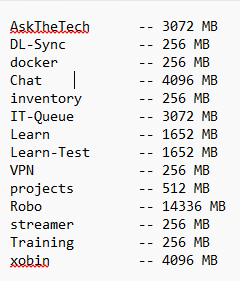
for context, this is how the memory were set for the 14 apps configured in the VPS
-
Not too sure what to do with that list. So memory limits on Cloudron for apps are just the upper limit on when the app gets restarted. If any of your apps hit this limit, you will see a notification in Cloudron about the app getting restarted due to out-of-memory. Until you see this, it all looks fine and it seems your server just has more memory than the apps currently need.
-
Not too sure what to do with that list. So memory limits on Cloudron for apps are just the upper limit on when the app gets restarted. If any of your apps hit this limit, you will see a notification in Cloudron about the app getting restarted due to out-of-memory. Until you see this, it all looks fine and it seems your server just has more memory than the apps currently need.
@nebulon got it sir. thank you for this feedback.
-
J joseph has marked this topic as solved on


Hello! It looks like you're interested in this conversation, but you don't have an account yet.
Getting fed up of having to scroll through the same posts each visit? When you register for an account, you'll always come back to exactly where you were before, and choose to be notified of new replies (either via email, or push notification). You'll also be able to save bookmarks and upvote posts to show your appreciation to other community members.
With your input, this post could be even better 💗
Register Login