
DNS update with Dry Run "activated"
-
Hi.
I wanted to test my backups, by restoring Cloudron on a new, local VM.- In order to do so, I created a fresh Ubuntu 24 installation and installed Cloudron.
- Then I created a new folder on the server, in which I copied the latest Backup folder.
- I modified the hosts file on my Windows system by indicating the IP address of my VM and the domains of my apps.
- Opened the IP Address of my VM in the browser
- Restored with dry run enabled.
- I then logged in to the dashboard and saw that the apps were all in restoring mode.
- Double checked by logging in to cloudron from another device to see, that the "live" apps were running and not restoring, so I was sure, I was on my VM Cloudron on the PC.
- After a while, I saw that all the apps on the VM were not restoring anymore, but they all showed Error.
- I then clicked on "Repeat restore" in the "Reparation" (not sure that this is the exact name, since my interface is in German)
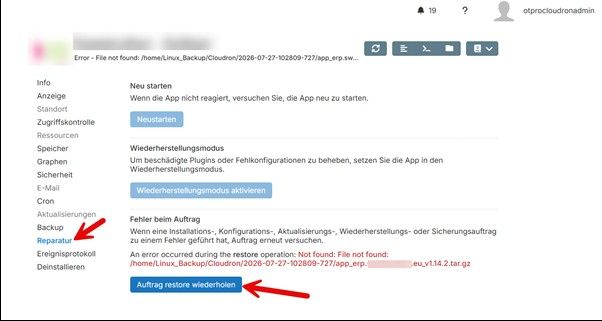
- The app was restored
- Tried to log in with my user --> did not work.
- Tried to log in with the standard user, that is indicated after installation. --> Worked
So this meant that the app was nor restored but it just installed an empty / new app. - I checked and saw that I did not change the owner on my Backup folder.
- I changed the owner of the backup folder
- Since I could not run restore once again (button was greyed out), I thought I would try the method "Import Backup" in the "Backup" menu.
- Indicated the backup file of the wanted app and ran the import.
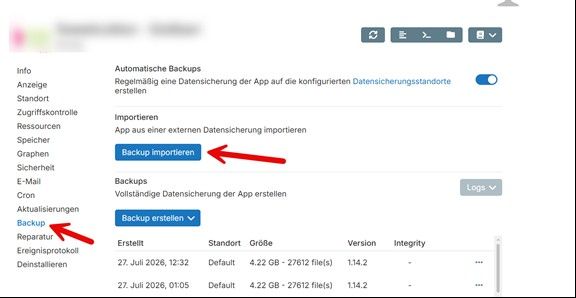
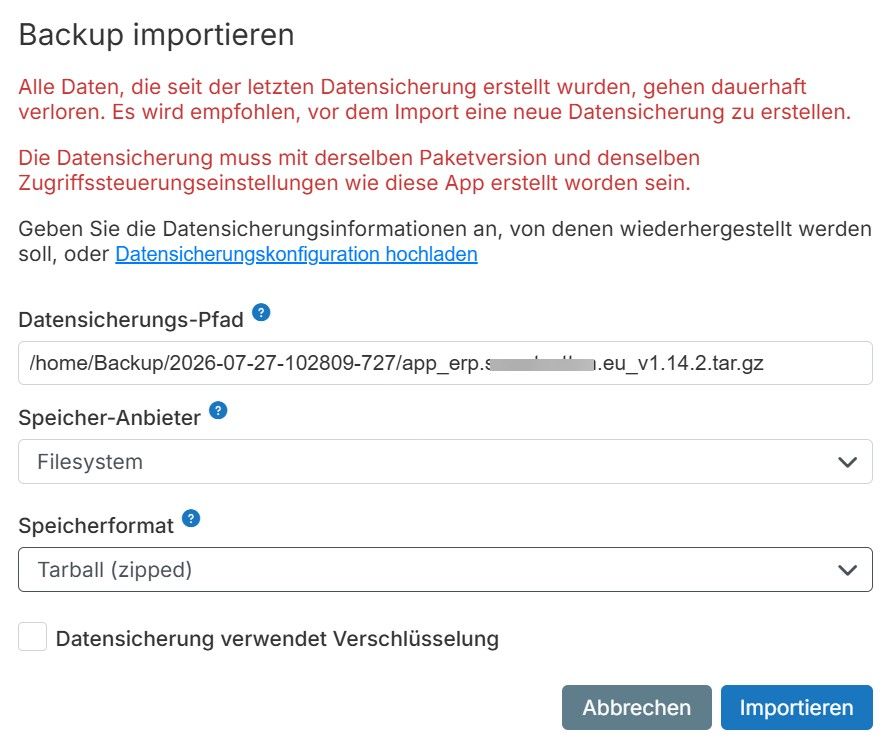
- After that I was able to log in with my normal app user and the data was there.
- Switched of the VM, since I figured that the backup had my data and that I was able to restore the apps
- Changed my hosts file, by commenting all the lines, I added for the dry run.
- Checked my "live" app and nearly got a hard attack, since the app was not reachable.
- Tried to restart it, nothing. Maintenance mode --> nothing.
- Finaly I went to check the DNS settings to find out, that they were changed to the IP address of my rooter.
So the questions I have are:
- Why is there not a verification before restoring, if the indicated file, for the restore, can be read correctly?
- Why did the manual restore "work" but only installed an empty app?
- Why was the dns changed when importing the Backup, although the IP addresses and hostnames were added in the hosts file?
Can anybody tell me if I'm missing something?
Thanks
-
Hi.
I wanted to test my backups, by restoring Cloudron on a new, local VM.- In order to do so, I created a fresh Ubuntu 24 installation and installed Cloudron.
- Then I created a new folder on the server, in which I copied the latest Backup folder.
- I modified the hosts file on my Windows system by indicating the IP address of my VM and the domains of my apps.
- Opened the IP Address of my VM in the browser
- Restored with dry run enabled.
- I then logged in to the dashboard and saw that the apps were all in restoring mode.
- Double checked by logging in to cloudron from another device to see, that the "live" apps were running and not restoring, so I was sure, I was on my VM Cloudron on the PC.
- After a while, I saw that all the apps on the VM were not restoring anymore, but they all showed Error.
- I then clicked on "Repeat restore" in the "Reparation" (not sure that this is the exact name, since my interface is in German)
- The app was restored
- Tried to log in with my user --> did not work.
- Tried to log in with the standard user, that is indicated after installation. --> Worked
So this meant that the app was nor restored but it just installed an empty / new app. - I checked and saw that I did not change the owner on my Backup folder.
- I changed the owner of the backup folder
- Since I could not run restore once again (button was greyed out), I thought I would try the method "Import Backup" in the "Backup" menu.
- Indicated the backup file of the wanted app and ran the import.
- After that I was able to log in with my normal app user and the data was there.
- Switched of the VM, since I figured that the backup had my data and that I was able to restore the apps
- Changed my hosts file, by commenting all the lines, I added for the dry run.
- Checked my "live" app and nearly got a hard attack, since the app was not reachable.
- Tried to restart it, nothing. Maintenance mode --> nothing.
- Finaly I went to check the DNS settings to find out, that they were changed to the IP address of my rooter.
So the questions I have are:
- Why is there not a verification before restoring, if the indicated file, for the restore, can be read correctly?
- Why did the manual restore "work" but only installed an empty app?
- Why was the dns changed when importing the Backup, although the IP addresses and hostnames were added in the hosts file?
Can anybody tell me if I'm missing something?
Thanks
Hi @onetools-project welcome here.
Then I created a new folder on the server, in which I copied the latest Backup folder.
It looks like you are using the tgz backup (from the backup screenshot). Did you copy all the tgz files, including those of the apps? From the error message is says that the app_xx.tgz files are missing. On Cloudron, the platform (box) and the apps are backed up each separately. So, if you have 10 apps, there will be 10 separate tgz files, one for box code and another for the mail . So 12 tgz files in total have to be copied.
Regarding 10, 11, 12 - may be there is a bug related to permissions. If a back up cannot be accessed, probably the restore logic is not flagging it correctly. We will have to try and reproduce it (cc @james).
So the questions I have are:
Why is there not a verification before restoring, if the indicated file, for the restore, can be read correctly?We will try to reproduce this.
Why did the manual restore "work" but only installed an empty app?
I think it didn't restore at all, unfortunately. Seems to be related to the above bug.
Why was the dns changed when importing the Backup, although the IP addresses and hostnames were added in the hosts file?
This is a tricky one. When you did "Dry run" in the initial Cloudron restore, that flag only applies to Cloudron restore. Not to all possible operations in the future. So, if you go and install an app or change the location of an app etc, it will update the DNS. App restore updates the DNS as part of the lifecycle and this is why the DNS of that app was updated. We do this because when you restore an app, the normal user expectation is to be able to click on the app after restore and see that it's running. Updating the DNS makes sure user can reach it...
-
Hi @onetools-project welcome here.
Then I created a new folder on the server, in which I copied the latest Backup folder.
It looks like you are using the tgz backup (from the backup screenshot). Did you copy all the tgz files, including those of the apps? From the error message is says that the app_xx.tgz files are missing. On Cloudron, the platform (box) and the apps are backed up each separately. So, if you have 10 apps, there will be 10 separate tgz files, one for box code and another for the mail . So 12 tgz files in total have to be copied.
Regarding 10, 11, 12 - may be there is a bug related to permissions. If a back up cannot be accessed, probably the restore logic is not flagging it correctly. We will have to try and reproduce it (cc @james).
So the questions I have are:
Why is there not a verification before restoring, if the indicated file, for the restore, can be read correctly?We will try to reproduce this.
Why did the manual restore "work" but only installed an empty app?
I think it didn't restore at all, unfortunately. Seems to be related to the above bug.
Why was the dns changed when importing the Backup, although the IP addresses and hostnames were added in the hosts file?
This is a tricky one. When you did "Dry run" in the initial Cloudron restore, that flag only applies to Cloudron restore. Not to all possible operations in the future. So, if you go and install an app or change the location of an app etc, it will update the DNS. App restore updates the DNS as part of the lifecycle and this is why the DNS of that app was updated. We do this because when you restore an app, the normal user expectation is to be able to click on the app after restore and see that it's running. Updating the DNS makes sure user can reach it...
Hi @joseph.
Thanks for the feedback.Here are my comments:
Yes, I copied the entire Backup Folder with all the files in it. The error message got me thinking as well, that's why I checked the permissions on the folder, since I was sure that the folder existed.Regarding the update of the DNS. This leads me to another question. When the hosts file is modified, will the restore backup function restore the App on the VM, or is it possible that the "live" app will be restored?
-
Hello @onetools-project
I was able to reproduce the issue of apps not restoring correctly.
When restoring Cloudron on set up time from a different folder then the original backup site location all app restore tasks will fail due to the restored backup site location being used at this stage.
That is because the system was restored and is using the backup site location configuration.Copied the backup to
/mnt/restoreand restored Cloudron.
This restores also theBackup Sitewhich was default/var/backups.
The Cloudron system itself restored correctly, but when the one test LAMP app is trying to be restored the following error is thrown:Not found: File not found: /var/backups/2026-07-28-123039-682/app_lamp.15738.cloudron.dev_v5.2.3.tar.gzFrom your screenshots I also see this difference in locations.
Your error:Not found: File not found: /home/Linux_Backup/Cloudron/2026-07-27-102809-727/app_erp.-REDACTED-.eu_v1.14.2.tar.gzAnd the manual restore from location:
/home/Backup/2026-07-27-102809-727/app_erp.-REDACTED-.eu_v1.14.2.tar.gzSo you also manually copied your backup to
/home/Backup/restored the Cloudron system correctly, that restored the backup site with location/home/Linux_Backup/Cloudron/and then fails the app backup restore.I will add a warning to the Cloudron documentation when using filesystem type backups and restoring.
note:
In the future, please also include the error message as copied text in the post and not only a screenshot.
Not only excludes our visually impaired Cloudron users, but also is the text from the error searchable or copy-pasteable. -
Hi @james.
So if I recreate the same folder structure on the VM, as it is on the original system, the restore should work? Did I get that right?I'll try my best to remember adding the error messages as text in the future.
Thanks.
Hello @OneTools-Project
So if I recreate the same folder structure on the VM, as it is on the original system, the restore should work? Did I get that right?
Yes.
If you copy your backups to/home/Linux_Backup/Cloudron/instead of/home/Backup/the whole system and app restore process works.
Just to make sure, you can also inspect your running Cloudron to view the actual configured path again. -
Thank you.
-
Hi @james
I just re-run the entire setup of Linux, installed and restored Cloudron by using the exact folder structure as on the live system.
I confirm that the restore (so far I testet 3 apps, the others are still restoring) was successful.
So, yes, you can mark the topic as resolved.Thanks again!
-
J joseph has marked this topic as solved

Hello! It looks like you're interested in this conversation, but you don't have an account yet.
Getting fed up of having to scroll through the same posts each visit? When you register for an account, you'll always come back to exactly where you were before, and choose to be notified of new replies (either via email, or push notification). You'll also be able to save bookmarks and upvote posts to show your appreciation to other community members.
With your input, this post could be even better 💗
Register Login