
🚀 Meilisearch on Cloudron: Community Package now available
-
Meilisearch: community package now available
TL;DR: Meilisearch is an open source, typo-tolerant search engine written in Rust. It indexes your documents and serves fast full-text, filtered and sorted search over a plain REST API. Now packaged for Cloudron, built and tested on Cloudron 9.2, unofficial and community maintained.
Links
- Project homepage: https://www.meilisearch.com
- Upstream repository: https://github.com/meilisearch/meilisearch
- Cloudron package repository: https://github.com/OrcVole/meilisearch-cloudron
This is a headless service. There is no web interface to log into: everything is the REST API, and that is deliberate, because the applications that consume it are the users.
How to install
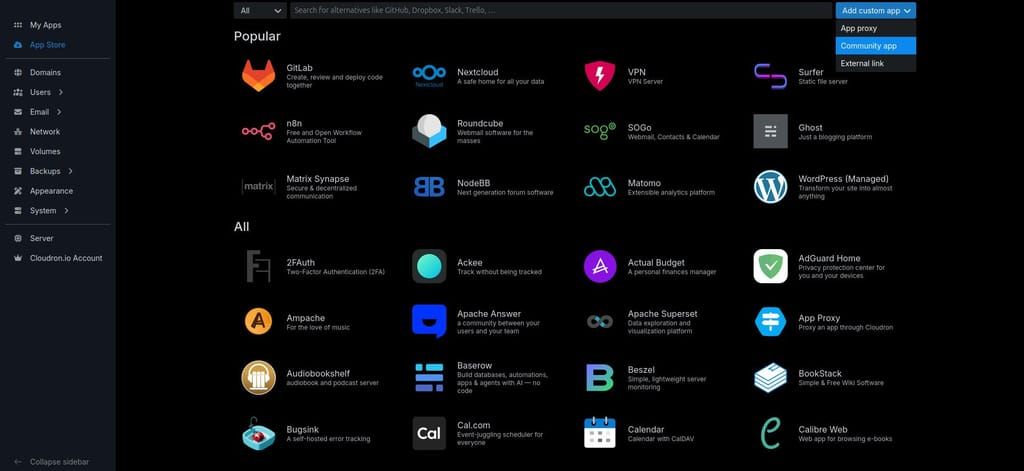
The easy route is the dashboard. In the App Store, open the Add custom app dropdown at the top right, choose Community app, and paste this URL:
https://raw.githubusercontent.com/OrcVole/meilisearch-cloudron/main/CloudronVersions.jsonApps installed this way receive automatic updates.
After installing, read your master key from the app's Terminal (the
>_button):cat /app/data/master-keyEvery route except
GET /healthneeds that key, or a scoped key minted from it viaPOST /keys. Mint one key per consumer rather than sharing the master key.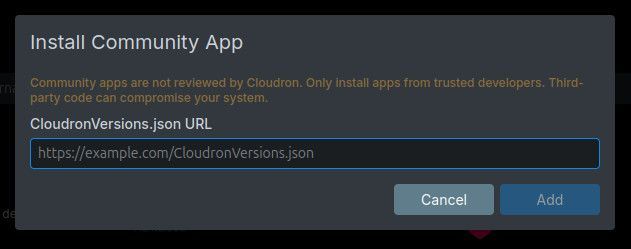
What you get
Meilisearch 1.51.0, pinned by digest, running in production mode. Vector and hybrid search are included and stable in this release, and the embedder can point at a local Ollama instance or any REST embedding service, so you do not need a cloud API key.
Two details specific to this package that other packagers may find useful.
The store lives on a
persistentDirspath, outside the backup file walk, and abackupCommandasks the running server for a snapshot over HTTP and leaves it in/app/data. This matters because a search engine rewrites its files constantly, and a churning store inside the walked tree can abort the whole server's backup run. The design was tested by taking a backup while a million document index was in flight.The default memory limit is 4 GB. That is measured, not guessed: a deliberately pessimistic million document corpus peaked at 1.82 GB of anonymous memory, about 46 per cent of the limit. Indexing, not searching, is the hungry phase, and Meilisearch batches document additions aggressively.
Wiring it to other applications
Linkwarden gains full text search it cannot otherwise have on Cloudron: point it at this instance and it back-fills and searches happily.
Worth knowing before you wire LibreChat: the Cloudron LibreChat package already ships and supervises its own private Meilisearch, so chat search there is not broken for want of an instance. Pointing it here is a redirection onto a shared, backed-up, separately sized instance, which is useful, but it is not an enablement.
One trap that applies to any consumer: they mark documents as already indexed. Point an established consumer at a fresh instance and it will index nothing while search quietly returns empty. The package README documents the reset for both applications.
What is not proven
A cross-version database migration has not been exercised, because no newer upstream release existed during packaging. Meilisearch refuses to open a store written by a different version and the package runs
--upgrade-dbon the way through, but that path has not yet met a real version change. I will report back when it has.Feedback and bug reports welcome, here or on the repository.
-
Hello @loudlemur
I just noticed your community app for meilisearch only after I have also published meilisearch community app.
This now caused some issues in the community app store which we need to fix.
I have removed my community app again since it caused the issues.But I noticed some things in your community app which could be improved.
Your package is much more polished: released, tested in CI, careful upgrade handling, protection against losing the master key, and thorough docs.
But it backs up the wrong kind of file for Cloudron. Snapshots aren't portable between versions. With no restoreCommand, restoring over the same app doesn't roll back the search data, and failed backups look successful.My package is correct on backup and restore and has the multi-tenancy tooling. It's weaker on upgrade handling and master-key safety, and it hasn't been installed on a real Cloudron yet.
Maybe you could look into these findings and we can move everything into your community app.
Here is my repo https://git.cloudron.io/playground/meilisearch-app -
Hello @loudlemur
I just noticed your community app for meilisearch only after I have also published meilisearch community app.
This now caused some issues in the community app store which we need to fix.
I have removed my community app again since it caused the issues.But I noticed some things in your community app which could be improved.
Your package is much more polished: released, tested in CI, careful upgrade handling, protection against losing the master key, and thorough docs.
But it backs up the wrong kind of file for Cloudron. Snapshots aren't portable between versions. With no restoreCommand, restoring over the same app doesn't roll back the search data, and failed backups look successful.My package is correct on backup and restore and has the multi-tenancy tooling. It's weaker on upgrade handling and master-key safety, and it hasn't been installed on a real Cloudron yet.
Maybe you could look into these findings and we can move everything into your community app.
Here is my repo https://git.cloudron.io/playground/meilisearch-appMaybe you could look into these findings and we can move everything into your community app.
Thank you, James. We will get onto this right away and will try and improve it as you suggested.
It is ironic that search packages found each other like this. I also packaged an application for cloudron and found that somebody else had already created one! We must be soul mates. It is kind of like a dating site where Packagers go to find people with similar interests!
-
Thank you, @james, for such a careful review, and for the kind words. We checked all three of your findings against our own evidence, and all three are right.
What we found
- Restore did not roll back the search data. Our own gate had measured it: the backup held 260,000 documents and the store still held 1,000,000 after the restore. We scored it as a pass because nothing was lost. The persistent store survives an in-place restore, and without a restoreCommand nothing replaced it.
- Snapshots only, and the dump fallback was dead code. As you said, a snapshot is not portable between Meilisearch versions. Our upgrade-failure path did fall back to a dump, but nothing ever wrote one.
- A failed backup was invisible unless you read a log file inside /app/data.
What we changed, in package 1.2.0 (published)
- A restoreCommand. After a restore or clone, the live store is moved aside (kept for 30 days) and rebuilt from the backup's snapshot. If a backup has no snapshot, the live store is kept and a warning is logged, rather than replacing it with nothing.
- Every backup now takes a dump as well as a snapshot, so the version-portable copy exists.
- A failed backup writes /app/data/BACKUP-FAILED.txt, and the app repeats it in its log at every start until a backup succeeds.
We gated it on Cloudron 10.0.4. We installed the published 1.1.0 from its feed and updated it to 1.2.0 over 2,000 documents. After a backup we added 500 more, then restored: the count came back to 2,000, with the content fingerprint identical to the backup's. A clone from the same backup matched too.
One place where we kept our approach, and a question
The backup command still exits 0 when it fails. In 10.0.4, fullBackup in backuptask.js rethrows the first app error from inside its loop, so one app's failing backupCommand stops the backup of every app after it, plus mail and system data. Exiting 1 on a failed dump would cost the whole server its nightly backup. Could fullBackup record a per-app failure and carry on, or raise a notification? Then packages could fail honestly instead of writing a notice file.
Your tenant-token tooling, now merged
Thank you for offering to move everything into one package. Your multi-tenancy tooling was the part ours lacked, and package 1.3.0, now published, carries it: meili-token.sh and your guide, adapted to this package's master-key file and env file. It is opt-in, so existing installs see no change on update: set MEILISEARCH_TENANT_TOKEN_KEY=true in /app/data/env and restart, and the app creates a search-only signing key in /app/data/tenant-token-signing-key.env. Setting it back to false deletes the key and revokes every token it signed. We also took your dumps/latest pointer: a backup now records which dump it completed, and a rebuild imports that one rather than whichever is newest, so a half-written dump can never be used. The changelog and README credit you, and the guide is in docs/TENANT-TOKENS.md. If anything in the port does not match how you meant it to work, please say so and we will fix it.
-
Hello @loudlemur
Exiting 1 on a failed dump would cost the whole server its nightly backup. Could fullBackup record a per-app failure and carry on, or raise a notification? Then packages could fail honestly instead of writing a notice file.
If the
backupCommandof an app fails, the backup should fail, since if thebackupCommanddid not return a success this means something is missing for a real full backup.
With this sentiment, a full system backup should also fail if a single app failed.
Full system backups that include all apps are also used to restore the whole Cloudron server and if an app failed to backup correctly and still simply passes as OK, the restore of that app would cause problems.
Or did I get something wrong about what you are asking? -
Thank you, @james. You have it right, and I agree with the principle: a backup that is missing something should say so, and a full-server backup that contains a broken app should not pass as fine.
My concern is narrower than that. In 10.0.4, fullBackup rethrows the first app error inside its loop (
if (appBackupError) throw appBackupError;in backuptask.js). So when one app's backupCommand fails, every app after it in the loop, plus mail and the system data, is not backed up at all.That makes a whole-server restore worse than an app failing honestly. Instead of one app with a flagged, incomplete backup, it gets a server where half the apps have no fresh backup, all because of an app that may be at the far end of the list.
So the question was really this: Could fullBackup carry on through the remaining apps, then mark the whole backup as failed and name the app that failed? The run would still fail, as you say it should, but one app would not cost all the others their backup.
If that is how it behaves, or once it does, we will make the Meilisearch package exit non-zero when its snapshot fails, because that snapshot is what a restore needs. A failed dump would stay a logged warning, since the snapshot alone still restores. Until then, the notice file is our way of not failing silently without taking everyone else's backup down with us.
-
Hello @loudlemur
My concern is narrower than that. In 10.0.4, fullBackup rethrows the first app error inside its loop (if (appBackupError) throw appBackupError; in backuptask.js). So when one app's backupCommand fails, every app after it in the loop, plus mail and the system data, is not backed up at all.
That makes a whole-server restore worse than an app failing honestly. Instead of one app with a flagged, incomplete backup, it gets a server where half the apps have no fresh backup, all because of an app that may be at the far end of the list.
That is a good point.
So the question was really this: Could fullBackup carry on through the remaining apps, then mark the whole backup as failed and name the app that failed? The run would still fail, as you say it should, but one app would not cost all the others their backup.
Possible? Sure. How? A different topic.
We would have to mark the backup as partially faulty but keep it.
Can you create a feature request regarding this behaviour and then we can discuss it there? -
Hello @loudlemur
My concern is narrower than that. In 10.0.4, fullBackup rethrows the first app error inside its loop (if (appBackupError) throw appBackupError; in backuptask.js). So when one app's backupCommand fails, every app after it in the loop, plus mail and the system data, is not backed up at all.
That makes a whole-server restore worse than an app failing honestly. Instead of one app with a flagged, incomplete backup, it gets a server where half the apps have no fresh backup, all because of an app that may be at the far end of the list.
That is a good point.
So the question was really this: Could fullBackup carry on through the remaining apps, then mark the whole backup as failed and name the app that failed? The run would still fail, as you say it should, but one app would not cost all the others their backup.
Possible? Sure. How? A different topic.
We would have to mark the backup as partially faulty but keep it.
Can you create a feature request regarding this behaviour and then we can discuss it there?


Hello! It looks like you're interested in this conversation, but you don't have an account yet.
Getting fed up of having to scroll through the same posts each visit? When you register for an account, you'll always come back to exactly where you were before, and choose to be notified of new replies (either via email, or push notification). You'll also be able to save bookmarks and upvote posts to show your appreciation to other community members.
With your input, this post could be even better 💗
Register Login