
Cloudron makes it easy to run web apps like WordPress, Nextcloud, GitLab on your server. Find out more or install now.


Skip to content
  • Categories
  • Recent
  • Tags
  • Popular
  • Bookmarks
  • Search
Skins
  • Light
  • Brite
  • Cerulean
  • Cosmo
  • Flatly
  • Journal
  • Litera
  • Lumen
  • Lux
  • Materia
  • Minty
  • Morph
  • Pulse
  • Sandstone
  • Simplex
  • Sketchy
  • Spacelab
  • United
  • Yeti
  • Zephyr
  • Dark
  • Cyborg
  • Darkly
  • Quartz
  • Slate
  • Solar
  • Superhero
  • Vapor

  • Default (No Skin)
  • No Skin
Collapse
Brand Logo

Cloudron Forum

Offical apps | Community apps | Demo | Docs | Install
  1. Cloudron Forum
  2. LAMP
  3. LAMP - No SFTP connection possible

LAMP - No SFTP connection possible

Scheduled Pinned Locked Moved LAMP
6 Posts 4 Posters 216 Views 4 Watching
  • Oldest to Newest
  • Newest to Oldest
  • Most Votes
Reply
  • Reply as topic
Log in to reply
This topic has been deleted. Only users with topic management privileges can see it.
  • T
    T
    timo.betz
    wrote last edited by
    #1

    Hello,

    I have a problem with the SFTP connection. In terminal with debug on I get debug1: Connection established so this should be fine. But after entering my password, I get Permission denied.
    I use the admin user, same as Cloudron UI and is set in the app at Access for operators and user management.
    I also deleted the app and installed it with another subdomain, same problem.

    Any ideas what going on?

    Regards,
    Timo

    1 Reply Last reply
    0
    • robiR
      robiR
      robi
      wrote last edited by
      #2

      Check the App side logs from the gear UI and see if you have the same problem on the Demo server.

      Frequency tech

      1 Reply Last reply
      0
      • jamesJ
        jamesJ
        james
        Staff
        wrote last edited by
        #3

        Hello @timo.betz
        With the latest Cloudron versions you need to create an app password for SFTP.

        T 1 Reply Last reply
        0
        • jamesJ james

          Hello @timo.betz
          With the latest Cloudron versions you need to create an app password for SFTP.

          T
          T
          timo.betz
          wrote last edited by
          #4

          Hi @james
          how would I do that? I just checked the documentation, but nothing is mentioned about creating an app password. And btw. I get a browser console error after clicking on SFTP Access in the UI (see screenshot)
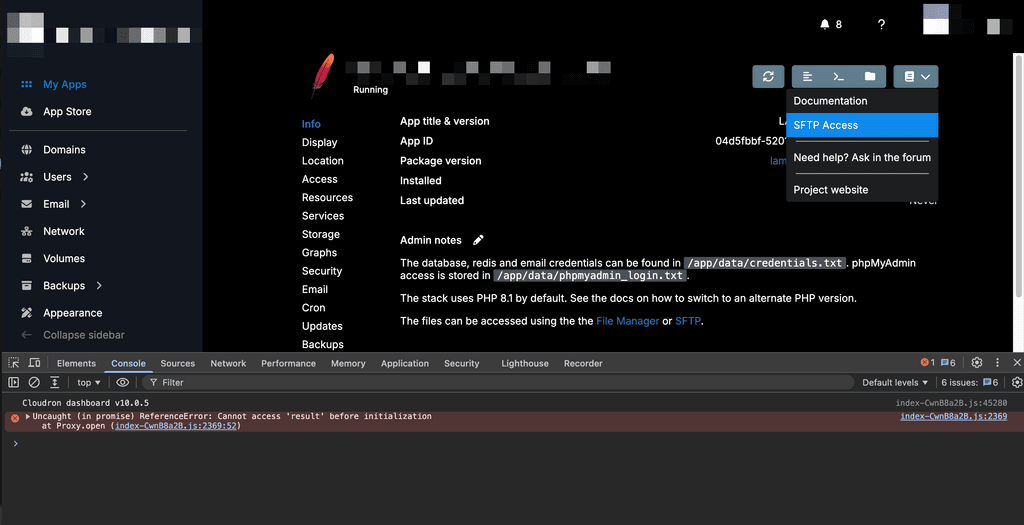
          Screenshot 2026-09-27 at 09-22-09.png

          J 1 Reply Last reply
          0
          • T timo.betz

            Hi @james
            how would I do that? I just checked the documentation, but nothing is mentioned about creating an app password. And btw. I get a browser console error after clicking on SFTP Access in the UI (see screenshot)
            Screenshot 2026-09-27 at 09-22-09.png

            J
            J
            joseph
            Staff
            wrote last edited by
            #5

            @timo.betz see https://docs.cloudron.io/apps#sftp-access . For login, the username is <username>@app.domain.com . The password is one that you can to create in app password UI . This is in Profile -> App passwords. See https://docs.cloudron.io/profile#app-passwords . Select the App as the LAMP app .

            The UI bug is known and fix is coming in next release.

            T 1 Reply Last reply
            1
            • J joseph

              @timo.betz see https://docs.cloudron.io/apps#sftp-access . For login, the username is <username>@app.domain.com . The password is one that you can to create in app password UI . This is in Profile -> App passwords. See https://docs.cloudron.io/profile#app-passwords . Select the App as the LAMP app .

              The UI bug is known and fix is coming in next release.

              T
              T
              timo.betz
              wrote last edited by
              #6

              hi @joseph
              don't know how I missed that! Thanks, app password is set and connection to sftp is working.
              Thanks again...

              1 Reply Last reply
              1

              Hello! It looks like you're interested in this conversation, but you don't have an account yet.

              Getting fed up of having to scroll through the same posts each visit? When you register for an account, you'll always come back to exactly where you were before, and choose to be notified of new replies (either via email, or push notification). You'll also be able to save bookmarks and upvote posts to show your appreciation to other community members.

              With your input, this post could be even better 💗

              Register Login
              Reply
              • Reply as topic
              Log in to reply
              • Oldest to Newest
              • Newest to Oldest
              • Most Votes


              • Login

              • Don't have an account? Register

              • Login or register to search.
              • First post
                Last post
              0
              • Categories
              • Recent
              • Tags
              • Popular
              • Bookmarks
              • Search