
Tiny Tiny RSS: error after last update: "Your access level is insufficient to run this script."
-
Tried an older update, similar error:
Jun 04 13:51:45 box:apptask rss.domain.com error installing app: BackupsError: unable to chmod: ENOENT: no such file or directory, chmod '/home/yellowtent/appsdata/855b5a8c-62b4-4760-8e48-f2355412f845/data/plugins/fever/fever_api.php'
Jun 04 13:51:45 box:apptask rss.domain.com updating app with values: {"installationState":"error","installationProgress":"unable to chmod: ENOENT: no such file or directory, chmod '/home/yellowtent/appsdata/855b5a8c-62b4-4760-8e48-f2355412f845/data/plugins/fever/fever_api.php'"}
Jun 04 13:51:45 box:apptask Apptask completed with error { BackupsError: unable to chmod: ENOENT: no such file or directory, chmod '/home/yellowtent/appsdata/855b5a8c-62b4-4760-8e48-f2355412f845/data/plugins/fever/fever_api.php'
Jan 01 00:00:00 at /home/yellowtent/box/src/backups.js:524:40
Jan 01 00:00:00 at /home/yellowtent/box/node_modules/async/dist/async.js:473:16
Jan 01 00:00:00 at iterateeCallback (/home/yellowtent/box/node_modules/async/dist/async.js:988:17)
Jan 01 00:00:00 at /home/yellowtent/box/node_modules/async/dist/async.js:969:16
Jan 01 00:00:00 at FSReqWrap.oncomplete (fs.js:141:20)
Jan 01 00:00:00 name: 'BackupsError',
Jan 01 00:00:00 reason: 'external error',
Jan 01 00:00:00 message:
Jan 01 00:00:00 'unable to chmod: ENOENT: no such file or directory, chmod \'/home/yellowtent/appsdata/855b5a8c-62b4-4760-8e48-f2355412f845/data/plugins/fever/fever_api.php\'' }
Jun 04 13:51:45 box:apptask Apptask completed for 855b5a8c-62b4-4760-8e48-f2355412f845
Apparently, the fever plugin that was part of my Tiny Tiny RSS installation is 'gone' - it's not even in the backups (I just checked the folder...)
-
Ok, managed to restore to a functional version by manually recreating all files and folders in the plugins directory...
Why weren't the backed up? -
They are in
appsdataso they will get backed up. Can you check if they are backed up now after your fix or if the issue persists?@nebulon
Yep, it's backed up now. Weird. -
They are in
appsdataso they will get backed up. Can you check if they are backed up now after your fix or if the issue persists?@nebulon
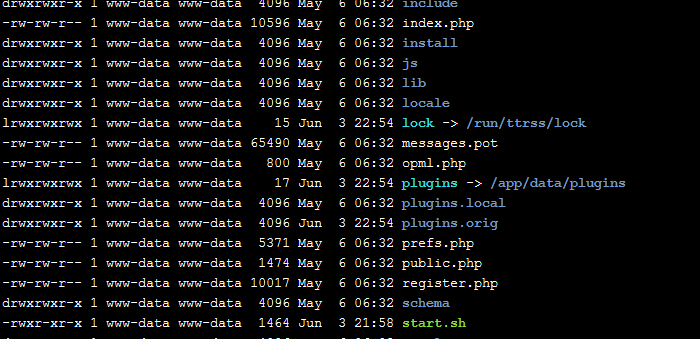
I realized something now: Plugins in /app/date/plugins.local/ (where the software author fox wants user plugins to go to) are not recognized in the Cloudron version of TT-RSS.... -
What do you mean by this? The plugins would still be updated if they are located within
/app/data/. Do you mean manually installed plugins are now located in some other folder which the app does not include?@nebulon
/app/data has two folders for plugins: "plugins" (system plugins) and "plugins.local" (user plugins).According to https://git.tt-rss.org/fox/tt-rss/wiki/Plugins:
Installing plugins Copy plugin folder to tt-rss/plugins.local then activate it in the settings panel. Plugin folder name should correspond to plugin class name defined in (plugin)/init.php, i.e. Af_ExamplePlugin should be copied to plugins.local/af_exampleplugin.
If I have the a plugin folder in "plugins.local" it's not recognized in TT-RSS on Cloudron, only if the plugin folder is in "plugins".
-
Yep!



Hello! It looks like you're interested in this conversation, but you don't have an account yet.
Getting fed up of having to scroll through the same posts each visit? When you register for an account, you'll always come back to exactly where you were before, and choose to be notified of new replies (either via email, or push notification). You'll also be able to save bookmarks and upvote posts to show your appreciation to other community members.
With your input, this post could be even better 💗
Register Login