Cloudron makes it easy to run web apps like WordPress, Nextcloud, GitLab on your server. Find out more or install now.


Skip to content
  • Categories
  • Recent
  • Tags
  • Popular
  • Bookmarks
  • Search
Skins
  • Light
  • Brite
  • Cerulean
  • Cosmo
  • Flatly
  • Journal
  • Litera
  • Lumen
  • Lux
  • Materia
  • Minty
  • Morph
  • Pulse
  • Sandstone
  • Simplex
  • Sketchy
  • Spacelab
  • United
  • Yeti
  • Zephyr
  • Dark
  • Cyborg
  • Darkly
  • Quartz
  • Slate
  • Solar
  • Superhero
  • Vapor

  • Default (No Skin)
  • No Skin
Collapse
Brand Logo

Cloudron Forum

Apps - Status | Demo | Docs | Install
  1. Cloudron Forum
  2. Support
  3. Postgresql

Postgresql

Scheduled Pinned Locked Moved Solved Support
addons
10 Posts 3 Posters 3.6k Views 3 Watching
  • Oldest to Newest
  • Newest to Oldest
  • Most Votes
Reply
  • Reply as topic
Log in to reply
This topic has been deleted. Only users with topic management privileges can see it.
  • J Offline
    J Offline
    Jenova
    wrote on last edited by girish
    #1

    Hello, I have an issue with postgresql. It wont start back up. I tried using the restart button under System. I talked to Girish about this before and solved it, but I lost the email. Can someone help me? Thanks.

    1 Reply Last reply
    0
    • girishG Do not disturb
      girishG Do not disturb
      girish
      Staff
      wrote on last edited by
      #4

      @Jenova Ah! I found your support email. I wonder why this issue has re-surfaced. That too twice with you...

      NOTE: this nukes all postgresql data. Don't use this if any of your apps are using postgresql already.

      docker stop postgresql
      rm -rf /home/yellowtent/platformdata/postgresql/*
      sed -e 's/postgresql:2.0.2/postgresql:2.0.1/' -i /home/yellowtent/platformdata/INFRA_VERSION
      systemctl restart box
      
      J 1 Reply Last reply
      1
      • girishG Do not disturb
        girishG Do not disturb
        girish
        Staff
        wrote on last edited by
        #2

        @Jenova If you click the logs button of postgresql what does it say?

        1 Reply Last reply
        0
        • J Offline
          J Offline
          Jenova
          wrote on last edited by Jenova
          #3

          @girish

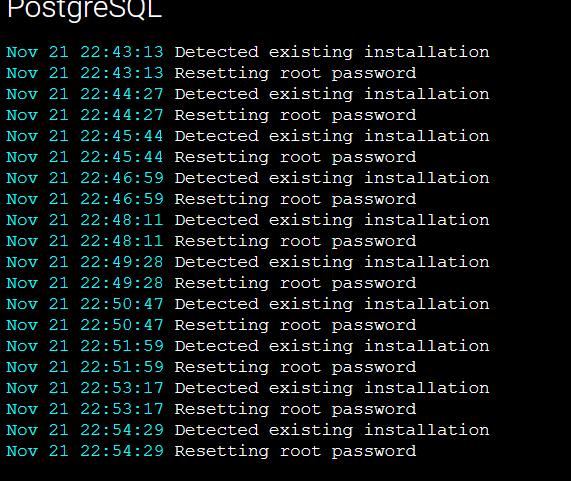
          "Detected existing installation"

          I am the person that emailed you the last time, in which the command wouldn't work since I was on my phone. 😕

          1 Reply Last reply
          0
          • girishG Do not disturb
            girishG Do not disturb
            girish
            Staff
            wrote on last edited by
            #4

            @Jenova Ah! I found your support email. I wonder why this issue has re-surfaced. That too twice with you...

            NOTE: this nukes all postgresql data. Don't use this if any of your apps are using postgresql already.

            docker stop postgresql
            rm -rf /home/yellowtent/platformdata/postgresql/*
            sed -e 's/postgresql:2.0.2/postgresql:2.0.1/' -i /home/yellowtent/platformdata/INFRA_VERSION
            systemctl restart box
            
            J 1 Reply Last reply
            1
            • girishG girish

              @Jenova Ah! I found your support email. I wonder why this issue has re-surfaced. That too twice with you...

              NOTE: this nukes all postgresql data. Don't use this if any of your apps are using postgresql already.

              docker stop postgresql
              rm -rf /home/yellowtent/platformdata/postgresql/*
              sed -e 's/postgresql:2.0.2/postgresql:2.0.1/' -i /home/yellowtent/platformdata/INFRA_VERSION
              systemctl restart box
              
              J Offline
              J Offline
              Jenova
              wrote on last edited by
              #5

              @girish

              Because I get impatient with my VPS and run commands while other commands are still running and I break things. This was one of those times where I would run start.sh and systemctl restart docker one too many times and things were not done running. 😕

              1 Reply Last reply
              0
              • S Offline
                S Offline
                SebGG
                wrote on last edited by
                #6

                Hi all, i have this problem as well. Which type of apps ar using this service?

                1 Reply Last reply
                0
                • S Offline
                  S Offline
                  SebGG
                  wrote on last edited by
                  #7

                  275d79dc-320b-4a15-8a65-57d5b5cbf784-grafik.png

                  1 Reply Last reply
                  0
                  • S Offline
                    S Offline
                    SebGG
                    wrote on last edited by
                    #8

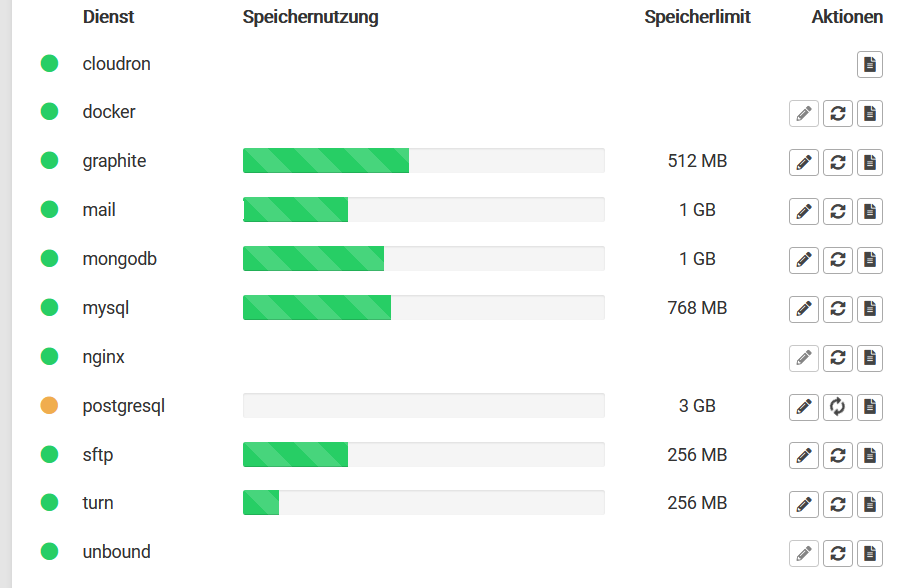
                    978c64c0-0bad-4157-a3ef-4fe9586a4126-grafik.png

                    1 Reply Last reply
                    0
                    • S Offline
                      S Offline
                      SebGG
                      wrote on last edited by
                      #9

                      after Minutes of restarting retries the dot is red
                      bc0ce88c-efba-47b4-9672-b4882c1e2afc-grafik.png

                      What can i do?

                      girishG 1 Reply Last reply
                      0
                      • S SebGG

                        after Minutes of restarting retries the dot is red
                        bc0ce88c-efba-47b4-9672-b4882c1e2afc-grafik.png

                        What can i do?

                        girishG Do not disturb
                        girishG Do not disturb
                        girish
                        Staff
                        wrote on last edited by
                        #10

                        @sebgg have you tried clearing out postgresql directory entirely ? Assuming you have backups,

                        docker stop postgresql
                        rm -rf /home/yellowtent/platformdata/postgresql/*
                        ```
                        
                        Then, go to services -> postgresql -> restart. That will rebuild the postgresql container.

                        1 Reply Last reply
                        0

                        Hello! It looks like you're interested in this conversation, but you don't have an account yet.

                        Getting fed up of having to scroll through the same posts each visit? When you register for an account, you'll always come back to exactly where you were before, and choose to be notified of new replies (either via email, or push notification). You'll also be able to save bookmarks and upvote posts to show your appreciation to other community members.

                        With your input, this post could be even better 💗

                        Register Login
                        Reply
                        • Reply as topic
                        Log in to reply
                        • Oldest to Newest
                        • Newest to Oldest
                        • Most Votes


                        • Login

                        • Don't have an account? Register

                        • Login or register to search.
                        • First post
                          Last post
                        0
                        • Categories
                        • Recent
                        • Tags
                        • Popular
                        • Bookmarks
                        • Search