
Best way to redirect users from root domain to non-Cloudron sub-domain?
-
I have Cloudron installed at my.mydomain.com (for example) and I also have a site at social.mydomain.com. I don't have anything at mydomain.com, but I'd like any visitors to the root to be forwarded to social.mydomain.com. What's the best way to implement this?
-
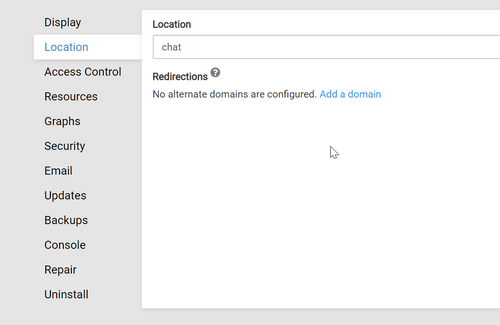
- Go to Cloudron Dashboard
- Click the gear wheel at social.mydomain.com
- In the App settings go to location and "Add a Domain"
- Select mydomain.com and confirm ^^
-
I already have mydomain.com listed as a domain. I guess because of how I installed Cloudron.
I have a non-Cloudron site installed at social.mydomain.com. Sorry, that part of my post may have been confusing or ambiguous.
-
I already have mydomain.com listed as a domain. I guess because of how I installed Cloudron.
I have a non-Cloudron site installed at social.mydomain.com. Sorry, that part of my post may have been confusing or ambiguous.
@YurkshireLad said in Best way to redirect users from root domain to non-Cloudron sub-domain?:
I have a non-Cloudron site installed at social.mydomain.com. Sorry, that part of my post may have been confusing or ambiguous.
Personally I simply go directly at your DNS manager (Namecheap, Cloudflare, GoDaddy, ...) than add the entry manually, such as you would do without Cloudron.
It also confused me a few weeks ago but at the end Cloudron only add and manage entries it need such as:
- A for my.
- MX for mail (if you active them and decide to receive email)
- TTX for DMARC, DKIM and SPF
in your case you will have to add something like
- Entry Type: A
- Name: @
- Content: TheIPofYour "social.mydomain.com"
- TTL: Auto
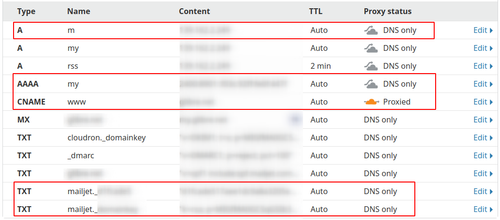
since we are all graphic bug, here a sample of my zone at Cloudron
the one in red are the one I added manually.


Hello! It looks like you're interested in this conversation, but you don't have an account yet.
Getting fed up of having to scroll through the same posts each visit? When you register for an account, you'll always come back to exactly where you were before, and choose to be notified of new replies (either via email, or push notification). You'll also be able to save bookmarks and upvote posts to show your appreciation to other community members.
With your input, this post could be even better 💗
Register Login