
Unread/Recent/Nav buttons don't work within categories/topics
-
They only seem to work from the homepage, seemingly because of the URL structure.
If within a category or topic, the buttons try to go to their respective functions within the category or topic which doesn't work/exist.
This doesn't appear to be a problem here.
One thought it that perhaps the URL domain structure we have which is one more layer deep is causing the issue.
Here 3 layers:
forum.cloudron.io
which gives a recent URL of:
https://forum.cloudron.io/recentWe have 4 layers:
forum.sub.domain.io
giving:
https://forum.sub.domain.io/topic/xxx/recentwhich is a 404.Anyone come across this before?
Can anyone with a wildcard domain validate this behavior?
Is there a regex to adjust?
-
I just use the "recents" tab and intentionally went and ignored all the apps I didn't care about and that achieved a similar result for me. Do you think what you're experiencing is a NodeBB specific bug or Cloudron routing issue?
-
@Lonk said in Unread/Recent buttons don't work within categories/topics:
@robi So this is happening on your personal install that has more than one subdomain then?
No, it's a client machine with a dyndns setup.
-
@Lonk said in Unread/Recent buttons don't work within categories/topics:
@robi So this is happening on your personal install that has more than one subdomain then?
No, it's a client machine with a dyndns setup.
-
@Lonk said in Unread/Recent buttons don't work within categories/topics:
@robi Can you reproduce the error while watching the NGINX log?
it's not an nginx issue.
it's a problem with how NodeBB generates the URL for the top buttons like
/recent.I don't know why it would be doing the extra URI paths when all it needs to do is
/recent. -
@Lonk said in Unread/Recent buttons don't work within categories/topics:
So this is def a nodebb bug...then?
that would be a rash conclusion at this point.
I did post it here in the NodeBB section with the hopes to find out the actual reason, configuration or bug or otherwise.
-
@robi When I installed a NodeBB plugin, the navigations links did become corrupt once and I had to fix it by going to
/admin/settings/navigationand editing all the entries one by one. I reported this on their forum but didn't get any real response. -
@Lonk said in Unread/Recent buttons don't work within categories/topics:
So this is def a nodebb bug...then?
that would be a rash conclusion at this point.
I did post it here in the NodeBB section with the hopes to find out the actual reason, configuration or bug or otherwise.
-
@robi Have you switched to a regular singular sub domain and tested to see if the double sub-domain is the real issue at hand here?
@Lonk said in Unread/Recent buttons don't work within categories/topics:
@robi Have you switched to a regular singular sub domain and tested to see if the double sub-domain is the real issue at hand here?
Yeah, this is a good idea to check out as well. Just clone the forum to another place and check if the links are correct.
-
@robi When I installed a NodeBB plugin, the navigations links did become corrupt once and I had to fix it by going to
/admin/settings/navigationand editing all the entries one by one. I reported this on their forum but didn't get any real response.@girish said in Unread/Recent buttons don't work within categories/topics:
@robi When I installed a NodeBB plugin, the navigations links did become corrupt once and I had to fix it by going to
/admin/settings/navigationand editing all the entries one by one. I reported this on their forum but didn't get any real response.This is a good suggestion, but I don't have enough access to do this and I don't see anything wrong with these entries.
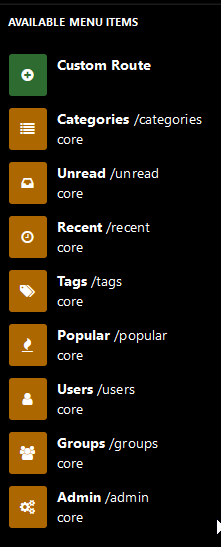
-
@Lonk said in Unread/Recent buttons don't work within categories/topics:
@robi Have you switched to a regular singular sub domain and tested to see if the double sub-domain is the real issue at hand here?
Yeah, this is a good idea to check out as well. Just clone the forum to another place and check if the links are correct.
-
@robi said in Unread/Recent/Nav buttons don't work within categories/topics:
This is a good suggestion, but I don't have enough access to do this and I don't see anything wrong with these entries.
What I meant is the thing on the left side named "Route". Does it say "/categories" for you? In my case, it had become"corrupt" like "/categories#xxx" something.
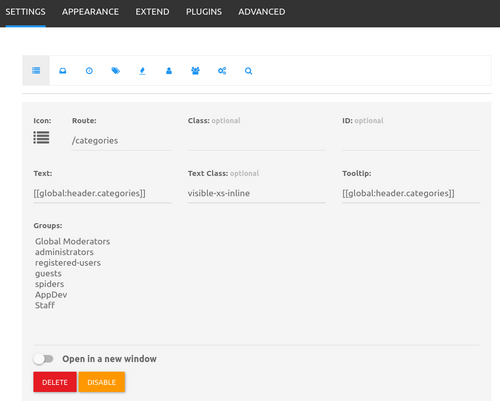
-
@robi said in Unread/Recent/Nav buttons don't work within categories/topics:
This is a good suggestion, but I don't have enough access to do this and I don't see anything wrong with these entries.
What I meant is the thing on the left side named "Route". Does it say "/categories" for you? In my case, it had become"corrupt" like "/categories#xxx" something.
-
@girish thank you that was it!
I changed all the routes for all the menu items to start with a
/and we're good now.Like you said, it must have been a plugin that changed the routes

@robi said in Unread/Recent/Nav buttons don't work within categories/topics:
@girish thank you that was it!
I changed all the routes for all the menu items to start with a
/and we're good now.Like you said, it must have been a plugin that changed the routes
Niceeeee. Always feels good to fix a weird problems - glad you got it figured out!
 ️
️



Hello! It looks like you're interested in this conversation, but you don't have an account yet.
Getting fed up of having to scroll through the same posts each visit? When you register for an account, you'll always come back to exactly where you were before, and choose to be notified of new replies (either via email, or push notification). You'll also be able to save bookmarks and upvote posts to show your appreciation to other community members.
With your input, this post could be even better 💗
Register Login