
Resized Koel container to give it more memory but
-
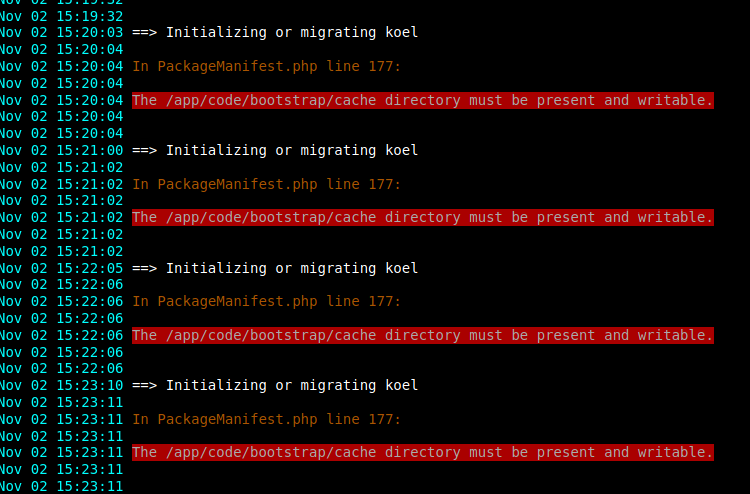
Since then It cannot restart and output this error :
Nov 02 15:23:10 ==> Initializing or migrating koel
Nov 02 15:23:11
Nov 02 15:23:11 In PackageManifest.php line 177:
Nov 02 15:23:11
Nov 02 15:23:11 The /app/code/bootstrap/cache directory must be present and writable.
-
@mehdi Where do I have to do this ?
because in a ubuntu system the run folder is at the system level, should I create a folder there ?
this makes no sense..since the /app/code/bootstrap/cache folder already exist but in a read-only place, what is clear is that if anyone resize the default Koel app these errors will enfold, if you don't the app start itself just fine :
-
@mehdi Where do I have to do this ?
because in a ubuntu system the run folder is at the system level, should I create a folder there ?
this makes no sense..since the /app/code/bootstrap/cache folder already exist but in a read-only place, what is clear is that if anyone resize the default Koel app these errors will enfold, if you don't the app start itself just fine :@rmdes to me, these errors do not seem linked to having resized the memory. I have no idea how resizing could cause this, I don't think it can.
It seems that this is a more general packaging bug.
@rmdes said in Resized Koel container to give it more memory but:
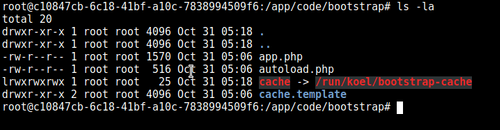
since the /app/code/bootstrap/cache folder already exist
No, it does not exist. According to your screenshot, it's not a folder that there is there, but a symlink to
/run/koel/bootstrap-cache.@rmdes said in Resized Koel container to give it more memory but:
Where do I have to do this ?
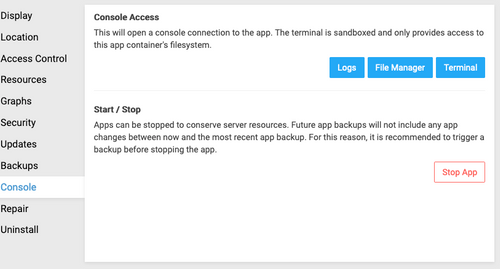
Click on the Terminal button here, and do the command I said. (You may have to go to Repair tab first, enable recovery mode, do the command, then re-disable it.)
-
@rmdes to me, these errors do not seem linked to having resized the memory. I have no idea how resizing could cause this, I don't think it can.
It seems that this is a more general packaging bug.
@rmdes said in Resized Koel container to give it more memory but:
since the /app/code/bootstrap/cache folder already exist
No, it does not exist. According to your screenshot, it's not a folder that there is there, but a symlink to
/run/koel/bootstrap-cache.@rmdes said in Resized Koel container to give it more memory but:
Where do I have to do this ?
Click on the Terminal button here, and do the command I said. (You may have to go to Repair tab first, enable recovery mode, do the command, then re-disable it.)
-
One thing is clear, since I resized the app cannot start anymore.
Sadly I did not backup before crashing it, so I cannot go back and also I did not check prior to resizing if these errors were already there..but at least before the resizing these errors would not stop the app from working, I scanned 40gb of music, and I was listening songs just fine. -
@mehdi done, I created the folders but it does not change a thing, same error in loop, koel won't restart properly, cannot start actually.
@rmdes said in Resized Koel container to give it more memory but:
@mehdi done, I created the folders but it does not change a thing, same error in loop, koel won't restart properly, cannot start actually.
Each time the container is restarted the folders created in /run/ are gone
I recreated them but I'm not convinced this should even be done, probably this place should be in app/data/ instead of app/code right ? -
Oh, looking at the commit history, a new version 0.2.0 was released yesterday that fixes the permission error I was thinking of. Can you check if your app is up to date ?



Hello! It looks like you're interested in this conversation, but you don't have an account yet.
Getting fed up of having to scroll through the same posts each visit? When you register for an account, you'll always come back to exactly where you were before, and choose to be notified of new replies (either via email, or push notification). You'll also be able to save bookmarks and upvote posts to show your appreciation to other community members.
With your input, this post could be even better 💗
Register Login