
Cloudron makes it easy to run web apps like WordPress, Nextcloud, GitLab on your server. Find out more or install now.


Skip to content
  • Categories
  • Recent
  • Tags
  • Popular
  • Bookmarks
  • Search
Skins
  • Light
  • Brite
  • Cerulean
  • Cosmo
  • Flatly
  • Journal
  • Litera
  • Lumen
  • Lux
  • Materia
  • Minty
  • Morph
  • Pulse
  • Sandstone
  • Simplex
  • Sketchy
  • Spacelab
  • United
  • Yeti
  • Zephyr
  • Dark
  • Cyborg
  • Darkly
  • Quartz
  • Slate
  • Solar
  • Superhero
  • Vapor

  • Default (No Skin)
  • No Skin
Collapse
Brand Logo

Cloudron Forum

Apps - Status | Demo | Docs | Install
  1. Cloudron Forum
  2. Nextcloud
  3. Users Storage-Quota-Management

Users Storage-Quota-Management

Scheduled Pinned Locked Moved Nextcloud
5 Posts 5 Posters 1.8k Views 5 Watching
  • Oldest to Newest
  • Newest to Oldest
  • Most Votes
Reply
  • Reply as topic
Log in to reply
This topic has been deleted. Only users with topic management privileges can see it.
  • B Offline
    B Offline
    Bluxomat
    wrote on last edited by
    #1

    Hey there.

    I am sorry, maybe I am a little stupid. But I cant find a way to increase the storage-quota for certain users scince I don’t have the usermanagement-Panel in Nextcloud anymore.

    In my very situation is would help me to increase it for me as an admin.
    But I am interested in it generally as well.

    I’d be gladfull for any hint!
    Thanks a lot and cheers
    Bluxomat

    girishG H 2 Replies Last reply
    0
    • nebulonN Offline
      nebulonN Offline
      nebulon
      Staff
      wrote on last edited by
      #2

      Are you logging into Nextcloud with the admin account? The admin account would have the username admin

      1 Reply Last reply
      0
      • B Bluxomat

        Hey there.

        I am sorry, maybe I am a little stupid. But I cant find a way to increase the storage-quota for certain users scince I don’t have the usermanagement-Panel in Nextcloud anymore.

        In my very situation is would help me to increase it for me as an admin.
        But I am interested in it generally as well.

        I’d be gladfull for any hint!
        Thanks a lot and cheers
        Bluxomat

        girishG Offline
        girishG Offline
        girish
        Staff
        wrote on last edited by
        #3

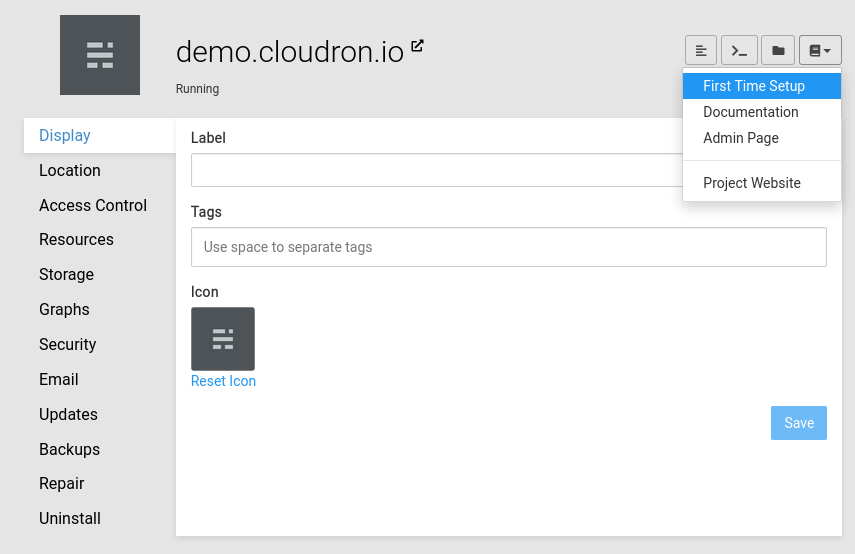
        @bluxomat For admin account credentials, on the top right there a documentation button. Clicking on that there is a "First time setup" menu entry. Usually admin credentials are also displayed in a popup as soon as you install the app.
        3ada50c1-894f-4a7d-8854-ae08e8012450-image.png

        marcusquinnM 1 Reply Last reply
        1
        • girishG girish

          @bluxomat For admin account credentials, on the top right there a documentation button. Clicking on that there is a "First time setup" menu entry. Usually admin credentials are also displayed in a popup as soon as you install the app.

          3ada50c1-894f-4a7d-8854-ae08e8012450-image.png

          marcusquinnM Offline
          marcusquinnM Offline
          marcusquinn
          wrote on last edited by
          #4

          @girish Learned something new too - that is nice!

          Web Design & Development: https://www.evergreen.je
          Technology & Apps: https://www.marcusquinn.com

          1 Reply Last reply
          0
          • B Bluxomat

            Hey there.

            I am sorry, maybe I am a little stupid. But I cant find a way to increase the storage-quota for certain users scince I don’t have the usermanagement-Panel in Nextcloud anymore.

            In my very situation is would help me to increase it for me as an admin.
            But I am interested in it generally as well.

            I’d be gladfull for any hint!
            Thanks a lot and cheers
            Bluxomat

            H Offline
            H Offline
            hilariojsb
            wrote on last edited by
            #5

            @bluxomat
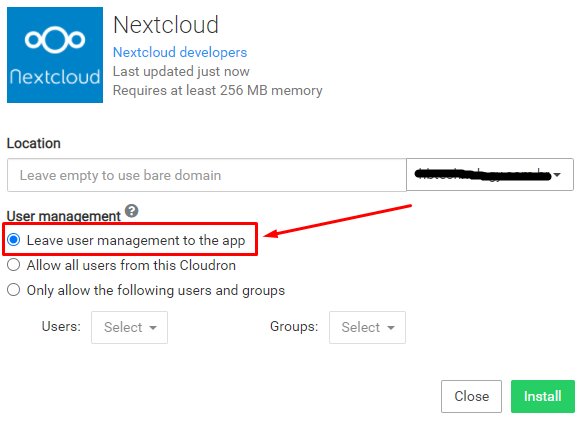
            When creating an instance check the option as shown in the image below.
            755cffb2-90b6-44aa-9ab9-568d51deca0a-image.png

            That way, when you log in with the admin user, the user quota option will appear

            1 Reply Last reply
            0
            • jamesJ james marked this topic as a regular topic on

            Hello! It looks like you're interested in this conversation, but you don't have an account yet.

            Getting fed up of having to scroll through the same posts each visit? When you register for an account, you'll always come back to exactly where you were before, and choose to be notified of new replies (either via email, or push notification). You'll also be able to save bookmarks and upvote posts to show your appreciation to other community members.

            With your input, this post could be even better 💗

            Register Login
            Reply
            • Reply as topic
            Log in to reply
            • Oldest to Newest
            • Newest to Oldest
            • Most Votes


            • Login

            • Don't have an account? Register

            • Login or register to search.
            • First post
              Last post
            0
            • Categories
            • Recent
            • Tags
            • Popular
            • Bookmarks
            • Search


