
Error on changing Discourse root email

-
@zylstra Can you check if that
=is actually the equal to sign? Some browsers use different fonts and use some fancy character which looks like=but is not really equal to. From the screenshot you posted, it doesn't look like=... -
@girish Yes, I checked the equal sign that I originally pasted. Then I tried again typing everything out just to be sure.
-
My terminal session looks like this:
root@52b89a18-00b8-4e38-b4f6-67920f021bd8:/app/code# sudo -E -u root bundle exec script/rails console
Loading production environment (Rails 6.1.3.2)
irb(main):001:0> u = User.find_by_username("root")
=> #<User id: 1, username: "root", created_at: "2021-10-01 17:39:37.393537000 +0000", updated_at: "2021-10-01 17:39:42.179054000 +0000"...
irb(main):002:0>
The user 'root' is found and should not be nil.
-
My terminal session looks like this:
root@52b89a18-00b8-4e38-b4f6-67920f021bd8:/app/code# sudo -E -u root bundle exec script/rails console
Loading production environment (Rails 6.1.3.2)
irb(main):001:0> u = User.find_by_username("root")
=> #<User id: 1, username: "root", created_at: "2021-10-01 17:39:37.393537000 +0000", updated_at: "2021-10-01 17:39:42.179054000 +0000"...
irb(main):002:0>
The user 'root' is found and should not be nil.
@girish Am I not logged in as root in Discourse automatically when I click on the terminal icon on the Cloudron app page?
Does the terminal prompt not show that I am logged in as root, i.e. the root in
root@5dfbf59d-2d3e-45f8-b95f-42ff675cdeea:/app/code#?How do I log in as root?
su?su root?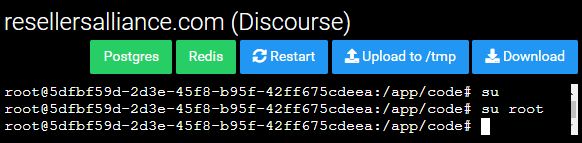
-
@girish Am I not logged in as root in Discourse automatically when I click on the terminal icon on the Cloudron app page?
Does the terminal prompt not show that I am logged in as root, i.e. the root in
root@5dfbf59d-2d3e-45f8-b95f-42ff675cdeea:/app/code#?How do I log in as root?
su?su root? -
@zylstra Sorry - my comment was vague - I meant can you login as the root user on the discourse web app (not the terminal)
-
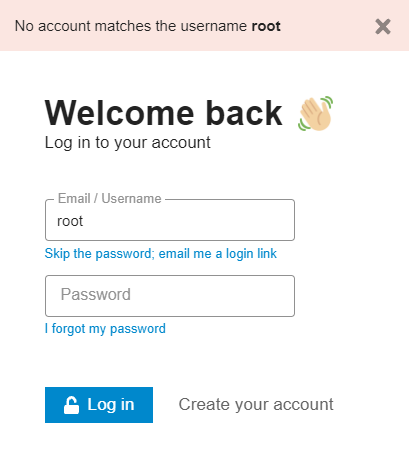
@murgero I clicked the "Skip the password; email me a login link" link after entering root as the username. I got the error "No account matches the username root".
-
@murgero I clicked the "Skip the password; email me a login link" link after entering root as the username. I got the error "No account matches the username root".
-
@murgero @girish
I think I figured it out: I suspect that I changed root's username soon after install, then forgot about it, or did not realize that I did so. I am not sure what happened with the password either, but what I had wasn't working. So I was able to change the email address associated with the (renamed) root account. Then I had to wait a couple days to get a new password while time4vps's occasionally available support opened port 25. It's set up correctly now.Now that I mentioned it, I will state for the record that time4vps's support is NOT 24/7 like they so proudly state on their homepage. Their hours are GMT +3:
weekdays: 8:30 till 21:30
weekends: 10:00 till 16:30
So if you are on the West Coast of the US you can get support until 11:30 am on weekdays and until 6:30 am on weekends.


Hello! It looks like you're interested in this conversation, but you don't have an account yet.
Getting fed up of having to scroll through the same posts each visit? When you register for an account, you'll always come back to exactly where you were before, and choose to be notified of new replies (either via email, or push notification). You'll also be able to save bookmarks and upvote posts to show your appreciation to other community members.
With your input, this post could be even better 💗
Register Login