
Nextcloud - protocol in admin view is broken

-
Hello,
I just installed a fresh Cloudron.io instance on a KVM VPS. For that I chose DNS option "no-op DNS" and modified my local hosts file to point a non-existing domain to my VPS. Installation of Nextcloud was smooth but when I try to open the protocol in the admin view, e. g. to see if there were any issues during setup, I get a blank page (menu stays visible but no log is shown) and the console shows errors.
Is this a issue because I used a non-existing domain and redirected my traffic by modifying the hosts file or is this some issue with the Nextcloud package?
Screenshot from Firefox (Edge shows the same issue):

I'm sorry if this issue is caused by my test setup and I should have used a proper domain.
Best Regards,
-
Hello,
I just installed a fresh Cloudron.io instance on a KVM VPS. For that I chose DNS option "no-op DNS" and modified my local hosts file to point a non-existing domain to my VPS. Installation of Nextcloud was smooth but when I try to open the protocol in the admin view, e. g. to see if there were any issues during setup, I get a blank page (menu stays visible but no log is shown) and the console shows errors.
Is this a issue because I used a non-existing domain and redirected my traffic by modifying the hosts file or is this some issue with the Nextcloud package?
Screenshot from Firefox (Edge shows the same issue):
I'm sorry if this issue is caused by my test setup and I should have used a proper domain.
Best Regards,
@warg said in Nextcloud - protocol in admin view is broken:
but when I try to open the protocol in the admin view
I think the logs view does not work in nextcloud . We log to stdout and nextcloud does not like this (for some reason). I guess they haven't fixed their code to handle this.
BTW, I am not 100% sure what the "protocol in admin view" means . Maybe you mean logging view at
/settings/admin/logging? I can confirm this doesn't work on normal instances either. I wouldn't worry about it. -
@warg said in Nextcloud - protocol in admin view is broken:
but when I try to open the protocol in the admin view
I think the logs view does not work in nextcloud . We log to stdout and nextcloud does not like this (for some reason). I guess they haven't fixed their code to handle this.
BTW, I am not 100% sure what the "protocol in admin view" means . Maybe you mean logging view at
/settings/admin/logging? I can confirm this doesn't work on normal instances either. I wouldn't worry about it.@girish I refer to
/settings/admin/logging, yes. Is this a known issue with NC 26? I had a Nextcloud 24 SaaS instance and there the protocol/logging view did work fine.If this is indeed broken upstream, even in regular NC 26 setups, I would report it there.
Is there a workaround where I can view errors like the ones being logged there? When the container gets restarted or updated, the log is gone, right? I would like to have a persistent log I can check regularly, e. g. to see if there are hidden errors I'm not aware about.
-
@girish I refer to
/settings/admin/logging, yes. Is this a known issue with NC 26? I had a Nextcloud 24 SaaS instance and there the protocol/logging view did work fine.If this is indeed broken upstream, even in regular NC 26 setups, I would report it there.
Is there a workaround where I can view errors like the ones being logged there? When the container gets restarted or updated, the log is gone, right? I would like to have a persistent log I can check regularly, e. g. to see if there are hidden errors I'm not aware about.
@warg the logs are in the cloudron app logs. https://docs.cloudron.io/apps/#log-viewer . Is that what you are looking for?
-
@warg the logs are in the cloudron app logs. https://docs.cloudron.io/apps/#log-viewer . Is that what you are looking for?
@girish I saw that option but I'm not sure it's the same. Like when I did some activities in Nextcloud yesterday, I just saw single HTTP calls which are not the entries I would have expected/know from the logging view. I will keep an eye on it there and then get back to this topic.
I also found some file called
data/nextcloud.login the filemanager which reports some"message":"Error during app service registration: There can only be one Talk backend"error. Is that file from setup/packaging process? Seems like it's not relevant for monitoring? -
@girish I saw that option but I'm not sure it's the same. Like when I did some activities in Nextcloud yesterday, I just saw single HTTP calls which are not the entries I would have expected/know from the logging view. I will keep an eye on it there and then get back to this topic.
I also found some file called
data/nextcloud.login the filemanager which reports some"message":"Error during app service registration: There can only be one Talk backend"error. Is that file from setup/packaging process? Seems like it's not relevant for monitoring?@warg said in Nextcloud - protocol in admin view is broken:
@girish I saw that option but I'm not sure it's the same. Like when I did some activities in Nextcloud yesterday, I just saw single HTTP calls which are not the entries I would have expected/know from the logging view. I will keep an eye on it there and then get back to this topic.
I tested this now since I was curious. It's just showing the entries in the log file as a table. You can test this yourself with something like this:
  'logfile' => '/run/nextcloud/logs.txt',
  'loglevel' => '1',
This results in:
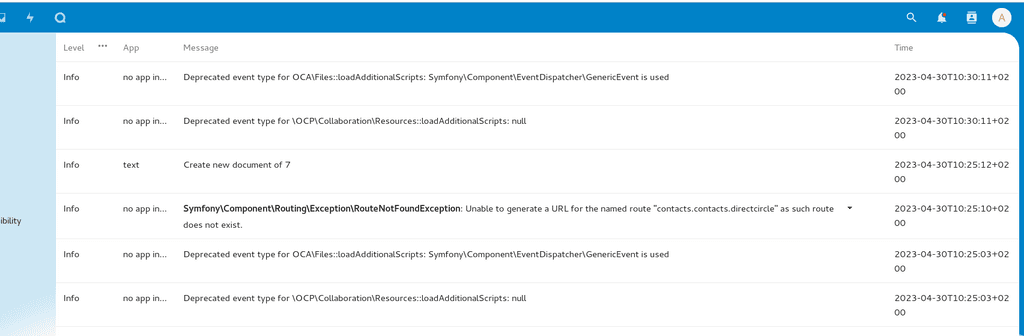
You get the same logs in stderr on Cloudron (in json format).
-
@girish I saw that option but I'm not sure it's the same. Like when I did some activities in Nextcloud yesterday, I just saw single HTTP calls which are not the entries I would have expected/know from the logging view. I will keep an eye on it there and then get back to this topic.
I also found some file called
data/nextcloud.login the filemanager which reports some"message":"Error during app service registration: There can only be one Talk backend"error. Is that file from setup/packaging process? Seems like it's not relevant for monitoring?@warg said in Nextcloud - protocol in admin view is broken:
I also found some file called data/nextcloud.log in the filemanager which reports some "message":"Error during app service registration: There can only be one Talk backend" error. Is that file from setup/packaging process? Seems like it's not relevant for monitoring?
This can be ignored. It's an upstream bug - https://github.com/nextcloud/server/issues/34919
Also, easily verified:
root@9b380172-8da6-44fe-9379-3c5dd9dc5e11:/app/code# cat /app/data/data/nextcloud.log
root@9b380172-8da6-44fe-9379-3c5dd9dc5e11:/app/code# php /app/code/occ app:install spreed
spreed 16.0.3 installed
spreed enabled
root@9b380172-8da6-44fe-9379-3c5dd9dc5e11:/app/code# cat /app/data/data/nextcloud.log
{"reqId":"jSOaEj74uoZDbWtjYYbF","level":4,"time":"2023-04-30T08:35:33+00:00","remoteAddr":"","user":"--","app":"spreed","method":"","url":"--","message":"Error during app service registration: There can only be one Talk backend","userAgent":"--","version":"26.0.1.1","exception":{"Exception":"RuntimeException","Message":"There can only be one Talk backend","Code":0,"Trace":[{"file":"/app/code/lib/private/AppFramework/Bootstrap/RegistrationContext.php","line":314,"function":"registerTalkBackend","class":"OC\\AppFramework\\Bootstrap\\RegistrationContext","type":"->"},{"file":"/app/data/apps/spreed/lib/AppInfo/Application.php","line":153,"function":"registerTalkBackend","class":"OCP\\AppFramework\\Bootstrap\\IRegistrationContext@anonymous\u0000/app/code/lib/private/AppFramework/Bootstrap/RegistrationContext.php:152$4b","type":"->"},{"file":"/app/code/lib/private/AppFramework/Bootstrap/Coordinator.php","line":142,"function":"register","class":"OCA\\Talk\\AppInfo\\Application","type":"->"},{"file":"/app/code/lib/private/AppFramework/Bootstrap/Coordinator.php","line":94,"function":"registerApps","class":"OC\\AppFramework\\Bootstrap\\Coordinator","type":"->"},{"file":"/app/code/lib/private/Installer.php","line":143,"function":"runLazyRegistration","class":"OC\\AppFramework\\Bootstrap\\Coordinator","type":"->"},{"file":"/app/code/lib/private/legacy/OC_App.php","line":451,"function":"installApp","class":"OC\\Installer","type":"->"},{"file":"/app/code/core/Command/App/Install.php","line":97,"function":"enable","class":"OC_App","type":"->"},{"file":"/app/code/3rdparty/symfony/console/Command/Command.php","line":255,"function":"execute","class":"OC\\Core\\Command\\App\\Install","type":"->"},{"file":"/app/code/3rdparty/symfony/console/Application.php","line":1009,"function":"run","class":"Symfony\\Component\\Console\\Command\\Command","type":"->"},{"file":"/app/code/3rdparty/symfony/console/Application.php","line":273,"function":"doRunCommand","class":"Symfony\\Component\\Console\\Application","type":"->"},{"file":"/app/code/3rdparty/symfony/console/Application.php","line":149,"function":"doRun","class":"Symfony\\Component\\Console\\Application","type":"->"},{"file":"/app/code/lib/private/Console/Application.php","line":215,"function":"run","class":"Symfony\\Component\\Console\\Application","type":"->"},{"file":"/app/code/console.php","line":100,"function":"run","class":"OC\\Console\\Application","type":"->"},{"file":"/app/code/occ","line":11,"args":["/app/code/console.php"],"function":"require_once"}],"File":"/app/code/lib/private/AppFramework/Bootstrap/RegistrationContext.php","Line":461,"message":"Error during app service registration: There can only be one Talk backend","exception":{},"CustomMessage":"Error during app service registration: There can only be one Talk backend"}}

Hello! It looks like you're interested in this conversation, but you don't have an account yet.
Getting fed up of having to scroll through the same posts each visit? When you register for an account, you'll always come back to exactly where you were before, and choose to be notified of new replies (either via email, or push notification). You'll also be able to save bookmarks and upvote posts to show your appreciation to other community members.
With your input, this post could be even better 💗
Register Login