Cloudron makes it easy to run web apps like WordPress, Nextcloud, GitLab on your server. Find out more or install now.


Skip to content
  • Categories
  • Recent
  • Tags
  • Popular
  • Bookmarks
  • Search
Skins
  • Light
  • Brite
  • Cerulean
  • Cosmo
  • Flatly
  • Journal
  • Litera
  • Lumen
  • Lux
  • Materia
  • Minty
  • Morph
  • Pulse
  • Sandstone
  • Simplex
  • Sketchy
  • Spacelab
  • United
  • Yeti
  • Zephyr
  • Dark
  • Cyborg
  • Darkly
  • Quartz
  • Slate
  • Solar
  • Superhero
  • Vapor

  • Default (No Skin)
  • No Skin
Collapse
Brand Logo

Cloudron Forum

Apps - Status | Demo | Docs | Install
  1. Cloudron Forum
  2. LanguageTool
  3. Languagetool: Download of n-grams ignores path set in env

Languagetool: Download of n-grams ignores path set in env

Scheduled Pinned Locked Moved Solved LanguageTool
10 Posts 4 Posters 2.8k Views 4 Watching
  • Oldest to Newest
  • Newest to Oldest
  • Most Votes
Reply
  • Reply as topic
Log in to reply
This topic has been deleted. Only users with topic management privileges can see it.
  • necrevistonnezrN Offline
    necrevistonnezrN Offline
    necrevistonnezr
    wrote on last edited by necrevistonnezr
    #1

    My env:

    NGRAMS_DATASET_PATH=/media/Languagetool/
    

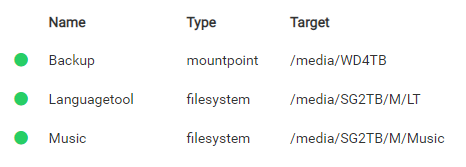
    My volume:
    87097514-7faf-40b0-9860-d2555d3b65ec-image.png
    When I download n-grams

    # /app/pkg/install-ngrams.sh /app/data/ngrams en de
    

    they get installed in /app/data/ngrams

    Be sure to set NGRAMS_DATASET_PATH=/app/data/ngrams in /app/data/env and restart the app.
    
    1 Reply Last reply
    0
    • nebulonN Offline
      nebulonN Offline
      nebulon
      Staff
      wrote on last edited by
      #2

      ah the docs are not obvious then. So the install-ngrams.sh first argument is the path where they get installed. Then it also has to be set in the env.

      1 Reply Last reply
      0
      • necrevistonnezrN Offline
        necrevistonnezrN Offline
        necrevistonnezr
        wrote on last edited by necrevistonnezr
        #3

        I see my stupidity... ๐Ÿ™‚
        I thought it would adopt the path set in env

        1 Reply Last reply
        0
        • necrevistonnezrN necrevistonnezr has marked this topic as solved on
        • necrevistonnezrN Offline
          necrevistonnezrN Offline
          necrevistonnezr
          wrote on last edited by necrevistonnezr
          #4

          Added a commit to the documentation, https://git.cloudron.io/necrevistonnezr/docs/-/blob/7625f8d9b7dbfa55f83cc18420fb1bd82177484f/knowledgebase/docs/apps/languagetool.md

          1 Reply Last reply
          0
          • nebulonN Offline
            nebulonN Offline
            nebulon
            Staff
            wrote on last edited by
            #5

            thanks, can you rebase your merge request to current docs master so we can merge?

            1 Reply Last reply
            0
            • necrevistonnezrN Offline
              necrevistonnezrN Offline
              necrevistonnezr
              wrote on last edited by
              #6

              Hmm, I thought I did... now?

              1 Reply Last reply
              0
              • nebulonN Offline
                nebulonN Offline
                nebulon
                Staff
                wrote on last edited by nebulon
                #7

                There seems to be one https://git.cloudron.io/cloudron/docs/-/merge_requests/46 which is 120 commits behind and then an empty draft one at https://git.cloudron.io/cloudron/docs/-/merge_requests/47

                If its easier, I can also just copy the text itself.

                1 Reply Last reply
                0
                • necrevistonnezrN Offline
                  necrevistonnezrN Offline
                  necrevistonnezr
                  wrote on last edited by necrevistonnezr
                  #8

                  That's fine, thank you, I'm not particularly familiar with Git systems.

                  1 Reply Last reply
                  1
                  • girishG Offline
                    girishG Offline
                    girish
                    Staff
                    wrote on last edited by
                    #9

                    I have manually copied/merged.

                    1 Reply Last reply
                    1
                    • G Offline
                      G Offline
                      giofonseca
                      wrote last edited by
                      #10

                      I would suggest adding the following to the documentation here: https://docs.cloudron.io/packages/languagetool/

                      If you want to use a volume to install and store ngrams there, after creating that volume[link to doc], mount it to the Language Tool application under the โ€œStorageโ€ menu and set it as a "read and writing" volume.

                      Normally the volumes are reachable via /mnt/volumens/<volume-id> but once mounted to an application are reachable via /media/<volumen-id>, therefore the command you need to use for installing the ngrams will be as follows:

                      /app/pkg/install-ngrams.sh /media/<volume-id> en es

                      and the path under /app/data/env has to be like NGRAMS_DATASET_PATH=/media/<volume-id>

                      That may help some user like me with a more step-by-step guide ๐Ÿ™‚

                      1 Reply Last reply
                      0

                      Hello! It looks like you're interested in this conversation, but you don't have an account yet.

                      Getting fed up of having to scroll through the same posts each visit? When you register for an account, you'll always come back to exactly where you were before, and choose to be notified of new replies (either via email, or push notification). You'll also be able to save bookmarks and upvote posts to show your appreciation to other community members.

                      With your input, this post could be even better ๐Ÿ’—

                      Register Login
                      Reply
                      • Reply as topic
                      Log in to reply
                      • Oldest to Newest
                      • Newest to Oldest
                      • Most Votes


                      • Login

                      • Don't have an account? Register

                      • Login or register to search.
                      • First post
                        Last post
                      0
                      • Categories
                      • Recent
                      • Tags
                      • Popular
                      • Bookmarks
                      • Search