
Unexpected CiviCRM behavior after clone
-
I cloned a managed WordPress install, but noticed that when I added a contact into CiviCRM it appeared in both the original and the cloned WordPress instance.
This was unexpected to me as I thought a clone would be completely separate.
Do the plugins of managed WordPress installs share data?
-
I ran into an issue a bit ago similar to this. When I cloned the app it copied the database details from the old WordPress app into the cloned version. You can open wp-config.php on both apps and see if they match. If they match, then that would more than likely be the problem.
-
@superhua this is most likely because CiviCRM in clone is using the same database as the previous installation. How does one configure CiviCRM ? Do you have to give it database information ? In general, it's not possible for the clone to access the previous app's database.
Another aspect could be that maybe CiviCRM is using an API or external service? In that case too, contacts will appear in both places.
-
@superhua this is most likely because CiviCRM in clone is using the same database as the previous installation. How does one configure CiviCRM ? Do you have to give it database information ? In general, it's not possible for the clone to access the previous app's database.
Another aspect could be that maybe CiviCRM is using an API or external service? In that case too, contacts will appear in both places.
-
@girish I installed CiviCRM by uploading the file to the plugin page under the WordPress dashboard.
From there, it auto configured itself. I did not give it database information.
-
@superhua Is https://docs.civicrm.org/installation/en/latest/wordpress/ the setup/download you are talking about? Just testing it out myself.
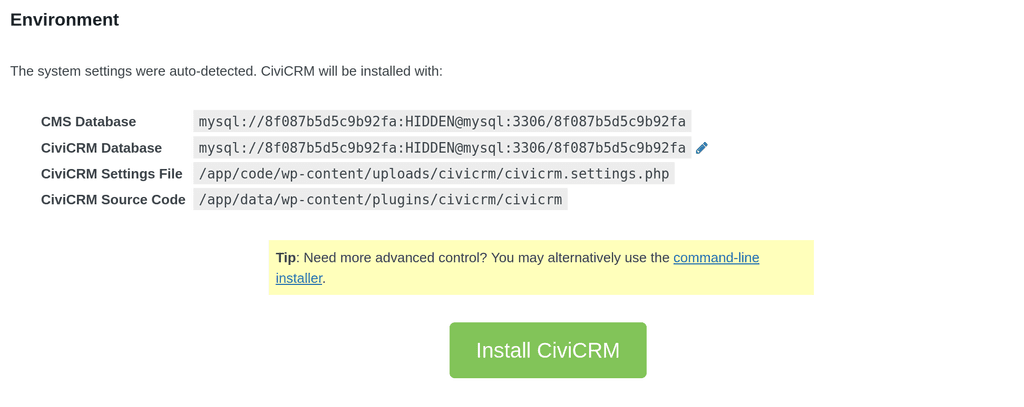
Edit: OK, indeed, when installing CiviCRM, it's reading the raw DB credentials from wordpress:
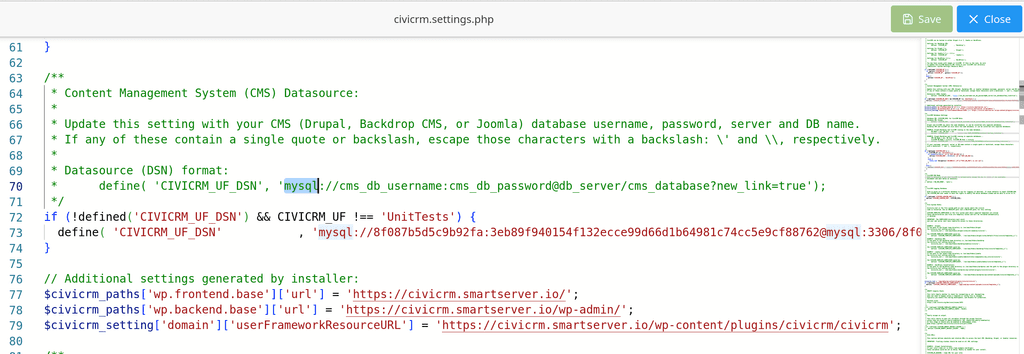
And it's stored raw in the above civicrm.settings.php file:


Hello! It looks like you're interested in this conversation, but you don't have an account yet.
Getting fed up of having to scroll through the same posts each visit? When you register for an account, you'll always come back to exactly where you were before, and choose to be notified of new replies (either via email, or push notification). You'll also be able to save bookmarks and upvote posts to show your appreciation to other community members.
With your input, this post could be even better 💗
Register Login