
thank you – at least, it does not seem like my own fault 
pls update this thread when a fix is in sight (or you need some testing)
 D
D
thank you – at least, it does not seem like my own fault
pls update this thread when a fix is in sight (or you need some testing)
Hey,
I'm running Nextcloud (latest 34.0.4) on my cloudron and installed EuroOffice (ultilizing the Nextcloud Office App). Sadly, (maybe since EuroOffice moved from community apps to cloudron app strore (unstable)), comments in shared docs do not get saved anymore.
Both logfiles (EuroOffice and Nextcloud) do not indicate any errors.
anyone else with this issue?
Best,
David
It would be embeddable
If that's going to be a feature, I'd like to
Hey, @luckow!
Could this app be considered for the catalog of safeserver applications?
Title: FediSuite - An advanced dashboard and management toolset for the Fediverse
Website: https://www.fedisuite.com/
Repository: https://codeberg.org/christinloehner/FediSuite
License: AGPL-3.0 (Open Source)
Instructions for self hosting: https://www.fedisuite.com/#self-hosting
Description:
FediSuite is an open-source web application that acts as a comprehensive dashboard and management suite for the Fediverse (such as Mastodon and others). It is designed to help users efficiently manage their presence across decentralized networks.
Why this should be a Cloudron app:
Cloudron already provides an excellent foundation for the decentralized web with apps like Mastodon or Pixelfed. However, a dedicated management and scheduling suite is currently missing for those who need to maintain a professional or highly active presence. – And postiz never worked really well.
FediSuite would be the perfect companion app for community managers, educators, and power users on Cloudron.
Having this as a 1-click community app would significantly lower the barrier to entry for self-hosting this powerful Fediverse tool.
Hey,
I would like to simplify the IT infrastructure for our team (all non-nerds). Most of them don't need access to the various Cloudron apps or the built-in email server, but only use Nextcloud. Therefore, I would like to create new users directly in Nextcloud in the future to simplify the login process. That's no problem. However, I have a handful of users who currently log in via OIDC, and I would like to switch them over. Is that even possible? Transfer a user provided by Cloudron to a local user and keep all files, shared links, and groups (groups are set up in Nextcloud anyway).
Best,
David
Has anything new been added to this issue? I came across this guide: https://github.com/Chocobozzz/PeerTube/issues/6522#issuecomment-3698599168
However, I was unable to implement it (I suppose I lack knowledge of CLI and skills).
I'm happily running 9.0.12 by now.
One thing keeps my annoyed: If you're in the app store and have opened a detail pane from one of the apps: on closing the infoe pane, the app store scrolls to the very top of the app list.
I've updated my ubuntu 22.04 (I guess) server to 9.0.12 – and migrated it to a new machine (ubuntu 24.04) running 9.0.12. Everything (only ten apps; four users) went smoothly and well.
Hi @james,
I did not use admin, instead, I used the credentials of a admin (and another non-admin) user of my Cloudron, since it should be present on the LDAP server, as the instructions state. I also tried the credentials of the Wordpress admin user. Didn't help.
Miniorange's support suggested entering the Bind secret into the Service Account Password field, which also did not work.
Here are screenshots of
role mapping tab: https://snap.notizlab.de/1TMMdRHFattribute mapping tab: https://snap.notizlab.de/jthpJyjxlogin settings: https://snap.notizlab.de/XLtVcDNpI guess they might not be very helpful in particular.
Hi,
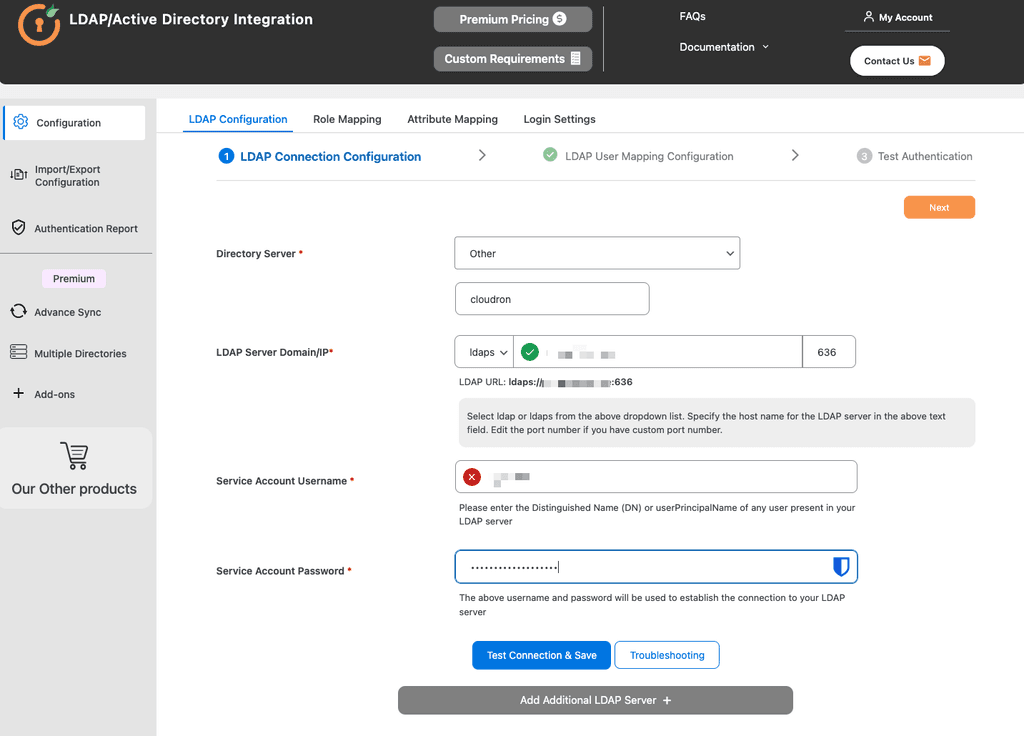
first of all: I know, this might be outside the scope of cloudron support. I've want to use my cloudron als LDAP directory for an external Wordpress site. On this Wordpress, this Plugin is installed: https://plugins.miniorange.com/step-by-step-guide-for-wordpress-ldap-login-plugin
I've whitelisted the IP address of the external website in the user directory settings. Connection to the cloudron directory server works, but I keep getting this error:
Connection to LDAP server is Successful but unable to make authenticated bind to LDAP server. Make sure you have provided correct username or password.
The (free version of the) plugin does not allow my to put the bind secret anywhere. I assume, this might be the issue, but I have no idea how to solve that:
Title: [Docker-Obsidian] on Cloudron
I came across this on Appaddict.app
Please see this post as an initial question whether this would be possible to support on Cloudron. To be honest, I have no clue what constraints might appear or if it is even allowed (due to the license of Obsidian itself).
Hi,
I will soon have to give up access to my employer’s Exchange account, but I will continue working with many of the same contacts (volunteer work, etc.). In many cases, it’s common practice in these organizations to send calendar invitations via Exchange in order to coordinate meetings.
How can I best replicate this setup using Cloudron? I have one primary mailbox set up, but I’d like to use different email aliases for various partner organizations. In Nextcloud, I can only enter one email address (the primary one). Might SOGo be better suited for my needs?
I’d like to make sure that as little as possible changes for my contacts (ideally, only the email address): when I receive a calendar invitation, I want to be able to simply accept it and appear as a participant.
I've got a similar problem. Sending the first few newsletters to a handful of subscribers worked, after that, I've kept getting errors. The log file states that my sending domain “is not allowed to send large batches yet”.
Mailgun Support:
After further review, your account was automatically placed on an evaluation period, which enforces the following limits on the account: a maximum of 100 messages per hour, a maximum of 9 recipients per message, and disabled usage of email validations. To help protect our customers against spam, we have automated systems in place to flag accounts that appear suspicious. On most occasions, this process works very well; however, sometimes we get it wrong and flag a genuine account. There are a number of factors that contribute to the flagging of the account for business verification, but they are not necessarily directly related to you.
I mean wtf: 9 (NINE) recipients per message? This is nuts. (My blog has 11 subscribers)
A few e-mails later, this is my current state:
To establish sufficient sending history with Mailgun and conclude the evaluation process, please conduct normal business operations with 3-5 days of consistent sending. We require your recipient email addresses to be collected organically and for those recipients to be double opt-in recipients. That means that they provided their email address directly to you themselves and have agreed to receive your correspondence. Once achieved, please update this ticket so that our team can re-evaluate the account and remove the sending limitation.
"normal business" for 3-5 days equals "do nothing" when you have a personal blog and write only occasionally new posts, maybe one or two a month.
Anyone else with similar experiences?
Hey,
I wonder if I could ditch Zoom/MS Teams from a small team environment and set up our own video conferencing solution (aka Mirotalk SFU).
Are there any suggestions or experiences on system requirements for Miro SFU for meetings with more than, let's say, 10 people?
And: is it possible to change settings for ALL attendees at once (e.g. who is pinned, the theme/language), in short: I'd like to have some moderation features, which I cannot find (or could not, yet).
best
David