
@james thanks, any ETA on a fix? Is there another way I can upload my app backup?
G
ghosted
@ghosted
Posts
-
prefix must be a string -
Update 9.0.11 Broke Services@james I restored to a previous image, downloaded the backup of my apps. Completely wiped the server, deleted my linode and its disk image backups. then switched host providers.
Maybe this information will help if some one else runs into the same problem. This server was a cloud image install, through Linode. I never did any manual configurations, always followed official docs. Never had a problem. Was solid for 3 years. Server updated on its own from the last 8x version to 9.0.11.
-
prefix must be a string -
prefix must be a string -
prefix must be a string -
prefix must be a stringI have the same problem. Previous import backups worked, previous to 9x. I'm also using the same exact backup paths.
-
Update 9.0.11 Broke ServicesI tried to, but I got the following lines of
2025-11-23T11:16:19.847Z box:shell services: grep -q avx /proc/cpuinfo
2025-11-23T11:16:22.579Z box:shell services: grep -q avx /proc/cpuinfo
It was THOUSANDS of lines, currently had a production instance, so needed it back up asap.
-
Update 9.0.11 Broke ServicesI've decided to restore to a previous disk image, through the host provider. Can't seem to delete this post.
-
Update 9.0.11 Broke ServicesSupport
- Cloudron services not starting
Description
After my cloudron instance automatically updated to Cloudron 9.0.11, certain services wont start ( "Starting services, this can take a while", despite waiting for 48 hours, then rebooting several times, issue persists.
Services that won't start; graphite, mongodb, mysql, postgresql, sftp
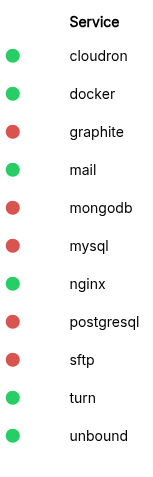
Steps to reproduce
N/A. This happened right after updating and is persistent despite rebooting.
Potential Solution
I could potential restore to a previous disk image, but that's about 10 days back.
I could also backup my two apps, then import into a new install.
But I can't even download my app's backups... seems to be related to the given issue.

When trying to download an app's backup: App > backups > Download
I get
'{
  "status": "Conflict",
  "message": "only tgz backups can be downloaded"
}
Logs
Logs seem to be thousands of lines of the following....
2025-11-23T11:16:09.713Z box:shell services: grep -q avx /proc/cpuinfo
2025-11-23T11:16:09.989Z box:shell services: grep -q avx /proc/cpuinfo
2025-11-23T11:16:12.994Z box:shell services: grep -q avx /proc/cpuinfo
2025-11-23T11:16:13.168Z box:shell services: grep -q avx /proc/cpuinfo
2025-11-23T11:16:16.232Z box:shell services: grep -q avx /proc/cpuinfo
2025-11-23T11:16:16.681Z box:shell services: grep -q avx /proc/cpuinfo
2025-11-23T11:16:19.402Z box:shell services: grep -q avx /proc/cpuinfo
2025-11-23T11:16:19.847Z box:shell services: grep -q avx /proc/cpuinfo
2025-11-23T11:16:22.579Z box:shell services: grep -q avx /proc/cpuinfo
Troubleshooting Already Performed
Rebooted 3-4 times. Allocated more ram to stopped services and enabled recovery mode, then rebooted. Reset all services to default ram usage limits, enabled recovery mode, then rebooted.
Cloudron Version
"version": "9.0.11"
Ubuntu Version
No LSB modules are available.
Distributor ID:	Ubuntu
Description:	Ubuntu 24.04.1 LTS
Release:	24.04
Codename:	noble
Cloudron installation method
- Cloud Image - Linode
Output of
cloudron-support --troubleshootroot@localhost:~# cloudron-support --troubleshoot Vendor: Linode Product: Compute Instance Linux: 6.8.0-87-generic Ubuntu: noble 24.04 Processor: AMD EPYC 7501 32-Core Processor BIOS pc-q35-7.2 CPU @ 2.0GHz x 1 RAM: 2015236KB Disk: /dev/sda 17G [OK] node version is correct [OK] IPv6 is enabled and public IPv6 address is working [OK] docker is running [OK] docker version is correct [OK] MySQL is running [OK] nginx is running [OK] dashboard cert is valid [OK] dashboard is reachable via loopback [OK] box v9.0.11 is running [OK] netplan is good [OK] DNS is resolving via systemd-resolved [OK] Dashboard is reachable via domain name Timeout. [OK] Domain is valid and has not expired [OK] unbound is running -
Tinybird IntegrationAny progress on the Tinybird Integration? We would love to be able to use it in our Ghost instance
 4
4