
wow, that was easy: changed the type to filesystem and the apps are working again.
I have no idea why or when that changed to the wrong mount type.
anyway, thanks for your help, resolved 
 H
H
wow, that was easy: changed the type to filesystem and the apps are working again.
I have no idea why or when that changed to the wrong mount type.
anyway, thanks for your help, resolved
Hello @james,
none of them is a separate drive or partition, just directories that I´ve created before I set them up as volumes in the dashboard
root@server:/media# lsblk -o path,size,model --nodeps
PATH        SIZE MODEL
/dev/loop0   13M
/dev/loop1 13.4M
/dev/loop2   74M
/dev/loop3 48.4M
/dev/loop4   74M
/dev/loop5 48.1M
/dev/sda    640G QEMU HARDDISK
root@server:/media# ls -la
total 96
drwxr-xr-x   7 root root  4096 Apr  5 13:23 .
drwxr-xr-x  23 root root  4096 May 19  2025 ..
drwxrwxrwx 835 1000 root 69632 Feb 22 09:35 calibre-library
drwxrwxrwx   5 root root  4096 Mar 30 18:46 ebook-share
drwxrwxrwx   4 root root  4096 May 22  2025 exchange-share
drwxrwxrwx   3 root root  4096 May 19  2025 obsidian-share
drwxrwxrwx   2 root root  4096 Apr  5 13:23 test
Hi, thanks for you answer!
No, I haven´t any fstab entries or seperate .mount files, but I created the volumes in the dashboard:
Create folder in /media (e.g, /media/test)
Create volume (screenshot)
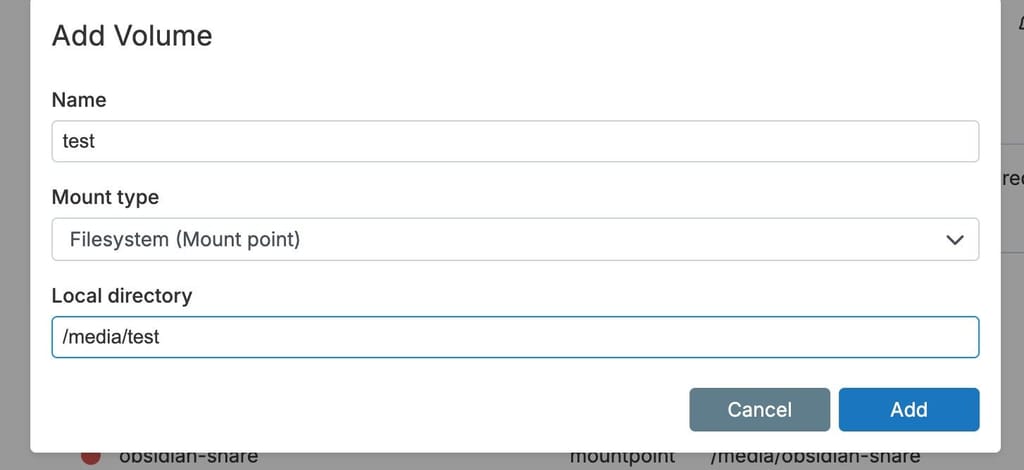
Volume is available in the apps (like calibre)
The idea was to separate the data from the app, since there’s no need to back it up. Was that the wrong approach?
Worked well for a long time...
I noticed that my Calibre Web instance is no longer working because the mounted volume containing the database could not be found.
According to the dashboard, no volume was mounted at all, so I'm posting this here:
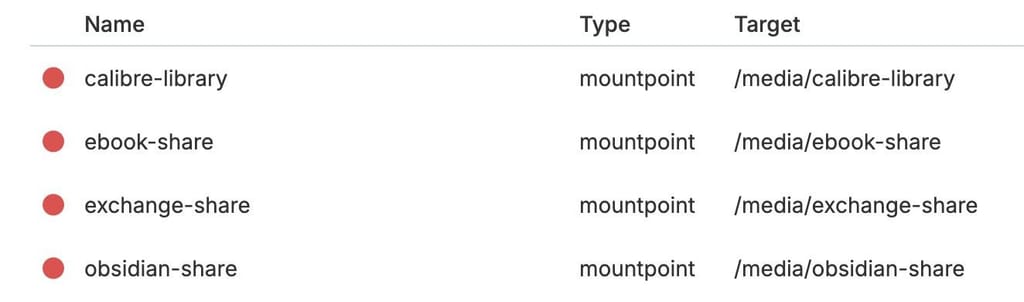
I use Syncthing for the remaining 3 volumes, and interestingly enough, there are no issues there—the app (and the shares) work as usual
There was no change in the last weeks (especially when it comes to the volumes), beside the regulary cloudron updates.
Mar 30 18:55:15 apptask: createContainer: creating container
Mar 30 18:55:15 shell: mounts: mountpoint -q -- /media/calibre-library
Mar 30 18:55:15 shell: mounts: mountpoint -q -- /media/calibre-library errored BoxError: mountpoint exited with code 32 signal null
Mar 30 18:55:15 apptask: run: app error for state pending_recreate_container: BoxError: Volume "calibre-library" is not active. Not mounted
Mar 30 18:55:15 tasks: setCompleted - 3520: {"result":null,"error":{"message":"Volume \"calibre-library\" is not active. Not mounted","reason":"Bad State"},"percent":100}
Mar 30 18:55:15 tasks: updating task 3520 with: {"completed":true,"result":null,"error":{"message":"Volume \"calibre-library\" is not active. Not mounted","reason":"Bad State"},"percent":100}
Mar 30 18:55:15 taskworker: Task took 3.154 seconds
Mar 30 18:55:15 Exiting with code 0
Mar 30 18:55:15 BoxError: Volume "calibre-library" is not active. Not mounted
Mar 30 18:55:15 BoxError: Volume "calibre-library" is not active. Not mounted
cloudron-support --troubleshoot output:Vendor: QEMU Product: Standard PC (Q35 + ICH9, 2009)
Linux: 6.8.0-106-generic
Ubuntu: noble 24.04
Execution environment: kvm
Processor: Intel(R) Xeon(R) Silver 4214 CPU @ 2.20GHz
BIOS pc-q35-10.0 CPU @ 2.0GHz x 8
RAM: 32866148KB
Disk: /dev/sda2 541G
[OK] node version is correct
[OK] IPv6 is enabled and public IPv6 address is working
[OK] docker is running
[OK] docker version is correct
[OK] MySQL is running
[OK] netplan is good
[OK] DNS is resolving via systemd-resolved
[OK] unbound is running
[OK] nginx is running
[OK] dashboard cert is valid
[OK] dashboard is reachable via loopback
[OK] No pending database migrations
[OK] Service 'mysql' is running and healthy
[OK] Service 'postgresql' is running and healthy
[OK] Service 'mongodb' is running and healthy
[OK] Service 'mail' is running and healthy
[OK] Service 'graphite' is running and healthy
[OK] Service 'sftp' is running and healthy
[OK] box v9.1.5 is running
[OK] Dashboard is reachable via domain name
2026-03-29T00:07:11.213Z apphealthmonitor: app health: 11 running / 6 stopped / 1 unresponsiveWhat could be the problem here?
Thanks in advance!
I tried it with
$ cloudron backup decrypt --password=passphrase backupid.tar.gz.enc backupid.tar.gz
My password contains special characters, so i tried with ' but I get
Error: Could not decrypt: Invalid password or tampered file (mac mismatch)
The backup itself is only 55mb, i`m afraid, there is not everthing in it ...
app_forum.xxx.yy_v2.22.0.tar.gz.enc
So, the forced recovery did not help, still an error when I tried to start the mysql daemon.
Now I wanted to try out the restore function and ran into another problem.
I do have backups (as I pompously wrote above), but the password for decryption doesn't work (for whatever reason).
Is there a way to read the password in the file system of the running Cloudron instance?
Or:
Can the database be regenerated? Basically, everything is working, except the dashboard won't load...
Sure, I have backups.
Should I follow the instructions in https://docs.cloudron.io/troubleshooting/#mysql?
What is, if I need a backup which is idk, 2-3 weeks old ... could that cause other problems?
Sure,
here is the output:
2025-12-01T08:48:55.564514Z 0 [System] [MY-010116] [Server] /usr/sbin/mysqld (mysqld 8.0.44-0ubuntu0.22.04.1) starting as process 14253
2025-12-01T08:48:55.582334Z 1 [System] [MY-013576] [InnoDB] InnoDB initialization has started.
2025-12-01T08:48:56.300337Z 1 [System] [MY-013577] [InnoDB] InnoDB initialization has ended.
2025-12-01T08:48:56.423692Z 1 [ERROR] [MY-013183] [InnoDB] Assertion failure: fut0lst.ic:82:addr.page == FIL_NULL || addr.boffset >= FIL_PAGE_DATA thread 140714909271616
InnoDB: We intentionally generate a memory trap.
InnoDB: Submit a detailed bug report to http://bugs.mysql.com.
InnoDB: If you get repeated assertion failures or crashes, even
InnoDB: immediately after the mysqld startup, there may be
InnoDB: corruption in the InnoDB tablespace. Please refer to
InnoDB: http://dev.mysql.com/doc/refman/8.0/en/forcing-innodb-recovery.html
InnoDB: about forcing recovery.
2025-12-01T08:48:56Z UTC - mysqld got signal 6 ;
Most likely, you have hit a bug, but this error can also be caused by malfunctioning hardware.
BuildID[sha1]=1d7b54cce103c7eb7743f877f7974b44575bd8ee
Thread pointer: 0x5595afeed3b0
Attempting backtrace. You can use the following information to find out
where mysqld died. If you see no messages after this, something went
terribly wrong...
stack_bottom = 7ffabe2e7bd0 thread_stack 0x100000
 #0 0x5595ac3d504d _Z8my_abortv
 #1 0x5595ac5853f2 _Z23ut_dbg_assertion_failedPKcS0_m
 #2 0x5595acc0933f <unknown>
 #3 0x5595ac6c5691 _Z18flst_insert_beforePhS_S_P5mtr_t
 #4 0x5595ac5a189b _Z36trx_purge_add_update_undo_to_historyP5trx_tP14trx_undo_ptr_tPhbmP5mtr_t
 #5 0x5595ac5a1af2 _Z23trx_undo_update_cleanupP5trx_tP14trx_undo_ptr_tPhbmP5mtr_t
 #6 0x5595ac5a1ead <unknown>
 #7 0x5595ac5a25ad _Z14trx_commit_lowP5trx_tP5mtr_t
 #8 0x5595ac5a2cc7 _Z10trx_commitP5trx_t
 #9 0x5595ac5a41a4 _Z31trx_rollback_or_clean_recoveredb
 #10 0x5595ac55f4e4 _Z27srv_dict_recover_on_restartv
 #11 0x5595ac41dcff <unknown>
 #12 0x5595ac286f1b _ZN2dd9bootstrap7restartEP3THD
 #13 0x5595ac3e4345 <unknown>
 #14 0x5595ac3f531d _ZN2dd10upgrade_5731do_pre_checks_and_initialize_ddEP3THD
 #15 0x5595aba95915 <unknown>
 #16 0x5595ac7d484d <unknown>
 #17 0x7ffac153dac2 <unknown>
 #18 0x7ffac15cf8bf <unknown>
 #19 0xffffffffffffffff <unknown>

Trying to get some variables.
Some pointers may be invalid and cause the dump to abort.
Query (0): is an invalid pointer
Connection ID (thread ID): 1
Status: NOT_KILLED

The manual page at http://dev.mysql.com/doc/mysql/en/crashing.html contains
information that should help you find out what is causing the crash.
The dashboard has recently become inaccessible, but all apps (e. g. NodeBB) works without problems.

Several reboots, no changes in the behaviour
2025-12-01T08:45:37.296Z box:server ==========================================
2025-12-01T08:45:37.296Z box:server            Cloudron 8.3.2
2025-12-01T08:45:37.296Z box:server ==========================================
2025-12-01T08:45:37.296Z box:platform initialize: start platform
2025-12-01T08:45:37.329Z box:tasks stopAllTasks: stopping all tasks
2025-12-01T08:45:37.332Z box:shell tasks /usr/bin/sudo -S /home/yellowtent/box/src/scripts/stoptask.sh all
2025-12-01T08:45:37.396Z box:shell All tasks stopped

2025-12-01T08:45:37.409Z Error: Error starting server: {"name":"BoxError","reason":"Database Error","details":{},"message":"connect ECONNREFUSED 127.0.0.1:3306","nestedError":{"errno":-111,"code":"ECONNREFUSED","syscall":"connect","address":"127.0.0.1","port":3306,"fatal":true},"code":"ECONNREFUSED","sqlMessage":null}
2025-12-01T08:45:37.409Z     at main (/home/yellowtent/box/box.js:58:41)
2025-12-01T08:45:37.409Z     at process.processTicksAndRejections (node:internal/process/task_queues:95:5)
Output from systemctl status mysql.service:
root@server:~# systemctl status mysql.service
× mysql.service - MySQL Community Server
     Loaded: loaded (/lib/systemd/system/mysql.service; enabled; vendor preset: enabled)
     Active: failed (Result: exit-code) since Mon 2025-12-01 08:48:56 UTC; 2min 57s ago
    Process: 14245 ExecStartPre=/usr/share/mysql/mysql-systemd-start pre (code=exited, status=0/SUCCESS)
    Process: 14253 ExecStart=/usr/sbin/mysqld (code=exited, status=2)
   Main PID: 14253 (code=exited, status=2)
     Status: "Server startup in progress"
        CPU: 876ms

Dez 01 08:48:56 v220230337933223533 systemd[1]: Failed to start MySQL Community Server.
Dez 01 08:48:56 v220230337933223533 systemd[1]: mysql.service: Scheduled restart job, restart counter is at 5.
Dez 01 08:48:56 v220230337933223533 systemd[1]: Stopped MySQL Community Server.
Dez 01 08:48:56 v220230337933223533 systemd[1]: mysql.service: Start request repeated too quickly.
Dez 01 08:48:56 v220230337933223533 systemd[1]: mysql.service: Failed with result 'exit-code'.
Dez 01 08:48:56 v220230337933223533 systemd[1]: Failed to start MySQL Community Server.
Reboot done, same again
Cloudron 8.3.2
No LSB modules are available.
Distributor ID:	Ubuntu
Description:	Ubuntu 22.04.2 LTS
Release:	22.04
Codename:	jammy
./cloudron-setupcloudron-support --troubleshootVendor: netcup Product: KVM Server
Linux: 5.15.0-161-generic
Ubuntu: jammy 22.04
Processor: QEMU Virtual CPU version 2.5+ x 2
RAM: 2010712KB
Disk: /dev/vda3 19G
[OK] node version is correct
[OK] IPv6 is enabled and public IPv6 address is working
[OK] docker is running
[OK] docker version is correct
MySQL is down. Trying to restart MySQL ...
Job for mysql.service failed because the control process exited with error code.
See "systemctl status mysql.service" and "journalctl -xeu mysql.service" for details.
Thank you for any hints!
I posted this in the evening and in bed that night I remembered that I hadn't even looked at the documentary (where it was demonstrably described) - no joke.
Regarding your question: It might have helped if somewhere when creating the post - especionally in the support section (preferably BEFORE you hit the big send button), there had been another note about whether you had already looked at the documentation.
Hi,
I´m playing a little bit arount with ghost blog and accessing the api via JWT.
Unfortunately, there is so jsonwebtoken support in the n8n image (according to the error message):
{
  "errorMessage": "Cannot find module 'jsonwebtoken' [line 1]",
  "errorDetails": {},
  "n8nDetails": {
    "n8nVersion": "1.94.1 (Self Hosted)",
    "binaryDataMode": "default",
    "stackTrace": [
      "Error: Cannot find module 'jsonwebtoken'",
      "    at /app/code/node_modules/@n8n/task-runner/dist/js-task-runner/require-resolver.js:16:27",
      "    at VmCodeWrapper (evalmachine.<anonymous>:1:243)",
      "    at evalmachine.<anonymous>:22:2",
      "    at Script.runInContext (node:vm:149:12)",
      "    at runInContext (node:vm:301:6)",
      "    at result (/app/code/node_modules/@n8n/task-runner/dist/js-task-runner/js-task-runner.js:162:63)",
      "    at new Promise (<anonymous>)",
      "    at JsTaskRunner.runForAllItems (/app/code/node_modules/@n8n/task-runner/dist/js-task-runner/js-task-runner.js:156:34)",
      "    at JsTaskRunner.executeTask (/app/code/node_modules/@n8n/task-runner/dist/js-task-runner/js-task-runner.js:117:26)",
      "    at process.processTicksAndRejections (node:internal/process/task_queues:95:5)"
    ]
  }
}
Is there a chance to install that plugin via terminal or does it need a own special n8n image?
Thx
Hi,
I got the same error after installing the calibre-web instance yesterday and moving(!) my existing database to the cloudron instance.
And yes, the cache directory does not exist for me either.
May 24 08:13:29 OSError: [Errno 30] Read-only file system: '/app/code/calibre-web/cps/cache'
May 24 08:13:29 OSError: [Errno 30] Read-only file system: '/app/code/calibre-web/cps/cache'
May 24 08:13:29 OSError: [Errno 30] Read-only file system: '/app/code/calibre-web/cps/cache'
May 24 08:13:29 Traceback (most recent call last):
May 24 08:13:29 Traceback (most recent call last):
May 24 08:13:29 [2025-05-24 06:13:29,905] INFO {cps.fs:41} Failed to create path /app/code/calibre-web/cps/cache (Permission denied).

Thx for your work!
Unfortunately, I get an error: Access Denied 
App update error: Installation failed: Unable to pull image brutalbirdie/foundryvtt.cloudron.app/tags/1.1.0. message: (HTTP code 404) unexpected - pull access denied for brutalbirdie/foundryvtt.cloudron.app/tags/1.1.0, repository does not exist or may require 'docker login': denied: requested access to the resource is denied statusCode: 404
No, there is no special plugin. I justed added (or uncomment) the specific options in the paperless.conf.
I checked my installation: The app had already 4GB, I changed to 6 and tried it again. Works.
So maybe the solution was really "Add more RAM if problem exists"
Thx
Hi,
I had to move a paperless installation from one cloudron server to another (+ new subdomain if this is important: from dms.domain1.com to dmsp.domain2.com).
Move means backing up on cloudron1 and restoring on cloudron2.
After that, app started without error. Login was possible, all documents are still there and also import of document works - UNLESS there is a QR code with an ASN number at the top of the document.
Then I get the following error in Paperless logs (and also in the app):
Apr 30 13:02:09 [2025-04-30 11:02:09,085] [INFO] [celery.worker.strategy] Task documents.tasks.consume_file[8611a6f5-ec9d-4039-85cc-dfb7ab632b88] received
Apr 30 13:02:19 """
Apr 30 13:02:19 """
Apr 30 13:02:19 File "/app/code/venv/lib/python3.12/site-packages/billiard/pool.py", line 1265, in mark_as_worker_lost
Apr 30 13:02:19 File "/app/code/venv/lib/python3.12/site-packages/billiard/pool.py", line 1265, in mark_as_worker_lost
Apr 30 13:02:19 Traceback (most recent call last):
Apr 30 13:02:19 Traceback (most recent call last):
Apr 30 13:02:19 [2025-04-30 11:02:19,445: ERROR/MainProcess] Process 'ForkPoolWorker-1' pid:226 exited with 'signal 9 (SIGKILL)'
Apr 30 13:02:19 [2025-04-30 11:02:19,649] [ERROR] [celery.worker.request] Task handler raised error: WorkerLostError('Worker exited prematurely: signal 9 (SIGKILL) Job: 0.')
Apr 30 13:02:19 billiard.einfo.ExceptionWithTraceback:
Apr 30 13:02:19 billiard.exceptions.WorkerLostError: Worker exited prematurely: signal 9 (SIGKILL) Job: 0.
Apr 30 13:02:19 raise WorkerLostError(
Apr 30 13:02:19 raise WorkerLostError(
Is there something missing?
Thanks!