
+1 
Now avaliable as docker container!
https://www.diagrams.net/blog/diagrams-docker-app
 H
H
+1
Now avaliable as docker container!
https://www.diagrams.net/blog/diagrams-docker-app
https://blog.omnivore.app/p/omnivore-is-joining-elevenlabs

"Next, all Omnivore users will be able to export their information from the service through November 15 2024, after which all information will be deleted.
Lastly, ElevenLabs is committed to the developer community and the Omnivore codebase will remain 100% open-source for all users. This decision ensures that the broader development community can continue to build upon and improve Omnivore’s technology."

Works perfectly!
All thumbnails are there, thx a lot!
No, there is no special plugin. I justed added (or uncomment) the specific options in the paperless.conf.
I checked my installation: The app had already 4GB, I changed to 6 and tried it again. Works.
So maybe the solution was really "Add more RAM if problem exists"
Thx
Hi,
I´m playing a little bit arount with ghost blog and accessing the api via JWT.
Unfortunately, there is so jsonwebtoken support in the n8n image (according to the error message):
{
  "errorMessage": "Cannot find module 'jsonwebtoken' [line 1]",
  "errorDetails": {},
  "n8nDetails": {
    "n8nVersion": "1.94.1 (Self Hosted)",
    "binaryDataMode": "default",
    "stackTrace": [
      "Error: Cannot find module 'jsonwebtoken'",
      "    at /app/code/node_modules/@n8n/task-runner/dist/js-task-runner/require-resolver.js:16:27",
      "    at VmCodeWrapper (evalmachine.<anonymous>:1:243)",
      "    at evalmachine.<anonymous>:22:2",
      "    at Script.runInContext (node:vm:149:12)",
      "    at runInContext (node:vm:301:6)",
      "    at result (/app/code/node_modules/@n8n/task-runner/dist/js-task-runner/js-task-runner.js:162:63)",
      "    at new Promise (<anonymous>)",
      "    at JsTaskRunner.runForAllItems (/app/code/node_modules/@n8n/task-runner/dist/js-task-runner/js-task-runner.js:156:34)",
      "    at JsTaskRunner.executeTask (/app/code/node_modules/@n8n/task-runner/dist/js-task-runner/js-task-runner.js:117:26)",
      "    at process.processTicksAndRejections (node:internal/process/task_queues:95:5)"
    ]
  }
}
Is there a chance to install that plugin via terminal or does it need a own special n8n image?
Thx
As written in the Release Notes 2023.11.3:
EWS is now fully supported to run with Microsoft Outlook for Mac as well as the native Apple organisation apps (Mail, Calendar, ...)
https://grommunio.com/release-notes/release-notes-2023-11-3/
yeah, it works now like a charm!
Sorry for my late respone, I "only" upvoted your thread.
I posted this in the evening and in bed that night I remembered that I hadn't even looked at the documentary (where it was demonstrably described) - no joke.
Regarding your question: It might have helped if somewhere when creating the post - especionally in the support section (preferably BEFORE you hit the big send button), there had been another note about whether you had already looked at the documentation.
Hi,
I had to move a paperless installation from one cloudron server to another (+ new subdomain if this is important: from dms.domain1.com to dmsp.domain2.com).
Move means backing up on cloudron1 and restoring on cloudron2.
After that, app started without error. Login was possible, all documents are still there and also import of document works - UNLESS there is a QR code with an ASN number at the top of the document.
Then I get the following error in Paperless logs (and also in the app):
Apr 30 13:02:09 [2025-04-30 11:02:09,085] [INFO] [celery.worker.strategy] Task documents.tasks.consume_file[8611a6f5-ec9d-4039-85cc-dfb7ab632b88] received
Apr 30 13:02:19 """
Apr 30 13:02:19 """
Apr 30 13:02:19 File "/app/code/venv/lib/python3.12/site-packages/billiard/pool.py", line 1265, in mark_as_worker_lost
Apr 30 13:02:19 File "/app/code/venv/lib/python3.12/site-packages/billiard/pool.py", line 1265, in mark_as_worker_lost
Apr 30 13:02:19 Traceback (most recent call last):
Apr 30 13:02:19 Traceback (most recent call last):
Apr 30 13:02:19 [2025-04-30 11:02:19,445: ERROR/MainProcess] Process 'ForkPoolWorker-1' pid:226 exited with 'signal 9 (SIGKILL)'
Apr 30 13:02:19 [2025-04-30 11:02:19,649] [ERROR] [celery.worker.request] Task handler raised error: WorkerLostError('Worker exited prematurely: signal 9 (SIGKILL) Job: 0.')
Apr 30 13:02:19 billiard.einfo.ExceptionWithTraceback:
Apr 30 13:02:19 billiard.exceptions.WorkerLostError: Worker exited prematurely: signal 9 (SIGKILL) Job: 0.
Apr 30 13:02:19 raise WorkerLostError(
Apr 30 13:02:19 raise WorkerLostError(
Is there something missing?
Thanks!
wow, absolutely welcome!
@jdaviescoates perfect, thx!
Hi, I have the problem that my Cloudron server freezes again and again, but not regularly, and only works again with an externally triggered reboot (even ping to no longer respond). Always at night, around 3 a.m. (UTC)
Server runs at the provider, I have already asked there and the answer is:
During a detailed investigation, I could see that the CPU usage was triggered sometimes, which might have caused the server to go down for a moment.
Could you please optimize the process you are running from your end?
Sure 
CPU-Usage in my dashboard:
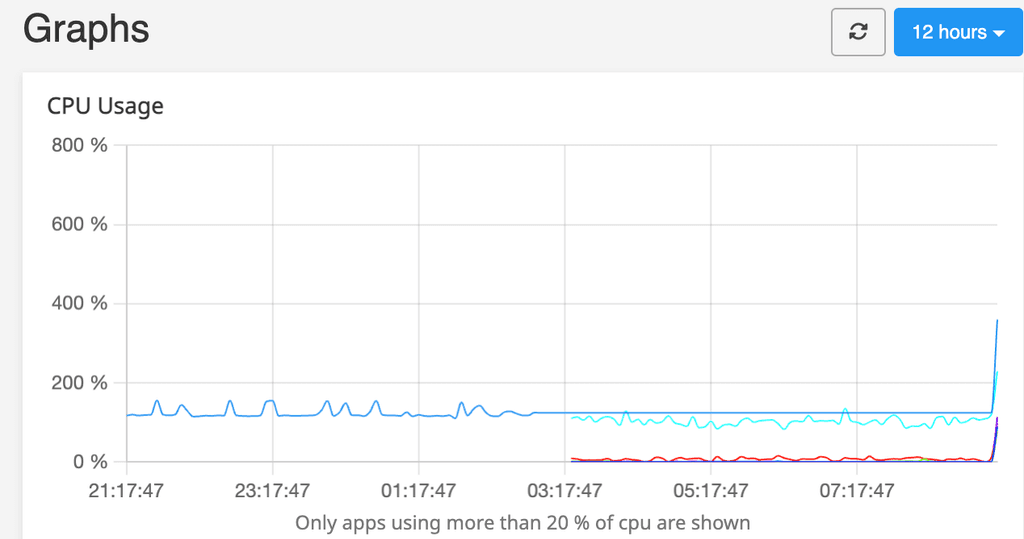
My first suspicion was the backup, but that is created every Monday at 11pm, so no change to be responsible in that case.
I then looked through the journal logs and these are the last entries in the log. The next ones only after the reboot.
Dec 05 02:04:24 hostname syslog.js[867]: <30>1 2024-12-05T02:04:24Z hostname 9f58c89e-f08c-429a-8092-2cf7d2b6fe75 1060 9f58c89e-f08c-429a-8092-2cf7d2b6fe75 - [2024-12-05 02:04:24,547] [WARNING] [celery.redirected]
Dec 05 02:04:24 hostname syslog.js[867]: <30>1 2024-12-05T02:04:24Z hostname 9f58c89e-f08c-429a-8092-2cf7d2b6fe75 1060 9f58c89e-f08c-429a-8092-2cf7d2b6fe75 - [2024-12-05 02:04:24,547] [WARNING] [celery.redirected] self.dict[key.encode(self.keyencoding)] = f.getvalue()
Dec 05 02:04:24 hostname syslog.js[867]: <30>1 2024-12-05T02:04:24Z hostname 9f58c89e-f08c-429a-8092-2cf7d2b6fe75 1060 9f58c89e-f08c-429a-8092-2cf7d2b6fe75 - [2024-12-05 02:04:24,547] [WARNING] [celery.redirected] _dbm
Dec 05 02:04:24 hostname syslog.js[867]: <30>1 2024-12-05T02:04:24Z hostname 9f58c89e-f08c-429a-8092-2cf7d2b6fe75 1060 9f58c89e-f08c-429a-8092-2cf7d2b6fe75 - [2024-12-05 02:04:24,547] [WARNING] [celery.redirected] .
Dec 05 02:04:24 hostname syslog.js[867]: <30>1 2024-12-05T02:04:24Z hostname 9f58c89e-f08c-429a-8092-2cf7d2b6fe75 1060 9f58c89e-f08c-429a-8092-2cf7d2b6fe75 - [2024-12-05 02:04:24,547] [WARNING] [celery.redirected] error
Dec 05 02:04:24 hostname syslog.js[867]: <30>1 2024-12-05T02:04:24Z hostname 9f58c89e-f08c-429a-8092-2cf7d2b6fe75 1060 9f58c89e-f08c-429a-8092-2cf7d2b6fe75 - [2024-12-05 02:04:24,548] [WARNING] [celery.redirected] :
Dec 05 02:04:24 hostname syslog.js[867]: <30>1 2024-12-05T02:04:24Z hostname 9f58c89e-f08c-429a-8092-2cf7d2b6fe75 1060 9f58c89e-f08c-429a-8092-2cf7d2b6fe75 - [2024-12-05 02:04:24,548] [WARNING] [celery.redirected] cannot add item to database
Dec 05 02:04:24 hostname syslog.js[867]: 2024-12-05T02:04:24.966Z syslog:server Unable to parse: <30>1 2024-12-05T02:04:24Z hostname 9f58c89e-f08c-429a-8092-2cf7d2b6fe75 1060 9f58c89e-f08c-429a-8092-2cf7d2b6fe75 - celery beat v5.4.0 (opalescent) is starting.
Dec 05 02:04:24 hostname syslog.js[867]: <30>1 2024-12-05T02:04:24Z hostname 9f58c89e-f08c-429a-8092-2cf7d2b6fe75 1060 9f58c89e-f08c-429a-8092-2cf7d2b6fe75 - __    -    ... __   -        _
Dec 05 02:04:24 hostname syslog.js[867]: <30>1 2024-12-05T02:04:24Z hostname 9f58c89e-f08c-429a-8092-2cf7d2b6fe75 1060 9f58c89e-f08c-429a-8092-2cf7d2b6fe75 - LocalTime -> 2024-12-05 02:04:24
Dec 05 02:04:24 hostname syslog.js[867]: <30>1 2024-12-05T02:04:24Z hostname 9f58c89e-f08c-429a-8092-2cf7d2b6fe75 1060 9f58c89e-f08c-429a-8092-2cf7d2b6fe75 - Configuration ->
Dec 05 02:04:24 hostname syslog.js[867]: <30>1 2024-12-05T02:04:24Z hostname 9f58c89e-f08c-429a-8092-2cf7d2b6fe75 1060 9f58c89e-f08c-429a-8092-2cf7d2b6fe75 -     . broker -> redis://redis-9f58c89e-f08c-429a-8092-2cf7d2b6fe75:6379//
Dec 05 02:04:24 hostname syslog.js[867]: <30>1 2024-12-05T02:04:24Z hostname 9f58c89e-f08c-429a-8092-2cf7d2b6fe75 1060 9f58c89e-f08c-429a-8092-2cf7d2b6fe75 -     . loader -> celery.loaders.app.AppLoader
Dec 05 02:04:24 hostname syslog.js[867]: <30>1 2024-12-05T02:04:24Z hostname 9f58c89e-f08c-429a-8092-2cf7d2b6fe75 1060 9f58c89e-f08c-429a-8092-2cf7d2b6fe75 -     . scheduler -> celery.beat.PersistentScheduler
Dec 05 02:04:24 hostname syslog.js[867]: <30>1 2024-12-05T02:04:24Z hostname 9f58c89e-f08c-429a-8092-2cf7d2b6fe75 1060 9f58c89e-f08c-429a-8092-2cf7d2b6fe75 -     . db -> /app/data/data/celerybeat-schedule.db
Dec 05 02:04:24 hostname syslog.js[867]: <30>1 2024-12-05T02:04:24Z hostname 9f58c89e-f08c-429a-8092-2cf7d2b6fe75 1060 9f58c89e-f08c-429a-8092-2cf7d2b6fe75 -     . logfile -> [stderr]@%INFO
Dec 05 02:04:24 hostname syslog.js[867]: <30>1 2024-12-05T02:04:24Z hostname 9f58c89e-f08c-429a-8092-2cf7d2b6fe75 1060 9f58c89e-f08c-429a-8092-2cf7d2b6fe75 -     . maxinterval -> 5.00 minutes (300s)
Dec 05 02:04:25 hostname syslog.js[867]: 2024-12-05T02:04:25.502Z syslog:server Unable to parse: <30>1 2024-12-05T02:04:25Z hostname 9f58c89e-f08c-429a-8092-2cf7d2b6fe75 1060 9f58c89e-f08c-429a-8092-2cf7d2b6fe75 - 2024-12-05 02:04:25,500 INFO exited: paperless-scheduler.service (exit status 1; not expected)
Dec 05 02:04:26 hostname syslog.js[867]: 2024-12-05T02:04:26.510Z syslog:server Unable to parse: <30>1 2024-12-05T02:04:26Z hostname 9f58c89e-f08c-429a-8092-2cf7d2b6fe75 1060 9f58c89e-f08c-429a-8092-2cf7d2b6fe75 - 2024-12-05 02:04:26,508 INFO spawned: 'paperless-scheduler.service' with pid 3032591
Dec 05 02:04:27 hostname syslog.js[867]: 2024-12-05T02:04:27.512Z syslog:server Unable to parse: <30>1 2024-12-05T02:04:27Z hostname 9f58c89e-f08c-429a-8092-2cf7d2b6fe75 1060 9f58c89e-f08c-429a-8092-2cf7d2b6fe75 - 2024-12-05 02:04:27,511 INFO success: paperless-scheduler.service entered RUNNING state, process has stayed up for > than 1 seconds (startsecs)
I'm at a bit of a loss: The server is otherwise running without any problems.
Where else can I troubleshoot?
Thank you!
Thx for your work!
Unfortunately, I get an error: Access Denied 
App update error: Installation failed: Unable to pull image brutalbirdie/foundryvtt.cloudron.app/tags/1.1.0. message: (HTTP code 404) unexpected - pull access denied for brutalbirdie/foundryvtt.cloudron.app/tags/1.1.0, repository does not exist or may require 'docker login': denied: requested access to the resource is denied statusCode: 404
The dashboard has recently become inaccessible, but all apps (e. g. NodeBB) works without problems.

Several reboots, no changes in the behaviour
2025-12-01T08:45:37.296Z box:server ==========================================
2025-12-01T08:45:37.296Z box:server            Cloudron 8.3.2
2025-12-01T08:45:37.296Z box:server ==========================================
2025-12-01T08:45:37.296Z box:platform initialize: start platform
2025-12-01T08:45:37.329Z box:tasks stopAllTasks: stopping all tasks
2025-12-01T08:45:37.332Z box:shell tasks /usr/bin/sudo -S /home/yellowtent/box/src/scripts/stoptask.sh all
2025-12-01T08:45:37.396Z box:shell All tasks stopped

2025-12-01T08:45:37.409Z Error: Error starting server: {"name":"BoxError","reason":"Database Error","details":{},"message":"connect ECONNREFUSED 127.0.0.1:3306","nestedError":{"errno":-111,"code":"ECONNREFUSED","syscall":"connect","address":"127.0.0.1","port":3306,"fatal":true},"code":"ECONNREFUSED","sqlMessage":null}
2025-12-01T08:45:37.409Z     at main (/home/yellowtent/box/box.js:58:41)
2025-12-01T08:45:37.409Z     at process.processTicksAndRejections (node:internal/process/task_queues:95:5)
Output from systemctl status mysql.service:
root@server:~# systemctl status mysql.service
× mysql.service - MySQL Community Server
     Loaded: loaded (/lib/systemd/system/mysql.service; enabled; vendor preset: enabled)
     Active: failed (Result: exit-code) since Mon 2025-12-01 08:48:56 UTC; 2min 57s ago
    Process: 14245 ExecStartPre=/usr/share/mysql/mysql-systemd-start pre (code=exited, status=0/SUCCESS)
    Process: 14253 ExecStart=/usr/sbin/mysqld (code=exited, status=2)
   Main PID: 14253 (code=exited, status=2)
     Status: "Server startup in progress"
        CPU: 876ms

Dez 01 08:48:56 v220230337933223533 systemd[1]: Failed to start MySQL Community Server.
Dez 01 08:48:56 v220230337933223533 systemd[1]: mysql.service: Scheduled restart job, restart counter is at 5.
Dez 01 08:48:56 v220230337933223533 systemd[1]: Stopped MySQL Community Server.
Dez 01 08:48:56 v220230337933223533 systemd[1]: mysql.service: Start request repeated too quickly.
Dez 01 08:48:56 v220230337933223533 systemd[1]: mysql.service: Failed with result 'exit-code'.
Dez 01 08:48:56 v220230337933223533 systemd[1]: Failed to start MySQL Community Server.
Reboot done, same again
Cloudron 8.3.2
No LSB modules are available.
Distributor ID:	Ubuntu
Description:	Ubuntu 22.04.2 LTS
Release:	22.04
Codename:	jammy
./cloudron-setupcloudron-support --troubleshootVendor: netcup Product: KVM Server
Linux: 5.15.0-161-generic
Ubuntu: jammy 22.04
Processor: QEMU Virtual CPU version 2.5+ x 2
RAM: 2010712KB
Disk: /dev/vda3 19G
[OK] node version is correct
[OK] IPv6 is enabled and public IPv6 address is working
[OK] docker is running
[OK] docker version is correct
MySQL is down. Trying to restart MySQL ...
Job for mysql.service failed because the control process exited with error code.
See "systemctl status mysql.service" and "journalctl -xeu mysql.service" for details.
Thank you for any hints!