Cloudron makes it easy to run web apps like WordPress, Nextcloud, GitLab on your server. Find out more or install now.


Skip to content

Grist

8 Topics 50 Posts
  • Grist - Package Updates

    Pinned Locked
    17
    0 Votes
    17 Posts
    2k Views
    Package UpdatesP
    [1.2.5] Update grist-core to 1.7.17 Full Changelog Row numbers, row IDs, or neither. A new "Row numbers" setting on grid widgets, in Grid Options and in a menu at the grid's top-left corner. Choose Numbers (position in the current sort, as before), Row IDs (bracketed like [15], matching how references render), or Hidden, which collapses the left-hand gutter. Addresses #220, open since 2022, and #1927. (#2448) Setup checklist for notifications and automations. Notifications, automations, invite emails, and the AI assistant each need plumbing behind them (an email backend, a Redis queue, an AI provider, the full edition), and when a prerequisite is missing the feature simply isn't there. Document Settings now lists what's ready and what each unfinished feature is waiting on. Users can press "Ask the admin" to request a step; admins see the requests in a new Admin Panel item. (commit) Switch to the full edition from the Admin Panel. Previously this meant changing Docker image. Now it's a button, in the Admin Panel or the first step of Quick Setup: the server downloads the extensions matching its own version, checks their SHA-256, and restarts in place. Offered on release builds only, not on main, nightlies, or dev checkouts. GRIST_EXT_FULL_EDITION_BASE_URL points it at a mirror, or turns it off for air-gapped installs. (#2450) "Help us improve" in Quick Setup. First-time setup now ends with an optional card: how you heard about Grist, what kind of user you are, and a switch subscribing an email address to product and security updates. It appears during setup only, and if you leave it blank nothing is sent at all. What you fill in goes to Grist Labs, along with your installation ID. (commit) Temporary row IDs are now translated inside RefList values, not just Ref values and row-ID positions. Rows that reference each other through RefList columns can be created in one bundle (#2477) "View as" is preserved for attachment previews and whole-document exports, which previously resolved as the document owner (#2478) An Airtable reference column holding a single value imported as unusable text rather than a working reference, leaving the raw Airtable ID behind as alt text (#2446) Airtable count columns no longer error when the column they count was imported as a Ref rather than a RefList (#2447) The server could crash when a client disconnected part-way through a proxied request (commit) The "reachable" self-check reported a false failure whenever anonymous access was disabled (#2420)
  • 1 Votes
    5 Posts
    23 Views
    C
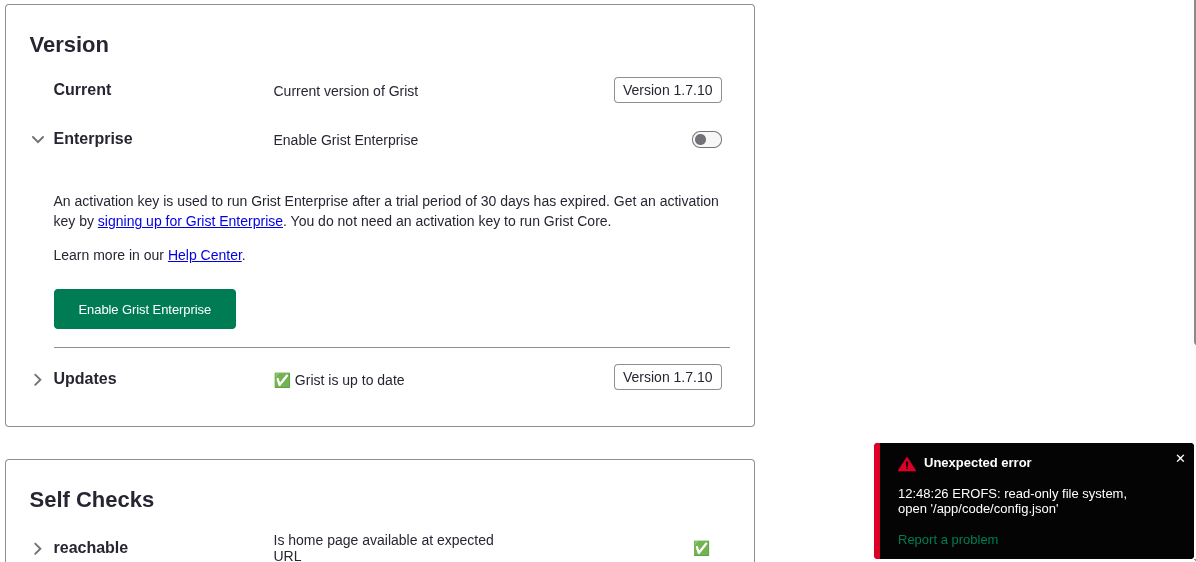
    Hi @james, You're right on both points. On the installationId — that was specific to my migration case, not relevant to the core bug. Scratch that. On forcing Full Edition by default — agreed, that's the user's call. One thing I want to add: I tested the same approaches as you did in post #15 (GRIST_EDITION=full, yarn run set-full-edition, the admin UI toggle) — none of them worked. The variable introduced in PR #2450 is actually GRIST_SERVER_EDITION=full, which is a different variable from GRIST_EDITION. It controls deploymentType at runtime via a separate code path. GRIST_EDITION=full had no effect on my side either. For anyone hitting this on Cloudron today, the workaround to test would be: Request a free activation key at getgrist.com (free for orgs under $1M revenue) In the Cloudron app config, add these env vars: GRIST_SERVER_EDITION=full GRIST_ACTIVATION=<your-key> Restart the app I haven't been able to test this on the Cloudron package itself — I had already migrated to the official gristlabs/grist image when I found GRIST_SERVER_EDITION, so my validation is on that image, not on Cloudron. If someone still on the Cloudron package could test adding GRIST_SERVER_EDITION=full to env.sh, that would confirm whether it's the fix. The Switch to Full Grist button in the admin UI likely sets GRIST_EDITION instead of GRIST_SERVER_EDITION, which would explain why it doesn't work. Chris
  • Allow email?

    11
    1
    2 Votes
    11 Posts
    664 Views
    jamesJ
    Tracking this issue in this topic with a maintainer of Grist https://forum.cloudron.io/post/126499 Current solution, restore to Cloudron app version 1.2.3 which packages Grist version 1.7.15. This version does not have the issue.
  • Is Grist worth the effort?

    2
    2 Votes
    2 Posts
    249 Views
    jamesJ
    Hello @umnz For context please read https://forum.cloudron.io/topic/14969/enabling-grist-enterprise-does-not-work and https://forum.cloudron.io/topic/14941/grist-is-now-available
  • Installation ID?

    2
    1 Votes
    2 Posts
    226 Views
    jamesJ
    Hello @superhua Currently, the @grist app for Cloudron does not come with the enterprise option. We will need to look into that again, see https://forum.cloudron.io/post/124882
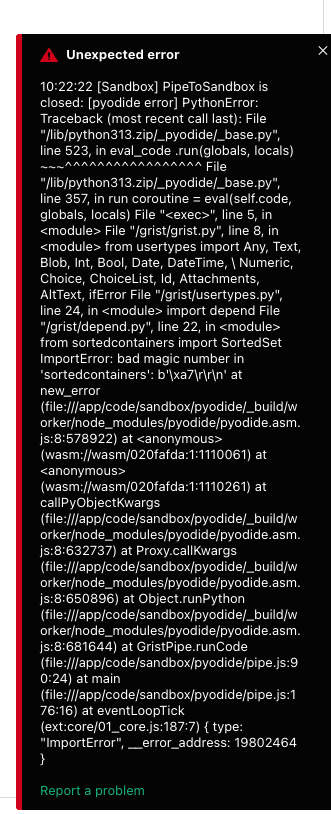
  • pyodide error - can't use it

    3
    3
    1 Votes
    3 Posts
    287 Views
    nebulonN
    Fix landed in the latest package now.
  • Public Forms redirect to OIDC due to hardcoded GRIST_FORCE_LOGIN

    3
    4 Votes
    3 Posts
    324 Views
    nebulonN
    The new package allows to override that variable now in the env.sh file.
  • Enabling Grist Enterprise does not work

    Solved
    7
    1
    1 Votes
    7 Posts
    1k Views
    nebulonN
    So just to update this here, we have to roll back the enterprise edition, since apparently this requires access to a now private git repo to build the app https://github.com/gristlabs/grist-ee -> 404