
AI on Cloudron
-
Llama 3.1 405b released. Try here: https://www.meta.ai
-
-
-

-
Step Games - an prisoner's dilemma for Large Language Models. The emergent text section is quite interesting:
https://github.com/lechmazur/step_game -
A Fast And Easy Way To Run DeepSeek SECURELY-Locally On YOUR Computer.
The amazing open source developer, Surya Dantuluri (@sdan) has made a full DeepSeek R1 (distilled on Qwen) in a web browser! It is local and does not “call home” (as if that was possible).
This IS NOT the full large version of DeepSeek but it does allow you to test it out.
To run the DeepSeek R1-web browser project from GitHub (https://github.com/sdan/r1-web) on your computer or phone, follow these detailed steps. This guide assumes no prior technical knowledge and will walk you through the process step by step.
Understanding the Project
The r1-web project is a web application that utilizes advanced machine learning models entirely on the client side, leveraging modern browser technologies like WebGPU. Running this project involves setting up a local development environment, installing necessary software, and serving the application locally.~ As a regular install below, this looks like it would work well in our LAMP app -- @robi
Prerequisites
Before you begin, ensure you have the following:
• A Computer: A Windows, macOS, or Linux system.
• Internet Connection: To download necessary software and project files.
• Basic Computer Skills: Ability to install software and navigate your operating system.
Step 1: Install Node.js
Node.js is a JavaScript runtime that allows you to run JavaScript code outside of a web browser.- Download Node.js:
• Visit the official Node.js website: https://nodejs.org/
• Click on the “LTS” (Long Term Support) version suitable for your operating system (Windows, macOS, or Linux). - Install Node.js:
• Open the downloaded installer file.
• Follow the on-screen instructions to complete the installation.
• During installation, ensure the option to install npm (Node Package Manager) is selected.
Step 2: Verify Installation
After installation, confirm that Node.js and npm are installed correctly. - Open Command Prompt or Terminal:
• On Windows: Press the Windows key, type cmd, and press Enter.
• On macOS/Linux: Open the Terminal application. - Check Node.js Version:
• Type node -v and press Enter.
• You should see a version number (e.g., v18.18.0 or higher). - Check npm Version:
• Type npm -v and press Enter.
• A version number should be displayed, indicating npm is installed.
Step 3: Download the r1-web Project
Next, you’ll download the project files from GitHub. - Visit the GitHub Repository:
• Go to https://github.com/sdan/r1-web - Download the Project:
• Click on the green “Code” button.
• Select “Download ZIP” from the dropdown menu.
• Save the ZIP file to a convenient location on your computer. - Extract the ZIP File:
• Navigate to the downloaded ZIP file.
• Right-click and select “Extract All” (Windows) or double-click to extract (macOS).
• This will create a folder named r1-web-master or similar.
Step 4: Install Project Dependencies
Now, you’ll install the necessary packages required to run the project. - Open Command Prompt or Terminal:
• Navigate to the extracted project folder.
• For example, if the folder is on your Desktop:
• Type cd Desktop/r1-web-master and press Enter. - Install Dependencies:
• Type npm install and press Enter.
• This command downloads and installs all necessary packages.
• Wait for the process to complete; it may take a few minutes.
Step 5: Run the Application
With everything set up, you can now run the application. - Start the Development Server:
• In the same Command Prompt or Terminal window, type npm run dev and press Enter.
• The application will compile and start a local development server. - Access the Application:
• Open your web browser (e.g., Chrome, Firefox).
• Navigate to http://localhost:3000.
• You should see the r1-web application running.
Running on a Mobile Device
Running the r1-web project directly on a mobile device is more complex and typically not recommended for beginners. However, you can access the application from your mobile device by ensuring both your computer and mobile device are connected to the same Wi-Fi network. - Find Your Computer’s IP Address:
• On Windows:
• Open Command Prompt and type ipconfig.
• Look for the “IPv4 Address” under your active network connection.
• On macOS:
• Open Terminal and type ifconfig | grep inet.
• Find the IP address associated with your active network. - Access from Mobile Device:
• On your mobile device’s browser, enter http://<your-computer-ip>:3000.
• Replace <your-computer-ip> with the IP address you found earlier.
• For example, http://192.168.1.5:3000.
• You should see the application running on your mobile device.
- Download Node.js:
-
Definitely more useful to run on a private VPS or on a Cloudron instance than locally, presumably behind Basic Auth or Cloudron’s login add on.
-
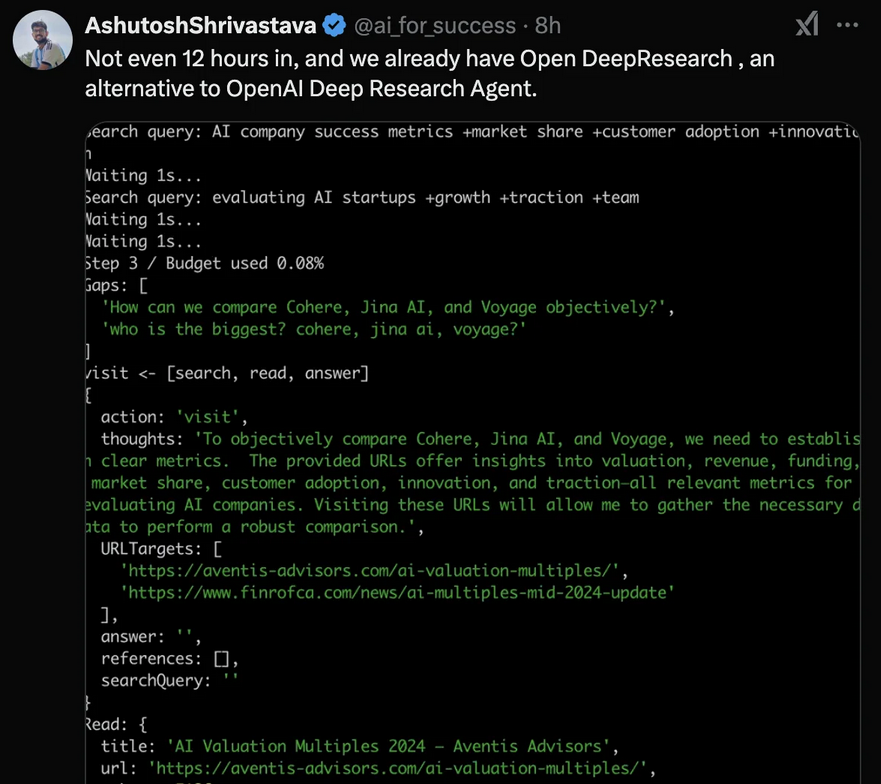
OpenAI are now offering an agent run on o3. It is available on the web platform for ChatGPT. It is called Deep Research, goes out onto the web and comes back to you with a research report.
Here is a quick research report it made on Cloudron:
Below is a detailed analysis of Cloudron’s current strengths and weaknesses, along with some forward‐looking ideas—especially in light of rapid developments in artificial intelligence, container packaging, and self‑hosting technologies.
Strengths
Turnkey Self‑Hosting Experience
Cloudron’s primary appeal lies in its “all-in‑one” approach. It automates many traditionally manual system administration tasks: installing web applications via Docker containers; automatically configuring DNS, SSL certificates (with Let’s Encrypt), and a built‑in mail server; and offering centralized user management and backup/restore functionality. This makes it accessible even to users with limited DevOps experience .Consistent Application Management and Updates
The platform’s design allows users to deploy, update, and roll back applications easily via manifest files and an App Store–like interface. Its packaging framework—built around Dockerfiles and a standardized CloudronManifest.json—ensures that apps run with a consistent configuration and security posture. The packaging tutorial and CLI tools simplify this process further .Ease of Maintenance and Stability
Users and forum discussions consistently note that once Cloudron is set up, ongoing maintenance is minimal. Automated updates for both the underlying system and installed apps mean that even non‑expert users can keep their self‑hosted services secure over the long term .
Weaknesses
Performance and Resource Constraints
Some reviews and user experiences have noted that, out of the box, Cloudron’s performance (for instance, when running specific applications like WordPress) may be less than optimal compared with some alternatives. This can be partly due to its generic configuration aimed at wide compatibility rather than fine‑tuned performance for every single use case.Limited App Catalog and Customization Challenges
While Cloudron offers over 120 supported apps, the selection can be more limited than what you might find with solutions like Softaculous—which boasts thousands of options. In addition, packaging custom or emerging applications (for example, resource‑intensive AI services) may require more advanced tweaks than the typical “point‑and‑click” installation experience.Pricing Model for Small Users
Although the platform automates many tasks, its premium tiers (starting around USD 30/month for unlimited apps and a built‑in mail server) may seem steep for hobbyists or very small operations, especially when compared to free or lower‑cost alternatives for simple self‑hosting.
Ways Forward: Capitalizing on Technological Advancements
Leveraging AI for Automated Packaging and Configuration
There is a growing trend where tools like ChatGPT are being used to generate configuration files and Docker manifests. Cloudron could integrate AI–driven assistants that automatically generate or optimize CloudronManifest.json files and Dockerfiles for new applications. Such tools would further reduce the barrier to entry for packaging custom apps, as discussed in forum threads on using AI for packaging Cloudron apps .Integrating Self‑Hosted AI Modules
Recent community experiments (for example, ChatPad and other AI chat interfaces) show that self‑hosted AI is rapidly maturing . As AI models become more lightweight and efficient, Cloudron could consider offering native support or streamlined packaging for AI applications such as local LLM interfaces or even AI‑powered monitoring tools. Such features could help users automate troubleshooting or optimize resource allocation in real time.Enhanced Automation and Predictive Maintenance
Advancements in monitoring and anomaly detection powered by AI could be incorporated into Cloudron’s management dashboard. Predictive maintenance—where the system learns typical usage patterns and warns of impending issues before they occur—could further reduce the need for manual intervention and make long‑term operation even smoother.Expanding Ecosystem and Integration with Modern Container Runtimes
As container orchestration evolves (for instance, with improvements in lightweight runtimes like Podman or advanced Kubernetes integrations), Cloudron might consider adopting a more modular architecture. This would not only boost performance for specific high‑demand apps (like AI services that might require GPU support) but also broaden the range of deployable applications beyond the current Docker‑centric model.Community and Developer Incentives
Finally, to expand the app catalog and encourage third‑party contributions, Cloudron might develop further incentives for developers. This could include enhanced developer tools, streamlined submission processes (possibly assisted by AI), and more flexible pricing tiers aimed at non‑commercial or hobbyist users.
Conclusion
Cloudron currently shines as a user‑friendly platform that abstracts away much of the complexity of self‑hosting. Its strengths in automation, security, and ease of maintenance make it ideal for users who want a “set it and forget it” solution. However, performance limitations, a relatively narrow app catalog compared to other installers, and a pricing model that may not suit everyone are challenges that need addressing.
By embracing advancements in AI for smarter packaging and predictive maintenance, integrating support for emerging self‑hosted AI applications, and evolving its container management approach, Cloudron can continue to be a leader in the self‑hosting space. These improvements would not only enhance the user experience but also extend the platform’s appeal to a broader range of users—from individual enthusiasts to enterprise teams.
This comprehensive evolution would help Cloudron remain competitive in a fast‑changing technological landscape where AI and automation are increasingly central to every aspect of software deployment and management.
-
-
-
@LoudLemur are these on Alibaba?
-
@LoudLemur are these on Alibaba?
-
MCP (Model Context Protocol)
https://modelcontextprotocol.io/introductionAccording to the CEO of Anthropic, this is what is going to be writing 90% of code in 6 months, and almost all of it by the end of the year.
You can see some uses here:
https://github.com/punkpeye/awesome-mcp-serversThe brilliant "Fireship" has a fast introduction to MCP:
https://odysee.com/@fireship:6/i-gave-claude-root-access-to-my:bIt would require somebody with something like @robi or @Kubernetes skill levels to be able to use it or make worth of it on Cloudron.
-
Aww, thanks @LoudLemur
Actually it's already part of the update for OpenWebUI which can use it.
There are also many MCP directory websites out there who are keeping lists of many as well as some better ones who are letting you run them remotely. One such is Smithery.ai
-
Aww, thanks @LoudLemur
Actually it's already part of the update for OpenWebUI which can use it.
There are also many MCP directory websites out there who are keeping lists of many as well as some better ones who are letting you run them remotely. One such is Smithery.ai
-
@jdaviescoates Thanks again for the correction.
-
MCP (Model Context Protocol)
https://modelcontextprotocol.io/introductionAccording to the CEO of Anthropic, this is what is going to be writing 90% of code in 6 months, and almost all of it by the end of the year.
You can see some uses here:
https://github.com/punkpeye/awesome-mcp-serversThe brilliant "Fireship" has a fast introduction to MCP:
https://odysee.com/@fireship:6/i-gave-claude-root-access-to-my:bIt would require somebody with something like @robi or @Kubernetes skill levels to be able to use it or make worth of it on Cloudron.
@LoudLemur said in AI on Cloudron:
MCP (Model Context Protocol)
https://modelcontextprotocol.io/introductionAccording to the CEO of Anthropic, this is what is going to be writing 90% of code in 6 months, and almost all of it by the end of the year.
MCP has been adopted by OpenAI and will hence be the de-facto standard https://techcrunch.com/2025/03/26/openai-adopts-rival-anthropics-standard-for-connecting-ai-models-to-data/
In a post on X on Wednesday, OpenAI CEO Sam Altman said that OpenAI will add support for Anthropic’s Model Context Protocol, or MCP, across its products, including the desktop app for ChatGPT. MCP is an open source standard that helps AI models produce better, more relevant responses to certain queries.
-
It would be great to have additional MCP support in OWUI.
@girish or @nebulon can you take a look?It requires a few things added to the package it seems.
https://github.com/open-webui/openapi-servers
Also, the import functions feature seems to be broken, although one can use the +
Add function manually and copy/paste the code from https://openwebui.com/functions -
For those that want to experience how simple it is to build an agent and imagine implementing it on Cloudron.. read on: https://github.com/voxmenthe/coding-agent/blob/main/tutorial.md
-
RAG with documents in a Docker
https://github.com/SciPhi-AI/R2R




Hello! It looks like you're interested in this conversation, but you don't have an account yet.
Getting fed up of having to scroll through the same posts each visit? When you register for an account, you'll always come back to exactly where you were before, and choose to be notified of new replies (either via email, or push notification). You'll also be able to save bookmarks and upvote posts to show your appreciation to other community members.
With your input, this post could be even better 💗
Register Login