
Switched DNS to Cloudflare. Can't access anything.
-
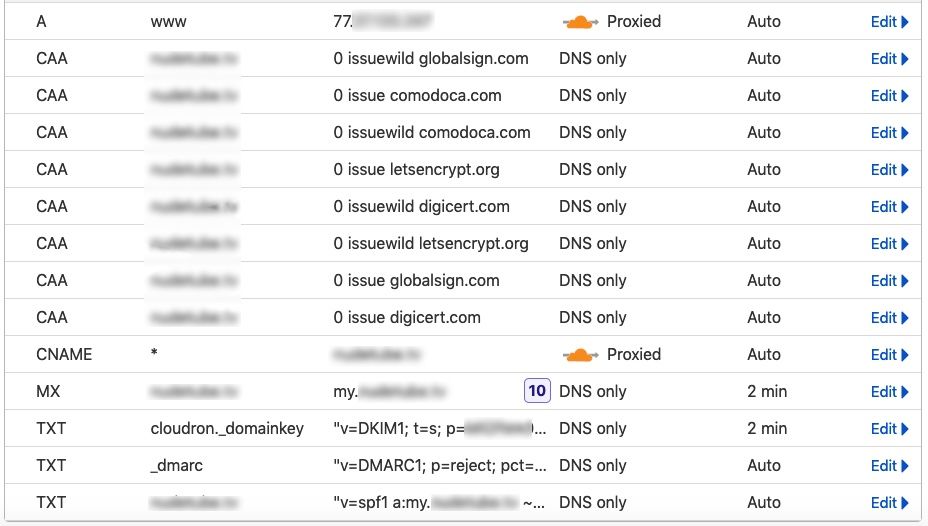
I was having a problem with every browser saying my Let's Encrypt certificate through Cloudron was untrusted. Obviously, the site not loading would kill any chance of launching it to the public. I switched to Cloudflare and edited the domain entry in Cloudron and changed it to Cloudflare and added the token. But now I can't access Cloudron or anything else. I am confused about what my DNS table is suppose to look like. When I try to access my.foo.example, I get a Cloudflare 1016 error (origin). When I try to access the public site with or without the www, it just doesn't load. When I check the domain with or without www on dnschecker.org, the CNAME doesn't work in any country. The A record without www is only loading in Brazil. The A record with www works in every country. When I try to load the site without www in Firefox on Android, I get a Cloudflare page giving a 522 error code (connection timed out) with host error. The server is in France. I currently have the SSL setting on Strict with self-hosted since I had not installed the Cloudflare origin certificate on the server. There could be an issue with the Proxied entries but I can't access Cloudron. I have included a screenshot of my DNS table in Cloudflare. The problem seems to lie in the table entries:
-
@dreamingofadmin I think first step is to get access to your dashboard.
- In Cloudflare, do you have an entry for my.domain.com to your server IP (DNS A record) ? If not, add this manually.
- Wait a bit.
- Access https://my.domain.com . If it's asking to accept self signed certs, accept them.
- Once in dashboard, Domains -> Sync DNS . This will add all the DNS entries.
- Then, Domains -> Renew all certs.
Please let us know what is failing and where.
-
 G girish marked this topic as a question on
-
 J james has marked this topic as solved on
Hello! It looks like you're interested in this conversation, but you don't have an account yet.
Getting fed up of having to scroll through the same posts each visit? When you register for an account, you'll always come back to exactly where you were before, and choose to be notified of new replies (either via email, or push notification). You'll also be able to save bookmarks and upvote posts to show your appreciation to other community members.
With your input, this post could be even better 💗
Register Login