
Cloudron makes it easy to run web apps like WordPress, Nextcloud, GitLab on your server. Find out more or install now.


Skip to content
  • Categories
  • Recent
  • Tags
  • Popular
  • Bookmarks
  • Search
Skins
  • Light
  • Brite
  • Cerulean
  • Cosmo
  • Flatly
  • Journal
  • Litera
  • Lumen
  • Lux
  • Materia
  • Minty
  • Morph
  • Pulse
  • Sandstone
  • Simplex
  • Sketchy
  • Spacelab
  • United
  • Yeti
  • Zephyr
  • Dark
  • Cyborg
  • Darkly
  • Quartz
  • Slate
  • Solar
  • Superhero
  • Vapor

  • Default (No Skin)
  • No Skin
Collapse
Brand Logo

Cloudron Forum

Apps - Status | Demo | Docs | Install
  1. Cloudron Forum
  2. Discuss
  3. Cloudron 9.0 (beta) bug reports

Cloudron 9.0 (beta) bug reports

Scheduled Pinned Locked Moved Discuss
205 Posts 32 Posters 16.0k Views 26 Watching
  • Oldest to Newest
  • Newest to Oldest
  • Most Votes
Reply
  • Reply as topic
Log in to reply
This topic has been deleted. Only users with topic management privileges can see it.
  • firmansiF firmansi

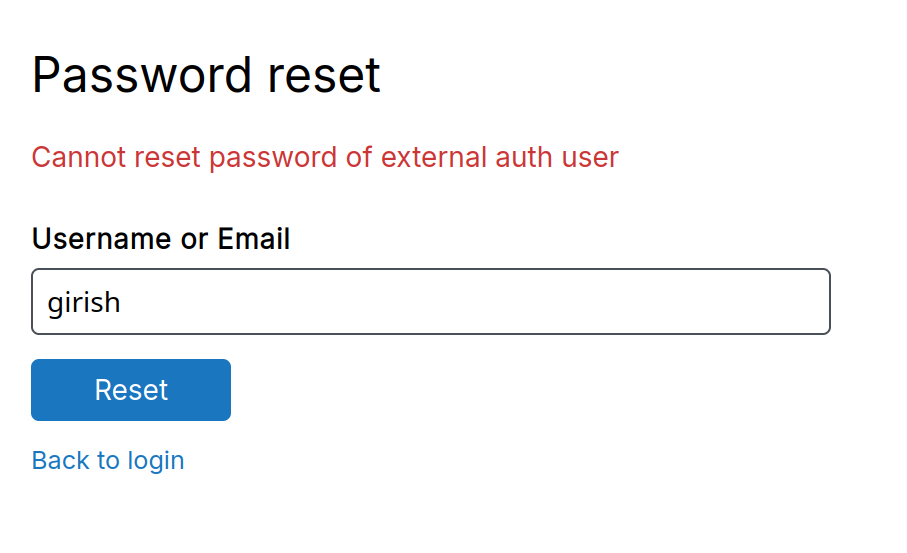
    @jdaviescoates thanks for the citation, yes i refer to that. So, I’ve already upgraded to the latest Cloudron version, 9.07. Now, Cloudron A pulls its user data from Cloudron B via LDAP. I tested the password reset function on Cloudron A by clicking “Reset Password.” After clicking, the password reset window did open as expected. However, after entering the email and clicking the reset button, I never received the password reset email—even though the interface displayed a success message stating that the email had been sent.

    Previously, in Cloudron version 8, when I clicked the “Reset Password” button for a user authenticated via LDAP, the system correctly responded with an error message indicating that the user’s authentication source is external (e.g., “The authentication provider for this user is not managed by this Cloudron instance”). Now, in version 9.07, that check seems to be missing or bypassed—instead of rejecting the request early, it proceeds and falsely reports success, even though no email is actually sent.

    girishG Offline
    girishG Offline
    girish
    Staff
    wrote on last edited by
    #124

    @firmansi I have fixed this now in https://git.cloudron.io/platform/box/-/commit/29e2be47d0da86e77105db47d6c73b601c0fc472 . I think what you meant is below correct?
    69136ab5-6aac-4ff9-a368-0d22c7ee3eec-image.png

    firmansiF 1 Reply Last reply
    0
    • T Teiluj

      Possibly a bug - Maybe more of a specification/documentation situation.

      I updated one of our servers from v8.3.2 to v9.0.7 yesterday. The overnight S3 backup to a local device failed with the following error:

      Backup endpoint is not active: Error listing objects. code: undefined message: self-signed certificate HTTP: undefined

      Up until now, the server was configured to backup to a s3-v4 compatible storage location using https and allowing self signed certificate.

      While troubleshooting, changing the s3 endpoint from https to http and updating the cloudron config accordingly resolved the issue and allowed for backup to proceed.
      To note:

      • the (local) address and port of the S3 endpoint have not changed
      • I regenerated the self signed certificate and made another attempt but got no luck here either.

      I am not clear whether https id part of the s3 specifications or not. However, https with S3 worked fine with 8.3.2 so it is:

      • either a bug in v9.0.7
      • or a change / normalization within cloudron for which a more meaningful error message (or form validation) and/or documentation would be helpful.

      Hopefully this helps.

      girishG Offline
      girishG Offline
      girish
      Staff
      wrote on last edited by
      #125

      @Neiluj that looks like a bug. Shouldn't have to use http. https + self-signed is more secure. Maybe something broke when switching over the S3 module. We will try to reproduce it.

      1 Reply Last reply
      0
      • girishG girish

        @firmansi I have fixed this now in https://git.cloudron.io/platform/box/-/commit/29e2be47d0da86e77105db47d6c73b601c0fc472 . I think what you meant is below correct?

        69136ab5-6aac-4ff9-a368-0d22c7ee3eec-image.png

        firmansiF Offline
        firmansiF Offline
        firmansi
        wrote on last edited by
        #126

        @girish awesome, i believe this will be included in next update.

        1 Reply Last reply
        0
        • nebulonN nebulon

          ah thanks for the clarification. We haven't looked into this yet. Given that LDAP has no such built-in feature, we probably need some extra API to trigger a password reset on the directory provider (which will of course then only work if it is also a Cloudron). For that case though I think the better approach would be to somehow make that work with OpenID instead of LDAP, but no code has been written for that either.

          firmansiF Offline
          firmansiF Offline
          firmansi
          wrote on last edited by firmansi
          #127

          @nebulon I’ve actually suggested this before: what if cloudron team added a field so that Cloudron admins like me could include a link or instructions for users on how to reset their LDAP password at the location where their user data is stored? I assume not everyone using Cloudron uses Cloudron itself as their LDAP server—some may use a separate external LDAP server. While adding an extra API to trigger password changes or resets on the external LDAP server is indeed a good idea, it might take some time to implement. So, I was just thinking of a more practical, immediate solution: letting each admin using Cloudron take responsibility for providing their own reset link or instructions.

          1 Reply Last reply
          0
          • T Teiluj

            Possibly a bug - Maybe more of a specification/documentation situation.

            I updated one of our servers from v8.3.2 to v9.0.7 yesterday. The overnight S3 backup to a local device failed with the following error:

            Backup endpoint is not active: Error listing objects. code: undefined message: self-signed certificate HTTP: undefined

            Up until now, the server was configured to backup to a s3-v4 compatible storage location using https and allowing self signed certificate.

            While troubleshooting, changing the s3 endpoint from https to http and updating the cloudron config accordingly resolved the issue and allowed for backup to proceed.
            To note:

            • the (local) address and port of the S3 endpoint have not changed
            • I regenerated the self signed certificate and made another attempt but got no luck here either.

            I am not clear whether https id part of the s3 specifications or not. However, https with S3 worked fine with 8.3.2 so it is:

            • either a bug in v9.0.7
            • or a change / normalization within cloudron for which a more meaningful error message (or form validation) and/or documentation would be helpful.

            Hopefully this helps.

            girishG Offline
            girishG Offline
            girish
            Staff
            wrote on last edited by
            #128

            @Neiluj Fixed in https://git.cloudron.io/platform/box/-/commit/ce15958a9a09c60348f4605736d961f694f293a8 . Thanks for reporting .

            1 Reply Last reply
            2
            • H Offline
              H Offline
              hakunamatata
              wrote on last edited by
              #129

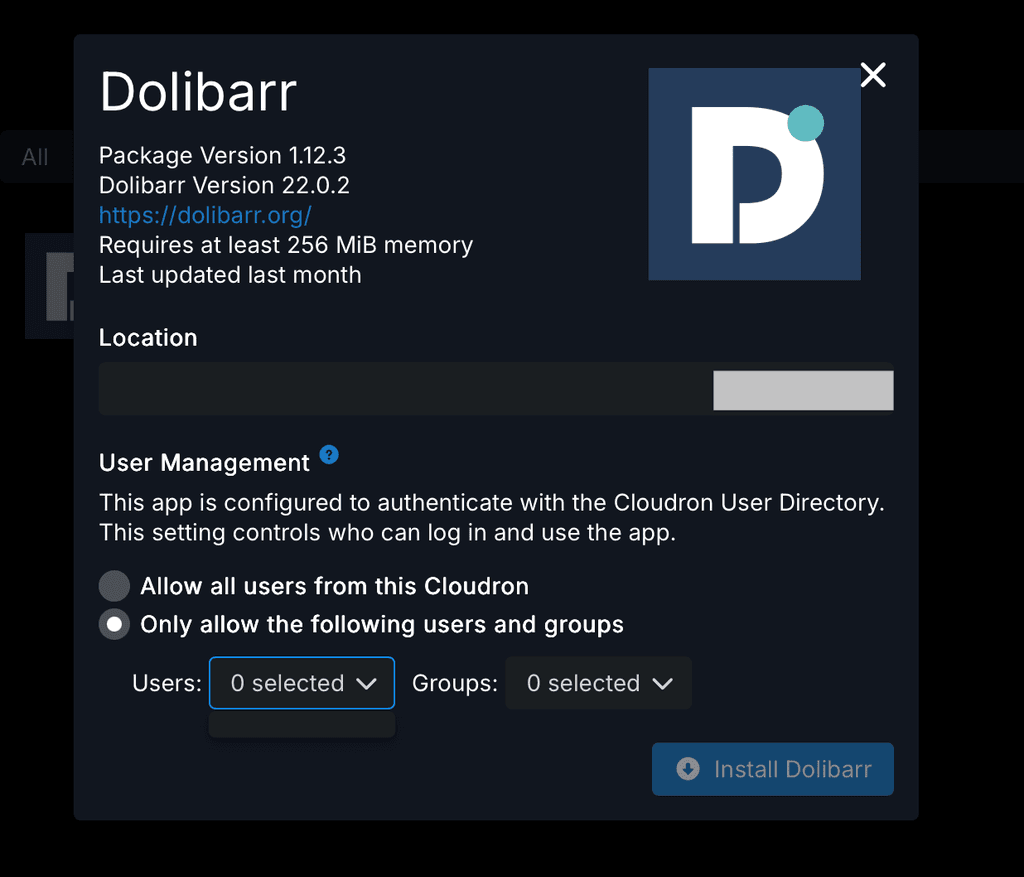
              Trying to install an app that utilizes Cloudron’s user directory but unable to restrict access to specific users or groups.
              Tillit Technical Services Ltd Dashboard.png

              1 Reply Last reply
              0
              • nebulonN Offline
                nebulonN Offline
                nebulon
                Staff
                wrote on last edited by
                #130

                @hakunamatata that has been fixed already with latest patch release

                1 Reply Last reply
                3
                • J joseph referenced this topic on
                • D Offline
                  D Offline
                  dylightful
                  wrote on last edited by
                  #131

                  Hi all! Congrats on v9!

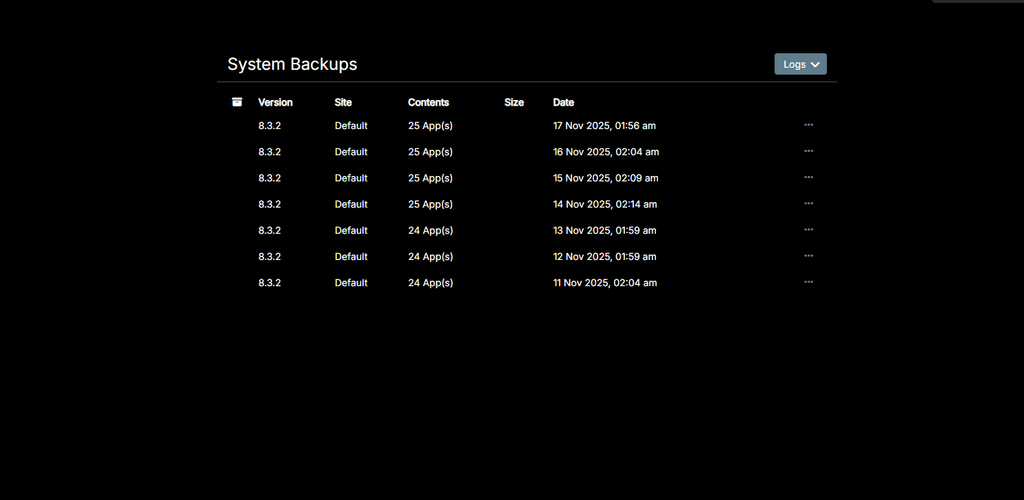
                  One bug I discovered so far - Backup Sites is completely missing from Backups -> Sites and only displays the latest System backups?
                  missing_backup_sites.png

                  D 1 Reply Last reply
                  1
                  • D dylightful

                    Hi all! Congrats on v9!

                    One bug I discovered so far - Backup Sites is completely missing from Backups -> Sites and only displays the latest System backups?

                    missing_backup_sites.png

                    D Offline
                    D Offline
                    dylightful
                    wrote on last edited by dylightful
                    #132

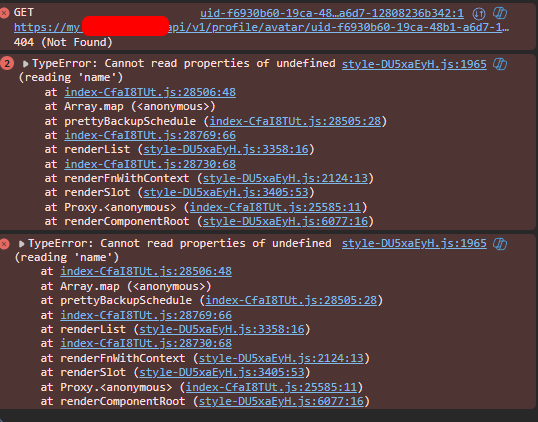
                    Update: I can briefly see 'Backup Sites' if I refresh the page quickly, however it disappears and only displays the above screenshot.

                    Browser console issue;
                    cloudron_backup_list_issue.png

                    girishG 1 Reply Last reply
                    1
                    • D dylightful

                      Update: I can briefly see 'Backup Sites' if I refresh the page quickly, however it disappears and only displays the above screenshot.

                      Browser console issue;
                      cloudron_backup_list_issue.png

                      girishG Offline
                      girishG Offline
                      girish
                      Staff
                      wrote on last edited by girish
                      #133

                      @dylightful are you on 9.0.10 ? I thought we fixed this bug.

                      Can you give the output of mysql -uroot -ppassword -e "select schedule from box.backupSites" (run this on server via ssh, please).

                      D 1 Reply Last reply
                      0
                      • girishG girish

                        @dylightful are you on 9.0.10 ? I thought we fixed this bug.

                        Can you give the output of mysql -uroot -ppassword -e "select schedule from box.backupSites" (run this on server via ssh, please).

                        D Offline
                        D Offline
                        dylightful
                        wrote on last edited by
                        #134

                        @girish said in Cloudron 9.0 (beta) bug reports:

                        mysql -uroot -ppassword -e "select schedule from box.backupSites"

                        Yep version 9.0.10;
                        Command response below. Interestingly the backup looks to have been successful, however I still cannot see the 'Backup Sites' section of backups

                        root@my:~#  mysql -uroot -ppassword -e "select schedule from box.backupSites"
                        mysql: [Warning] Using a password on the command line interface can be insecure.
                        +--------------+
                        | schedule     |
                        +--------------+
                        | 00 00  * * * |
                        +--------------+
                        
                        girishG 1 Reply Last reply
                        0
                        • D dylightful

                          @girish said in Cloudron 9.0 (beta) bug reports:

                          mysql -uroot -ppassword -e "select schedule from box.backupSites"

                          Yep version 9.0.10;
                          Command response below. Interestingly the backup looks to have been successful, however I still cannot see the 'Backup Sites' section of backups

                          root@my:~#  mysql -uroot -ppassword -e "select schedule from box.backupSites"
                          mysql: [Warning] Using a password on the command line interface can be insecure.
                          +--------------+
                          | schedule     |
                          +--------------+
                          | 00 00  * * * |
                          +--------------+
                          
                          girishG Offline
                          girishG Offline
                          girish
                          Staff
                          wrote on last edited by
                          #135

                          @dylightful thanks! fixed in https://git.cloudron.io/platform/box/-/commit/c5f97e8bb0368e515027a33721c3b4002de54ff6 . Yes, it's a UI issue and not a backend problems. The UI had a bug parsing that cron schedule (not sure why it has a double space but maybe there was a bug in some old UI).

                          D 1 Reply Last reply
                          1
                          • girishG girish

                            @dylightful thanks! fixed in https://git.cloudron.io/platform/box/-/commit/c5f97e8bb0368e515027a33721c3b4002de54ff6 . Yes, it's a UI issue and not a backend problems. The UI had a bug parsing that cron schedule (not sure why it has a double space but maybe there was a bug in some old UI).

                            D Offline
                            D Offline
                            dylightful
                            wrote on last edited by
                            #136

                            @girish Thank you! Looking forward to the next update!

                            1 Reply Last reply
                            0
                            • imc67I Offline
                              imc67I Offline
                              imc67
                              translator
                              wrote on last edited by
                              #137

                              GUI bug?

                              Event list in Email > Event Log: there is a list of email events but you can't scroll down to older events because somehow it has no focus on mouse over (MacOS -Safari). Only when you open an Event and close it you can scroll down the list.

                              1 Reply Last reply
                              1
                              • nebulonN Offline
                                nebulonN Offline
                                nebulon
                                Staff
                                wrote on last edited by
                                #138

                                huh good catch, I can reproduce that when zooming out to load the view without any overflow, then the scrollhandler won't kick it it seems

                                1 Reply Last reply
                                0
                                • nebulonN Offline
                                  nebulonN Offline
                                  nebulon
                                  Staff
                                  wrote on last edited by
                                  #139

                                  Fixed with https://git.cloudron.io/platform/box/-/commit/b53da61e7cec3c919ac11ebd65a8ccce03f7f611

                                  1 Reply Last reply
                                  3
                                  • imc67I Offline
                                    imc67I Offline
                                    imc67
                                    translator
                                    wrote on last edited by
                                    #140

                                    In System > Eventlog the OIDC app logins showing this:

                                    User ***** logged in to 8a60ee4d-7e33-4199-ab15-*****-oidc
                                    

                                    Any idea which app this is 😉😂?

                                    It would be useful to have the app name here I guess?

                                    1 Reply Last reply
                                    1
                                    • jamesJ Online
                                      jamesJ Online
                                      james
                                      Staff
                                      wrote on last edited by
                                      #141

                                      Hello @imc67
                                      You can actually take the id or part of the ID and search for it in the dashboard.
                                      Here:
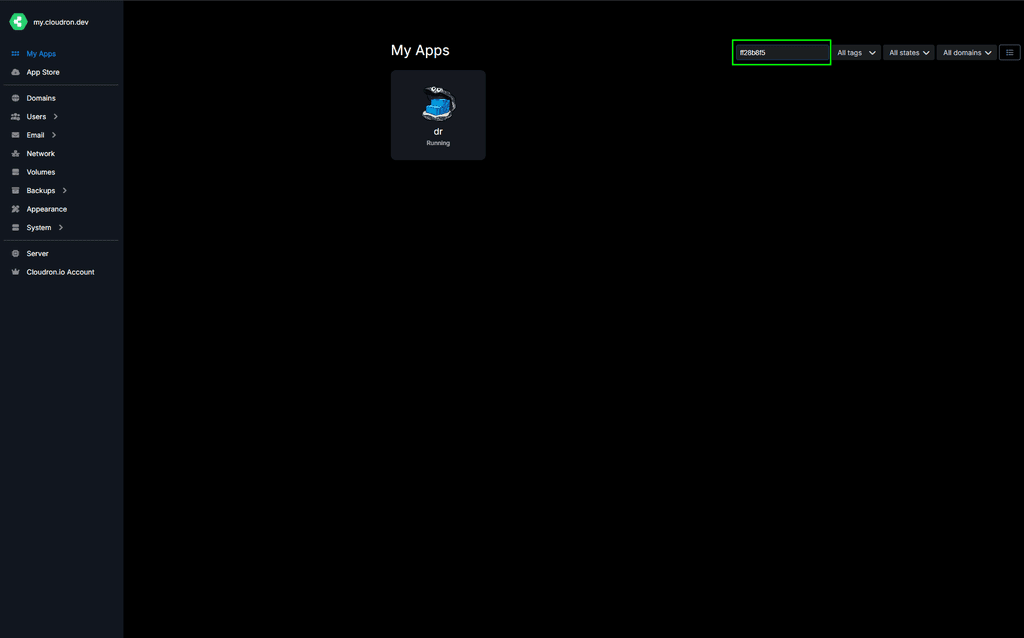
                                      image.png

                                      imc67I 1 Reply Last reply
                                      1
                                      • jamesJ james

                                        Hello @imc67
                                        You can actually take the id or part of the ID and search for it in the dashboard.
                                        Here:

                                        image.png

                                        imc67I Offline
                                        imc67I Offline
                                        imc67
                                        translator
                                        wrote on last edited by imc67
                                        #142

                                        @james said in Cloudron 9.0 (beta) bug reports:

                                        Hello @imc67
                                        You can actually take the id or part of the ID and search for it in the dashboard.
                                        Here:

                                        Yes ofcourse I know but for every login of the 30 users to one of the 35 apps (ID) check to corresponding name is ridiculous 😂

                                        In version 8 it like this:

                                        User **** logged in to crm.****.com
                                        
                                        1 Reply Last reply
                                        3
                                        • nebulonN Offline
                                          nebulonN Offline
                                          nebulon
                                          Staff
                                          wrote on last edited by
                                          #143

                                          Fixed now with https://git.cloudron.io/platform/box/-/commit/2b4f8ff00de78b191b4528940c664a0c90a45565 so it would correctly find the app and print the more readable domain like before.

                                          1 Reply Last reply
                                          4
                                          Reply
                                          • Reply as topic
                                          Log in to reply
                                          • Oldest to Newest
                                          • Newest to Oldest
                                          • Most Votes


                                          • Login

                                          • Don't have an account? Register

                                          • Login or register to search.
                                          • First post
                                            Last post
                                          0
                                          • Categories
                                          • Recent
                                          • Tags
                                          • Popular
                                          • Bookmarks
                                          • Search



