Cloudron makes it easy to run web apps like WordPress, Nextcloud, GitLab on your server. Find out more or install now.


Skip to content
  • Categories
  • Recent
  • Tags
  • Popular
  • Bookmarks
  • Search
Skins
  • Light
  • Brite
  • Cerulean
  • Cosmo
  • Flatly
  • Journal
  • Litera
  • Lumen
  • Lux
  • Materia
  • Minty
  • Morph
  • Pulse
  • Sandstone
  • Simplex
  • Sketchy
  • Spacelab
  • United
  • Yeti
  • Zephyr
  • Dark
  • Cyborg
  • Darkly
  • Quartz
  • Slate
  • Solar
  • Superhero
  • Vapor

  • Default (No Skin)
  • No Skin
Collapse
Brand Logo

Cloudron Forum

Apps - Status | Demo | Docs | Install
  1. Cloudron Forum
  2. Discuss
  3. Cloudron 9.0 (beta) bug reports

Cloudron 9.0 (beta) bug reports

Scheduled Pinned Locked Moved Discuss
205 Posts 32 Posters 16.0k Views 26 Watching
  • Oldest to Newest
  • Newest to Oldest
  • Most Votes
Reply
  • Reply as topic
Log in to reply
This topic has been deleted. Only users with topic management privileges can see it.
  • H Offline
    H Offline
    hakunamatata
    wrote on last edited by
    #129

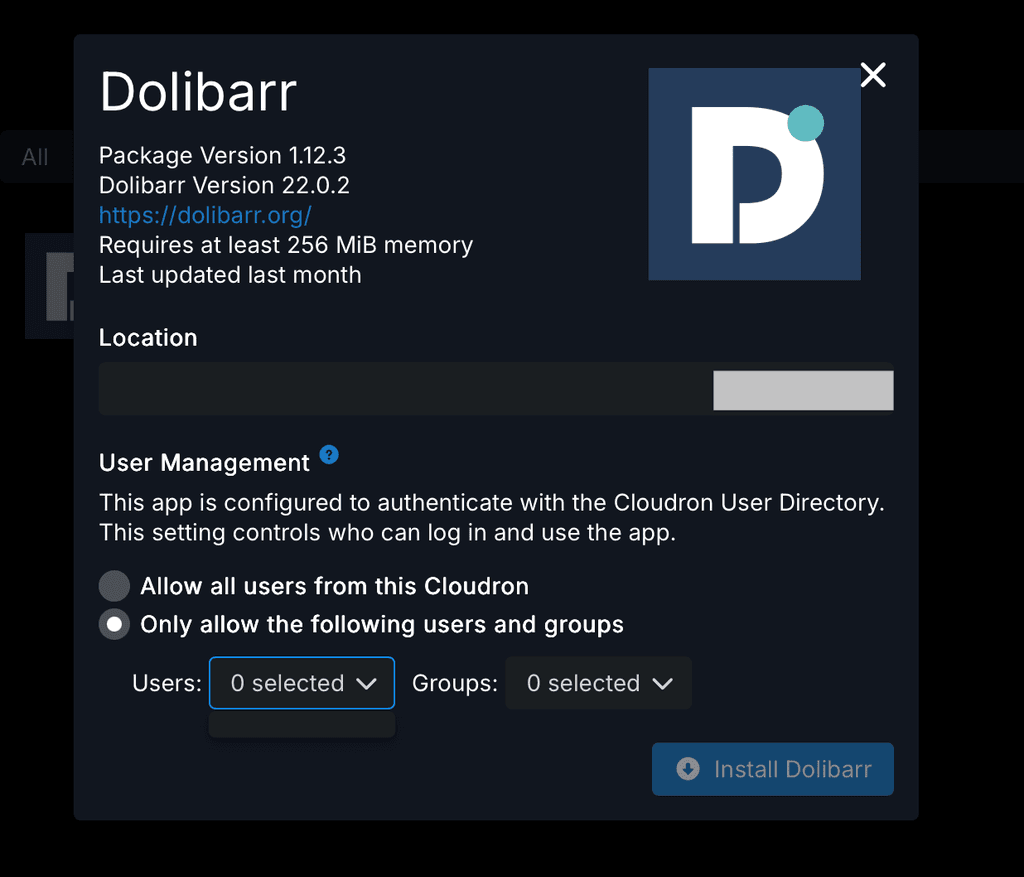
    Trying to install an app that utilizes Cloudron’s user directory but unable to restrict access to specific users or groups.
    Tillit Technical Services Ltd Dashboard.png

    1 Reply Last reply
    0
    • nebulonN Away
      nebulonN Away
      nebulon
      Staff
      wrote on last edited by
      #130

      @hakunamatata that has been fixed already with latest patch release

      1 Reply Last reply
      3
      • J joseph referenced this topic on
      • D Offline
        D Offline
        dylightful
        wrote on last edited by
        #131

        Hi all! Congrats on v9!

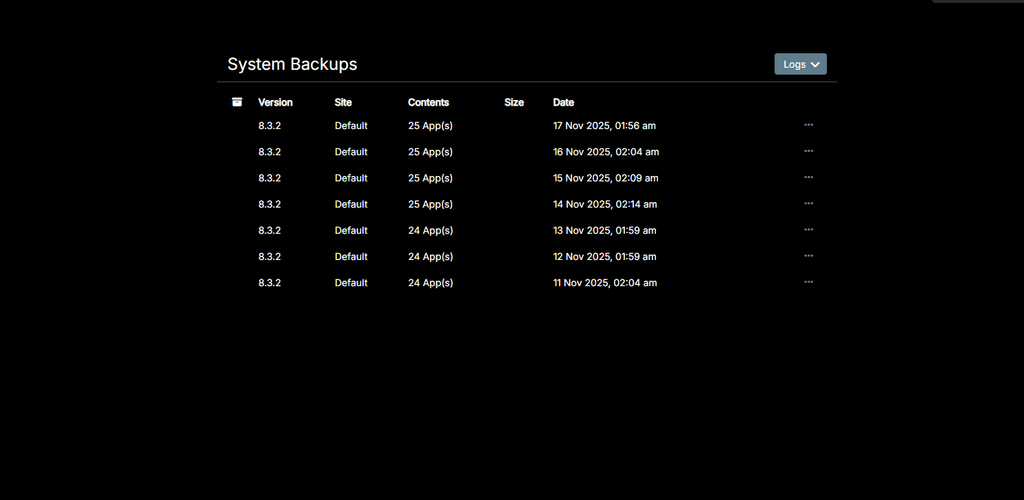
        One bug I discovered so far - Backup Sites is completely missing from Backups -> Sites and only displays the latest System backups?
        missing_backup_sites.png

        D 1 Reply Last reply
        1
        • D dylightful

          Hi all! Congrats on v9!

          One bug I discovered so far - Backup Sites is completely missing from Backups -> Sites and only displays the latest System backups?

          missing_backup_sites.png

          D Offline
          D Offline
          dylightful
          wrote on last edited by dylightful
          #132

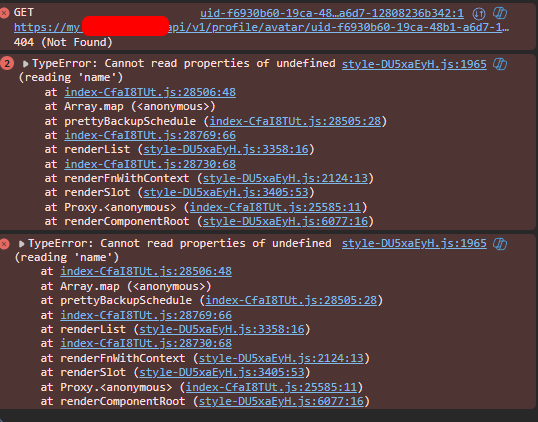
          Update: I can briefly see 'Backup Sites' if I refresh the page quickly, however it disappears and only displays the above screenshot.

          Browser console issue;
          cloudron_backup_list_issue.png

          girishG 1 Reply Last reply
          1
          • D dylightful

            Update: I can briefly see 'Backup Sites' if I refresh the page quickly, however it disappears and only displays the above screenshot.

            Browser console issue;
            cloudron_backup_list_issue.png

            girishG Offline
            girishG Offline
            girish
            Staff
            wrote on last edited by girish
            #133

            @dylightful are you on 9.0.10 ? I thought we fixed this bug.

            Can you give the output of mysql -uroot -ppassword -e "select schedule from box.backupSites" (run this on server via ssh, please).

            D 1 Reply Last reply
            0
            • girishG girish

              @dylightful are you on 9.0.10 ? I thought we fixed this bug.

              Can you give the output of mysql -uroot -ppassword -e "select schedule from box.backupSites" (run this on server via ssh, please).

              D Offline
              D Offline
              dylightful
              wrote on last edited by
              #134

              @girish said in Cloudron 9.0 (beta) bug reports:

              mysql -uroot -ppassword -e "select schedule from box.backupSites"

              Yep version 9.0.10;
              Command response below. Interestingly the backup looks to have been successful, however I still cannot see the 'Backup Sites' section of backups

              root@my:~#  mysql -uroot -ppassword -e "select schedule from box.backupSites"
              mysql: [Warning] Using a password on the command line interface can be insecure.
              +--------------+
              | schedule     |
              +--------------+
              | 00 00  * * * |
              +--------------+
              
              girishG 1 Reply Last reply
              0
              • D dylightful

                @girish said in Cloudron 9.0 (beta) bug reports:

                mysql -uroot -ppassword -e "select schedule from box.backupSites"

                Yep version 9.0.10;
                Command response below. Interestingly the backup looks to have been successful, however I still cannot see the 'Backup Sites' section of backups

                root@my:~#  mysql -uroot -ppassword -e "select schedule from box.backupSites"
                mysql: [Warning] Using a password on the command line interface can be insecure.
                +--------------+
                | schedule     |
                +--------------+
                | 00 00  * * * |
                +--------------+
                
                girishG Offline
                girishG Offline
                girish
                Staff
                wrote on last edited by
                #135

                @dylightful thanks! fixed in https://git.cloudron.io/platform/box/-/commit/c5f97e8bb0368e515027a33721c3b4002de54ff6 . Yes, it's a UI issue and not a backend problems. The UI had a bug parsing that cron schedule (not sure why it has a double space but maybe there was a bug in some old UI).

                D 1 Reply Last reply
                1
                • girishG girish

                  @dylightful thanks! fixed in https://git.cloudron.io/platform/box/-/commit/c5f97e8bb0368e515027a33721c3b4002de54ff6 . Yes, it's a UI issue and not a backend problems. The UI had a bug parsing that cron schedule (not sure why it has a double space but maybe there was a bug in some old UI).

                  D Offline
                  D Offline
                  dylightful
                  wrote on last edited by
                  #136

                  @girish Thank you! Looking forward to the next update!

                  1 Reply Last reply
                  0
                  • imc67I Online
                    imc67I Online
                    imc67
                    translator
                    wrote on last edited by
                    #137

                    GUI bug?

                    Event list in Email > Event Log: there is a list of email events but you can't scroll down to older events because somehow it has no focus on mouse over (MacOS -Safari). Only when you open an Event and close it you can scroll down the list.

                    1 Reply Last reply
                    1
                    • nebulonN Away
                      nebulonN Away
                      nebulon
                      Staff
                      wrote on last edited by
                      #138

                      huh good catch, I can reproduce that when zooming out to load the view without any overflow, then the scrollhandler won't kick it it seems

                      1 Reply Last reply
                      0
                      • nebulonN Away
                        nebulonN Away
                        nebulon
                        Staff
                        wrote on last edited by
                        #139

                        Fixed with https://git.cloudron.io/platform/box/-/commit/b53da61e7cec3c919ac11ebd65a8ccce03f7f611

                        1 Reply Last reply
                        3
                        • imc67I Online
                          imc67I Online
                          imc67
                          translator
                          wrote on last edited by
                          #140

                          In System > Eventlog the OIDC app logins showing this:

                          User ***** logged in to 8a60ee4d-7e33-4199-ab15-*****-oidc
                          

                          Any idea which app this is 😉😂?

                          It would be useful to have the app name here I guess?

                          1 Reply Last reply
                          1
                          • jamesJ Online
                            jamesJ Online
                            james
                            Staff
                            wrote on last edited by
                            #141

                            Hello @imc67
                            You can actually take the id or part of the ID and search for it in the dashboard.
                            Here:
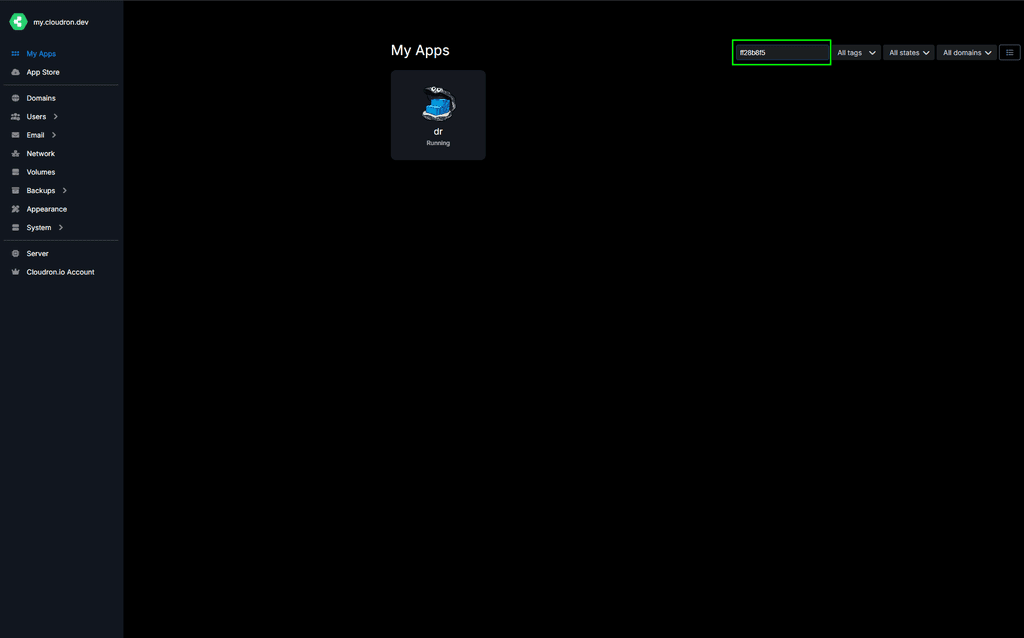
                            image.png

                            imc67I 1 Reply Last reply
                            1
                            • jamesJ james

                              Hello @imc67
                              You can actually take the id or part of the ID and search for it in the dashboard.
                              Here:

                              image.png

                              imc67I Online
                              imc67I Online
                              imc67
                              translator
                              wrote on last edited by imc67
                              #142

                              @james said in Cloudron 9.0 (beta) bug reports:

                              Hello @imc67
                              You can actually take the id or part of the ID and search for it in the dashboard.
                              Here:

                              Yes ofcourse I know but for every login of the 30 users to one of the 35 apps (ID) check to corresponding name is ridiculous 😂

                              In version 8 it like this:

                              User **** logged in to crm.****.com
                              
                              1 Reply Last reply
                              3
                              • nebulonN Away
                                nebulonN Away
                                nebulon
                                Staff
                                wrote on last edited by
                                #143

                                Fixed now with https://git.cloudron.io/platform/box/-/commit/2b4f8ff00de78b191b4528940c664a0c90a45565 so it would correctly find the app and print the more readable domain like before.

                                1 Reply Last reply
                                4
                                • imc67I Online
                                  imc67I Online
                                  imc67
                                  translator
                                  wrote on last edited by
                                  #144

                                  GUI bug?
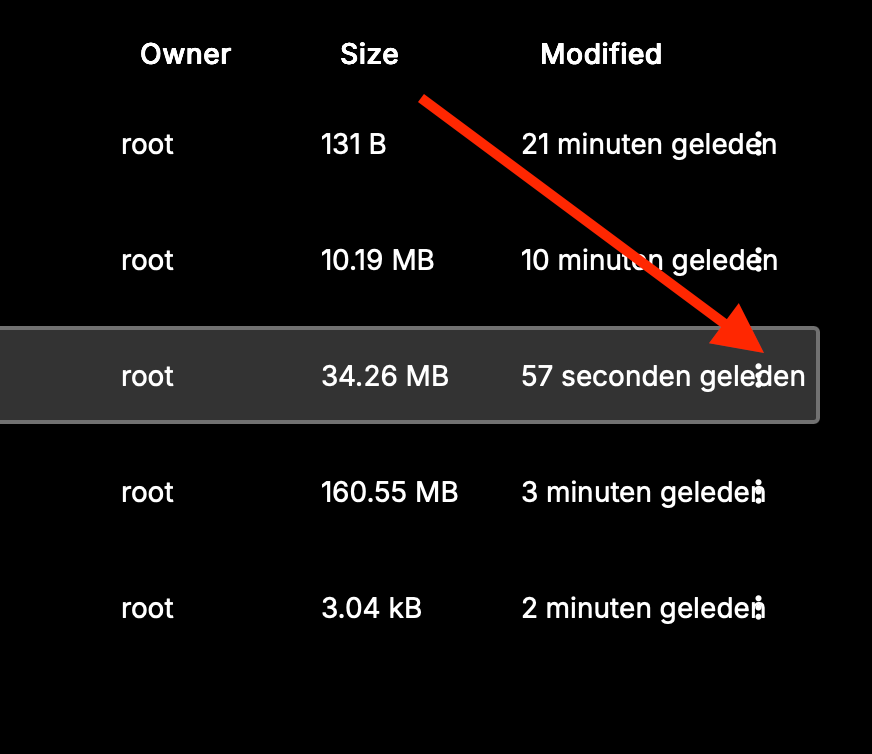
                                  In the app's Filemanager the 3 dots (menu) on file are hardly visible (MacOS+Safari)
                                  63c5d118-9c61-4452-acdc-bb1154544a0b-Scherm­afbeelding 2025-11-20 om 13.00.18.png Scherm­afbeelding 2025-11-20 om 13.00.18

                                  imc67I 1 Reply Last reply
                                  1
                                  • luckowL Offline
                                    luckowL Offline
                                    luckow
                                    translator
                                    wrote on last edited by luckow
                                    #145

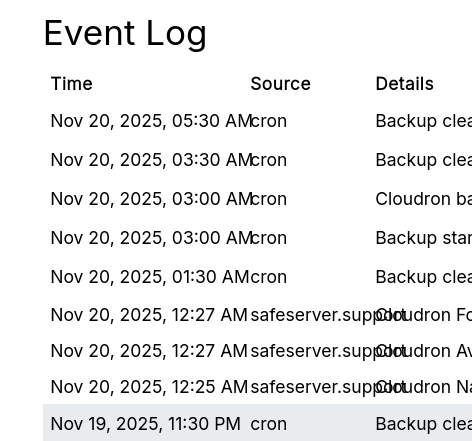
                                    slight glitch in the event log

                                    image.png

                                    Cloudron v. 9.0.11 / Firefox

                                    Pronouns: he/him | Primary language: German

                                    d19dotcaD 1 Reply Last reply
                                    0
                                    • nebulonN Away
                                      nebulonN Away
                                      nebulon
                                      Staff
                                      wrote on last edited by
                                      #146

                                      thanks, currently reworking the eventlog table to give us more flexibility. We have a couple of things to improve there: https://git.cloudron.io/platform/box/-/issues/874

                                      1 Reply Last reply
                                      1
                                      • luckowL luckow

                                        slight glitch in the event log

                                        image.png

                                        Cloudron v. 9.0.11 / Firefox

                                        d19dotcaD Offline
                                        d19dotcaD Offline
                                        d19dotca
                                        wrote on last edited by
                                        #147

                                        @luckow I reported this a couple weeks ago too. Hoping it gets fixed soon as it’s a bit hard to read.

                                        --
                                        Dustin Dauncey
                                        www.d19.ca

                                        1 Reply Last reply
                                        1
                                        • imc67I imc67

                                          GUI bug?
                                          In the app's Filemanager the 3 dots (menu) on file are hardly visible (MacOS+Safari)
                                          63c5d118-9c61-4452-acdc-bb1154544a0b-Scherm­afbeelding 2025-11-20 om 13.00.18.png Scherm­afbeelding 2025-11-20 om 13.00.18

                                          imc67I Online
                                          imc67I Online
                                          imc67
                                          translator
                                          wrote on last edited by
                                          #148

                                          said in Cloudron 9.0 (beta) bug reports:

                                          GUI bug?
                                          In the app's Filemanager the 3 dots (menu) on file are hardly visible (MacOS+Safari)
                                          63c5d118-9c61-4452-acdc-bb1154544a0b-Scherm­afbeelding 2025-11-20 om 13.00.18.png Scherm­afbeelding 2025-11-20 om 13.00.18

                                          @nebulon @girish did you got this?

                                          1 Reply Last reply
                                          1
                                          Reply
                                          • Reply as topic
                                          Log in to reply
                                          • Oldest to Newest
                                          • Newest to Oldest
                                          • Most Votes


                                          • Login

                                          • Don't have an account? Register

                                          • Login or register to search.
                                          • First post
                                            Last post
                                          0
                                          • Categories
                                          • Recent
                                          • Tags
                                          • Popular
                                          • Bookmarks
                                          • Search