Cloudron makes it easy to run web apps like WordPress, Nextcloud, GitLab on your server. Find out more or install now.


Skip to content
  • Categories
  • Recent
  • Tags
  • Popular
  • Bookmarks
  • Search
Skins
  • Light
  • Brite
  • Cerulean
  • Cosmo
  • Flatly
  • Journal
  • Litera
  • Lumen
  • Lux
  • Materia
  • Minty
  • Morph
  • Pulse
  • Sandstone
  • Simplex
  • Sketchy
  • Spacelab
  • United
  • Yeti
  • Zephyr
  • Dark
  • Cyborg
  • Darkly
  • Quartz
  • Slate
  • Solar
  • Superhero
  • Vapor

  • Default (No Skin)
  • No Skin
Collapse
Brand Logo

Cloudron Forum

Apps - Status | Demo | Docs | Install
  1. Cloudron Forum
  2. LAMP
  3. Connecting the LAMP app with Git

Connecting the LAMP app with Git

Scheduled Pinned Locked Moved LAMP
20 Posts 4 Posters 696 Views 4 Watching
  • Oldest to Newest
  • Newest to Oldest
  • Most Votes
Reply
  • Reply as topic
Log in to reply
This topic has been deleted. Only users with topic management privileges can see it.
  • jamesJ Offline
    jamesJ Offline
    james
    Staff
    wrote on last edited by
    #3

    Hello @privsec
    I talked with @staff about it, and we asked @BrutalBirdie to create a GitHub Action for this since he knows a lot about GitLab CI/CD and also GitHub actions.

    1 Reply Last reply
    1
    • BrutalBirdieB Offline
      BrutalBirdieB Offline
      BrutalBirdie
      Partner
      wrote on last edited by
      #4

      HeyO šŸ‘‹ šŸ˜„

      Now there is this GitHub Repository: https://github.com/cloudron-io/cloudron-push-to-app which publishes this action to the GitHub Marketplace https://github.com/marketplace/actions/cloudron-push-to-app

      The README should explain how to use it.
      Still, this can be confusing for people who never used GitHub actions.

      I have created a demo repo https://github.com/BrutalBirdie/github-action-test-repo and added the workflow according to my README.
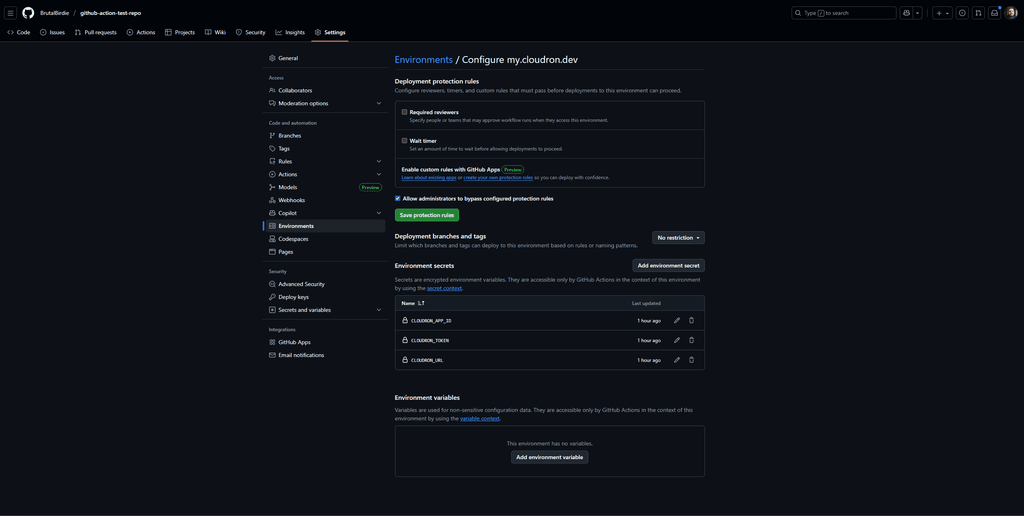
      Added an Environment:
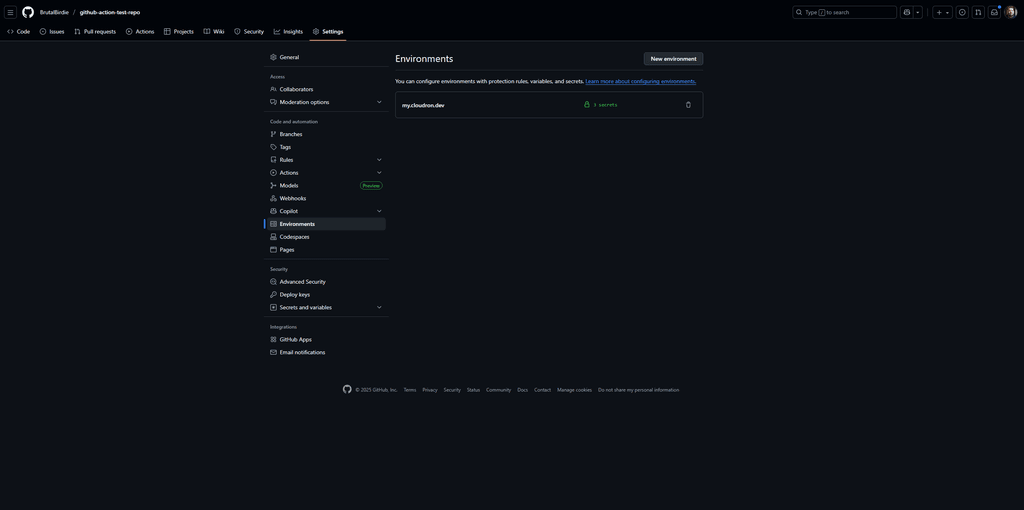
      a089ffb1-88ef-43ce-aa35-a101474692a2-image.png
      and the secrets:
      20a75422-173a-4486-9f73-f55556b6c4f4-image.png

      Now if I update the README.md, add a simple index.html and index.css it will be deployed to https://default-lamp.cloudron.dev/ when accessing https://default-lamp.cloudron.dev you should see some neon 404 page and you can access the README.md https://default-lamp.cloudron.dev/README.md

      And in the action view you can see the executed action and logs https://github.com/BrutalBirdie/github-action-test-repo/actions/runs/19704245518/job/56447718391

      Like my work? Consider donating a drink. Cheers!

      1 Reply Last reply
      6
      • J Offline
        J Offline
        joseph
        Staff
        wrote on last edited by joseph
        #5

        Oh nice, this is incredible. Can you also make a guide @BrutalBirdie ? A PR to https://docs.cloudron.io/guides/ would be awesome .

        Not a PHP dev but when/where does one run "composer install" in the workflow ? Maybe in the action itself?

        1 Reply Last reply
        1
        • J Offline
          J Offline
          joseph
          Staff
          wrote on last edited by
          #6

          Doc page is at https://docs.cloudron.io/guides/github-action/

          1 Reply Last reply
          1
          • P Offline
            P Offline
            privsec
            wrote on last edited by
            #7

            This is awesome! Now, how can I confirm if this worked?

            1 Reply Last reply
            0
            • P Offline
              P Offline
              privsec
              wrote on last edited by
              #8

              Also, looks like in the YAML file the token and url is wapped

              1 Reply Last reply
              0
              • P Offline
                P Offline
                privsec
                wrote on last edited by
                #9

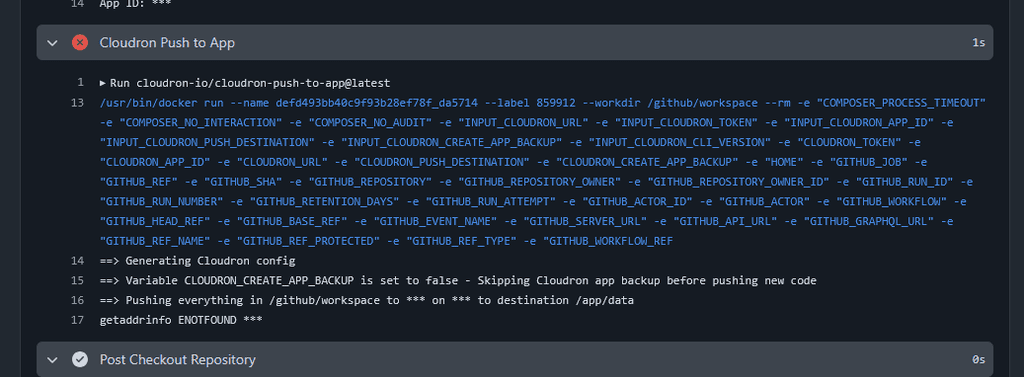
                I keep getting this error message

                image.png

                I have ensured that the URL, Token, and App ID are correct.

                Here is my YAML file

                on:
                  push:
                    branches:
                      - main
                jobs:
                  deploy-to-cloudron-app:
                    runs-on: ubuntu-latest
                    environment: my.domain.com
                    steps:
                      - name: Checkout Repository
                        uses: actions/checkout@v6
                      - name: Setup PHP
                        uses: shivammathur/setup-php@v2
                        with:
                          php-version: '8.3'
                          extensions: pdo_mysql, pdo, json, mbstring, curl
                          coverage: none
                      - name: Verify PHP Extensions
                        run: |
                          echo "PHP Version:"
                          php -v
                          echo -e "\nInstalled Extensions:"
                          php -m | grep -E "(pdo_mysql|pdo|json|mbstring|curl)" || echo "Some extensions not found"
                          echo -e "\nAll PHP Extensions:"
                          php -m
                      - name: Install composer dependencies
                        run: |
                          composer install --no-interaction --prefer-dist --optimize-autoloader
                      - name: Verify Cloudron Connection
                        run: |
                          if [ -z "${{ secrets.CLOUDRON_URL }}" ]; then
                            echo "Error: CLOUDRON_URL secret is not set"
                            exit 1
                          fi
                          echo "Cloudron URL configured: ${{ secrets.CLOUDRON_URL }}"
                          echo "App ID: ${{ secrets.CLOUDRON_APP_ID }}"
                      - name: Cloudron Push to App
                        uses: cloudron-io/cloudron-push-to-app@latest
                        with:
                          CLOUDRON_URL: "${{ secrets.CLOUDRON_URL }}"
                          CLOUDRON_TOKEN: "${{ secrets.CLOUDRON_TOKEN }}"
                          CLOUDRON_APP_ID: "${{ secrets.CLOUDRON_APP_ID }}"
                          CLOUDRON_PUSH_DESTINATION: "/app/data" (I want to push to this directory, rather then to public)
                          CLOUDRON_CREATE_APP_BACKUP: "false"
                
                
                1 Reply Last reply
                0
                • J Offline
                  J Offline
                  joseph
                  Staff
                  wrote on last edited by
                  #10

                  Just guessing but @brutalbirdie can confirm. Does CLOUDRON_URL need to have https:// ?

                  1 Reply Last reply
                  1
                  • BrutalBirdieB Offline
                    BrutalBirdieB Offline
                    BrutalBirdie
                    Partner
                    wrote on last edited by
                    #11

                    Ah, yes, CLOUDRON_URL is a misleading variable name, changing it to CLOUDRON_FQDN.
                    So the documented example of my.demo.cloudron.io is correct.
                    I have updated the GitHub Action repo, Example Repo and Cloudron documentation (will be deployed soon) accordingly.

                    I have added the demo branch to demo GitHub project https://github.com/cloudron-io/github-action-test-repo and the file .github/workflows/deploy-to-my-demo-cloudron-io.yaml which is using a clear text token, url, and appid for better understanding and only deploys on the demo branch.
                    You can use this file as a copy-and-paste example for testing.
                    But be aware, the APP_ID and TOKEN might be outdated anytime if the my.demo.cloudron.io server is reset or someone deletes the app.

                    Like my work? Consider donating a drink. Cheers!

                    jamesJ 1 Reply Last reply
                    4
                    • BrutalBirdieB Offline
                      BrutalBirdieB Offline
                      BrutalBirdie
                      Partner
                      wrote on last edited by
                      #12

                      @privsec said in Connecting the LAMP app with Git:

                      (I want to push to this directory, rather then to public)

                      Note on that.
                      The action runs:

                      cloudron push --app ${CLOUDRON_APP_ID} ${GITHUB_WORKSPACE}/. ${CLOUDRON_PUSH_DESTINATION}
                      

                      Be aware of the /. after ${GITHUB_WORKSPACE}.
                      From the cloudron cli:

                      cloudron push --help
                      Usage: cloudron push [options] <local> <remote>
                      
                      push a single local file or directory to a remote directory
                      
                      Options:
                        --app <id/location>  App id or location
                        -h, --help           display help for command
                      
                        Examples:
                      
                          $ cloudron push --app myapp file.txt /app/data/file.txt # pushes file.txt
                          $ cloudron push --app myapp file.txt /app/data/         # pushes file.txt. trailing slash is important
                          $ cloudron push --app myapp dir /app/data               # pushes dir/* as /app/data/dir/*
                          $ cloudron push --app myapp dir/. /app/data             # pushes dir/* as /app/data/*
                          $ cloudron push --app myapp dir/subdir /app/data        # pushes dir/subdir/* as /app/data/subdir/*
                          $ cloudron push --app myapp . /app/data                 # pushes .* as /app/data/*
                      

                      Meaning, if you set CLOUDRON_PUSH_DESTINATION: "/app/data", yes, everything in the GitHub repository will be pushed to /app/data, but be aware, this does not delete existing files.
                      So, if you have the file /app/data/historic.txt and this is not in your GitHub repo, after the action has run, this file will still exist.

                      This could be seen as inconvenient, but, let's take the following scenario:
                      You have the folder /app/data/static/images which holds all your static image assets and in the GitHub repo you have static/images/.gitkeep an empty folder that is still tracked by git but empty.
                      If I changed the GitHub Action to overwrite the CLOUDRON_PUSH_DESTINATION instead of copying into it, all the /app/data/static/images files would be deleted.

                      Just wanted to make you aware of that šŸ™‚

                      Like my work? Consider donating a drink. Cheers!

                      1 Reply Last reply
                      4
                      • P Offline
                        P Offline
                        privsec
                        wrote on last edited by
                        #13

                        For clarification purposes, by reset, do you mean restarting the app?

                        1 Reply Last reply
                        0
                        • BrutalBirdieB BrutalBirdie

                          Ah, yes, CLOUDRON_URL is a misleading variable name, changing it to CLOUDRON_FQDN.
                          So the documented example of my.demo.cloudron.io is correct.
                          I have updated the GitHub Action repo, Example Repo and Cloudron documentation (will be deployed soon) accordingly.

                          I have added the demo branch to demo GitHub project https://github.com/cloudron-io/github-action-test-repo and the file .github/workflows/deploy-to-my-demo-cloudron-io.yaml which is using a clear text token, url, and appid for better understanding and only deploys on the demo branch.
                          You can use this file as a copy-and-paste example for testing.
                          But be aware, the APP_ID and TOKEN might be outdated anytime if the my.demo.cloudron.io server is reset or someone deletes the app.

                          jamesJ Offline
                          jamesJ Offline
                          james
                          Staff
                          wrote on last edited by
                          #14

                          Hello @privsec

                          I assume you are asking about this sentence:

                          @BrutalBirdie said in Connecting the LAMP app with Git:

                          But be aware, the APP_ID and TOKEN might be outdated anytime if the my.demo.cloudron.io server is reset or someone deletes the app.

                          With resetting the my.demo.cloudron.io the following is referenced.
                          The server my.demo.cloudron.io is re-deployed regularly to keep it nice and clean.
                          This deletes all apps, users and so on. Like you would set up the server from 0 again.
                          Since @brutalbirdie used my.demo.cloudron.io for demonstration, the used app id and token inside .github/workflows/deploy-to-my-demo-cloudron-io.yaml#L20-L21 can be invalidated any given time.

                          So the warning given by @brutalbirdie simplified: Don't expect the demo for my.demo.cloudron.io inside .github/workflows/deploy-to-my-demo-cloudron-io.yaml#L20-L21 to work all the time, since the my.demo.cloudron.io instance is build anew regularly.

                          I hope this helps and if I interpreted this wrong, please correct me @brutalbirdie

                          1 Reply Last reply
                          1
                          • P Offline
                            P Offline
                            privsec
                            wrote on last edited by privsec
                            #15

                            So, im feeling pretty dumb.

                            I have updated the .yaml file and I have ensured the right values are in my secrets environment. I even ran this through chatgpt to make sure nothing is missing or wrong. And the action is still failing for me.

                            The issue is when it actually tries to push to my cloudron app

                            Here is my current yaml

                            name: Cloudron Diagnostic Deploy
                            
                            on:
                              workflow_dispatch:
                              push:
                                branches: [main]
                            
                            jobs:
                              deploy-to-cloudron-app:
                                runs-on: ubuntu-latest
                                environment: environment
                            
                                steps:
                                  - name: Checkout Repository
                                    uses: actions/checkout@v4
                            
                                  - name: Diagnostic – Print environment context
                                    run: |
                                      echo "=== GITHUB CONTEXT ==="
                                      echo "Branch: $GITHUB_REF"
                                      echo "Workflow: $GITHUB_WORKFLOW"
                                      echo "Runner: $RUNNER_NAME"
                                      echo "Workspace: $GITHUB_WORKSPACE"
                                      echo "======================"
                            
                                  - name: Diagnostic – Check secret presence
                                    shell: bash
                                    run: |
                                      declare -A secrets
                                      secrets["CLOUDRON_FQDN"]="${{ secrets.CLOUDRON_FQDN }}"
                                      secrets["CLOUDRON_TOKEN"]="${{ secrets.CLOUDRON_TOKEN }}"
                                      secrets["CLOUDRON_APP_ID"]="${{ secrets.CLOUDRON_APP_ID }}"
                            
                                      echo "Checking secrets..."
                                      for key in "${!secrets[@]}"; do
                                        if [ -z "${secrets[$key]}" ]; then
                                          echo "āŒ $key is EMPTY"
                                        else
                                          echo "āœ… $key is set"
                                        fi
                                      done
                            
                                  - name: Cloudron Push to App
                                    uses: cloudron-io/cloudron-push-to-app@latest
                                    
                                    with:
                                      CLOUDRON_FQDN: "${{ secrets.CLOUDRON_FQDN }}"
                                      CLOUDRON_TOKEN: "${{ secrets.CLOUDRON_TOKEN }}"
                                      CLOUDRON_APP_ID: "${{ secrets.CLOUDRON_APP_ID }}"
                                      CLOUDRON_PUSH_DESTINATION: "/app/data"
                                      CLOUDRON_CREATE_APP_BACKUP: "false"

                            

                            I have the three keys set in my environment using my main cloudron domain name, my API key, and the app id string found in the app under info

                            1 Reply Last reply
                            0
                            • P Offline
                              P Offline
                              privsec
                              wrote on last edited by
                              #16

                              Ok, so I just found out the issue, its the /app/data/public push

                              It has to be /app/data/public, otherwise it will fail.

                              This also just screwed my app up as I was testing randomly and now i have nested project files.

                              1 Reply Last reply
                              0
                              • P Offline
                                P Offline
                                privsec
                                wrote on last edited by
                                #17

                                I need this changed to be /add/data as /app/data/public, can you update that?

                                1 Reply Last reply
                                0
                                • jamesJ Offline
                                  jamesJ Offline
                                  james
                                  Staff
                                  wrote on last edited by
                                  #18

                                  Hello @privsec

                                  @privsec said in Connecting the LAMP app with Git:

                                  I need this changed to be /add/data as /app/data/public, can you update that?

                                  Can you please elaborate?


                                  The Actions does:

                                  cloudron push --app ${CLOUDRON_APP_ID} ${GITHUB_WORKSPACE}/. ${CLOUDRON_PUSH_DESTINATION}
                                  

                                  A manual test of this.
                                  I created the following folder and file structure as the ${GITHUB_WORKSPACE}:

                                  push-test
                                  ā”œā”€ā”€ base-file-1
                                  └── sub-folder-1
                                      └── sub-file-1
                                  

                                  Now, if I run:

                                  cloudron push --app "default-lamp" push-test/. /app/data
                                  

                                  The expected outcome is:

                                  • the file base-file-1 in /app/data/base-file
                                  • the folder sub-folder-1 in /app/data/sub-folder-1
                                  • the file sub-file-1 in /app/data/sub-folder-1/sub-file-1

                                  and indeed, that is the case:

                                  cloudron exec --app default-lamp -- ls -lah /app/data/
                                  total 44K
                                  drwxr-xr-x 5 cloudron cloudron 4.0K Nov 29 01:46 .
                                  drwxr-xr-x 1 root     root     4.0K Nov 25 10:28 ..
                                  -rw-r--r-- 1 www-data www-data   44 Nov 25 10:28 .phpmyadminauth
                                  -rw-r--r-- 1 www-data www-data  100 Nov 25 10:28 PHP_VERSION
                                  drwxr-xr-x 2 www-data www-data 4.0K Nov 25 10:28 apache
                                  -rw-r--r-- 1 cloudron cloudron    0 Nov 29 01:43 base-file-1
                                  -rw-r--r-- 1 www-data www-data 2.3K Nov 25 10:28 credentials.txt
                                  -rw-r--r-- 1 www-data www-data  157 Nov 25 10:28 php.ini
                                  -rw-r--r-- 1 www-data www-data  343 Nov 25 10:28 phpmyadmin_login.txt
                                  drwxr-xr-x 5     1001     1001 4.0K Nov 28 10:24 public
                                  -rw-r--r-- 1 www-data www-data   50 Nov 25 10:28 run.sh
                                  drwxr-xr-x 2 cloudron cloudron 4.0K Nov 29 01:45 sub-folder-1
                                  

                                  I think you need to articulate and explain what you expect it to do.

                                  1 Reply Last reply
                                  1
                                  • P Offline
                                    P Offline
                                    privsec
                                    wrote on last edited by
                                    #19

                                    So my git repo has
                                    /public
                                    /apache
                                    /logs

                                    when I ran the yaml with the push to being /app/data, the action would fail.

                                    I updated the yaml to push to /app/data/public

                                    I then had a project file like this
                                    /public/public
                                    /public/apache
                                    /public/logs
                                    /public
                                    /apache
                                    /logs

                                    1 Reply Last reply
                                    0
                                    • P Offline
                                      P Offline
                                      privsec
                                      wrote on last edited by
                                      #20

                                      oK, Im not sure if I just fat fingered something or if this was fixed, but the yaml is now set up to be working.

                                      Here is my .yaml file

                                      name: Sync Repo with Cloudron LAMP app
                                      on:
                                        workflow_dispatch:
                                        push:
                                          branches: [main]
                                      
                                      jobs:
                                        deploy-to-cloudron-app:
                                          runs-on: ubuntu-latest
                                          environment: [WHATEVER YOUR ENVIRONMENT NAME WAS IN SETTINGS OF REPO]
                                      
                                          steps:
                                            - name: Checkout Repository
                                              uses: actions/checkout@v4
                                      
                                            - name: Diagnostic – Print environment context
                                              run: |
                                                echo "=== GITHUB CONTEXT ==="
                                                echo "Branch: $GITHUB_REF"
                                                echo "Workflow: $GITHUB_WORKFLOW"
                                                echo "Runner: $RUNNER_NAME"
                                                echo "Workspace: $GITHUB_WORKSPACE"
                                                echo "======================"
                                      
                                            - name: Diagnostic – Check secret presence
                                              shell: bash
                                              run: |
                                                declare -A secrets
                                                secrets["CLOUDRON_FQDN"]="${{ secrets.CLOUDRON_FQDN }}"
                                                secrets["CLOUDRON_TOKEN"]="${{ secrets.CLOUDRON_TOKEN }}"
                                                secrets["CLOUDRON_APP_ID"]="${{ secrets.CLOUDRON_APP_ID }}"
                                      
                                                echo "Checking secrets..."
                                                for key in "${!secrets[@]}"; do
                                                  if [ -z "${secrets[$key]}" ]; then
                                                    echo "āŒ $key is EMPTY"
                                                  else
                                                    echo "āœ… $key is set"
                                                  fi
                                                done
                                      
                                            - name: Cloudron Push to App
                                              uses: cloudron-io/cloudron-push-to-app@latest
                                              
                                              with:
                                                CLOUDRON_FQDN: "${{ secrets.CLOUDRON_FQDN }}"
                                                CLOUDRON_TOKEN: "${{ secrets.CLOUDRON_TOKEN }}"
                                                CLOUDRON_APP_ID: "${{ secrets.CLOUDRON_APP_ID }}"
                                                CLOUDRON_PUSH_DESTINATION: "/app/data"
                                                CLOUDRON_CREATE_APP_BACKUP: "false"

                                      
                                      
                                      1 Reply Last reply
                                      3
                                      Reply
                                      • Reply as topic
                                      Log in to reply
                                      • Oldest to Newest
                                      • Newest to Oldest
                                      • Most Votes


                                      • Login

                                      • Don't have an account? Register

                                      • Login or register to search.
                                      • First post
                                        Last post
                                      0
                                      • Categories
                                      • Recent
                                      • Tags
                                      • Popular
                                      • Bookmarks
                                      • Search