
Link (emoji) assets to app/data
-
Hello. I would like to incude the following emoji set in my Discourse instance: https://mutant.tech/ (or more: twemoji | openmoji). And remove the existing ones as well.
There's a folder which holds the included emoji sets at
app/code/public/images/emoji/. Is it possible to link this folder to an emoji folder underapp/data/in order to add custom sets ?Is that even possible without a change in the Discourse package ?
Thx
-
-
-
-
https://meta.discourse.org/t/configure-custom-emoji/23365 works well for me.
@joseph thanks for looking into this. I was trying to follow that guide but stoped short because I wanted to remove the existing emojis from my site and then upload an entire pack of emojis. If I understand well, deleting existing emojis is not possible in the interface and upload is only for 10 emojis at the time.
-
I forgot to precise that the idea was that the new emoji set would replace the already existing/used emoji on the site. If I understand well, the keywords like
:heart:would be linked to a new image. A HTML rebuild would then replace the visuals in all the site posts. -
My first attempt is to replace the 6 standard reaction emojis manually with custom images from within the Discourse admin UI. One has to set the name
heart,+1, etc. before uploading the file. The new images show up as reactions, but now, the original set is not coherent anymore as 6 images differ in style.Second try is to upload the new emoji with a different name and set the new emoji as the 6 reaction choices. That works at first but then the reaction plugin refers to the original set when displaying the bundled reactions under a post.
I went back to the first option but I think the best solution here is still to be able to remove and replace the different emoji folders in
app/data/. -
My first attempt is to replace the 6 standard reaction emojis manually with custom images from within the Discourse admin UI. One has to set the name
heart,+1, etc. before uploading the file. The new images show up as reactions, but now, the original set is not coherent anymore as 6 images differ in style.Second try is to upload the new emoji with a different name and set the new emoji as the 6 reaction choices. That works at first but then the reaction plugin refers to the original set when displaying the bundled reactions under a post.
I went back to the first option but I think the best solution here is still to be able to remove and replace the different emoji folders in
app/data/.@mononym said in Link (emoji) assets to app/data:
replace the 6 standard reaction emojis manually with custom images from within the Discourse admin UI. One has to set the name heart, +1, etc. before uploading the file. The new images show up as reactions, but now, the original set is not coherent anymore as 6 images differ in style.
Once done the steps above, I thought that it is all set. Now, I discovered that there are many more emoji present in quick access at least inside the chat interface. @staff would it be possible to move the
app/code/public/images/emoji/intoapp/data/.../emojiso that one could remove entire emoji sets or to make customization at the source please ?
-
Hello @mononym
I have looked into this feature request for the @discourse app.
Unfortunately just tinkering with the emoji files directly does not work as flawlessly as thought.
This will result in broken images, wrong displayed emojis and even @discourse crashing when starting the app.A fully custom emoji set in @discourse can only be achieved with a custom plugin.
An example would be: https://github.com/cpradio/discourse-plugin-vb-emoticons
Which then can be configured to be used in the @discourse Emoji settings.
But there is a somewhat silver lining.
Discourse offers the configuration option to set a custom emoji URL.
With that you can specify a URL that holds custom emoji images.The external URL folder structure and file names must follow a template: https://github.com/discourse/discourse-emojis/tree/main/dist/emoji emoji set and must include all emoji image files. Otherwise, they will get displayed as broken images in the post and emoji picker.
You can download these folders and files and upload them to e.g. a @lamp app.
I have done so and placed the folders in/app/data/public/images/emoji
In @discourse I have configured the settingExternal emoji URLtohttps://lamp.cloudron.dev/images/emojiand I have set theEmoji SettoNoto Emoji.
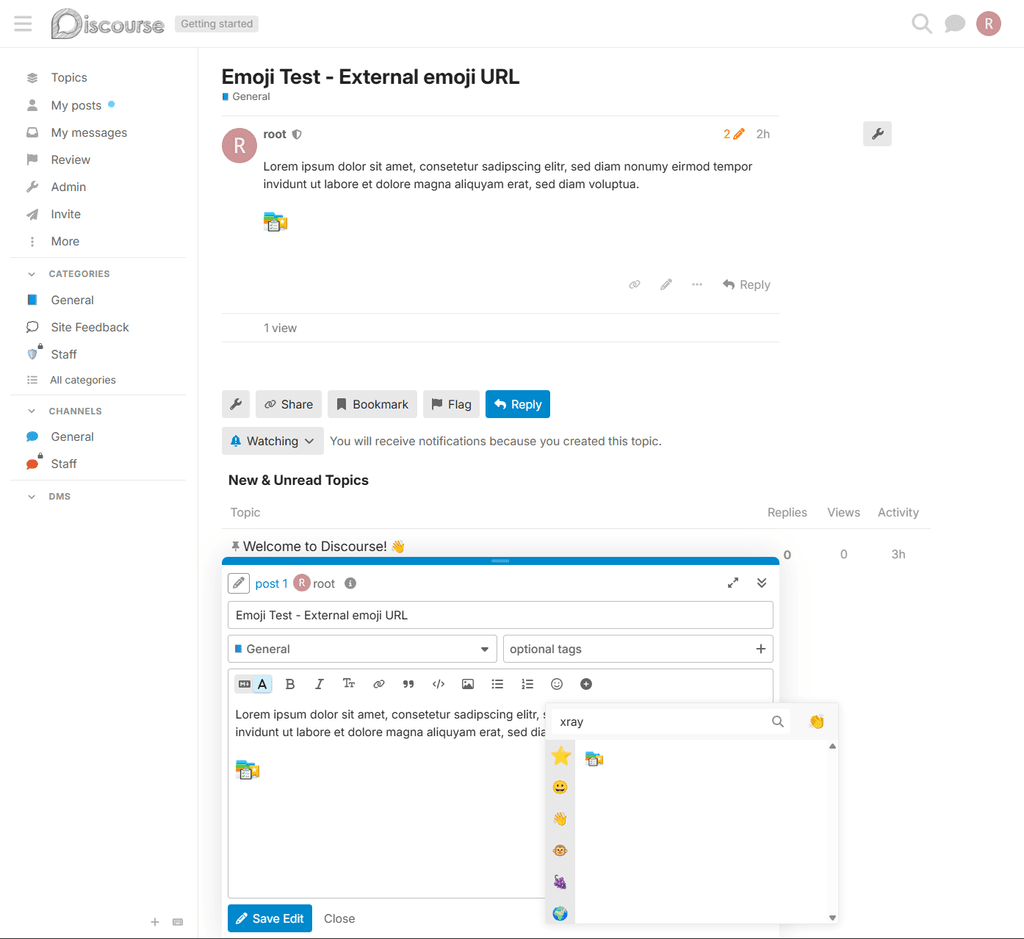
In the @lamp app I have replaced thexray.pngandx_ray.pngin the noto folder with a custom PNG, but the file name must bexray.pngandx_ray.pngto replace the xray emoji.Which then gets displayed correctly in the post and the emoji picker:
-
Hello @mononym
I have looked into this feature request for the @discourse app.
Unfortunately just tinkering with the emoji files directly does not work as flawlessly as thought.
This will result in broken images, wrong displayed emojis and even @discourse crashing when starting the app.A fully custom emoji set in @discourse can only be achieved with a custom plugin.
An example would be: https://github.com/cpradio/discourse-plugin-vb-emoticons
Which then can be configured to be used in the @discourse Emoji settings.
But there is a somewhat silver lining.
Discourse offers the configuration option to set a custom emoji URL.
With that you can specify a URL that holds custom emoji images.The external URL folder structure and file names must follow a template: https://github.com/discourse/discourse-emojis/tree/main/dist/emoji emoji set and must include all emoji image files. Otherwise, they will get displayed as broken images in the post and emoji picker.
You can download these folders and files and upload them to e.g. a @lamp app.
I have done so and placed the folders in/app/data/public/images/emoji
In @discourse I have configured the settingExternal emoji URLtohttps://lamp.cloudron.dev/images/emojiand I have set theEmoji SettoNoto Emoji.
In the @lamp app I have replaced thexray.pngandx_ray.pngin the noto folder with a custom PNG, but the file name must bexray.pngandx_ray.pngto replace the xray emoji.Which then gets displayed correctly in the post and the emoji picker:
Thank you @james !
I'll maybe open an upstream issue for the missing images. I guess the expected behaviour would be that at least the emoji picker simply omits the images not present in the emoji folder. For existing posts, it's understandable that a broken image is shown.



Hello! It looks like you're interested in this conversation, but you don't have an account yet.
Getting fed up of having to scroll through the same posts each visit? When you register for an account, you'll always come back to exactly where you were before, and choose to be notified of new replies (either via email, or push notification). You'll also be able to save bookmarks and upvote posts to show your appreciation to other community members.
With your input, this post could be even better 💗
Register Login