
How to create Sender from outbound mail ?
-
Hello.
I think setting up Keila is straight forward, but I can't figure out how to add the outbound mail as Sender. The main question is: can I simply use the outbound email provided by Cloudron fot the app or do I need to set up a Cloudron mailbox for the app ?
In the Cloudron app dashboard of Keila, the email tab shows an outbound email. I set it to
keila@domain.netand save. In Keila, I need to set up a Sender: https://www.keila.io/docs/senders. I attempted to follow the answer here: https://forum.cloudron.io/topic/3247/need-help-with-the-smtp-settings/3?_=1771073978666Server =
my.domain.net
Username =keila@domain.net
Password =my domain cloudron password
Connection security =STARTTLS
Port =587The above settings fail to send the email:
Feb 14 14:19:28 2026-02-14T13:19:28.248 [warning] Failed sending email to valid_email@mailbox.org for campaign nmc_xogqjL2z: {:no_more_hosts, {:permanent_failure, ~c"109.77.148.140", :auth_failed}}109.77.148.140= IP of the Cloudron serverDo you think I need to create a distinct mailbox in Cloudron and connect it to Keila instead ?
Thanks -
M mononym marked this topic as a question on
-
Hello @mononym
Currently, there is an issue with the Keila shared mailer admin ui.
See: https://github.com/pentacent/keila/issues/501
@brutalbirdie did write a PR to fix the issue https://github.com/pentacent/keila/pull/509Without this fix you have to setup the mailer for the campaign.
To get the credentials from the Cloudron App, open the Web Terminal and run:printenv | grep -i "CLOUDRON_MAIL"This will give you all the details.
Example mailer setup:
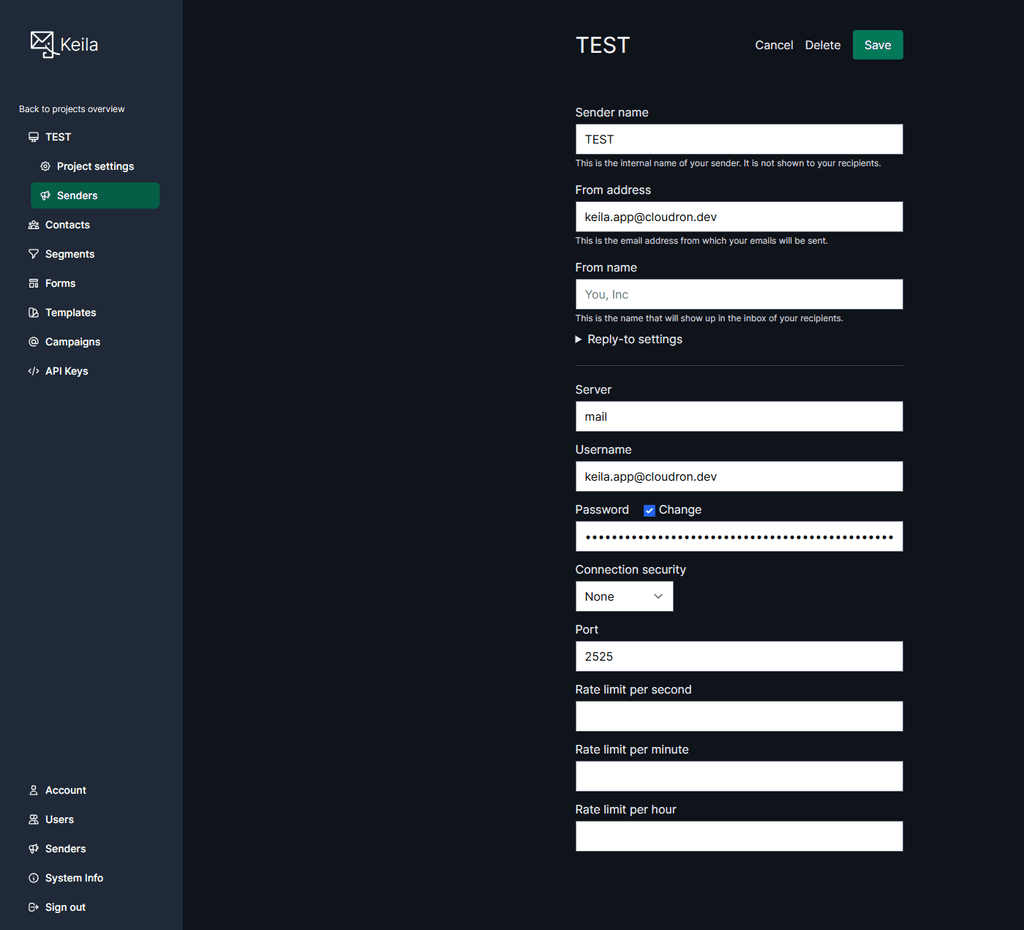
-
Hello @mononym
The Keila app has the sendmail addon.
This means automatic mail configuration is included.But I can see no default shared sender is configured on app installation which makes it confusing when setting up a campaign for the first time.
I will look into it. -
Hello @mononym
Currently, there is an issue with the Keila shared mailer admin ui.
See: https://github.com/pentacent/keila/issues/501
@brutalbirdie did write a PR to fix the issue https://github.com/pentacent/keila/pull/509Without this fix you have to setup the mailer for the campaign.
To get the credentials from the Cloudron App, open the Web Terminal and run:printenv | grep -i "CLOUDRON_MAIL"This will give you all the details.
Example mailer setup:
-
M mononym has marked this topic as solved on
-
Hello @mononym
Currently, there is an issue with the Keila shared mailer admin ui.
See: https://github.com/pentacent/keila/issues/501
@brutalbirdie did write a PR to fix the issue https://github.com/pentacent/keila/pull/509Without this fix you have to setup the mailer for the campaign.
To get the credentials from the Cloudron App, open the Web Terminal and run:printenv | grep -i "CLOUDRON_MAIL"This will give you all the details.
Example mailer setup:
@james said in How to create Sender from outbound mail ?:
Currently, there is an issue with the Keila shared mailer admin ui.
I saw that error after I started this thread. My guess was that it wasn't implemented yet as the app is marked as unstable.
@james said in How to create Sender from outbound mail ?:
This will give you all the details.
That works perfectly, thanks !
-
Hi,
This is a bug report (except if I missed something!):
- create a new Keila instance
- log in with the generic admin account (admin@cloudron.local)
- head to the "Senders" menu
- there's a button to create a shared sender. Clicking on that button triggers a server error
I tried increasing the allocated resources for the app, but no change.
Thanks -
Mar 03 15:37:42 2026-03-03T21:37:42.190 request_id=GJlyiUIE9OJthqsAAMcB [info] GET /admin/shared-senders/new
Mar 03 15:37:42 2026-03-03T21:37:42.202 request_id=GJlyiUIE9OJthqsAAMcB [info] Sent 500 in 11ms
Mar 03 15:37:42 2026-03-03T21:37:42.203 request_id=GJlyiUIE9OJthqsAAMcB [error] ** (Phoenix.Template.UndefinedError) Could not render "_config.html" for KeilaWeb.SenderView, please define a matching clause for render/2 or define a template at "lib/keila_web/templates/sender/*". The following templates were compiled:
Mar 03 15:37:42 %{form: %Phoenix.HTML.Form{source: #Ecto.Changeset<action: nil, changes: %{config: #Ecto.Changeset<action: :insert, changes: %{type: "ses"}, errors: [], data: #Keila.Mailings.Sender.Config<>, valid?: true, ...>}, errors: [], data: #Keila.Mailings.SharedSender<>, valid?: true, ...>, impl: Phoenix.HTML.FormData.Ecto.Changeset, id: "form", name: "shared_sender", data: %Keila.Mailings.SharedSender{__meta__: #Ecto.Schema.Metadata<:built, "mailings_shared_senders">, id: nil, name: nil, config: nil, inserted_at: nil, updated_at: nil}, action: nil, hidden: [], params: %{}, errors: [], options: [method: "post", id: "form", multipart: false, class: "mt-8 max-w-md flex flex-col gap-4", "@change": "setUnsavedReminder(true)", "x-data": true], index: nil}, sender_adapters: ["ses"]}
Mar 03 15:37:42 (keila 0.19.0) lib/keila_web/controllers/shared_sender_admin_controller.ex:1: KeilaWeb.SharedSenderAdminController.action/2
Mar 03 15:37:42 (keila 0.19.0) lib/keila_web/templates/shared_sender_admin/edit.html.heex:60: anonymous fn/3 in KeilaWeb.SharedSenderAdminView."edit.html"/1
Mar 03 15:37:42 (phoenix 1.7.21) lib/phoenix/controller.ex:1008: anonymous fn/5 in Phoenix.Controller.template_render_to_iodata/4
Mar 03 15:37:42 (phoenix 1.7.21) lib/phoenix/controller.ex:974: Phoenix.Controller.render_and_send/4
Mar 03 15:37:42 (phoenix_live_view 1.1.24) lib/phoenix_live_view/engine.ex:130: Phoenix.HTML.Safe.Phoenix.LiveView.Rendered.to_iodata/1
Mar 03 15:37:42 (phoenix_live_view 1.1.24) lib/phoenix_live_view/engine.ex:142: Phoenix.HTML.Safe.Phoenix.LiveView.Rendered.to_iodata/3
Mar 03 15:37:42 (phoenix_view 2.0.4) lib/phoenix_view.ex:694: Phoenix.View.__not_found__!/3
Mar 03 15:37:42 (telemetry 1.3.0) /app/code/deps/telemetry/src/telemetry.erl:324: :telemetry.span/3


Hello! It looks like you're interested in this conversation, but you don't have an account yet.
Getting fed up of having to scroll through the same posts each visit? When you register for an account, you'll always come back to exactly where you were before, and choose to be notified of new replies (either via email, or push notification). You'll also be able to save bookmarks and upvote posts to show your appreciation to other community members.
With your input, this post could be even better 💗
Register Login