
sed: can't read dashboard/my.mozysswamp.com.conf: No such file or directory
-
Hi All
looks like I found a bug maybe ( with all service down )
server is my.mozysswamp.com try to move it to https://my.4the1thathavefallen.com/ us the move domain in the UIlook list was done BUT lost access not sure so run the support files still on my.mozysswamp.com
and look in the folder and the my.mozysswamp.com.conf is lost 100% can't see it in the backup ( that can be access on the server from )
/mnt/cloudronbackupserver ssh access you can get to from bbs.mozysswamp.org port 3232 (sorry bbs is using 22 )
( did this in the shell cloudron-support --enable-remote-support)
after this I will be moving it 1 more time to my.enigmacloud.com
so we can test it after the fix if you like.root@cloudron:/home/yellowtent/box/dashboard# cloudron-support --troubleshoot Vendor: Microsoft Corporation Product: Virtual Machine Linux: 5.4.0-216-generic Ubuntu: focal 20.04 Execution environment: microsoft Processor: Intel(R) Xeon(R) CPU E5-2650 v2 @ 2.60GHz x 16 RAM: 26044984KB Disk: /dev/sda2 64G [OK] node version is correct [OK] IPv6 is enabled in kernel. No public IPv6 address [OK] docker is running [OK] docker version is correct [OK] MySQL is running [OK] netplan is good [OK] DNS is resolving via systemd-resolved [OK] unbound is running [OK] nginx is running sed: can't read /home/yellowtent/platformdata/nginx/applications/dashboard/my.mozysswamp.com.conf: No such file or directory Can't open for reading, No such file or directory 140077408437568:error:02001002:system library:fopen:No such file or directory:../crypto/bio/bss_file.c:69:fopen('','r') 140077408437568:error:2006D080:BIO routines:BIO_new_file:no such file:../crypto/bio/bss_file.c:76: unable to load certificate [FAIL] Certificate has expired. Certificate expired at Please check /home/yellowtent/platformdata/logs/tasks/14824.log for last cert renewal logs Common issues include expiry of domain's API key OR incoming http port 80 not being openlog I had just after the move
Mar 01 20:56:43 "url": "http://my.4the1thathavefallen.com/.well-known/acme-challenge/ipXkzadF5u4yTMlO9vyXvkR7pw6-TJz1qWY3eeI9FoU", Mar 01 20:56:43 "hostname": "my.4the1thathavefallen.com", Mar 01 20:56:43 "port": "80", Mar 01 20:56:43 "addressesResolved": [ Mar 01 20:56:43 "121.200.29.194" Mar 01 20:56:43 ], Mar 01 20:56:43 "addressUsed": "121.200.29.194" Mar 01 20:56:43 } Mar 01 20:56:43 ] Mar 01 20:56:43 }" Mar 01 20:56:43 box:cert/acme2 cleanupChallenge: http: true Mar 01 20:56:43 box:cert/acme2 cleanupHttpChallenge: unlinking /home/yellowtent/platformdata/acme/ipXkzadF5u4yTMlO9vyXvkR7pw6-TJz1qWY3eeI9FoU Mar 01 20:56:43 box:cert/acme2 ensureKey: generating new key for my.4the1thathavefallen.com Mar 01 20:56:43 box:shell acme2: openssl ecparam -genkey -name secp256r1 Mar 01 20:56:43 box:shell acme2: openssl req -new -key /tmp/acme-Uq0LZq/key -outform PEM -subj /CN=my.4the1thathavefallen.com -config /tmp/acme-Uq0LZq/openssl.conf Mar 01 20:56:43 box:cert/acme2 createCsr: csr file created for my.4the1thathavefallen.com Mar 01 20:56:43 box:shell acme2: openssl req -inform pem -outform der Mar 01 20:56:43 box:cert/acme2 signCertificate: sending sign request to https://acme-v02.api.letsencrypt.org/acme/finalize/140607040/485695138502 Mar 01 20:56:43 box:cert/acme2 sendSignedRequest: using nonce E1g8ClBFBXexBJlhzBrX45w4eyt0Zz6yYdlj1Fj9gU2Jl90-sZA for url https://acme-v02.api.letsencrypt.org/acme/finalize/140607040/485695138502 Mar 01 20:56:46 box:cert/acme2 waitForOrder: https://acme-v02.api.letsencrypt.org/acme/order/140607040/485695138502 Mar 01 20:56:46 box:cert/acme2 waitForOrder: getting status Mar 01 20:56:46 box:cert/acme2 sendSignedRequest: using nonce E1g8ClBFCDMW05cl9bxd8IPFNxjPwwaNsTwWna5izvyPZJxIA7k for url https://acme-v02.api.letsencrypt.org/acme/order/140607040/485695138502 Mar 01 20:56:47 box:cert/acme2 waitForOrder: status is "valid {"status":"valid","expires":"2026-03-08T09:56:20Z","identifiers":[{"type":"dns","value":"my.4the1thathavefallen.com"}],"authorizations":["https://acme-v02.api.letsencrypt.org/acme/authz/140607040/666275666882"],"finalize":"https://acme-v02.api.letsencrypt.org/acme/finalize/140607040/485695138502","certificate":"https://acme-v02.api.letsencrypt.org/acme/cert/0551c38f6ae9dcede42ce6aec41500106f98"} Mar 01 20:56:47 box:cert/acme2 downloadCertificate: downloading certificate of my.4the1thathavefallen.com Mar 01 20:56:47 box:cert/acme2 sendSignedRequest: using nonce E1g8ClBFqMoRumtVo955C75QYYsabBdj2gQC4tIMFrEt9iJS46E for url https://acme-v02.api.letsencrypt.org/acme/cert/0551c38f6ae9dcede42ce6aec41500106f98 Mar 01 20:56:47 box:cert/acme2 getCertificate: acme flow completed for my.4the1thathavefallen.com Mar 01 20:56:47 box:reverseproxy ensureCertificate: error: null Mar 01 20:56:47 box:tasks setCompleted - 14840: {"result":null,"error":null,"percent":100} Mar 01 20:56:47 box:tasks updating task 14840 with: {"completed":true,"result":null,"error":null,"percent":100} Mar 01 20:56:47 box:taskworker Task took 952.354 seconds Mar 01 20:56:47 Exiting with code 0 -
Hello @nozy
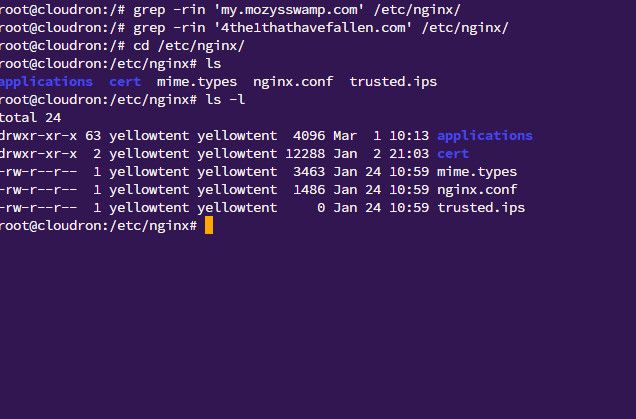
Can you please share the content of the following folder:
ls -lah /etc/nginx/applications/dashboard/and also the output of the following commands:
grep -rin 'my.mozysswamp.com' /etc/nginx/ grep -rin '4the1thathavefallen.com' /etc/nginx/ -
Hello @nozy
Note:
Ubuntu: focal 20.04when this is resolved you should upgrade to Ubuntu 22 or better 24.
See: https://docs.cloudron.io/guides/upgrade-ubuntu-22 and https://docs.cloudron.io/guides/upgrade-ubuntu-24
Please tail the following log file:
tail -f /home/yellowtent/platformdata/logs/box.logWhile tailing this logfile, in another shell session, restart the box service.
systemctl restart box.serviceIf any errors or other warning appear, please report them here.
Also, did you already try to reboot the server once? -
Hello @nozy
Note:
Ubuntu: focal 20.04when this is resolved you should upgrade to Ubuntu 22 or better 24.
See: https://docs.cloudron.io/guides/upgrade-ubuntu-22 and https://docs.cloudron.io/guides/upgrade-ubuntu-24
Please tail the following log file:
tail -f /home/yellowtent/platformdata/logs/box.logWhile tailing this logfile, in another shell session, restart the box service.
systemctl restart box.serviceIf any errors or other warning appear, please report them here.
Also, did you already try to reboot the server once?@james
looks like it is up .... its book in for this weekend in for this weekend to full upgrade just thinking if it time to move from hyper V to Promox...yep that why I move it over to the temp domains for the upgrade if I had to roll back.

looks like the config is backstarted it looks ok to me
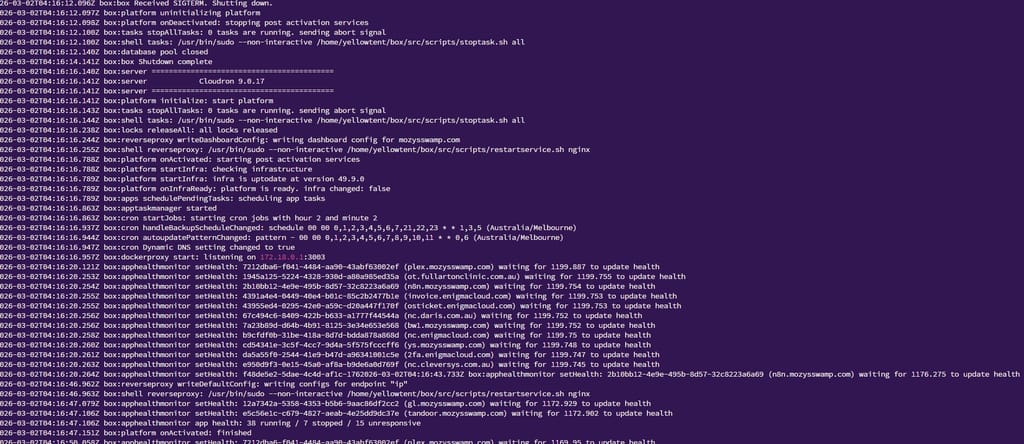
-
Hi All
looks like I found a bug maybe ( with all service down )
server is my.mozysswamp.com try to move it to https://my.4the1thathavefallen.com/ us the move domain in the UIlook list was done BUT lost access not sure so run the support files still on my.mozysswamp.com
and look in the folder and the my.mozysswamp.com.conf is lost 100% can't see it in the backup ( that can be access on the server from )
/mnt/cloudronbackupserver ssh access you can get to from bbs.mozysswamp.org port 3232 (sorry bbs is using 22 )
( did this in the shell cloudron-support --enable-remote-support)
after this I will be moving it 1 more time to my.enigmacloud.com
so we can test it after the fix if you like.root@cloudron:/home/yellowtent/box/dashboard# cloudron-support --troubleshoot Vendor: Microsoft Corporation Product: Virtual Machine Linux: 5.4.0-216-generic Ubuntu: focal 20.04 Execution environment: microsoft Processor: Intel(R) Xeon(R) CPU E5-2650 v2 @ 2.60GHz x 16 RAM: 26044984KB Disk: /dev/sda2 64G [OK] node version is correct [OK] IPv6 is enabled in kernel. No public IPv6 address [OK] docker is running [OK] docker version is correct [OK] MySQL is running [OK] netplan is good [OK] DNS is resolving via systemd-resolved [OK] unbound is running [OK] nginx is running sed: can't read /home/yellowtent/platformdata/nginx/applications/dashboard/my.mozysswamp.com.conf: No such file or directory Can't open for reading, No such file or directory 140077408437568:error:02001002:system library:fopen:No such file or directory:../crypto/bio/bss_file.c:69:fopen('','r') 140077408437568:error:2006D080:BIO routines:BIO_new_file:no such file:../crypto/bio/bss_file.c:76: unable to load certificate [FAIL] Certificate has expired. Certificate expired at Please check /home/yellowtent/platformdata/logs/tasks/14824.log for last cert renewal logs Common issues include expiry of domain's API key OR incoming http port 80 not being openlog I had just after the move
Mar 01 20:56:43 "url": "http://my.4the1thathavefallen.com/.well-known/acme-challenge/ipXkzadF5u4yTMlO9vyXvkR7pw6-TJz1qWY3eeI9FoU", Mar 01 20:56:43 "hostname": "my.4the1thathavefallen.com", Mar 01 20:56:43 "port": "80", Mar 01 20:56:43 "addressesResolved": [ Mar 01 20:56:43 "121.200.29.194" Mar 01 20:56:43 ], Mar 01 20:56:43 "addressUsed": "121.200.29.194" Mar 01 20:56:43 } Mar 01 20:56:43 ] Mar 01 20:56:43 }" Mar 01 20:56:43 box:cert/acme2 cleanupChallenge: http: true Mar 01 20:56:43 box:cert/acme2 cleanupHttpChallenge: unlinking /home/yellowtent/platformdata/acme/ipXkzadF5u4yTMlO9vyXvkR7pw6-TJz1qWY3eeI9FoU Mar 01 20:56:43 box:cert/acme2 ensureKey: generating new key for my.4the1thathavefallen.com Mar 01 20:56:43 box:shell acme2: openssl ecparam -genkey -name secp256r1 Mar 01 20:56:43 box:shell acme2: openssl req -new -key /tmp/acme-Uq0LZq/key -outform PEM -subj /CN=my.4the1thathavefallen.com -config /tmp/acme-Uq0LZq/openssl.conf Mar 01 20:56:43 box:cert/acme2 createCsr: csr file created for my.4the1thathavefallen.com Mar 01 20:56:43 box:shell acme2: openssl req -inform pem -outform der Mar 01 20:56:43 box:cert/acme2 signCertificate: sending sign request to https://acme-v02.api.letsencrypt.org/acme/finalize/140607040/485695138502 Mar 01 20:56:43 box:cert/acme2 sendSignedRequest: using nonce E1g8ClBFBXexBJlhzBrX45w4eyt0Zz6yYdlj1Fj9gU2Jl90-sZA for url https://acme-v02.api.letsencrypt.org/acme/finalize/140607040/485695138502 Mar 01 20:56:46 box:cert/acme2 waitForOrder: https://acme-v02.api.letsencrypt.org/acme/order/140607040/485695138502 Mar 01 20:56:46 box:cert/acme2 waitForOrder: getting status Mar 01 20:56:46 box:cert/acme2 sendSignedRequest: using nonce E1g8ClBFCDMW05cl9bxd8IPFNxjPwwaNsTwWna5izvyPZJxIA7k for url https://acme-v02.api.letsencrypt.org/acme/order/140607040/485695138502 Mar 01 20:56:47 box:cert/acme2 waitForOrder: status is "valid {"status":"valid","expires":"2026-03-08T09:56:20Z","identifiers":[{"type":"dns","value":"my.4the1thathavefallen.com"}],"authorizations":["https://acme-v02.api.letsencrypt.org/acme/authz/140607040/666275666882"],"finalize":"https://acme-v02.api.letsencrypt.org/acme/finalize/140607040/485695138502","certificate":"https://acme-v02.api.letsencrypt.org/acme/cert/0551c38f6ae9dcede42ce6aec41500106f98"} Mar 01 20:56:47 box:cert/acme2 downloadCertificate: downloading certificate of my.4the1thathavefallen.com Mar 01 20:56:47 box:cert/acme2 sendSignedRequest: using nonce E1g8ClBFqMoRumtVo955C75QYYsabBdj2gQC4tIMFrEt9iJS46E for url https://acme-v02.api.letsencrypt.org/acme/cert/0551c38f6ae9dcede42ce6aec41500106f98 Mar 01 20:56:47 box:cert/acme2 getCertificate: acme flow completed for my.4the1thathavefallen.com Mar 01 20:56:47 box:reverseproxy ensureCertificate: error: null Mar 01 20:56:47 box:tasks setCompleted - 14840: {"result":null,"error":null,"percent":100} Mar 01 20:56:47 box:tasks updating task 14840 with: {"completed":true,"result":null,"error":null,"percent":100} Mar 01 20:56:47 box:taskworker Task took 952.354 seconds Mar 01 20:56:47 Exiting with code 0 -
J joseph has marked this topic as solved on
-
-
will was sure I got a way to easy ....
ssl site are down for what I can see
renew the SSl key at @ 115% love code it does fight back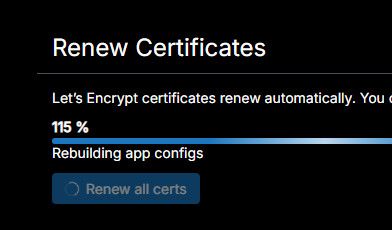
now all the SSL site are down
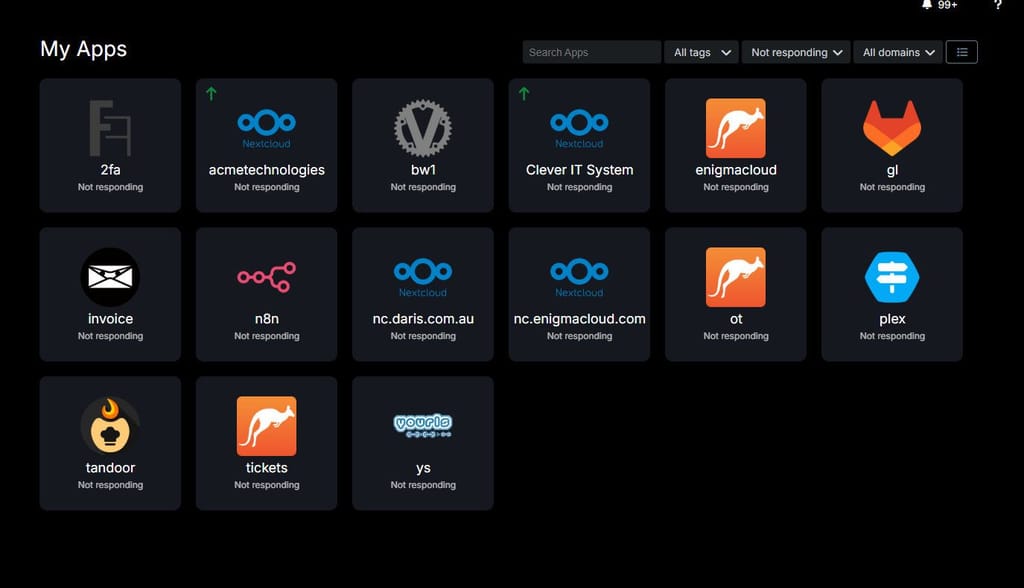
all look good till you login to one get SSL error
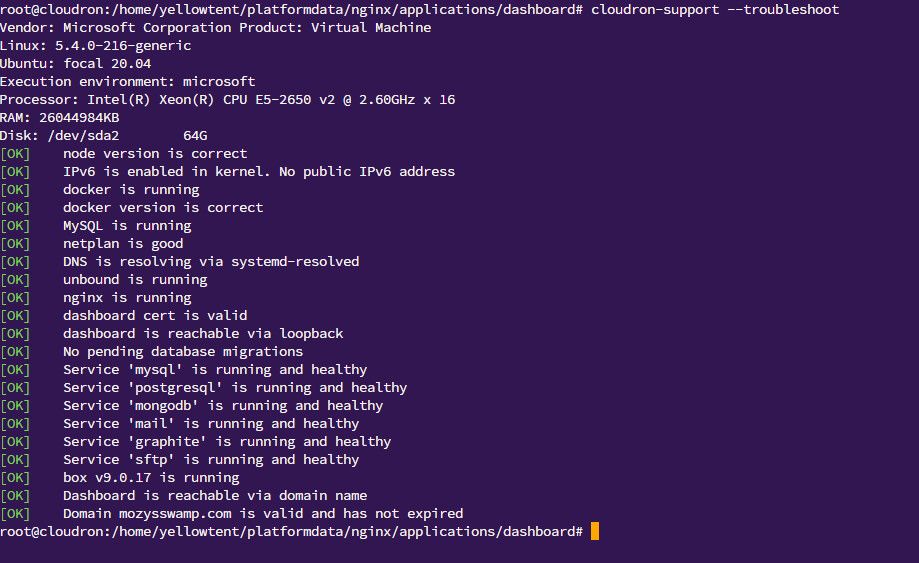
-
@nozy I had to restart docker since there was a problem with the docker network IPv6 connectivity. Now the apps seem to work.





 stop me making Dev cry ...... ( like I do a lot of right now )
Hello! It looks like you're interested in this conversation, but you don't have an account yet.
Getting fed up of having to scroll through the same posts each visit? When you register for an account, you'll always come back to exactly where you were before, and choose to be notified of new replies (either via email, or push notification). You'll also be able to save bookmarks and upvote posts to show your appreciation to other community members.
With your input, this post could be even better 💗
Register Login