Cloudron makes it easy to run web apps like WordPress, Nextcloud, GitLab on your server. Find out more or install now.


Skip to content
  • Categories
  • Recent
  • Tags
  • Popular
  • Bookmarks
  • Search
Skins
  • Light
  • Brite
  • Cerulean
  • Cosmo
  • Flatly
  • Journal
  • Litera
  • Lumen
  • Lux
  • Materia
  • Minty
  • Morph
  • Pulse
  • Sandstone
  • Simplex
  • Sketchy
  • Spacelab
  • United
  • Yeti
  • Zephyr
  • Dark
  • Cyborg
  • Darkly
  • Quartz
  • Slate
  • Solar
  • Superhero
  • Vapor

  • Default (No Skin)
  • No Skin
Collapse
Brand Logo

Cloudron Forum

Apps - Status | Demo | Docs | Install
  1. Cloudron Forum
  2. Support
  3. Volumes not mounted, Error in app

Volumes not mounted, Error in app
Scheduled Pinned Locked Moved Solved Support
mountsvolumes
8 Posts 3 Posters 101 Views 4 Watching
  • Oldest to Newest
  • Newest to Oldest
  • Most Votes
Reply
  • Reply as topic
Log in to reply
This topic has been deleted. Only users with topic management privileges can see it.
  • hpz24H Offline
    hpz24H Offline
    hpz24
    wrote last edited by joseph
    #1

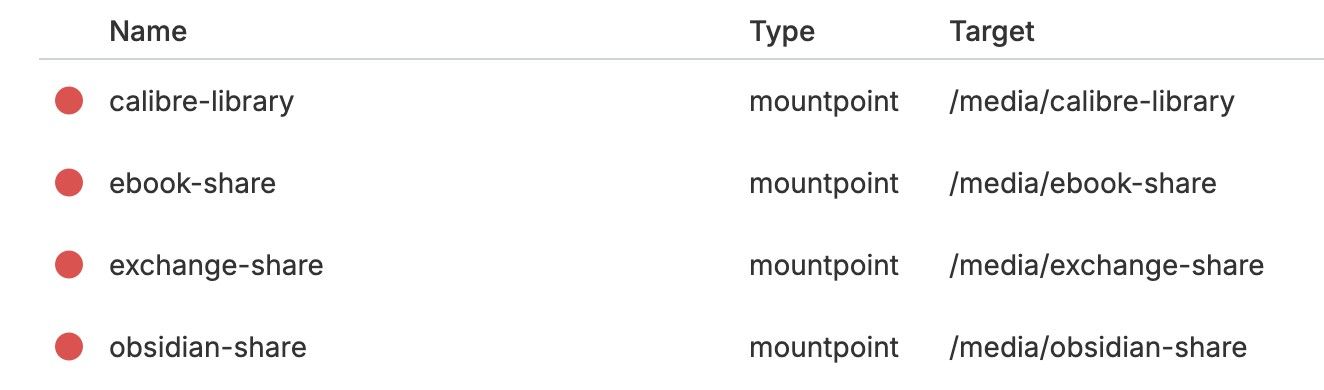
    I noticed that my Calibre Web instance is no longer working because the mounted volume containing the database could not be found.
    According to the dashboard, no volume was mounted at all, so I'm posting this here:
    4a66d2fa-6896-4d40-b9ce-0943119ad84f-image.jpeg

    I use Syncthing for the remaining 3 volumes, and interestingly enough, there are no issues there—the app (and the shares) work as usual

    There was no change in the last weeks (especially when it comes to the volumes), beside the regulary cloudron updates.

    What did I try
    • Server reboot
    • App reloaded, same error
      Output:
    Mar 30 18:55:15 apptask: createContainer: creating container
    Mar 30 18:55:15 shell: mounts: mountpoint -q -- /media/calibre-library
    Mar 30 18:55:15 shell: mounts: mountpoint -q -- /media/calibre-library errored BoxError: mountpoint exited with code 32 signal null
    Mar 30 18:55:15 apptask: run: app error for state pending_recreate_container: BoxError: Volume "calibre-library" is not active. Not mounted
    Mar 30 18:55:15 tasks: setCompleted - 3520: {"result":null,"error":{"message":"Volume \"calibre-library\" is not active. Not mounted","reason":"Bad State"},"percent":100}
    Mar 30 18:55:15 tasks: updating task 3520 with: {"completed":true,"result":null,"error":{"message":"Volume \"calibre-library\" is not active. Not mounted","reason":"Bad State"},"percent":100}
    Mar 30 18:55:15 taskworker: Task took 3.154 seconds
    Mar 30 18:55:15 Exiting with code 0
    Mar 30 18:55:15 BoxError: Volume "calibre-library" is not active. Not mounted
    Mar 30 18:55:15 BoxError: Volume "calibre-library" is not active. Not mounted
    
    • I found this case on the forum that sounds similar and tried to follow the steps, but there is no mount command with my volume id available
    • cloudron-support --troubleshoot output:
    Vendor: QEMU Product: Standard PC (Q35 + ICH9, 2009)
    Linux: 6.8.0-106-generic
    Ubuntu: noble 24.04
    Execution environment: kvm
    Processor: Intel(R) Xeon(R) Silver 4214 CPU @ 2.20GHz
    BIOS pc-q35-10.0  CPU @ 2.0GHz x 8
    RAM: 32866148KB
    Disk: /dev/sda2       541G
    [OK]	node version is correct
    [OK]	IPv6 is enabled and public IPv6 address is working
    [OK]	docker is running
    [OK]	docker version is correct
    [OK]	MySQL is running
    [OK]	netplan is good
    [OK]	DNS is resolving via systemd-resolved
    [OK]	unbound is running
    [OK]	nginx is running
    [OK]	dashboard cert is valid
    [OK]	dashboard is reachable via loopback
    [OK]	No pending database migrations
    [OK]	Service 'mysql' is running and healthy
    [OK]	Service 'postgresql' is running and healthy
    [OK]	Service 'mongodb' is running and healthy
    [OK]	Service 'mail' is running and healthy
    [OK]	Service 'graphite' is running and healthy
    [OK]	Service 'sftp' is running and healthy
    [OK]	box v9.1.5 is running
    [OK]	Dashboard is reachable via domain name
    
    • Output /home/yellowtent/platformdata/logs/box.log:
      2026-03-29T00:07:11.213Z apphealthmonitor: app health: 11 running / 6 stopped / 1 unresponsive

    What could be the problem here?
    Thanks in advance!

    1 Reply Last reply
    1
    • jamesJ Online
      jamesJ Online
      james
      Staff
      wrote last edited by
      #6

      Hello @hpz24
      Then you should use filesystem as the volume type.

      1 Reply Last reply
      1
      • J Online
        J Online
        joseph
        Staff
        wrote last edited by
        #2

        @hpz24 mountpoint means Cloudron does not manage the mountpoint. It is the user's responsibility to have them mounted before the containers are running. So, I guess the question is: do you have .mount files or fstab entries for these mountpoints?

        1 Reply Last reply
        0
        • hpz24H Offline
          hpz24H Offline
          hpz24
          wrote last edited by
          #3

          Hi, thanks for you answer!

          No, I haven´t any fstab entries or seperate .mount files, but I created the volumes in the dashboard:

          • Create folder in /media (e.g, /media/test)

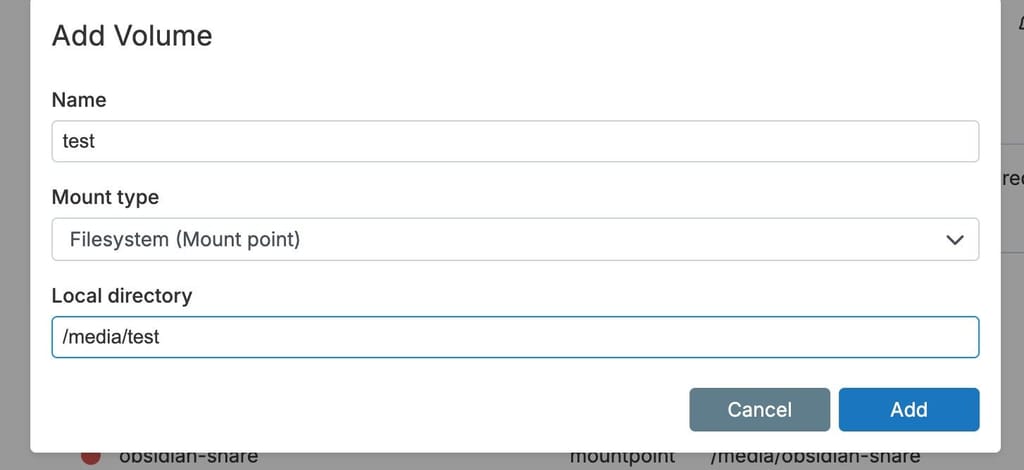
          • Create volume (screenshot)
            21bde792-695f-4f0d-8c25-b7b227f46a0a-image.jpeg

          • Volume is available in the apps (like calibre)

          The idea was to separate the data from the app, since there’s no need to back it up. Was that the wrong approach?
          Worked well for a long time...

          1 Reply Last reply
          0
          • jamesJ Online
            jamesJ Online
            james
            Staff
            wrote last edited by
            #4

            Hello @hpz24
            Are each of your /media/(calibre-libray|ebook-share|exchange-share|obsidian-share on your server really a separate drives or partitions that are mounted?

            1 Reply Last reply
            0
            • hpz24H Offline
              hpz24H Offline
              hpz24
              wrote last edited by
              #5

              Hello @james,
              none of them is a separate drive or partition, just directories that I´ve created before I set them up as volumes in the dashboard

              root@server:/media# lsblk -o path,size,model --nodeps
              PATH        SIZE MODEL
              /dev/loop0   13M
              /dev/loop1 13.4M
              /dev/loop2   74M
              /dev/loop3 48.4M
              /dev/loop4   74M
              /dev/loop5 48.1M
              /dev/sda    640G QEMU HARDDISK
              
              root@server:/media# ls -la
              total 96
              drwxr-xr-x   7 root root  4096 Apr  5 13:23 .
              drwxr-xr-x  23 root root  4096 May 19  2025 ..
              drwxrwxrwx 835 1000 root 69632 Feb 22 09:35 calibre-library
              drwxrwxrwx   5 root root  4096 Mar 30 18:46 ebook-share
              drwxrwxrwx   4 root root  4096 May 22  2025 exchange-share
              drwxrwxrwx   3 root root  4096 May 19  2025 obsidian-share
              drwxrwxrwx   2 root root  4096 Apr  5 13:23 test
              
              1 Reply Last reply
              0
              • jamesJ Online
                jamesJ Online
                james
                Staff
                wrote last edited by
                #6

                Hello @hpz24
                Then you should use filesystem as the volume type.

                1 Reply Last reply
                1
                • hpz24H Offline
                  hpz24H Offline
                  hpz24
                  wrote last edited by
                  #7

                  wow, that was easy: changed the type to filesystem and the apps are working again.
                  I have no idea why or when that changed to the wrong mount type.

                  anyway, thanks for your help, resolved 🙂

                  jamesJ 1 Reply Last reply
                  3
                  • hpz24H hpz24 has marked this topic as solved
                  • hpz24H hpz24

                    wow, that was easy: changed the type to filesystem and the apps are working again.
                    I have no idea why or when that changed to the wrong mount type.

                    anyway, thanks for your help, resolved 🙂

                    jamesJ Online
                    jamesJ Online
                    james
                    Staff
                    wrote last edited by
                    #8

                    Hello @hpz24

                    Glad to read this resolved your issue and sorry for the inconvenience.

                    1 Reply Last reply
                    1

                    Hello! It looks like you're interested in this conversation, but you don't have an account yet.

                    Getting fed up of having to scroll through the same posts each visit? When you register for an account, you'll always come back to exactly where you were before, and choose to be notified of new replies (either via email, or push notification). You'll also be able to save bookmarks and upvote posts to show your appreciation to other community members.

                    With your input, this post could be even better 💗

                    Register Login
                    Reply
                    • Reply as topic
                    Log in to reply
                    • Oldest to Newest
                    • Newest to Oldest
                    • Most Votes


                    • Login

                    • Don't have an account? Register

                    • Login or register to search.
                    • First post
                      Last post
                    0
                    • Categories
                    • Recent
                    • Tags
                    • Popular
                    • Bookmarks
                    • Search