Cloudron makes it easy to run web apps like WordPress, Nextcloud, GitLab on your server. Find out more or install now.


Skip to content
  • Categories
  • Recent
  • Tags
  • Popular
  • Bookmarks
  • Search
Skins
  • Light
  • Brite
  • Cerulean
  • Cosmo
  • Flatly
  • Journal
  • Litera
  • Lumen
  • Lux
  • Materia
  • Minty
  • Morph
  • Pulse
  • Sandstone
  • Simplex
  • Sketchy
  • Spacelab
  • United
  • Yeti
  • Zephyr
  • Dark
  • Cyborg
  • Darkly
  • Quartz
  • Slate
  • Solar
  • Superhero
  • Vapor

  • Default (No Skin)
  • No Skin
Collapse
Brand Logo

Cloudron Forum

Apps - Status | Demo | Docs | Install
  1. Cloudron Forum
  2. Discuss
  3. How to Setup LinkStack on Cloudron

How to Setup LinkStack on Cloudron

Scheduled Pinned Locked Moved Discuss
linkstacklinktreelittlelinktutorialcustom-apps
16 Posts 7 Posters 2.9k Views 8 Watching
  • Oldest to Newest
  • Newest to Oldest
  • Most Votes
Reply
  • Reply as topic
Log in to reply
This topic has been deleted. Only users with topic management privileges can see it.
  • L Offline
    L Offline
    LoudLemur
    wrote on last edited by
    #5
    chown -R www-data:www-data .
    
    1 Reply Last reply
    0
    • rstockmR Offline
      rstockmR Offline
      rstockm
      wrote on last edited by rstockm
      #6

      Thank you for the quick response. Nevertheless - no progress here, files seem to be at the right spot and with proper rights:
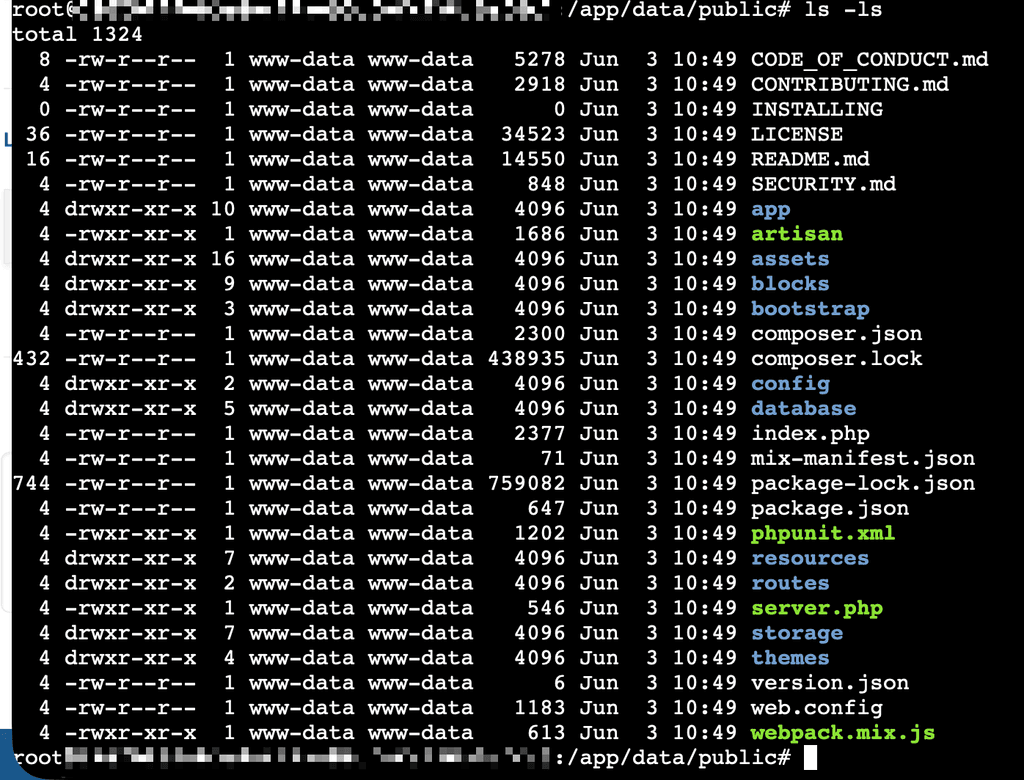
      CleanShot 2025-08-11 at 13.06.23@2x.png

      L 1 Reply Last reply
      1
      • rstockmR rstockm

        Thank you for the quick response. Nevertheless - no progress here, files seem to be at the right spot and with proper rights:

        CleanShot 2025-08-11 at 13.06.23@2x.png

        L Offline
        L Offline
        LoudLemur
        wrote on last edited by
        #7

        @rstockm Have you tried using the cli to extract the files from the zip directly into the root, instead of into a folder as usually happens? If you restart from there, you might have more success.

        1 Reply Last reply
        0
        • rstockmR Offline
          rstockmR Offline
          rstockm
          wrote on last edited by
          #8

          I'm confused. I
          a) followed your instructions step-by-step using copy&paste (except the URL, of course)
          b) postet a screenshot which shows all files are in the right place, and have the correct owner

          so either

          1. the vanilla Cloudron LDAP app behaves differently on different accounts (why should it, though?)
          2. there is an error in your manual
          3. ... I am missing something else?
          GengarG 1 Reply Last reply
          1
          • L Offline
            L Offline
            LoudLemur
            wrote on last edited by
            #9

            An error in the tutorial is the most likely explanation, I think. I will try and think back to what we were doing and see if we remember something else. Restarting from scratch might be the best idea, though you have probably tried that several times already. Maybe the browser has a cache of the page or something like that...

            1 Reply Last reply
            2
            • rstockmR rstockm

              I'm confused. I
              a) followed your instructions step-by-step using copy&paste (except the URL, of course)
              b) postet a screenshot which shows all files are in the right place, and have the correct owner

              so either

              1. the vanilla Cloudron LDAP app behaves differently on different accounts (why should it, though?)
              2. there is an error in your manual
              3. ... I am missing something else?
              GengarG Offline
              GengarG Offline
              Gengar
              wrote on last edited by
              #10

              @rstockm I did the same as you and having the same issue also.

              I guess @LoudLemur there is an issue in the tutorial.

              @rstockm did you suceed ?

              rstockmR 1 Reply Last reply
              1
              • GengarG Gengar

                @rstockm I did the same as you and having the same issue also.

                I guess @LoudLemur there is an issue in the tutorial.

                @rstockm did you suceed ?

                rstockmR Offline
                rstockmR Offline
                rstockm
                wrote on last edited by
                #11

                @Gengar said in How to Setup LinkStack on Cloudron:

                @rstockm did you suceed ?

                No, I didn't 😒

                1 Reply Last reply
                0
                • A Offline
                  A Offline
                  adhodgson
                  wrote on last edited by james
                  #12

                  I've been running with this setup for nearly 2 years, I have made the following changes to the config to use Cloudron provided services.

                  Database (MySQL):

                  DB_CONNECTION=mysql
                  DB_HOST=${CLOUDRON_MYSQL_HOST}
                  DB_DATABASE=${CLOUDRON_MYSQL_DATABASE}
                  DB_USERNAME=${CLOUDRON_MYSQL_USERNAME}
                  DB_PASSWORD=${CLOUDRON_MYSQL_PASSWORD}
                  

                  I can't remember whether I entered those environment variables into the install page on first time use or whether I had to put in the credentials directly then change them when I had finished installation.

                  Email:

                  MAIL_MAILER=smtp
                  MAIL_HOST=${CLOUDRON_MAIL_SMTP_SERVER}
                  MAIL_PORT=${CLOUDRON_MAIL_SMTP_PORT}
                  MAIL_USERNAME=${CLOUDRON_MAIL_SMTP_USERNAME}
                  MAIL_PASSWORD=${CLOUDRON_MAIL_SMTP_PASSWORD}
                  MAIL_FROM_ADDRESS=${CLOUDRON_MAIL_FROM}
                  MAIL_FROM_NAME="${APP_NAME}"
                  

                  Redis (https://blog.linkstack.org/redis-linkstack/😞

                  REDIS_HOST=${CLOUDRON_REDIS_HOST}
                  REDIS_PASSWORD=${CLOUDRON_REDIS_PASSWORD}
                  REDIS_PORT=${CLOUDRON_REDIS_PORT}
                  CACHE_DRIVER=redis
                  SESSION_DRIVER=redis
                  

                  Hope this helps.
                  Andrew.

                  1 Reply Last reply
                  3
                  • GengarG Offline
                    GengarG Offline
                    Gengar
                    wrote on last edited by Gengar
                    #13

                    Ok I did it and it works. @rstockm FYI, here is how I did it :

                    1. Install LAMP and open the terminal

                    2. Cd to the web root directory

                    cd /app/data/public
                    
                    1. Download the Latest LinkStack Release
                    LATEST_URL=$(curl -s https://api.github.com/repos/LinkStackOrg/LinkStack/releases/latest \
                      | grep "browser_download_url" \
                      | grep "linkstack.zip" \
                      | cut -d '"' -f 4)
                    
                    wget -O linkstack.zip "$LATEST_URL"
                    unzip -o linkstack.zip
                    rm linkstack.zip
                    
                    
                    1. Remove Cloudron’s LAMP Default index.php
                    rm index.php
                    
                    1. Fix folder structure
                      LinkStack is extracted inside a folder named linkstack/.
                      Move everything to the real web root:
                    mv linkstack/* ./
                    mv linkstack/.* ./ 2>/dev/null || true
                    rmdir linkstack
                    
                    1. Fix permissions
                    chown -R www-data:www-data /app/data/public
                    
                    1. Restart the app in Cloudron
                    2. Open the URL and follow the LinkStack setup installation guide.
                    1 Reply Last reply
                    6
                    • GrienauerG Offline
                      GrienauerG Offline
                      Grienauer
                      wrote on last edited by
                      #14

                      Step by step instructions from @gengar worked like a charm!

                      Drupal CMS and Open Source Expert, Mautic Community lead Secretary

                      1 Reply Last reply
                      2
                      • jdaviescoatesJ Offline
                        jdaviescoatesJ Offline
                        jdaviescoates
                        wrote on last edited by
                        #15

                        I just tried them too - so easy! Can literally copy paste it all as is and then it's done! πŸ‘ @gengar

                        I use Cloudron with Gandi & Hetzner

                        1 Reply Last reply
                        3
                        • robiR Offline
                          robiR Offline
                          robi
                          wrote on last edited by
                          #16

                          Has anyone experienced admin dashboard slowness?

                          Front end is fine, but clicking on management has the browser wait for 5-10secs.

                          Logs show:

                          Jun 11 18:59:03 172.69.67.20 - - [11/Jun/2026:23:59:03 +0000] "POST /studio/edit-link HTTP/1.1" 302 390 "https://l.toldyouso.com/studio/edit-link/121242148" "Mozilla/5.0 (Macintosh; Intel Mac OS X 10_15_7) AppleWebKit/537.36 (KHTML, like Gecko) Chrome/149.0.0.0 Safari/537.36"
                          Jun 11 18:59:04 [Thu Jun 11 23:59:04.258485 2026] [access_compat:error] [pid 72] [client 162.159.106.71:59436] AH01797: client denied by server configuration: /app/data/public/.env
                          Jun 11 18:59:04 162.159.106.71 - - [11/Jun/2026:23:59:04 +0000] "HEAD /.env HTTP/1.1" 403 - "-" "-"
                          Jun 11 18:59:04 [Thu Jun 11 23:59:04.412636 2026] [access_compat:error] [pid 74] [client 172.68.27.182:56976] AH01797: client denied by server configuration: /app/data/public/database/database.sqlite
                          Jun 11 18:59:04 172.68.27.182 - - [11/Jun/2026:23:59:04 +0000] "HEAD /database/database.sqlite HTTP/1.1" 403 - "-" "-"
                          Jun 11 18:59:10 - - - [11/Jun/2026:23:59:10 +0000] "GET / HTTP/1.1" 200 33462 "-" "Mozilla (CloudronHealth)"
                          Jun 11 18:59:15 172.69.67.20 - - [11/Jun/2026:23:59:03 +0000] "GET /studio/links HTTP/1.1" 200 34944 "https://l.toldyouso.com/studio/edit-link/121242148" "Mozilla/5.0 (Macintosh; Intel Mac OS X 10_15_7) AppleWebKit/537.36 (KHTML, like Gecko) Chrome/149.0.0.0 Safari/537.36"
                          Jun 11 18:59:15 172.69.67.20 - - [11/Jun/2026:23:59:15 +0000] "GET /@rob HTTP/1.1" 200 76669 "https://l.toldyouso.com/studio/links" "Mozilla/5.0 (Macintosh; Intel Mac OS X 10_15_7) AppleWebKit/537.36 (KHTML, like Gecko) Chrome/149.0.0.0 Safari/537.36"
                          Jun 11 18:59:16 172.69.67.20 - - [11/Jun/2026:23:59:15 +0000] "GET /@rob HTTP/1.1" 200 76669 "https://l.toldyouso.com/studio/links" "Mozilla/5.0 (Macintosh; Intel Mac OS X 10_15_7) AppleWebKit/537.36 (KHTML, like Gecko) Chrome/149.0.0.0 Safari/537.36"
                          Jun 11 18:59:16 - - - [11/Jun/2026:23:59:16 +0000] "OPTIONS * HTTP/1.0" 200 - "-" "Apache/2.4.58 (Ubuntu) OpenSSL/3.0.13 (internal dummy connection)"

                          

                          Conscious tech

                          1 Reply Last reply
                          0

                          Hello! It looks like you're interested in this conversation, but you don't have an account yet.

                          Getting fed up of having to scroll through the same posts each visit? When you register for an account, you'll always come back to exactly where you were before, and choose to be notified of new replies (either via email, or push notification). You'll also be able to save bookmarks and upvote posts to show your appreciation to other community members.

                          With your input, this post could be even better πŸ’—

                          Register Login
                          Reply
                          • Reply as topic
                          Log in to reply
                          • Oldest to Newest
                          • Newest to Oldest
                          • Most Votes


                          • Login

                          • Don't have an account? Register

                          • Login or register to search.
                          • First post
                            Last post
                          0
                          • Categories
                          • Recent
                          • Tags
                          • Popular
                          • Bookmarks
                          • Search