
Rsync backup integrity fails for one Nextcloud and Jellyfin.
-
Hello @jdaviescoates
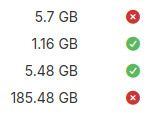
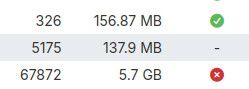
The logs are too short to see what failed the verification process.
If you could provide the full log file we might find something in them that could point out why.@james it'll DM you a link to the full logs
-
@james I've shared the link to full logs in chat on here
-
Hello @jdaviescoates
It looks like the back verification for Nextcloud failed because of:2026-04-07T15:37:52.568Z backupformat/rsync: verify: file count mismatch: Got 284709 files. Expecting 285450 files 2026-04-07T15:37:52.568Z tasks: updating task 26236 with: {"message":"Verification of 2026-04-07-000001-578/app_SUB.DOMAIN.TLD_v5.7.1 done"} 2026-04-07T15:37:52.568Z backupintegrity: verified: 2026-04-07-000001-578/app_SUB.DOMAIN.TLD_v5.7.1 [ "Got 284709 files. Expecting 285450 files" ]A difference of 741 files missing.
These files could be image preview files from Nextcloud which got deleted.
This is the only issue I see in the log.Would be interesting see what happens if Nextcloud is put into maintenance mode, so no files get changed by users, a backup is created twice and these two backups are compared against each other.
-
Hello @jdaviescoates
It looks like the back verification for Nextcloud failed because of:2026-04-07T15:37:52.568Z backupformat/rsync: verify: file count mismatch: Got 284709 files. Expecting 285450 files 2026-04-07T15:37:52.568Z tasks: updating task 26236 with: {"message":"Verification of 2026-04-07-000001-578/app_SUB.DOMAIN.TLD_v5.7.1 done"} 2026-04-07T15:37:52.568Z backupintegrity: verified: 2026-04-07-000001-578/app_SUB.DOMAIN.TLD_v5.7.1 [ "Got 284709 files. Expecting 285450 files" ]A difference of 741 files missing.
These files could be image preview files from Nextcloud which got deleted.
This is the only issue I see in the log.Would be interesting see what happens if Nextcloud is put into maintenance mode, so no files get changed by users, a backup is created twice and these two backups are compared against each other.
-
Hello @jdaviescoates
It looks like the back verification for Nextcloud failed because of:2026-04-07T15:37:52.568Z backupformat/rsync: verify: file count mismatch: Got 284709 files. Expecting 285450 files 2026-04-07T15:37:52.568Z tasks: updating task 26236 with: {"message":"Verification of 2026-04-07-000001-578/app_SUB.DOMAIN.TLD_v5.7.1 done"} 2026-04-07T15:37:52.568Z backupintegrity: verified: 2026-04-07-000001-578/app_SUB.DOMAIN.TLD_v5.7.1 [ "Got 284709 files. Expecting 285450 files" ]A difference of 741 files missing.
These files could be image preview files from Nextcloud which got deleted.
This is the only issue I see in the log.Would be interesting see what happens if Nextcloud is put into maintenance mode, so no files get changed by users, a backup is created twice and these two backups are compared against each other.
Would be interesting see what happens if Nextcloud is put into maintenance mode, so no files get changed by users, a backup is created twice and these two backups are compared against each other.
How would that help with this odd file count mismatch?
I'd guess both of those backups would be the same, but that the integrity checker would still have this odd file count mismatch.
But also, how to actually compare to rsync backups with each other given neither of them are single downloadable files

What am I missing?

-
Hello @jdaviescoates
Nextcloud creates image preview files and removes them constantly.
And not just one preview file, multiple.
This can mean that if one image gets uploaded or deleted that Nextcloud will add or remove multiple other files.
I suspect that this might happen in the backup process and thus changing the amount of files.With enabling the maintenance mode of Nextcloud, creating a backup twice, I would like to confirm if it is really that and not something else.
Since if I remember correctly, in maintenance mode Nextcloud should do nothing.If this is really the case, maybe we should consider moving the image preview folder outside of
/app/datasince it is also not really backup worthy. -
Hi @james there is also another option to completely disable image preview generation, or limit to only some providers:
For high security deployments we recommend disabling the preview generation by setting the enable_previews switch to false in config.php. As an administrator you are also able to manage which preview providers are enabled by modifying the enabledPreviewProviders option switch.
Sources:
-
Hello @jdaviescoates
Nextcloud creates image preview files and removes them constantly.
And not just one preview file, multiple.
This can mean that if one image gets uploaded or deleted that Nextcloud will add or remove multiple other files.
I suspect that this might happen in the backup process and thus changing the amount of files.With enabling the maintenance mode of Nextcloud, creating a backup twice, I would like to confirm if it is really that and not something else.
Since if I remember correctly, in maintenance mode Nextcloud should do nothing.If this is really the case, maybe we should consider moving the image preview folder outside of
/app/datasince it is also not really backup worthy.I suspect that this might happen in the backup process and thus changing the amount of files.
I think that's actually unlikely in this case because I'm pretty much the only active user of this instance and it backs up while I'm asleep.
But I'll try to give enabling maintenance mode a try to see what we can see...
-
@james I'd like to get to the bottom of why my rsync Nextcloud and Jellyfin backups always fail the integrity check.
I'm pretty certain it's not something happen during the backup process because if that were the case it'd only happen on some rare occasions when I'm active during the backup process, but it is literally every single rsync back up with both of these apps.
Nextcloud always seems to say:
Failed to verify 2026-05-31-000001-449/app_office.uniteddiversity.coop_v5.8.2: Cannot read properties of undefined (reading 'size')and
Jellyfin similarly always seems to say:
Failed to verify 2026-05-31-000001-449/app_media.uniteddiversity.coop_v1.13.7: Cannot read properties of undefined (reading 'size')So both seem to be having the same issue:
Cannot read properties of undefined (reading 'size')It doesn't happen on my other Nextcloud instance.
Any idea how we might get to the bottom of it?
BTW: out of interest I figured I'd try doing what you suggested previously (even though I don't really see how that'd help us work out what's going on) I tried to put the Nextcloud into maintenance mode using this command as per https://docs.nextcloud.com/server/stable/admin_manual/maintenance/backup.html#maintenance-mode
$ sudo -E -u www-data php occ maintenance:mode --onBut that just returned:
bash: $: command not found -
Hello @jdaviescoates
Theooctool is called this way https://docs.cloudron.io/packages/nextcloud#running-occ-toolsudo -u www-data php -f /app/code/occ $COMMAND -
Hello @jdaviescoates
Theooctool is called this way https://docs.cloudron.io/packages/nextcloud#running-occ-toolsudo -u www-data php -f /app/code/occ $COMMANDHello @jdaviescoates
Theooctool is called this way https://docs.cloudron.io/packages/nextcloud#running-occ-toolsudo -u www-data php -f /app/code/occ $COMMANDThanks, that worked.


Hello! It looks like you're interested in this conversation, but you don't have an account yet.
Getting fed up of having to scroll through the same posts each visit? When you register for an account, you'll always come back to exactly where you were before, and choose to be notified of new replies (either via email, or push notification). You'll also be able to save bookmarks and upvote posts to show your appreciation to other community members.
With your input, this post could be even better 💗
Register Login