
2FA sync via Cloudron Connector not working
-
-
In troubleshooting the following https://forum.cloudron.io/topic/15562/2fa-sync-via-cloudron-connector-not-working?_=1780301632476 last week:
- I enabled local 2FA on the "child" cloudron server (CSB)
- I attempted to login on CSB using a synced user.
- This leads CSB to ask to register for MFA (and in that instance create a passkey)
Having completed the test (and seeing that the "synced user" did not carry the 2FA from the parent Cloudron server - CSA - but rather was forcing to create a new 2FA/passkey for the synced user), I then turned off the enabling/enforcing of 2FA on CSB.
Right now, when this synced user (from CSA) attempt to log into CSB, username / password works fine. However he is prompted to use a passkey which only exists on CSB and which does not correspond to his MFA/passkey from CSA
Because it is a synced user ("synced from the external LDAP directory") there is also no option to reset his local MFA/passkey.
Not too sure how to process from here. Any suggestions?
-
T Teiluj referenced this topic on
-
Hello @teiluj
I have merged the topics together since this will be related.Interesting, indeed.
Since passkeys are bound to the domain, a Cloudron doing auth over another Cloudron how that should be handled is something we have to look into.
Thank you very much for working on this and giving us more insights. -
 G girish has marked this topic as solved on
-
In troubleshooting the following https://forum.cloudron.io/topic/15562/2fa-sync-via-cloudron-connector-not-working?_=1780301632476 last week:
- I enabled local 2FA on the "child" cloudron server (CSB)
- I attempted to login on CSB using a synced user.
- This leads CSB to ask to register for MFA (and in that instance create a passkey)
Having completed the test (and seeing that the "synced user" did not carry the 2FA from the parent Cloudron server - CSA - but rather was forcing to create a new 2FA/passkey for the synced user), I then turned off the enabling/enforcing of 2FA on CSB.
Right now, when this synced user (from CSA) attempt to log into CSB, username / password works fine. However he is prompted to use a passkey which only exists on CSB and which does not correspond to his MFA/passkey from CSA
Because it is a synced user ("synced from the external LDAP directory") there is also no option to reset his local MFA/passkey.
Not too sure how to process from here. Any suggestions?
Teiluj said:
Right now, when this synced user (from CSA) attempt to log into CSB, username / password works fine. However he is prompted to use a passkey which only exists on CSB and which does not correspond to his MFA/passkey from CSA
Because it is a synced user ("synced from the external LDAP directory") there is also no option to reset his local MFA/passkey.
Not too sure how to process from here. Any suggestions?
Apologies for bringing this up again but I do not think that the fix has been released for this yet and this is now creating major challenges.
How can I clear CSB-defined passkey for a given LDAP-synced from CSA user on CSB?
Hopefully this makes sense. Grateful in advance for any hints/help on this.
-
What is the way to clear 2FA (including passkey) for a given user?
If I stop the LDAP sync, clear the 2FA for the related user on CSB and restart the sync, would this get around the issue for now?
I know that @staff are working on Cloudron 10 and I am looking forward to this, but not having a working 2FA for Cloudron synced user and OIDC enabled apps is somewhat of a security concerns of importance,I would argue.
-
Hello @teiluj
The fix is included in Cloudron version 10.Hi @james - The release of the fix with v10, I understood. But I am not certain you can share a date for when v10 will be out, or can you (I see this is the demo server already!)?
OK so for the record, the following worked to re-enable the user to access the app:
With a local (i.e. non-LDAP-synced) admin user on CSB- Disable the LDAP sync on CSB
- Impersonate the impacted user on CSB
- While logged in CSB as the impacted user, go to profile and disable TOTP/passkey as required
- Logout from CSB as the impacted user
- Login on CSB as the local admin user
- Re-enable/reset the LDAP sync with CSA
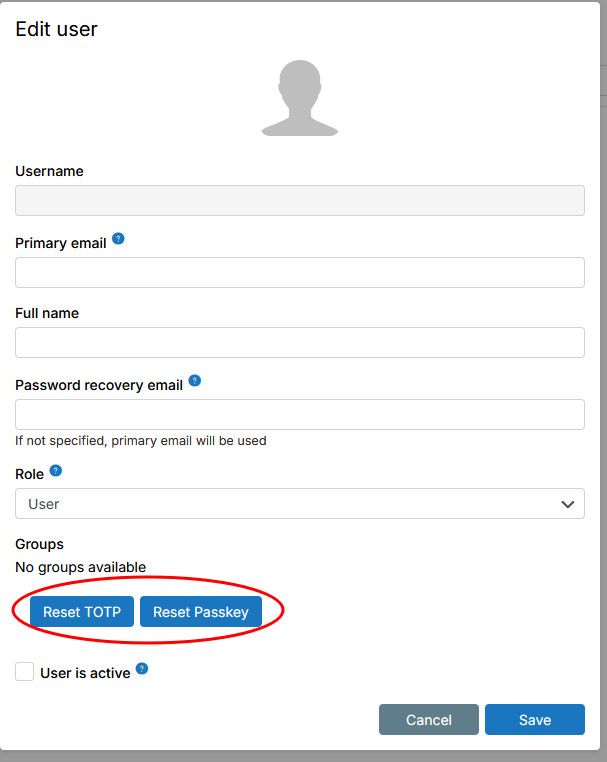
This would have been a lot faster, less complicated if an admin user had the possibility to reset TOTP/Passkey for other users.
Could this be made as a feature request?Something like the following would be great

Hello! It looks like you're interested in this conversation, but you don't have an account yet.
Getting fed up of having to scroll through the same posts each visit? When you register for an account, you'll always come back to exactly where you were before, and choose to be notified of new replies (either via email, or push notification). You'll also be able to save bookmarks and upvote posts to show your appreciation to other community members.
With your input, this post could be even better 💗
Register Login