
Stupid Q but how do you safely turn off a Cloudron home server?
-
How do you safely turn off a Cloudron home server if you want to perform some hardware maintenance?
I know there's a restart button in the dashboard and the lack of a shutdown button must mean I need to use the terminal. If so, does the standard Ubuntu "shutdown now" command do the trick?
-
 H humpty marked this topic as a question on
-
How do you safely turn off a Cloudron home server if you want to perform some hardware maintenance?
I know there's a restart button in the dashboard and the lack of a shutdown button must mean I need to use the terminal. If so, does the standard Ubuntu "shutdown now" command do the trick?
@humptydumpty Kinda related, but I recommend Eve plugs as a way to turn things off and on again remotely — assuming the thing that internet access isn't the thing that needs turn off and on again.
Even then you could potentially do that on an overnight schedule whilst away, so that the longest you'd be without a power cycle for a router would be until that time.
Web Design & Development: https://www.evergreen.je
Technology & Apps: https://www.marcusquinn.com -
@humptydumpty Kinda related, but I recommend Eve plugs as a way to turn things off and on again remotely — assuming the thing that internet access isn't the thing that needs turn off and on again.
Even then you could potentially do that on an overnight schedule whilst away, so that the longest you'd be without a power cycle for a router would be until that time.
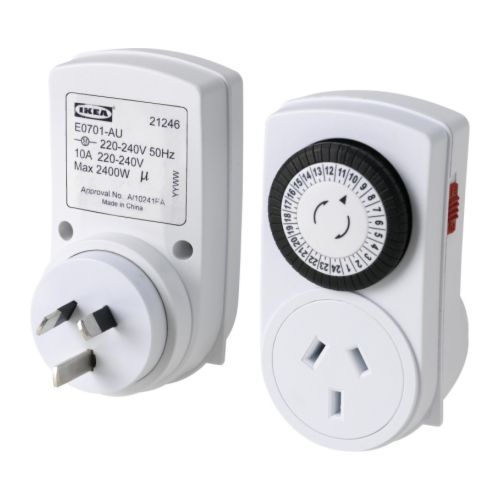
@marcusquinn Great idea! I have some laying around (Feit brand) but I keep losing access to them in the FEIT app. My custom schedules kept working though.
For the router, I could use something more reliable like a manual one that I got from IKEA like a decade ago. I can't find anything like it on their current website. It's a 24 hour timer and you set it up by pushing the black pins down to control the power.
-
@marcusquinn Great idea! I have some laying around (Feit brand) but I keep losing access to them in the FEIT app. My custom schedules kept working though.
For the router, I could use something more reliable like a manual one that I got from IKEA like a decade ago. I can't find anything like it on their current website. It's a 24 hour timer and you set it up by pushing the black pins down to control the power.
@humptydumpty Magic! Sometimes I think to myself, there's really nothing left to invent in the world, we just have to use it all now

-
How do you safely turn off a Cloudron home server if you want to perform some hardware maintenance?
I know there's a restart button in the dashboard and the lack of a shutdown button must mean I need to use the terminal. If so, does the standard Ubuntu "shutdown now" command do the trick?
-
@humptydumpty yes the normal
shutdowncommand should work as expected. Also I just tried on my server here, it seems Ubuntu 20 at least also has configured the physical power button to perform a normal shutdown, if that is easier to reach. -
 G girish marked this topic as a regular topic on
-
 N nebulon marked this topic as a question on
-
N nebulon has marked this topic as solved on

Hello! It looks like you're interested in this conversation, but you don't have an account yet.
Getting fed up of having to scroll through the same posts each visit? When you register for an account, you'll always come back to exactly where you were before, and choose to be notified of new replies (either via email, or push notification). You'll also be able to save bookmarks and upvote posts to show your appreciation to other community members.
With your input, this post could be even better 💗
Register Login