
Mixpost
-
@humptydumpty lol 🫡
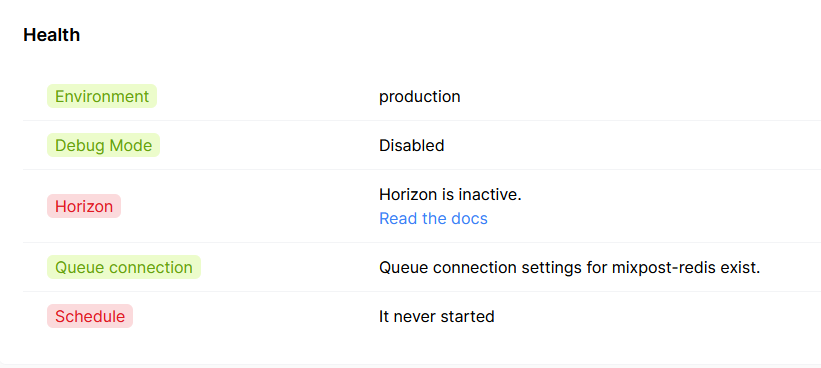
Final update for now: got all services "UP" and "working"
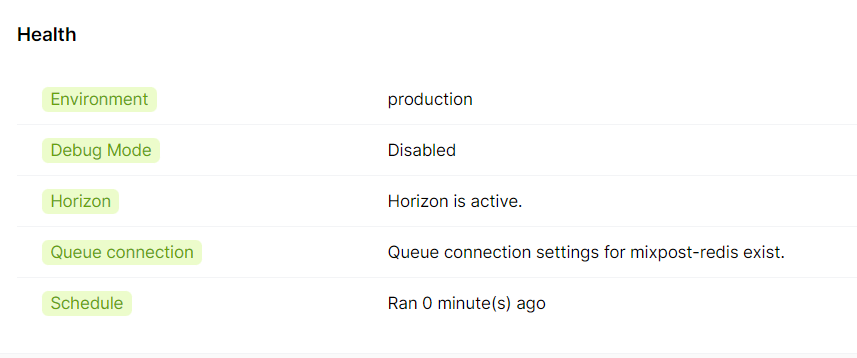
BUT... - still need to have Horizon/Supervisor Config set as it only stays alive for a little, in that time I was able to push some posts through

Dwindled down from 38 to 7 errors – something regarding: Illuminate & Symfony
[2023-08-06 22:56:13] production.ERROR: Not enough arguments (missing: "name"). {"exception":"[object] (Symfony\Component\Console\Exception\RuntimeException(code: 0): Not enough arguments (missing: "name"). at /app/data/mixpost-pro-team-app/vendor/symfony/console/Input/Input.php:76)
[stacktrace]
#0 /app/data/mixpost-pro-team-app/vendor/symfony/console/Command/Command.php(321): Symfony\Component\Console\Input\Input->validate()
#1 /app/data/mixpost-pro-team-app/vendor/laravel/framework/src/Illuminate/Console/Command.php(181): Symfony\Component\Console\Command\Command->run()
#2 /app/data/mixpost-pro-team-app/vendor/symfony/console/Application.php(1081): Illuminate\Console\Command->run()
#3 /app/data/mixpost-pro-team-app/vendor/symfony/console/Application.php(320): Symfony\Component\Console\Application->doRunCommand()
#4 /app/data/mixpost-pro-team-app/vendor/symfony/console/Application.php(174): Symfony\Component\Console\Application->doRun()
#5 /app/data/mixpost-pro-team-app/vendor/laravel/framework/src/Illuminate/Foundation/Console/Kernel.php(201): Symfony\Component\Console\Application->run()
#6 /app/data/mixpost-pro-team-app/artisan(37): Illuminate\Foundation\Console\Kernel->handle()
#7 {main}
"}@plusone-nick said in Mixpost:
[2023-08-06 22:56:13] production.ERROR: Not enough arguments (missing: "name"). {"exception":"[object] (Symfony\Component\Console\Exception\RuntimeException(code: 0): Not enough arguments (missing: "name"). at /app/data/mixpost-pro-team-app/vendor/symfony/console/Input/Input.php:76)
this seems like some CLI is expecting more arguments (specifically --name or something)
-
All errors cleared, and the system has been up for about two days going on three so i think it's safe to say its usable
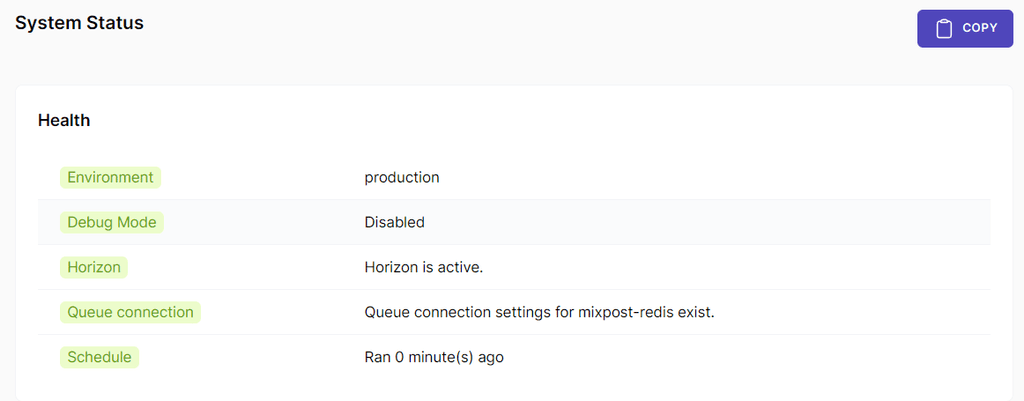
Still need a workaround for one last step to complete: configure a process monitor Supervisor as it wants to write to /etc/supervisor/conf.dOther than that i will document the steps i took and share them here before the end of the week
-
Cloudron + Mixpost + LAMP = +1
Note: this is for the Pro/Enterprise version of Mixpost
On a fresh LAMP install open a terminal
Step 1:
cd /app/data/Step 2:
composer create-project inovector/mixpost-pro-team-appStep 3: From the File Manager: You can use command line if you like
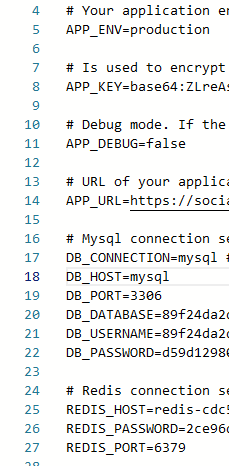
Change owner of the mixpost-pro-team-app folder to www-dataStep 4 Enter the mixpost-pro-team-app folder and open .env and Populate:
APP_URL=https://YOUR-DOMAIN
APP_ENV=production (WHEN READY)
APP_DEBUG=fale
Step 5: Populate SQL (creds @: /app/data/credentials.txt)
DB_HOST=172.18.30.1            /
DB_PORT=3306                     /
DB_DATABASE=CLOUDRON_MYSQL_DATABASE
DB_USERNAME=CLOUDRON_MYSQL_USERNAME
DB_PASSWORD=CLOUDRON_MYSQL_PASSWORD
NOTE: I had to put the slash / after the two DB_ env vars because the numbers were causing a line bug in the markdown while generating this post so make sure to remove them if you copy and paste the whole code block
Step 6: Populate REDIS (creds @: /app/data/credentials.txt )
REDIS_HOST=CLOUDRON_REDIS_HOST
REDIS_PASSWORD=CLOUDRON_REDIS_PASSWORD
REDIS_PORT=6379
- Save and Close
Step 7: Configure Database Tables:
cd /app/data/mixpost-pro-team-app
php artisan queue:batches-table
php artisan migrate
php artisan vendor:publish --tag=mixpost-config
Step 8: go to and edit
/app/data/apache/app.confChange both instances of: /app/data/public
To:/app/data/mixpost-pro-team-app/public- Save and Close
Step 9: On the CRON tab paste and save below:
* * * * * cd /app/data/mixpost-pro-team-app && php artisan schedule:run >> /app/data/null 2>&1Step 10: Install Supervisor:
sudo apt-get install supervisorStep 11: Cache Config:
php artisan config:cacheStep 12: Cache Routes:
php artisan route:cacheStep 13: Restart the APP to save the config
Step 14: Go to /app/data/mixpost-pro-team-app/ & Then Start Horizon
cd /app/data/mixpost-pro-team-app/
php artisan horizon
Step 15: Go to the landing page and register!
🦾

NOTE: i think there is still a need to figure out a solution to configure Supervisor: https://docs.inovector.com/books/server-configuration-mixpost/page/installing-configuring-supervisor
-
Until then manually start the app with php artisan horizon as needed
-
I Only have one license so I had to retrace the steps I took. If there are any errors please forgive me!
-
If anyone runs into issues let me know. I will help troubleshoot and can rebuild my instance as needed =]
 ️
️ +1
+1
✌💙+1
-
-
Cloudron + Mixpost + LAMP = +1
Note: this is for the Pro/Enterprise version of Mixpost
On a fresh LAMP install open a terminal
Step 1:
cd /app/data/Step 2:
composer create-project inovector/mixpost-pro-team-appStep 3: From the File Manager: You can use command line if you like
Change owner of the mixpost-pro-team-app folder to www-dataStep 4 Enter the mixpost-pro-team-app folder and open .env and Populate:
APP_URL=https://YOUR-DOMAIN
APP_ENV=production (WHEN READY)
APP_DEBUG=fale
Step 5: Populate SQL (creds @: /app/data/credentials.txt)
DB_HOST=172.18.30.1            /
DB_PORT=3306                     /
DB_DATABASE=CLOUDRON_MYSQL_DATABASE
DB_USERNAME=CLOUDRON_MYSQL_USERNAME
DB_PASSWORD=CLOUDRON_MYSQL_PASSWORD
NOTE: I had to put the slash / after the two DB_ env vars because the numbers were causing a line bug in the markdown while generating this post so make sure to remove them if you copy and paste the whole code block
Step 6: Populate REDIS (creds @: /app/data/credentials.txt )
REDIS_HOST=CLOUDRON_REDIS_HOST
REDIS_PASSWORD=CLOUDRON_REDIS_PASSWORD
REDIS_PORT=6379
- Save and Close
Step 7: Configure Database Tables:
cd /app/data/mixpost-pro-team-app
php artisan queue:batches-table
php artisan migrate
php artisan vendor:publish --tag=mixpost-config
Step 8: go to and edit
/app/data/apache/app.confChange both instances of: /app/data/public
To:/app/data/mixpost-pro-team-app/public- Save and Close
Step 9: On the CRON tab paste and save below:
* * * * * cd /app/data/mixpost-pro-team-app && php artisan schedule:run >> /app/data/null 2>&1Step 10: Install Supervisor:
sudo apt-get install supervisorStep 11: Cache Config:
php artisan config:cacheStep 12: Cache Routes:
php artisan route:cacheStep 13: Restart the APP to save the config
Step 14: Go to /app/data/mixpost-pro-team-app/ & Then Start Horizon
cd /app/data/mixpost-pro-team-app/
php artisan horizon
Step 15: Go to the landing page and register!
🦾
NOTE: i think there is still a need to figure out a solution to configure Supervisor: https://docs.inovector.com/books/server-configuration-mixpost/page/installing-configuring-supervisor
-
Until then manually start the app with php artisan horizon as needed
-
I Only have one license so I had to retrace the steps I took. If there are any errors please forgive me!
-
If anyone runs into issues let me know. I will help troubleshoot and can rebuild my instance as needed =]
️+1
@plusone-nick I have a Pro license and haven't been able to try Mixpost yet. I'll give it shot soon and report back. Thank you so much for getting this going!!
-
-
@plusone-nick Step 7 error: Could not open input file: artisan
I decided to continue anyway. Step 8 & 9 were easy. Step 10 error: bash: cd: app/Console/: No such file or directory
This is where I stopped. To backtrack a bit, what exactly do you mean by populate? I might have messed up Step 5 & 6. I tried to use the variables and not the actual values since it's mentioned they change on app restart so, CLOUDRON_MYSQL_DATABASE but that didn't get me through Step 7. Then, I tried the actual values of each field which were located in /app/data/credentials.txt. That didn't help with Step 7 either.
-
@plusone-nick Step 7 error: Could not open input file: artisan
I decided to continue anyway. Step 8 & 9 were easy. Step 10 error: bash: cd: app/Console/: No such file or directory
This is where I stopped. To backtrack a bit, what exactly do you mean by populate? I might have messed up Step 5 & 6. I tried to use the variables and not the actual values since it's mentioned they change on app restart so, CLOUDRON_MYSQL_DATABASE but that didn't get me through Step 7. Then, I tried the actual values of each field which were located in /app/data/credentials.txt. That didn't help with Step 7 either.
@humptydumpty you can't use the variables until you set them in the .env file
so you have to remove the placeholders like "CLOUDRON_MYSQL_DATABASE" and put the value for that variable which is located in /app/data/credentials.txt
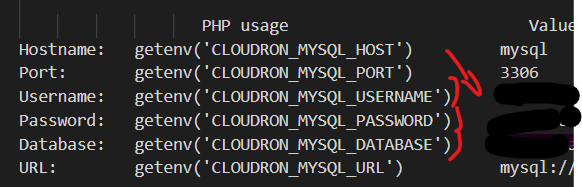
They are like 16 and 32 characters long -
I think I'm doing Step 7 wrong. Do you paste all 3 commands together in the terminal or do these go elsewhere?
Edit: I'm reading thru Mixpost's docs, and I think I prematurely changed the APP_ENV to production. They have that listed after doing the artisan stuff and when the UI is up. I'll try again tomorrow with a fresh mind. Doing this after work is a horrible idea

-
I think I'm doing Step 7 wrong. Do you paste all 3 commands together in the terminal or do these go elsewhere?
Edit: I'm reading thru Mixpost's docs, and I think I prematurely changed the APP_ENV to production. They have that listed after doing the artisan stuff and when the UI is up. I'll try again tomorrow with a fresh mind. Doing this after work is a horrible idea
@humptydumpty do them one at a time and i think you can change it back. I will try a build from scratch tomorrow and go thru the docs to update as needed.
-
@humptydumpty i see it - your DB host is wrong: should be DB_HOST=172.18.30.1
everything else looks correct. -
I changed DB_Host to:
- 172.18.30.1
- 172.18.0.1 (this is the LDAP port for me)
- 172.0.0.1 (this was the default in there originally)
Then, I tried those values for the both fields, DB_Host and for REDIS_HOST just in case they both needed to match.
Same step 7 error. I'm going to start again with a fresh LAMP install.
-
I figured it out. I had to cd into the mixpost-pro-team-app folder before doing step 7.
cd /app/data/mixpost-pro-team-appLine of 1 step 7 went OK. Line 2 with an error. Line 3 went OK.
In Connection.php line 795:

  SQLSTATE[42S01]: Base table or view already exists: 1050 Table 'job_batches' already exists (Connection: mysql, SQL: create table `job_batches` (`id` varchar(255) not null, `name` varchar(255) not null, `to
  tal_jobs` int not null, `pending_jobs` int not null, `failed_jobs` int not null, `failed_job_ids` longtext not null, `options` mediumtext null, `cancelled_at` int null, `created_at` int not null, `finished_
  at` int null) default character set utf8mb4 collate 'utf8mb4_unicode_ci')


In Connection.php line 580:

  SQLSTATE[42S01]: Base table or view already exists: 1050 Table 'job_batches' already exists
Step 10: I nano'd into kernel.php and removed the two references of void, but there's no &. I found actual lines of code in there, so I left those untouched and saved.
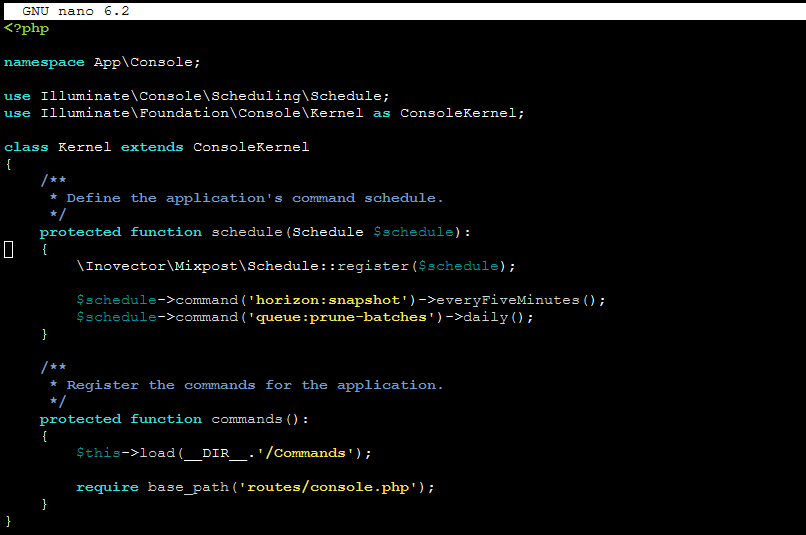
Step 11: not sure whether to stay in app/code or cd into /data or the mixpost app folder but running step 11's command shows this:
Reading package lists... Done
Building dependency tree... Done
Reading state information... Done
supervisor is already the newest version (4.2.1-1ubuntu1).
W: Not using locking for read only lock file /var/lib/dpkg/lock-frontend
W: Not using locking for read only lock file /var/lib/dpkg/lock
E: Archives directory /var/cache/apt/archives/partial is missing. - Acquire (2: No such file or directory)
Step 12: I encouter an error after running the command
PHP Parse error: syntax error, unexpected token "{" in /app/data/mixpost-pro-team-app/app/Console/Kernel.php on line 14Going to stop here for now.Changed my mind.I changed the environment from local to production. The app is live on my subdomain, despite all the errors. Woohoo!
What does your kernel.php file look like?
-
I figured it out. I had to cd into the mixpost-pro-team-app folder before doing step 7.
cd /app/data/mixpost-pro-team-appLine of 1 step 7 went OK. Line 2 with an error. Line 3 went OK.
In Connection.php line 795:

  SQLSTATE[42S01]: Base table or view already exists: 1050 Table 'job_batches' already exists (Connection: mysql, SQL: create table `job_batches` (`id` varchar(255) not null, `name` varchar(255) not null, `to
  tal_jobs` int not null, `pending_jobs` int not null, `failed_jobs` int not null, `failed_job_ids` longtext not null, `options` mediumtext null, `cancelled_at` int null, `created_at` int not null, `finished_
  at` int null) default character set utf8mb4 collate 'utf8mb4_unicode_ci')


In Connection.php line 580:

  SQLSTATE[42S01]: Base table or view already exists: 1050 Table 'job_batches' already exists
Step 10: I nano'd into kernel.php and removed the two references of void, but there's no &. I found actual lines of code in there, so I left those untouched and saved.
Step 11: not sure whether to stay in app/code or cd into /data or the mixpost app folder but running step 11's command shows this:
Reading package lists... Done
Building dependency tree... Done
Reading state information... Done
supervisor is already the newest version (4.2.1-1ubuntu1).
W: Not using locking for read only lock file /var/lib/dpkg/lock-frontend
W: Not using locking for read only lock file /var/lib/dpkg/lock
E: Archives directory /var/cache/apt/archives/partial is missing. - Acquire (2: No such file or directory)
Step 12: I encouter an error after running the command
PHP Parse error: syntax error, unexpected token "{" in /app/data/mixpost-pro-team-app/app/Console/Kernel.php on line 14Going to stop here for now.Changed my mind.I changed the environment from local to production. The app is live on my subdomain, despite all the errors. Woohoo!
What does your kernel.php file look like?
@humptydumpty remove the ":" at the end of each function and test
-
It's all green.
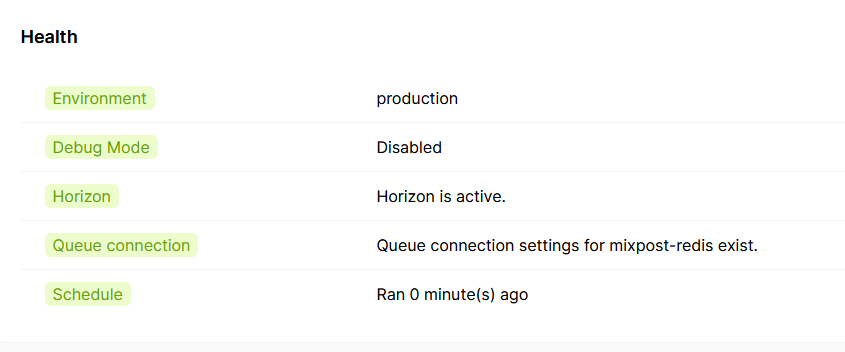
I am still getting an error on step 11 when installing supervisor.
Reading package lists... Done
Building dependency tree... Done
Reading state information... Done
supervisor is already the newest version (4.2.1-1ubuntu1).
W: Not using locking for read only lock file /var/lib/dpkg/lock-frontend
W: Not using locking for read only lock file /var/lib/dpkg/lock
E: Archives directory /var/cache/apt/archives/partial is missing. - Acquire (2: No such file or directory)
But the rest of the steps went smoothly. Now to the real questions:
- What does the upgrade process look like?
- Do Cloudron backups work in case things go south?
-
Nice!!! 🫡


You already have Supervisor it so no need to worry
-
Upgrade process look like?: idk yet as this is new to me too, I'd image its close to the install process. Since we are running off of LAMP and Composer - Mixpost plays nicely. So it should not be too cumbersome* (Famous Last Words, lol)
-
Cloudron backups DO cover whatever is in /app/data/.... in the LMAP app so yeah
You wont be the only one going through the process 🦾
-
-
@privsec Ive updated the docs with @humptydumpty's note on CD'ing to the app dir so just follow the current steps you should be good
-
Hi everyone,
Thank you @plusone-nick for your contribution. I'm glad to see that the community has found a solution to install Mixpost in Cloudron.I have a question, why do we have to delete the voids from the Kernel file?
-
Hi everyone,
Thank you @plusone-nick for your contribution. I'm glad to see that the community has found a solution to install Mixpost in Cloudron.I have a question, why do we have to delete the voids from the Kernel file?
@lao9s Hey Dima,
Thanks!
I recall that I was getting some error with Kernel.php, so I was really just shooting in the dark trying things. It could have been resolved via another change I made, and I was confusing the results.Will have to go back and try to reproduce the error. But assuming I broke or bypassed something with the change, what are the implications?
Edit* Any suggestions/edits on the docs are more than welcome =]
-
@plusone-nick Technically, there should be no error in those functions from Kernel.
I think you had some errors elsewhere and thought this was the solution. If you now have Mixpost functional, try to return ":void" and see if everything is fine.


Hello! It looks like you're interested in this conversation, but you don't have an account yet.
Getting fed up of having to scroll through the same posts each visit? When you register for an account, you'll always come back to exactly where you were before, and choose to be notified of new replies (either via email, or push notification). You'll also be able to save bookmarks and upvote posts to show your appreciation to other community members.
With your input, this post could be even better 💗
Register Login