
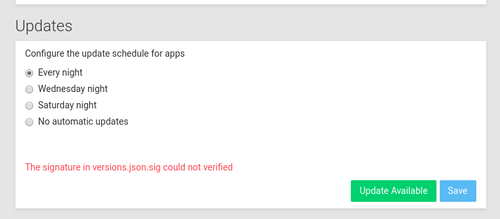
The signature in versions.json.sig could not verified
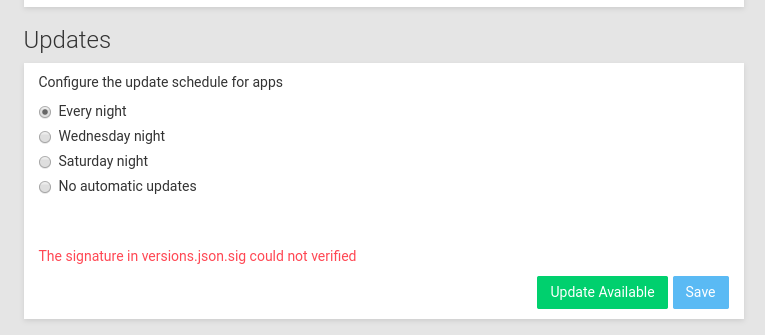
-
Ok thanks for your help, now, I have an different error message :
"No update available"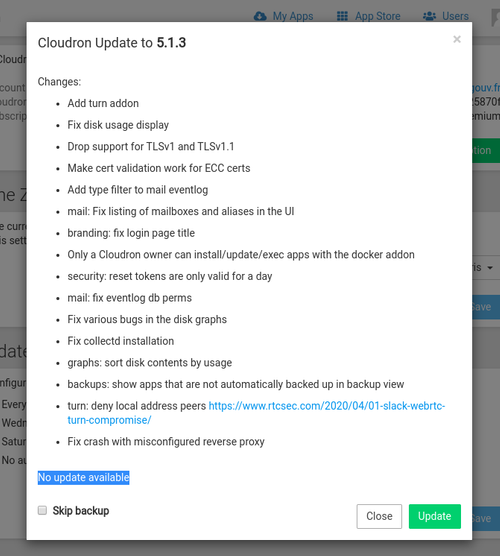
The log said I am in Cloudron 5.1.1 but 5.1.3 is the last version.
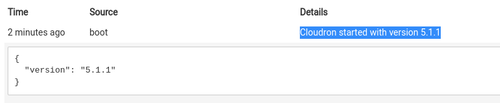
There is some weird logs when I have try to upgrade :
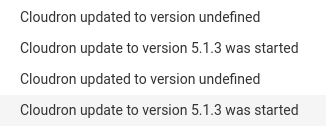
In /home/yellowtent/platformdata/logs/box.log
2020-04-11T16:41:31.274Z
2020-04-11T16:41:31.276Z ==========================================
2020-04-11T16:41:31.276Z            Cloudron 5.1.1
2020-04-11T16:41:31.276Z ==========================================
2020-04-11T16:41:31.276Z
2020-04-11T16:41:31.323Z box:settings initCache: pre-load settings
2020-04-11T16:41:31.335Z box:shell reload spawn: /usr/bin/sudo -S /home/yellowtent/box/src/scripts/reloadnginx.sh
2020-04-11T16:41:31.342Z box:reverseproxy writeAdminConfig: writing admin config for cluster-osc.incubateur.net
2020-04-11T16:41:31.351Z box:platform initializing addon infrastructure
2020-04-11T16:41:31.352Z box:platform platform is uptodate at version 48.17.0
2020-04-11T16:41:31.352Z box:platform onPlatformReady: platform is ready
2020-04-11T16:41:31.352Z box:apps schedulePendingTasks: scheduling app tasks
2020-04-11T16:41:31.352Z box:platform pruneInfraImages: checking existing images
2020-04-11T16:41:31.863Z box:reverseproxy writeDefaultConfig: done
2020-04-11T16:41:31.869Z box:dockerproxy startDockerProxy: started proxy on port 3003
2020-04-11T16:41:31.870Z Cloudron is up and running
2020-04-11T16:41:31.872Z box:shell reload spawn: /usr/bin/sudo -S /home/yellowtent/box/src/scripts/reloadnginx.sh
2020-04-11T16:41:31.879Z box:addons updateServiceConfig: {}
2020-04-11T16:41:31.879Z box:shell updatemysql spawn: /usr/bin/docker update --memory 536870912 --memory-swap 1073741824 mysql
2020-04-11T16:41:31.884Z box:cron backupConfigChanged: interval 86400 (Europe/Paris)
2020-04-11T16:41:31.890Z box:cron appAutoupdatePatternChanged: pattern 00 30 1,3,5,23 * * * (Europe/Paris)
2020-04-11T16:41:31.900Z box:cron boxAutoupdatePatternChanged: pattern - 00 00 1,3,5,23 * * * (Europe/Paris)
2020-04-11T16:41:31.902Z box:cron Dynamic DNS setting changed to false
2020-04-11T16:41:31.957Z box:shell updatemysql (stdout): mysql

2020-04-11T16:41:31.960Z box:shell updatepostgresql spawn: /usr/bin/docker update --memory 536870912 --memory-swap 1073741824 postgresql
2020-04-11T16:41:32.033Z box:shell updatepostgresql (stdout): postgresql

2020-04-11T16:41:32.037Z box:shell updatemail spawn: /usr/bin/docker update --memory 268435456 --memory-swap 536870912 mail
2020-04-11T16:41:32.108Z box:shell updatemail (stdout): mail

2020-04-11T16:41:32.111Z box:shell updatemongodb spawn: /usr/bin/docker update --memory 419430400 --memory-swap 838860800 mongodb
2020-04-11T16:41:32.187Z box:shell updatemongodb (stdout): mongodb

2020-04-11T16:41:32.190Z box:shell updategraphite spawn: /usr/bin/docker update --memory 78643200 --memory-swap 157286400 graphite
2020-04-11T16:41:32.254Z box:shell updategraphite (stdout): graphite

2020-04-11T16:41:40.211Z connect-lastmile Unprocessable Entity : No update available
Box POST /api/v1/cloudron/update 422 57.859 ms - 74
2020-04-11T16:41:40.275Z box:apphealthmonitor apps alive: [...REDACTED...]
2020-04-11T16:41:49.805Z connect-lastmile Unprocessable Entity : No update available
Box POST /api/v1/cloudron/update 422 5.357 ms - 74
2020-04-11T16:41:50.264Z box:apphealthmonitor apps alive: [...REDACTED...]
2020-04-11T16:41:58.558Z connect-lastmile Unprocessable Entity : No update available
Box POST /api/v1/cloudron/update 422 3.640 ms - 74
Looks like an API /api/v1/cloudron/update return 422 error code.
Do you have an idea, how to fix it ?
Best regards,
Julien -
@jd I think I forgot a step:
sudo systemctl restart box. Give it 10-15 seconds to restart.- Now refresh the UI. This is important. The button will be
Check for updatesand notUpdate available. - Now
Check for updatesand then click onUpdate available.
Does it work then?
-
Ok, I have done all the steps (systemctl restart box, "Check for updates", and after "Update available")
I see "Downloading and verifying release" and just after the error is "The signature in versions.json.sig could not verified"In /home/yellowtent/platformdata/logs/box.log
2020-04-11T19:04:07.066Z box:tasks startTask - starting task 60. logs at /home/yellowtent/platformdata/logs/tasks/60.log
2020-04-11T19:04:08.878Z box:tasks startTask: 60 completed with code 50 and signal null
2020-04-11T19:04:08.879Z box:locker Released : box_update
2020-04-11T19:04:08.879Z box:updater Update failed with error { stack:
   'BoxError: The signature in versions.json.sig could not verified\n    at /home/yellowtent/box/src/updater.js:67:36\n    at ChildProcess.exithandler (child_process.js:301:5)\n    at ChildProcess.emit (events.js:198:13)\n    at maybeClose (internal/child_process.js:982:16)\n    at Process.ChildProcess._handle.onexit (internal/child_process.js:259:5)',
  name: 'BoxError',
  reason: 'Not Signed',
  details: {},
  message: 'The signature in versions.json.sig could not verified' }
In /home/yellowtent/platformdata/logs/tasks/60.log
2020-04-11T19:04:07.563Z box:taskworker Starting task 60
2020-04-11T19:04:07.592Z box:settings initCache: pre-load settings
2020-04-11T19:04:07.600Z box:tasks 60: {"percent":1,"message":"Checking disk space"}
2020-04-11T19:04:07.627Z box:tasks 60: {"percent":5,"message":"Downloading and verifying release"}
2020-04-11T19:04:07.628Z box:updater Downloading https://s3.amazonaws.com/prod-cloudron-releases/versions.json to /home/yellowtent/platformdata/update/versions.json. Try 1
2020-04-11T19:04:07.628Z box:updater downloadUrl: curl -s --fail https://s3.amazonaws.com/prod-cloudron-releases/versions.json -o /home/yellowtent/platformdata/update/versions.json
2020-04-11T19:04:07.629Z box:shell downloadUrl spawn: /usr/bin/curl -s --fail https://s3.amazonaws.com/prod-cloudron-releases/versions.json -o /home/yellowtent/platformdata/update/versions.json
2020-04-11T19:04:08.382Z box:updater downloadUrl: downloadUrl https://s3.amazonaws.com/prod-cloudron-releases/versions.json to /home/yellowtent/platformdata/update/versions.json
2020-04-11T19:04:08.383Z box:updater Downloading https://s3.amazonaws.com/prod-cloudron-releases/versions.json.sig to /home/yellowtent/platformdata/update/versions.json.sig. Try 1
2020-04-11T19:04:08.383Z box:updater downloadUrl: curl -s --fail https://s3.amazonaws.com/prod-cloudron-releases/versions.json.sig -o /home/yellowtent/platformdata/update/versions.json.sig
2020-04-11T19:04:08.383Z box:shell downloadUrl spawn: /usr/bin/curl -s --fail https://s3.amazonaws.com/prod-cloudron-releases/versions.json.sig -o /home/yellowtent/platformdata/update/versions.json.sig
2020-04-11T19:04:08.852Z box:updater downloadUrl: downloadUrl https://s3.amazonaws.com/prod-cloudron-releases/versions.json.sig to /home/yellowtent/platformdata/update/versions.json.sig
2020-04-11T19:04:08.853Z box:updater gpgVerify: /usr/bin/gpg --status-fd 1 --no-default-keyring --keyring /home/yellowtent/box/src/releases.gpg --verify /home/yellowtent/platformdata/update/versions.json.sig /home/yellowtent/platformdata/update/versions.json
2020-04-11T19:04:08.868Z box:tasks setCompleted - 60: {"result":null,"error":{"stack":"BoxError: The signature in versions.json.sig could not verified\n    at /home/yellowtent/box/src/updater.js:67:36\n    at ChildProcess.exithandler (child_process.js:301:5)\n    at ChildProcess.emit (events.js:198:13)\n    at maybeClose (internal/child_process.js:982:16)\n    at Process.ChildProcess._handle.onexit (internal/child_process.js:259:5)","name":"BoxError","reason":"Not Signed","details":{},"message":"The signature in versions.json.sig could not verified"}}
2020-04-11T19:04:08.868Z box:tasks 60: {"percent":100,"result":null,"error":{"stack":"BoxError: The signature in versions.json.sig could not verified\n    at /home/yellowtent/box/src/updater.js:67:36\n    at ChildProcess.exithandler (child_process.js:301:5)\n    at ChildProcess.emit (events.js:198:13)\n    at maybeClose (internal/child_process.js:982:16)\n    at Process.ChildProcess._handle.onexit (internal/child_process.js:259:5)","name":"BoxError","reason":"Not Signed","details":{},"message":"The signature in versions.json.sig could not verified"}}
When I do
/usr/bin/gpg --status-fd 1 --no-default-keyring --keyring /home/yellowtent/box/src/releases.gpg --verify /home/yellowtent/platformdata/update/versions.json.sig /home/yellowtent/platformdata/update/versions.jsonI have the result :
[GNUPG:] NEWSIG
gpg: Signature made Thu 09 Apr 2020 01:35:58 AM UTC
gpg:                using RSA key 0EADB19CDDA23CD0FE71E3470A372F8703C493CC
[GNUPG:] KEY_CONSIDERED 0EADB19CDDA23CD0FE71E3470A372F8703C493CC 0
[GNUPG:] SIG_ID 694JDT6H2/e2n8+TEQ2lrkaJip8 2020-04-09 1586396158
[GNUPG:] KEY_CONSIDERED 0EADB19CDDA23CD0FE71E3470A372F8703C493CC 0
gpg: /home/outscale/.gnupg/trustdb.gpg: trustdb created
[GNUPG:] GOODSIG 0A372F8703C493CC Cloudron UG <admin@cloudron.io>
gpg: Good signature from "Cloudron UG <admin@cloudron.io>" [unknown]
[GNUPG:] VALIDSIG 0EADB19CDDA23CD0FE71E3470A372F8703C493CC 2020-04-09 1586396158 0 4 0 1 10 00 0EADB19CDDA23CD0FE71E3470A372F8703C493CC
[GNUPG:] TRUST_UNDEFINED 0 pgp
gpg: WARNING: This key is not certified with a trusted signature!
gpg:          There is no indication that the signature belongs to the owner.
Primary key fingerprint: 0EAD B19C DDA2 3CD0 FE71  E347 0A37 2F87 03C4 93CC
[GNUPG:] VERIFICATION_COMPLIANCE_MODE 23

Hello! It looks like you're interested in this conversation, but you don't have an account yet.
Getting fed up of having to scroll through the same posts each visit? When you register for an account, you'll always come back to exactly where you were before, and choose to be notified of new replies (either via email, or push notification). You'll also be able to save bookmarks and upvote posts to show your appreciation to other community members.
With your input, this post could be even better 💗
Register Login