Cloudron makes it easy to run web apps like WordPress, Nextcloud, GitLab on your server. Find out more or install now.


Skip to content
  • Categories
  • Recent
  • Tags
  • Popular
  • Bookmarks
  • Search
Skins
  • Light
  • Brite
  • Cerulean
  • Cosmo
  • Flatly
  • Journal
  • Litera
  • Lumen
  • Lux
  • Materia
  • Minty
  • Morph
  • Pulse
  • Sandstone
  • Simplex
  • Sketchy
  • Spacelab
  • United
  • Yeti
  • Zephyr
  • Dark
  • Cyborg
  • Darkly
  • Quartz
  • Slate
  • Solar
  • Superhero
  • Vapor

  • Default (No Skin)
  • No Skin
Collapse
Brand Logo

Cloudron Forum

Apps - Status | Demo | Docs | Install
  1. Cloudron Forum
  2. Invoice Ninja
  3. InvoiceNinja: Links don't work on PDF anymore

InvoiceNinja: Links don't work on PDF anymore

Scheduled Pinned Locked Moved Solved Invoice Ninja
22 Posts 5 Posters 7.0k Views 5 Watching
  • Oldest to Newest
  • Newest to Oldest
  • Most Votes
Reply
  • Reply as topic
Log in to reply
This topic has been deleted. Only users with topic management privileges can see it.
  • P pHneutre

    @nebulon said in InvoiceNinja: Links don't work on PDF anymore:

    At least between admin and superadmin there is no difference with regards to the app updates, not sure why this has happened.

    I'm not sure I am an "admin", I'm not used to cloudron's rights management, but I have rights to manage users and mailboxes. 🤷

    Tried to reproduce this in our instance, but tbh I don't even know how to add links in the invoice.

    To edit the invoice template in IN: Parameters > Advanced > Invoice template (or model?) > Customize > select your template > Edit
    To add a link: "body" tab and add it in the HTML as a <a href=""> tag.

    @robi said in InvoiceNinja: Links don't work on PDF anymore:

    Perhaps this is more related to the PDF viewer.
    Feel free to provide a PDF sample with a clickable link.

    Here's a PDF with a clickable link. Real-life invoice so discretion advised please. Link will expire on the 22nd of dec for now.

    robiR Offline
    robiR Offline
    robi
    wrote on last edited by robi
    #10

    @pHneutre said in InvoiceNinja: Links don't work on PDF anymore:

    Here's a PDF with a clickable link

    The link at the top of the PDF doc is clickable and leads to here for me in my Vivaldi browser.

    Conscious tech

    1 Reply Last reply
    1
    • girishG Offline
      girishG Offline
      girish
      Staff
      wrote on last edited by
      #11

      Right, same for me. I can click the link in the PDF just fine on Firefox.

      1 Reply Last reply
      0
      • P Offline
        P Offline
        pHneutre
        wrote on last edited by
        #12

        Why yes, I have been asked for a PDF with a clickable link so I provided 😅 . Now for an unclickable link (which does sound more appropriate indeed) (same expiration date).

        1 Reply Last reply
        1
        • robiR Offline
          robiR Offline
          robi
          wrote on last edited by
          #13

          That is just underlined text, and not a link from my perspective (browser and Foxit Phantom PDF).

          Conscious tech

          girishG 1 Reply Last reply
          1
          • robiR robi

            That is just underlined text, and not a link from my perspective (browser and Foxit Phantom PDF).

            girishG Offline
            girishG Offline
            girish
            Staff
            wrote on last edited by
            #14

            @robi I think that's the bug, that invoiceninja is not creating links and instead creating underlines (maybe?)

            1 Reply Last reply
            1
            • P pHneutre

              @nebulon said in InvoiceNinja: Links don't work on PDF anymore:

              At least between admin and superadmin there is no difference with regards to the app updates, not sure why this has happened.

              I'm not sure I am an "admin", I'm not used to cloudron's rights management, but I have rights to manage users and mailboxes. 🤷

              Tried to reproduce this in our instance, but tbh I don't even know how to add links in the invoice.

              To edit the invoice template in IN: Parameters > Advanced > Invoice template (or model?) > Customize > select your template > Edit
              To add a link: "body" tab and add it in the HTML as a <a href=""> tag.

              @robi said in InvoiceNinja: Links don't work on PDF anymore:

              Perhaps this is more related to the PDF viewer.
              Feel free to provide a PDF sample with a clickable link.

              Here's a PDF with a clickable link. Real-life invoice so discretion advised please. Link will expire on the 22nd of dec for now.

              jdaviescoatesJ Offline
              jdaviescoatesJ Offline
              jdaviescoates
              wrote on last edited by jdaviescoates
              #15

              @pHneutre said in InvoiceNinja: Links don't work on PDF anymore:

              To edit the invoice template in IN: Parameters > Advanced > Invoice template (or model?) > Customize > select your template > Edit
              To add a link: "body" tab and add it in the HTML as a <a href=""> tag.

              I guess you're working in a non English language as I couldn't see anything about Parameters etc.

              But I did just do this and links seemed to work fine:

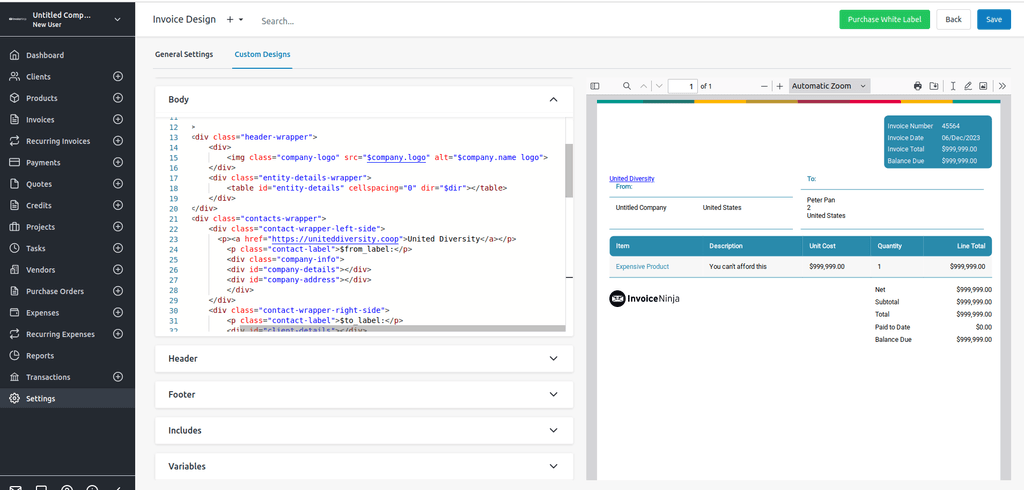
              Settings -> Invoice Design -> Custom Designs -> created a new custom design using Playful as the basis, then edited the Body to add a link and it worked:
              02638be7-1bbe-48f9-8151-4f174be69d22-image.png

              PDF invoice with working link

              I use Cloudron with Gandi & Hetzner

              P 1 Reply Last reply
              1
              • jdaviescoatesJ jdaviescoates

                @pHneutre said in InvoiceNinja: Links don't work on PDF anymore:

                To edit the invoice template in IN: Parameters > Advanced > Invoice template (or model?) > Customize > select your template > Edit
                To add a link: "body" tab and add it in the HTML as a <a href=""> tag.

                I guess you're working in a non English language as I couldn't see anything about Parameters etc.

                But I did just do this and links seemed to work fine:

                Settings -> Invoice Design -> Custom Designs -> created a new custom design using Playful as the basis, then edited the Body to add a link and it worked:

                02638be7-1bbe-48f9-8151-4f174be69d22-image.png

                PDF invoice with working link

                P Offline
                P Offline
                pHneutre
                wrote on last edited by
                #16

                @jdaviescoates Yes these were on-the-fly translations. And it seems that you couldn't reproduce my problem. Thanks for checking.

                1 Reply Last reply
                1
                • nebulonN Offline
                  nebulonN Offline
                  nebulon
                  Staff
                  wrote on last edited by
                  #17

                  I looked into this again and found that the href="" attribute needs to have a schema set. So https:// for example to render a clickable link. Maybe this is the difference? A browser would render it without a schema but maybe PDF viewers behave slightly different here.

                  P 1 Reply Last reply
                  0
                  • nebulonN nebulon

                    I looked into this again and found that the href="" attribute needs to have a schema set. So https:// for example to render a clickable link. Maybe this is the difference? A browser would render it without a schema but maybe PDF viewers behave slightly different here.

                    P Offline
                    P Offline
                    pHneutre
                    wrote on last edited by
                    #18

                    @nebulon No luck. I always created links with a schema, and IN built-in links parameters (such as $view_url) don't work either. Plus, if you open the unclickable PDF with a PDF editor, no link is detected at all.

                    1 Reply Last reply
                    0
                    • girishG Offline
                      girishG Offline
                      girish
                      Staff
                      wrote on last edited by
                      #19

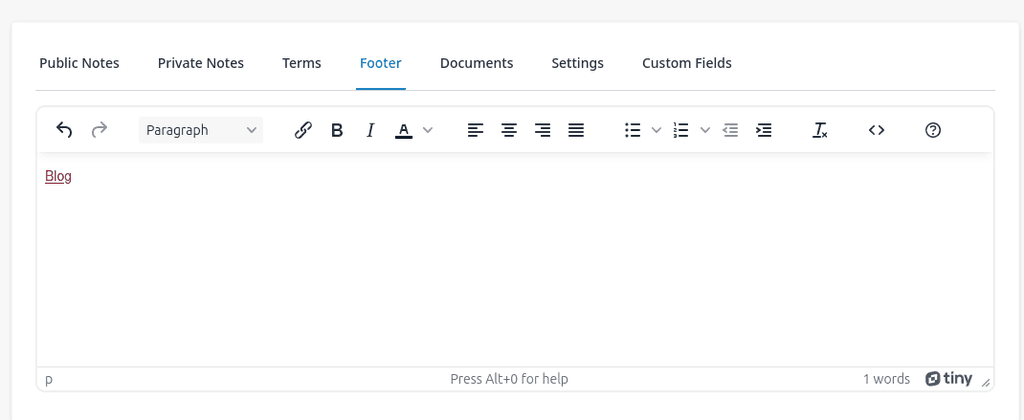
                      I tried adding a footer and that does work as well:

                      image.png

                      1 Reply Last reply
                      0
                      • nebulonN Offline
                        nebulonN Offline
                        nebulon
                        Staff
                        wrote on last edited by
                        #20

                        I think we are running out of ideas what the difference between the instances is.

                        1 Reply Last reply
                        0
                        • girishG Offline
                          girishG Offline
                          girish
                          Staff
                          wrote on last edited by
                          #21

                          Maybe the demo https://my.demo.cloudron.io (username: cloudron password: cloudron) can be setup with a test setup ?

                          1 Reply Last reply
                          0
                          • robiR Offline
                            robiR Offline
                            robi
                            wrote on last edited by
                            #22

                            Perhaps the translations are breaking the links.

                            Conscious tech

                            1 Reply Last reply
                            0
                            • girishG girish has marked this topic as solved on

                            Hello! It looks like you're interested in this conversation, but you don't have an account yet.

                            Getting fed up of having to scroll through the same posts each visit? When you register for an account, you'll always come back to exactly where you were before, and choose to be notified of new replies (either via email, or push notification). You'll also be able to save bookmarks and upvote posts to show your appreciation to other community members.

                            With your input, this post could be even better 💗

                            Register Login
                            Reply
                            • Reply as topic
                            Log in to reply
                            • Oldest to Newest
                            • Newest to Oldest
                            • Most Votes


                            • Login

                            • Don't have an account? Register

                            • Login or register to search.
                            • First post
                              Last post
                            0
                            • Categories
                            • Recent
                            • Tags
                            • Popular
                            • Bookmarks
                            • Search