Cloudron makes it easy to run web apps like WordPress, Nextcloud, GitLab on your server. Find out more or install now.


Skip to content
  • Categories
  • Recent
  • Tags
  • Popular
  • Bookmarks
  • Search
Skins
  • Light
  • Brite
  • Cerulean
  • Cosmo
  • Flatly
  • Journal
  • Litera
  • Lumen
  • Lux
  • Materia
  • Minty
  • Morph
  • Pulse
  • Sandstone
  • Simplex
  • Sketchy
  • Spacelab
  • United
  • Yeti
  • Zephyr
  • Dark
  • Cyborg
  • Darkly
  • Quartz
  • Slate
  • Solar
  • Superhero
  • Vapor

  • Default (No Skin)
  • No Skin
Collapse
Brand Logo

Cloudron Forum

Apps - Status | Demo | Docs | Install
  1. Cloudron Forum
  2. OpenWebUI
  3. OpenWebUI - Permissions Issue after last 2.2.5 update - cannot create directory /media/ollama-vol

OpenWebUI - Permissions Issue after last 2.2.5 update - cannot create directory /media/ollama-vol

Scheduled Pinned Locked Moved OpenWebUI
9 Posts 4 Posters 3.0k Views 4 Watching
  • Oldest to Newest
  • Newest to Oldest
  • Most Votes
Reply
  • Reply as topic
Log in to reply
This topic has been deleted. Only users with topic management privileges can see it.
  • J Offline
    J Offline
    jagan
    wrote on last edited by
    #1

    After the 2.2.5 update that Set NLTK_DIR env var, my app is unresponsive.
    The following is from the error logs:

    Jun 27 12:11:06 => Copying static files
    Jun 27 12:11:06 => Enabling local ollama
    Jun 27 12:11:06 => Ensure directories
    Jun 27 12:11:06 => Loading configuration
    Jun 27 12:11:06 mkdir: cannot create directory '/media/ollama-vol': Read-only file system
    Jun 27 12:11:13 => Healtheck error: Error: connect EHOSTUNREACH 172.18.18.172:8080
    

    I am not sure how to proceed.
    The Data Directory is pointing to a volume that I have.
    I don't understand how 'Mounts' work. And I don't know how the permissions for 'media' user do as well.

    Need help please, I have tried all that I can do and understand. Tried changing ownerships, created directories, moved back the 'Data Directory' back to the default 'Yellow Tent' location, but nothing worked.

    Would appreciate some points!

    Thank you

    1 Reply Last reply
    0
    • girishG Offline
      girishG Offline
      girish
      Staff
      wrote on last edited by
      #2

      You need to first create a volume and then mount it via https://docs.cloudron.io/apps/#mounts . Otherwise, apps cannot create /media/* directories.

      C 1 Reply Last reply
      0
      • girishG girish referenced this topic on
      • J Offline
        J Offline
        jagan
        wrote on last edited by
        #3

        I already have a volume, but I will create one more and mount it!

        1 Reply Last reply
        1
        • girishG girish

          You need to first create a volume and then mount it via https://docs.cloudron.io/apps/#mounts . Otherwise, apps cannot create /media/* directories.

          C Offline
          C Offline
          charlesnw
          wrote on last edited by
          #4

          @girish Except that doesn't work 🙂 I get the same issue and I created a mount. I did so while the application was stopped. I started the application and I get:

          Nov 23 06:00:29 - => Ensure directories
          Nov 23 06:00:29 - => Copying static files
          Nov 23 06:00:30 - => Loading configuration
          Nov 23 06:00:30 - => Enabling local ollama
          Nov 23 06:00:30 - mkdir: cannot create directory '/media/TSYSAI': Read-only file system

          The volume is created and added to the application

          J 1 Reply Last reply
          0
          • C charlesnw

            @girish Except that doesn't work 🙂 I get the same issue and I created a mount. I did so while the application was stopped. I started the application and I get:

            Nov 23 06:00:29 - => Ensure directories
            Nov 23 06:00:29 - => Copying static files
            Nov 23 06:00:30 - => Loading configuration
            Nov 23 06:00:30 - => Enabling local ollama
            Nov 23 06:00:30 - mkdir: cannot create directory '/media/TSYSAI': Read-only file system

            The volume is created and added to the application

            J Offline
            J Offline
            joseph
            Staff
            wrote on last edited by
            #5

            @charlesnw said in OpenWebUI - Permissions Issue after last 2.2.5 update - cannot create directory /media/ollama-vol:

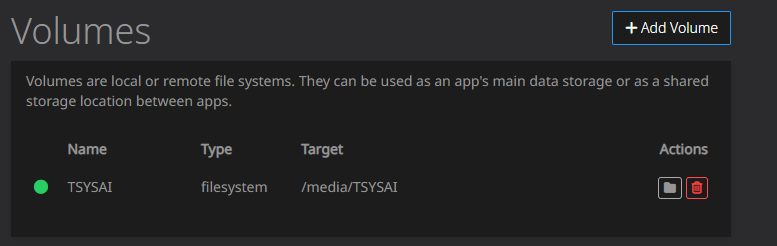
            TSYSAI

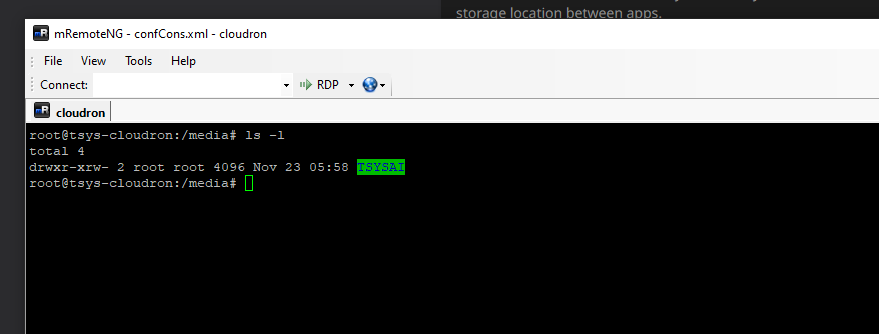
            is that the name of your mount? You can always open an app Web Terminal and do ls -l /media . You should have your volume listed there.
            1 Reply Last reply
            0
            • C Offline
              C Offline
              charlesnw
              wrote on last edited by
              #6

              Yes. That is the name of the mount.

              image.png

              image.png

              1 Reply Last reply
              0
              • C Offline
                C Offline
                charlesnw
                wrote on last edited by
                #7

                Any ideas/updates?

                1 Reply Last reply
                0
                • J Offline
                  J Offline
                  joseph
                  Staff
                  wrote on last edited by
                  #8

                  @charlesnw when you mounted the volume into the app, do you have the "Readonly" flag set?

                  Does "mkdir -p /media/TSYSAI/foobar` work ?

                  1 Reply Last reply
                  0
                  • C Offline
                    C Offline
                    charlesnw
                    wrote on last edited by
                    #9

                    I resolved the issue. I had the directory set to /media/TSYSAI instead of just /media.

                    Thanks!

                    1 Reply Last reply
                    1

                    Hello! It looks like you're interested in this conversation, but you don't have an account yet.

                    Getting fed up of having to scroll through the same posts each visit? When you register for an account, you'll always come back to exactly where you were before, and choose to be notified of new replies (either via email, or push notification). You'll also be able to save bookmarks and upvote posts to show your appreciation to other community members.

                    With your input, this post could be even better 💗

                    Register Login
                    Reply
                    • Reply as topic
                    Log in to reply
                    • Oldest to Newest
                    • Newest to Oldest
                    • Most Votes


                    • Login

                    • Don't have an account? Register

                    • Login or register to search.
                    • First post
                      Last post
                    0
                    • Categories
                    • Recent
                    • Tags
                    • Popular
                    • Bookmarks
                    • Search