
Request: include LESS package
-
According to the HumHub docs when you want to adjust colours of the themes in HumHub you have to create a Child-Theme and then edit .less files and then use LESS to compile them.
As far as I can discover LESS is not installed in the package and therefore you can't change colours.
https://docs.humhub.org/docs/theme/tutorial#step-2-adjust-colors-and-build-css
Step 2: Adjust colors and build CSS
Installing prerequisites
Install NodeJS
See: https://nodejs.org/en/download/
Install LESS
Open the command console and execute:
npm install less -g -
According to the HumHub docs when you want to adjust colours of the themes in HumHub you have to create a Child-Theme and then edit .less files and then use LESS to compile them.
As far as I can discover LESS is not installed in the package and therefore you can't change colours.
https://docs.humhub.org/docs/theme/tutorial#step-2-adjust-colors-and-build-css
Step 2: Adjust colors and build CSS
Installing prerequisites
Install NodeJS
See: https://nodejs.org/en/download/
Install LESS
Open the command console and execute:
npm install less -g -
ai this looks not good those 401's for such an organisation. I'll let you know when it's back.
-
@imc67 turns out even if we install lessc, building it is quite a pain because the build is referencing code outside the theme . i.e the theme is inside /app/data/theme/xxx but it's referencing with ../.. to reach into files inside /app/code . I guess this would have worked if Cloudron didn't use a separate directory.
I was able to build this quite easily on the desktop though:
wget https://download.humhub.com/downloads/install/humhub-1.15.2.tar.gz- Extract above
cd humhub-1.15.2/themescp -r HumHub Example# copy over them- Make theme changes as desired
cd Example/lessand thenlessc build.less ../css/theme.css
I used the CLI tool to push the files :
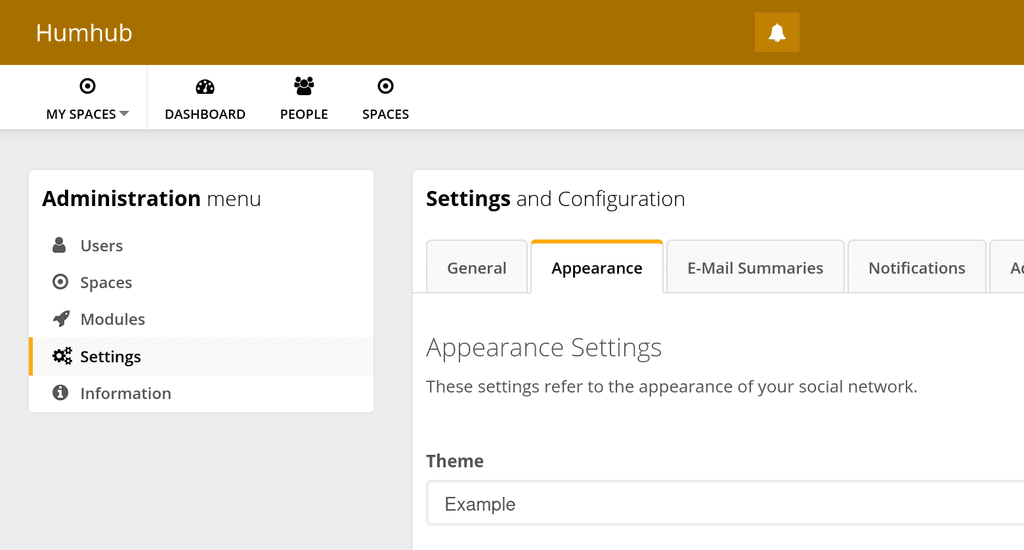
cloudron push --app humhub Example /app/data/themes/. Of course, you can always zip up that folder and upload it via File manager.Then, I select Example in the Appearance.
-
@imc67 turns out even if we install lessc, building it is quite a pain because the build is referencing code outside the theme . i.e the theme is inside /app/data/theme/xxx but it's referencing with ../.. to reach into files inside /app/code . I guess this would have worked if Cloudron didn't use a separate directory.
I was able to build this quite easily on the desktop though:
wget https://download.humhub.com/downloads/install/humhub-1.15.2.tar.gz- Extract above
cd humhub-1.15.2/themescp -r HumHub Example# copy over them- Make theme changes as desired
cd Example/lessand thenlessc build.less ../css/theme.css
I used the CLI tool to push the files :
cloudron push --app humhub Example /app/data/themes/. Of course, you can always zip up that folder and upload it via File manager.Then, I select Example in the Appearance.


 Otherwise, I have no way to test.

Hello! It looks like you're interested in this conversation, but you don't have an account yet.
Getting fed up of having to scroll through the same posts each visit? When you register for an account, you'll always come back to exactly where you were before, and choose to be notified of new replies (either via email, or push notification). You'll also be able to save bookmarks and upvote posts to show your appreciation to other community members.
With your input, this post could be even better 💗
Register Login