
New user emails dont work
-
I have a fresh deployment, i configured gmail properly and all tests are passed, it fetched the emails and i can reply to the email ticket and it goes through
The issue is when i make a new user and invite them, they dont get the email
Any ideas?
-
@xboxhaxorz Just to double check, is chatwoot deployed via Cloudron? Have to ask because other deployments have very different email setups.
@girish Yes it is
-
@xboxhaxorz so, step 1 would be to check if cloudron itself can send emails. If you go to Email -> Select the Domain . Is the Status tab all green? If it is, can you send a test email and see if that works (https://docs.cloudron.io/email/#send-test-email) ?
-
@xboxhaxorz so, step 1 would be to check if cloudron itself can send emails. If you go to Email -> Select the Domain . Is the Status tab all green? If it is, can you send a test email and see if that works (https://docs.cloudron.io/email/#send-test-email) ?
-
@girish This is that screen
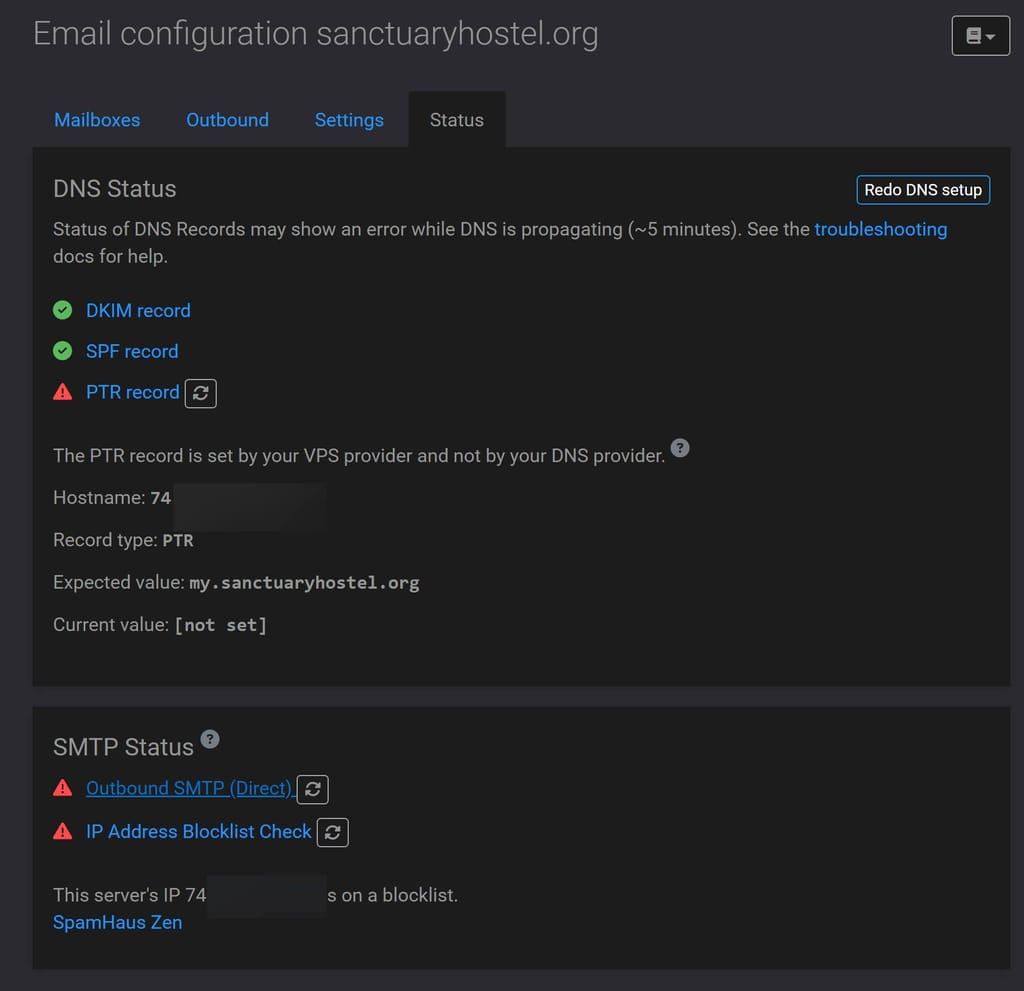
I checked with azure and changing port 25 is not allowed, at least not with the non profit plan that they give us
The test email does not work
@xboxhaxorz right, so you have to set up an email relay . See https://docs.cloudron.io/email/#relay-outbound-mails . This will let you bypass the port 25 restriction. Once you set this up, emails will work.
-
@xboxhaxorz right, so you have to set up an email relay . See https://docs.cloudron.io/email/#relay-outbound-mails . This will let you bypass the port 25 restriction. Once you set this up, emails will work.
@girish said in New user emails dont work:
@xboxhaxorz right, so you have to set up an email relay . See https://docs.cloudron.io/email/#relay-outbound-mails . This will let you bypass the port 25 restriction. Once you set this up, emails will work.
I did that, i used the same settings that i used with freescout, but i dont think its working, the status page is the same, i do get new user invite emails with freescout though
I only configured outgoing not incoming, i tried both the gmail passcode and the app passcode
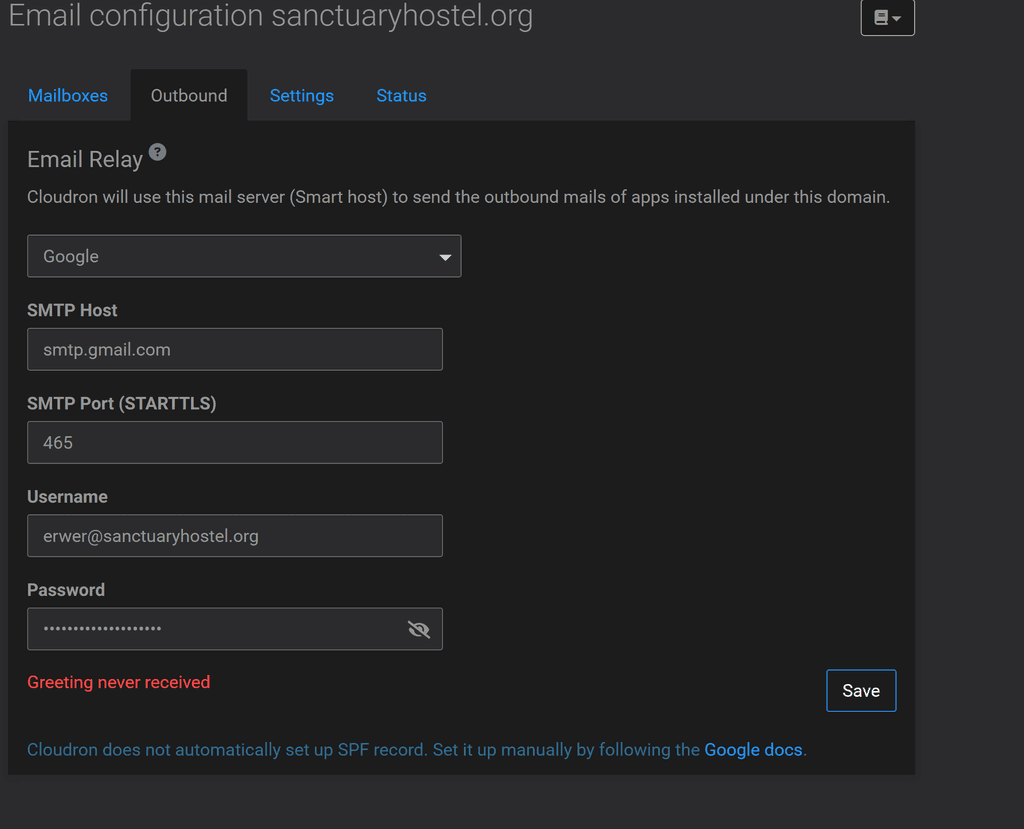
When i invited a new user in chatwoot, the invitation email never came, and i dont get the test email from cloudron either
I have cloudflare enabled but i dont think thats an issue since i get the freescout emails
-
@girish said in New user emails dont work:
@xboxhaxorz right, so you have to set up an email relay . See https://docs.cloudron.io/email/#relay-outbound-mails . This will let you bypass the port 25 restriction. Once you set this up, emails will work.
I did that, i used the same settings that i used with freescout, but i dont think its working, the status page is the same, i do get new user invite emails with freescout though
I only configured outgoing not incoming, i tried both the gmail passcode and the app passcode
When i invited a new user in chatwoot, the invitation email never came, and i dont get the test email from cloudron either
I have cloudflare enabled but i dont think thats an issue since i get the freescout emails
-
@xboxhaxorz cloudron only supports STARTTLS for relay. So, you have to use port 587 and not port 465 .
@girish said in New user emails dont work:
@xboxhaxorz cloudron only supports STARTTLS for relay. So, you have to use port 587 and not port 465 .
Great, its all working now
Thanks
-
 G girish marked this topic as a question on
-
G girish has marked this topic as solved on
Hello! It looks like you're interested in this conversation, but you don't have an account yet.
Getting fed up of having to scroll through the same posts each visit? When you register for an account, you'll always come back to exactly where you were before, and choose to be notified of new replies (either via email, or push notification). You'll also be able to save bookmarks and upvote posts to show your appreciation to other community members.
With your input, this post could be even better 💗
Register Login