
Cloudron makes it easy to run web apps like WordPress, Nextcloud, GitLab on your server. Find out more or install now.


Skip to content
  • Categories
  • Recent
  • Tags
  • Popular
  • Bookmarks
  • Search
Skins
  • Light
  • Brite
  • Cerulean
  • Cosmo
  • Flatly
  • Journal
  • Litera
  • Lumen
  • Lux
  • Materia
  • Minty
  • Morph
  • Pulse
  • Sandstone
  • Simplex
  • Sketchy
  • Spacelab
  • United
  • Yeti
  • Zephyr
  • Dark
  • Cyborg
  • Darkly
  • Quartz
  • Slate
  • Solar
  • Superhero
  • Vapor

  • Default (No Skin)
  • No Skin
Collapse
Brand Logo

Cloudron Forum

Apps - Status | Demo | Docs | Install
  1. Cloudron Forum
  2. Directus
  3. Setup CI/CD for my directus cloudron

Setup CI/CD for my directus cloudron

Scheduled Pinned Locked Moved Solved Directus
13 Posts 2 Posters 4.4k Views 2 Watching
  • Oldest to Newest
  • Newest to Oldest
  • Most Votes
Reply
  • Reply as topic
Log in to reply
This topic has been deleted. Only users with topic management privileges can see it.
  • O Offline
    O Offline
    Oleksii909
    wrote on last edited by Oleksii909
    #1

    I am using Aws Lightsail ubuntu instance.
    I need help to setup CI/CD to delivery my custom extensions there.

    I was able to login inside my directus app via cloudron exec, also i have ssh access to my linux via ssh, but i can't find any place to put my extensions to.

    Any hints would appreciated 🙂

    1 Reply Last reply
    0
    • girishG Offline
      girishG Offline
      girish
      Staff
      wrote on last edited by
      #2

      For extensions, see https://docs.cloudron.io/apps/directus/#extensions

      1 Reply Last reply
      0
      • O Offline
        O Offline
        Oleksii909
        wrote on last edited by Oleksii909
        #3

        I am trying to push files using directus cli:
        f586fca4-06d7-4bfa-b4d4-43ae9a44a52f-image.png
        But it says: local file files does not exist
        How to proceed?

        1 Reply Last reply
        0
        • girishG Offline
          girishG Offline
          girish
          Staff
          wrote on last edited by
          #4

          push <local> <remote> is pushing local files to the remote (app) . files is not a local path .

          O 2 Replies Last reply
          0
          • O Offline
            O Offline
            Oleksii909
            wrote on last edited by
            #5

            I was able to delivery custom directus extension via Filemanager in cloudron UI
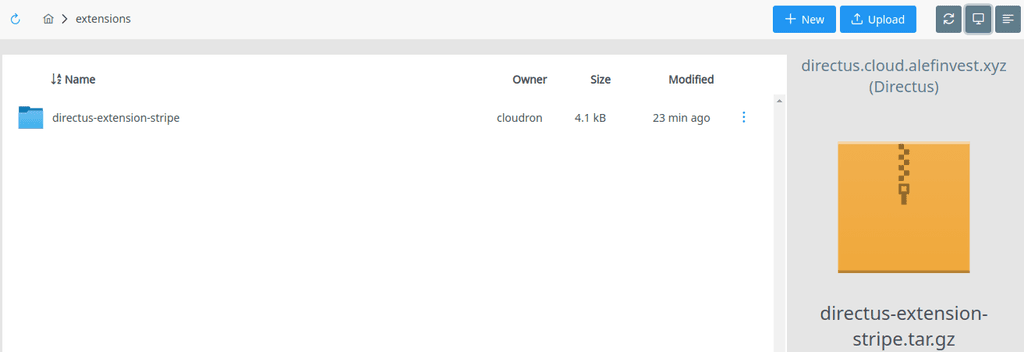
            7138ee64-15fe-4329-a375-8e27dec3159f-image.png

            But i am still interesting how to setup CI/CD to delivery the updates when i push to repository.

            1 Reply Last reply
            0
            • girishG girish

              push <local> <remote> is pushing local files to the remote (app) . files is not a local path .

              O Offline
              O Offline
              Oleksii909
              wrote on last edited by
              #6

              @girish Sorry i don't understand your advice. Could you please clarify what the terminal command should look like?

              1 Reply Last reply
              0
              • girishG girish

                push <local> <remote> is pushing local files to the remote (app) . files is not a local path .

                O Offline
                O Offline
                Oleksii909
                wrote on last edited by Oleksii909
                #7

                @girish I was able to get some progress on my flow: 8989026b-88a0-457e-b643-09cec41e842e-image.png
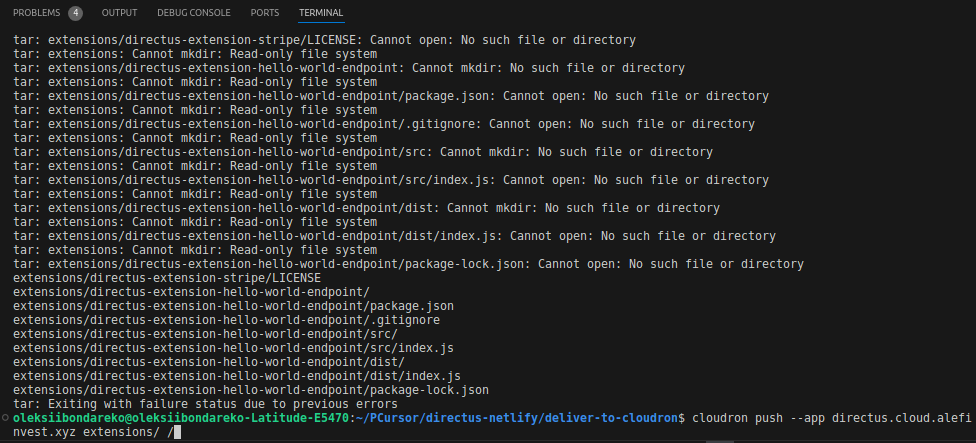
                The command should look like this: cloudron push --app directus.cloud.alefinvest.xyz extensions/ /
                but i need to specify <remote> path to be different then root=>/.

                How can i know the path of my directus app inside my aws lightsail instance?

                1 Reply Last reply
                0
                • O Offline
                  O Offline
                  Oleksii909
                  wrote on last edited by
                  #8

                  I was able to determine the full path of my directus app installed via cloudron: but i can't push the files via cloudron cli:

                  image.png

                  1 Reply Last reply
                  0
                  • girishG Offline
                    girishG Offline
                    girish
                    Staff
                    wrote on last edited by girish
                    #9

                    @Oleksii909 in Cloudron, apps have their own filesystem. If you open the web terminal, you will see the filesystem. The /app/data is the writable portion, rest if readonly.

                    So, the remote path will be like /app/data/extensions/ . If you open File manager, it is essentially a file browser for /app/data path of the app . Hope that clarifies!

                    O 1 Reply Last reply
                    0
                    • girishG girish

                      @Oleksii909 in Cloudron, apps have their own filesystem. If you open the web terminal, you will see the filesystem. The /app/data is the writable portion, rest if readonly.

                      So, the remote path will be like /app/data/extensions/ . If you open File manager, it is essentially a file browser for /app/data path of the app . Hope that clarifies!

                      O Offline
                      O Offline
                      Oleksii909
                      wrote on last edited by
                      #10

                      @girish said in Setup CI/CD for my directus cloudron:

                      /app/data/extensions/

                      Finaly i made all my extensions delivery properly with this command: cloudron push --app directus.cloud.alefinvest.xyz extensions/ /app/data/

                      1 Reply Last reply
                      0
                      • O Offline
                        O Offline
                        Oleksii909
                        wrote on last edited by Oleksii909
                        #11

                        Another question: is how to deploy via cloudron the custom nextjs app that i want to be hosted in additional url for example: app.directus.cloud.alefinvest.xyz or app.cloud.alefinvest.xyz ?

                        Could you please point me to the right direction?

                        1 Reply Last reply
                        0
                        • girishG Offline
                          girishG Offline
                          girish
                          Staff
                          wrote on last edited by
                          #12

                          @Oleksii909 Is that question directus related? How are you hosting your existing nextjs app? Via surfer? If so , look at https://docs.cloudron.io/apps/#aliases

                          1 Reply Last reply
                          1
                          • nebulonN nebulon marked this topic as a question on
                          • nebulonN nebulon has marked this topic as solved on
                          • O Offline
                            O Offline
                            Oleksii909
                            wrote on last edited by
                            #13

                            I was able to deploy with cloudron my nextjs frontend app fetching my directus backend via API here is the repository with STEP-BY-STEP guide: https://github.com/alexmazaltov/nextjs-app-for-directus-vai-cloudron

                            1 Reply Last reply
                            1

                            Hello! It looks like you're interested in this conversation, but you don't have an account yet.

                            Getting fed up of having to scroll through the same posts each visit? When you register for an account, you'll always come back to exactly where you were before, and choose to be notified of new replies (either via email, or push notification). You'll also be able to save bookmarks and upvote posts to show your appreciation to other community members.

                            With your input, this post could be even better 💗

                            Register Login
                            Reply
                            • Reply as topic
                            Log in to reply
                            • Oldest to Newest
                            • Newest to Oldest
                            • Most Votes


                            • Login

                            • Don't have an account? Register

                            • Login or register to search.
                            • First post
                              Last post
                            0
                            • Categories
                            • Recent
                            • Tags
                            • Popular
                            • Bookmarks
                            • Search
