
-
Following a discussion I had on n8n forum, I wonder what are the steps to install a new NPM package so that n8n can access it.
It seems to need to be installed globally (
-g) but a documented process about how to do that would be good.
Typically, where do I need to do it? Does it work if I do that on the server instance itself? or do I need to do it in some Docker instance for n8n?Having this being documented in https://www.cloudron.io/store/io.n8n.cloudronapp.html would be a great addition.
-
 N nebulon moved this topic from Support on
-
N nebulon marked this topic as a question on
-
@nebulon Yes, I had read those. I'm confused about whether those NPM packages need to be installed (in addition to changing the config file), and if so, how. I believe the documentation might be missing a key step, or maybe the installation of those packages is being done under the wheel, but I very much doubt so.
Here is a video that might explain better my issue:
https://www.loom.com/share/801e7f5745974be4b9676478053f7ff4 -
Okay, hence the best practice of specifying the module's version, otherwise the major version might change upon any app restart.
-
N nebulon has marked this topic as solved on
-
@nebulon How does one checks that a specified node module is installed?
I'm asking because despite having added
cloudinaryand restarted the n8n app, I'm still facing the same issue# https://docs.n8n.io/reference/environment-variables.html export EXECUTIONS_DATA_SAVE_MANUAL_EXECUTIONS=true export EXECUTIONS_DATA_SAVE_ON_ERROR=all export EXECUTIONS_DATA_SAVE_ON_SUCCESS=all export N8N_LOG_LEVEL=info export EXECUTIONS_DATA_PRUNE=true export EXECUTIONS_DATA_MAX_AGE=672 # Allow node modules to be used in code node - https://docs.n8n.io/hosting/configuration/#use-built-in-and-external-modules-in-the-code-node # Allows usage of all builtin modules export NODE_FUNCTION_ALLOW_BUILTIN=* # Allow usage of external npm modules # Those modules are auto-installed by Cloudron upon app restart, see https://forum.cloudron.io/topic/11946/how-to-install-npm-packages-that-n8n-app-can-use/4?_=1719382777426 export NODE_FUNCTION_ALLOW_EXTERNAL=cloudinary@2.2.0Getting:
VMError: Cannot find module 'cloudinary' at LegacyResolver.resolveFull (/app/code/node_modules/@n8n/vm2/lib/resolver.js:126:9) at LegacyResolver.resolveFull (/app/code/node_modules/@n8n/vm2/lib/resolver.js:316:16) at LegacyResolver.resolveFull (/app/code/node_modules/@n8n/vm2/lib/resolver-compat.js:147:17) at LegacyResolver.resolve (/app/code/node_modules/@n8n/vm2/lib/resolver.js:121:15) at resolve (/app/code/node_modules/@n8n/vm2/lib/nodevm.js:317:21) at VM2 Wrapper.apply (/app/code/node_modules/@n8n/vm2/lib/bridge.js:485:11) at requireImpl (/app/code/node_modules/@n8n/vm2/lib/setup-node-sandbox.js:90:19) at require (/app/code/node_modules/@n8n/vm2/lib/setup-node-sandbox.js:171:10) at /app/code/node_modules/n8n-nodes-base/dist/nodes/Code:1:117 at /app/code/node_modules/n8n-nodes-base/dist/nodes/Code:43:2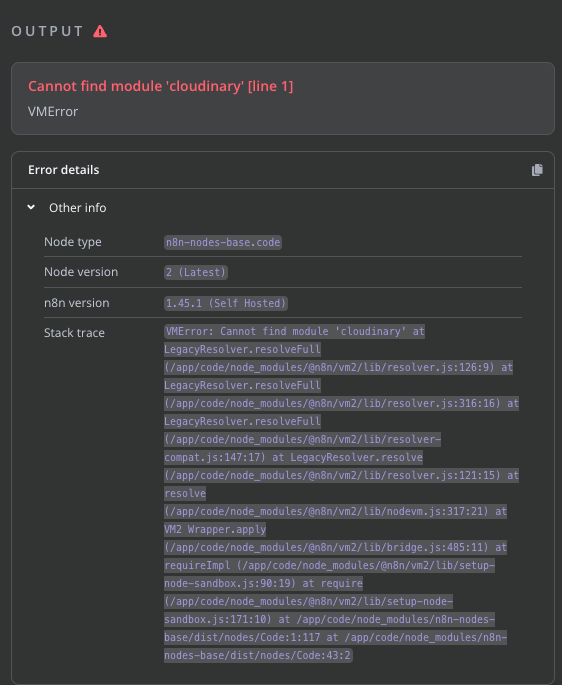
-
A AmbroiseUnly referenced this topic on
-
Ahhh, that's what I had missed! Thanks
The env.sh file default should definitely mention all of this more in details
And I'd suggest to enable built in (fs, etc.) by default, that's clearly not a security issue, and most of the people would want to use those. But that's a different topic.
-
Just for the sake of documenting, here is what I ended up with, in my
.env.shfile:# ------------- NODE MODULES --------------------- # Allow node modules to be used in code node - https://docs.n8n.io/hosting/configuration/#use-built-in-and-external-modules-in-the-code-node # Allows usage of all builtin modules export NODE_FUNCTION_ALLOW_BUILTIN=* # FYI This is a SPACE separated list export EXTRA_NODE_MODULES="cloudinary@2.2.0 node-fetch@3.1.1" # Allow usage of external npm modules # Those modules are auto-installed by Cloudron upon app restart, see https://forum.cloudron.io/topic/11946/how-to-install-npm-packages-that-n8n-app-can-use/4?_=1719382777426 # FYI This is a COMMA separated list export NODE_FUNCTION_ALLOW_EXTERNAL=cloudinary,node-fetch -
A AmbroiseUnly referenced this topic on

Hello! It looks like you're interested in this conversation, but you don't have an account yet.
Getting fed up of having to scroll through the same posts each visit? When you register for an account, you'll always come back to exactly where you were before, and choose to be notified of new replies (either via email, or push notification). You'll also be able to save bookmarks and upvote posts to show your appreciation to other community members.
With your input, this post could be even better 💗
Register Login