Cloudron makes it easy to run web apps like WordPress, Nextcloud, GitLab on your server. Find out more or install now.


Skip to content
  • Categories
  • Recent
  • Tags
  • Popular
  • Bookmarks
  • Search
Skins
  • Light
  • Brite
  • Cerulean
  • Cosmo
  • Flatly
  • Journal
  • Litera
  • Lumen
  • Lux
  • Materia
  • Minty
  • Morph
  • Pulse
  • Sandstone
  • Simplex
  • Sketchy
  • Spacelab
  • United
  • Yeti
  • Zephyr
  • Dark
  • Cyborg
  • Darkly
  • Quartz
  • Slate
  • Solar
  • Superhero
  • Vapor

  • Default (No Skin)
  • No Skin
Collapse
Brand Logo

Cloudron Forum

Apps - Status | Demo | Docs | Install
  1. Cloudron Forum
  2. Vikunja
  3. Vikunja - Desktop App error Could not find or use Vikunja installation

Vikunja - Desktop App error Could not find or use Vikunja installation

Scheduled Pinned Locked Moved Vikunja
12 Posts 5 Posters 868 Views 3 Watching
  • Oldest to Newest
  • Newest to Oldest
  • Most Votes
Reply
  • Reply as topic
Log in to reply
This topic was forked from Vikunja API and Cloudron james
This topic has been deleted. Only users with topic management privileges can see it.
  • robiR robi

    @subven did you log in first?

    subvenS Offline
    subvenS Offline
    subven
    wrote on last edited by
    #3

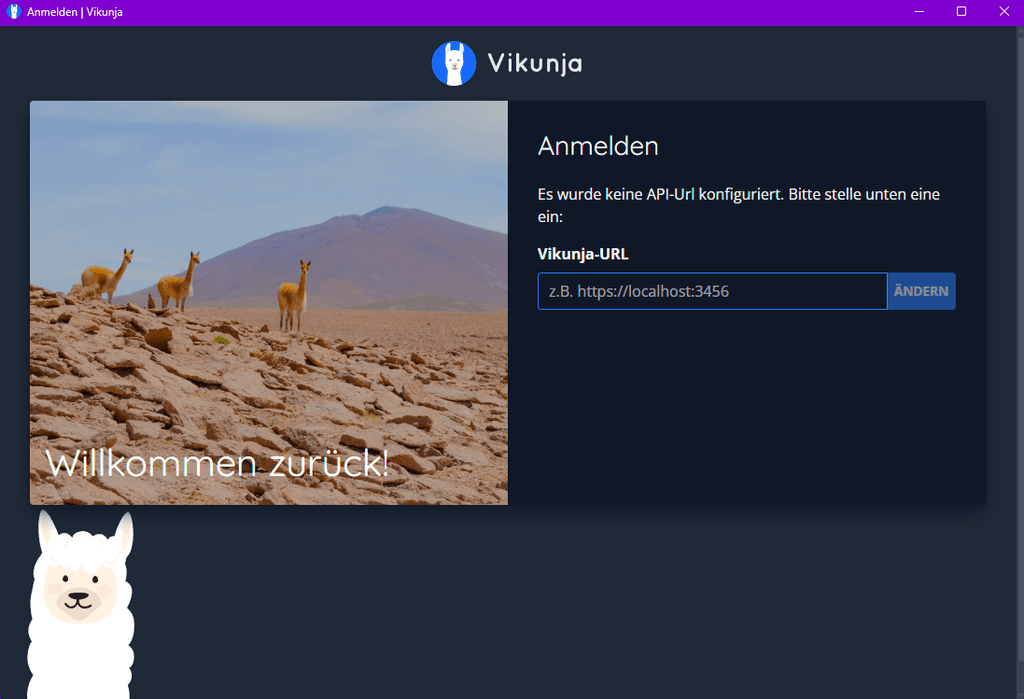
    @robi, you need to specify an API URL first. This is literally the first screen when you open the app:

    Screenshot 2025-10-22 163721.png

    1 Reply Last reply
    0
    • jamesJ Offline
      jamesJ Offline
      james
      Staff
      wrote on last edited by james
      #4

      Hello @subven
      I was not even able to install the Dekstop App on Windows for version 0.24.6 since the .exe is missng and it's just a Vikunja Desktop-v0.24.6.exe.blockmap https://dl.vikunja.io/desktop/0.24.6/

      Even when I use the older 0.24.4 or the new RC-2 I can see the error.
      But, what is odd, with both versions, I can see in the Cloudron Log that the request in fact do respond:

      Oct 22 16:57:27 2025-10-22T14:57:27Z: WEB ▶ -REDACTED- GET 200 /info 357.427µs - Mozilla/5.0 (Windows NT 10.0; Win64; x64) AppleWebKit/537.36 (KHTML, like Gecko) vikunja-desktop/v1.0.0-rc2 Chrome/138.0.7204.235 Electron/37.3.1 Safari/537.36
      Oct 22 16:57:27 2025-10-22T14:57:27Z: WEB ▶ -REDACTED- GET 200 /api/v1/info 235.855µs - Mozilla/5.0 (Windows NT 10.0; Win64; x64) AppleWebKit/537.36 (KHTML, like Gecko) vikunja-desktop/v1.0.0-rc2 Chrome/138.0.7204.235 Electron/37.3.1 Safari/537.36
      Oct 22 16:57:27 2025-10-22T14:57:27Z: WEB ▶ -REDACTED- GET 200 /api/v1/notifications?page=1 9.349822ms - Mozilla/5.0 (Windows NT 10.0; Win64; x64) AppleWebKit/537.36 (KHTML, like Gecko) Chrome/141.0.0.0 Safari/537.36
      
      1 Reply Last reply
      0
      • jamesJ Offline
        jamesJ Offline
        james
        Staff
        wrote on last edited by james
        #5

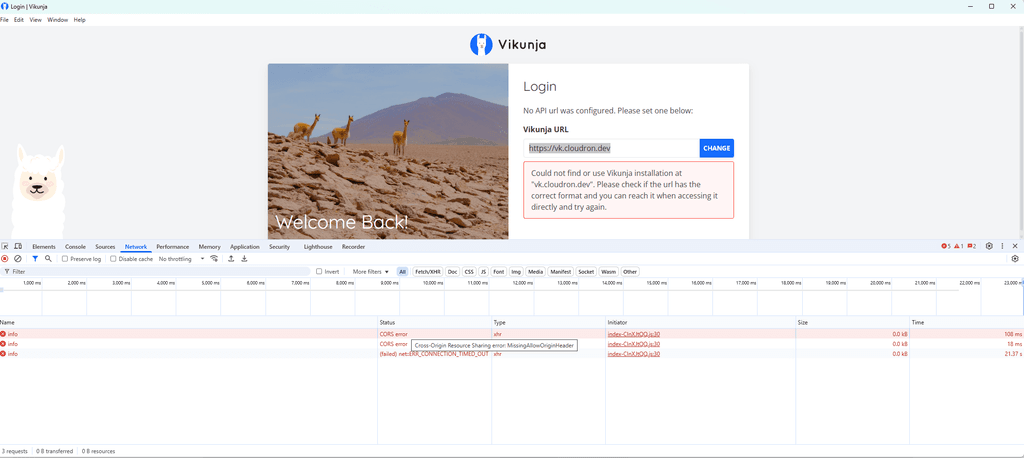
        I was able to attach a debugger to the Desktop application and had to override some source code to enable the menu bar.
        With the menu bar, I could open the Developer Tools and could inspect errors and the network.

        There seems to be a CORS issue.

        79a64250-6e6c-4bf0-8fc9-cf4be17956a0-image.png

        1 Reply Last reply
        0
        • jamesJ Offline
          jamesJ Offline
          james
          Staff
          wrote on last edited by james
          #6

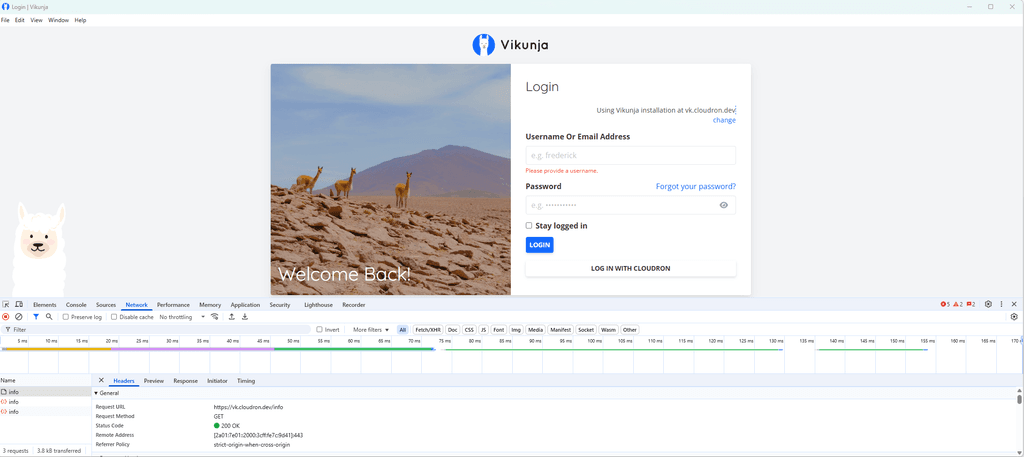
          Figured it out.
          You need to edit your /app/data/config.yml of your Vikunja app and add the following lines:

          cors:
            enable: true
            origins: "*"


          restart the app and now your Desktop Vinkunja Client should be able to connect.

          bbf133d4-7067-4287-936a-acc6510f03d6-image.png

          1 Reply Last reply
          1
          • humptydumptyH Offline
            humptydumptyH Offline
            humptydumpty
            wrote last edited by humptydumpty
            #7

            I'm using desktop v.2.1.0 and encountering an OIDC error on the login page.

            I added the cors enable true origins * code above and restarted the app with no effect on the error.

            OpenID Error
            redirect_uri did not match any of the client's registered redirect_uris
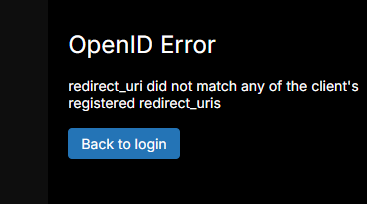
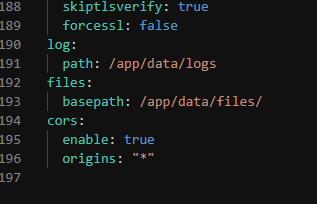
            

            image.png

            6f1de063-4375-4698-9af0-b1671991dbd3-image.png

            Vikunja 2.0.0 on Cloudron io.vikunja.cloudronapp@1.20.0.

            Cloudron version 9.0.17 | Ubuntu 24.04 LTS Linux 6.8.0-101-generic

            1 Reply Last reply
            0
            • humptydumptyH Offline
              humptydumptyH Offline
              humptydumpty
              wrote last edited by humptydumpty
              #8

              BTW, if I click on "Back to login", and log in with my username/password, it'll log into Cloudron and show me my dashboard! 😂

              On a positive note, I have a Cloudron dashboard desktop app now 👌

              J 1 Reply Last reply
              0
              • humptydumptyH humptydumpty

                BTW, if I click on "Back to login", and log in with my username/password, it'll log into Cloudron and show me my dashboard! 😂

                On a positive note, I have a Cloudron dashboard desktop app now 👌

                J Offline
                J Offline
                joseph
                Staff
                wrote last edited by
                #9

                @humptydumpty said:

                On a positive note, I have a Cloudron dashboard desktop app now 👌

                This usually happens when the app is really just a browser wrapper. The freescout mobile app does the same at times.

                1 Reply Last reply
                0
                • J Offline
                  J Offline
                  joseph
                  Staff
                  wrote last edited by
                  #10

                  Unfortunately, all desktop binaries crash on linux, so I am unable to debug more.

                  1 Reply Last reply
                  1
                  • jamesJ Offline
                    jamesJ Offline
                    james
                    Staff
                    wrote last edited by
                    #11

                    Hello @humptydumpty
                    I was able to debug the Vikunja Desktop Electron app.
                    An app update will available soon to fix the issue.


                    Some technical details for interested users.

                    The cors change now seems to be unnecessary since the default was changed to:

                    CorsOrigins.setDefault([]string{"http://127.0.0.1:*", "http://localhost:*"})
                    

                    Please ensure to always write the full URL in the Vikunja Desktop app e.g.: https://vinkunja.cloudron.dev.
                    When just using e.g.: vikunja.cloudron.dev an automatic redirection from http to https is done and the Vinkunja Desktop app will run into an internal CORS error (which is displayed no where) and the app will silently fail, and it will look like it does nothing to the end user.

                    I also was able to figure out the OIDC issue from the desktop app.
                    The Desktop app uses

                    http://127.0.0.1:$SOME_RANDOM_PORT/auth/openid/cloudron
                    

                    as the callback URL.

                    Needed to read up on the rfc8252 section 7.3 - Loopback Interface Redirection to understand how these random ports are handled.
                    Since I was very confused when the Desktop app used a random port e.g.: 10054 and the CloudronManifest.json allowed http://127.0.0.1:45735/auth/openid/cloudron (the default port used from the app https://github.com/go-vikunja/vikunja/blob/ec11643c24b0f00c55ec5a60328b54e2c3a69962/desktop/main.js#L29) and the callback URL still worked.
                    Thought at first this was some security issue, because, I did not explicitly allow port 10054 but did allow 45735.
                    But rfc8252 section 7.3 - Loopback Interface Redirection explains that behaviour since:

                    The authorization server MUST allow any port to be specified at the
                    time of the request for loopback IP redirect URIs, to accommodate
                    clients that obtain an available ephemeral port from the operating
                    system at the time of the request.

                    humptydumptyH 1 Reply Last reply
                    3
                    • jamesJ james

                      Hello @humptydumpty
                      I was able to debug the Vikunja Desktop Electron app.
                      An app update will available soon to fix the issue.


                      Some technical details for interested users.

                      The cors change now seems to be unnecessary since the default was changed to:

                      CorsOrigins.setDefault([]string{"http://127.0.0.1:*", "http://localhost:*"})
                      

                      Please ensure to always write the full URL in the Vikunja Desktop app e.g.: https://vinkunja.cloudron.dev.
                      When just using e.g.: vikunja.cloudron.dev an automatic redirection from http to https is done and the Vinkunja Desktop app will run into an internal CORS error (which is displayed no where) and the app will silently fail, and it will look like it does nothing to the end user.

                      I also was able to figure out the OIDC issue from the desktop app.
                      The Desktop app uses

                      http://127.0.0.1:$SOME_RANDOM_PORT/auth/openid/cloudron
                      

                      as the callback URL.

                      Needed to read up on the rfc8252 section 7.3 - Loopback Interface Redirection to understand how these random ports are handled.
                      Since I was very confused when the Desktop app used a random port e.g.: 10054 and the CloudronManifest.json allowed http://127.0.0.1:45735/auth/openid/cloudron (the default port used from the app https://github.com/go-vikunja/vikunja/blob/ec11643c24b0f00c55ec5a60328b54e2c3a69962/desktop/main.js#L29) and the callback URL still worked.
                      Thought at first this was some security issue, because, I did not explicitly allow port 10054 but did allow 45735.
                      But rfc8252 section 7.3 - Loopback Interface Redirection explains that behaviour since:

                      The authorization server MUST allow any port to be specified at the
                      time of the request for loopback IP redirect URIs, to accommodate
                      clients that obtain an available ephemeral port from the operating
                      system at the time of the request.

                      humptydumptyH Offline
                      humptydumptyH Offline
                      humptydumpty
                      wrote last edited by
                      #12

                      @james Thanks for the quick fix. I can confirm it's working now on Windows desktop v.2.1.0. 🎉

                      1 Reply Last reply
                      1

                      Hello! It looks like you're interested in this conversation, but you don't have an account yet.

                      Getting fed up of having to scroll through the same posts each visit? When you register for an account, you'll always come back to exactly where you were before, and choose to be notified of new replies (either via email, or push notification). You'll also be able to save bookmarks and upvote posts to show your appreciation to other community members.

                      With your input, this post could be even better 💗

                      Register Login
                      Reply
                      • Reply as topic
                      Log in to reply
                      • Oldest to Newest
                      • Newest to Oldest
                      • Most Votes


                      • Login

                      • Don't have an account? Register

                      • Login or register to search.
                      • First post
                        Last post
                      0
                      • Categories
                      • Recent
                      • Tags
                      • Popular
                      • Bookmarks
                      • Search