Cloudron makes it easy to run web apps like WordPress, Nextcloud, GitLab on your server. Find out more or install now.


Skip to content
  • Categories
  • Recent
  • Tags
  • Popular
  • Bookmarks
  • Search
Skins
  • Light
  • Brite
  • Cerulean
  • Cosmo
  • Flatly
  • Journal
  • Litera
  • Lumen
  • Lux
  • Materia
  • Minty
  • Morph
  • Pulse
  • Sandstone
  • Simplex
  • Sketchy
  • Spacelab
  • United
  • Yeti
  • Zephyr
  • Dark
  • Cyborg
  • Darkly
  • Quartz
  • Slate
  • Solar
  • Superhero
  • Vapor

  • Default (No Skin)
  • No Skin
Collapse
Brand Logo

Cloudron Forum

Apps - Status | Demo | Docs | Install
  1. Cloudron Forum
  2. Support
  3. cloning issues with Cloudflare R2

cloning issues with Cloudflare R2

Scheduled Pinned Locked Moved Solved Support
cloudflarer2backupclone
9 Posts 3 Posters 405 Views 4 Watching
  • Oldest to Newest
  • Newest to Oldest
  • Most Votes
Reply
  • Reply as topic
Log in to reply
This topic has been deleted. Only users with topic management privileges can see it.
  • osoboO Offline
    osoboO Offline
    osobo
    wrote on last edited by
    #1

    Hello everyone,

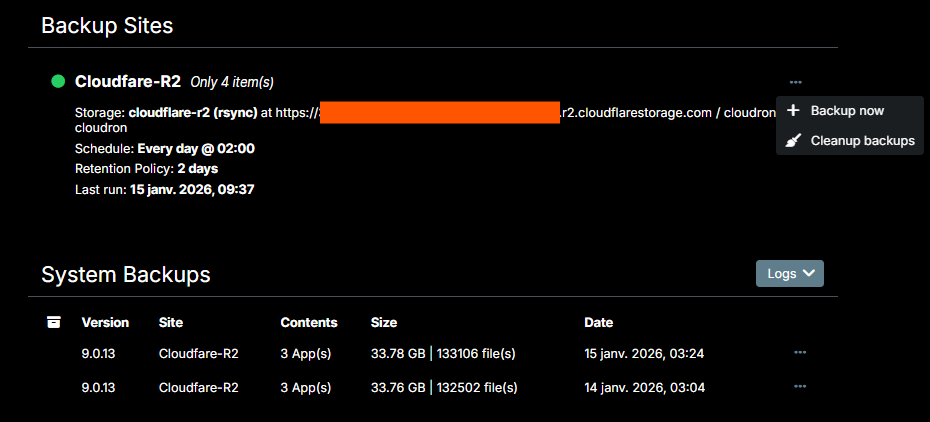
    I've a cloning app issue. It used to work flawlessly. I've tried multiple times but receive this error when I try to clone one Nextcloud app from backups.

    Error - Task 6703 crashed with unknown code 1

    I'm using Cloudfare R2. Location is Asia-Pacific (APAC). Cloudron version 9.0.13 . The apps backup is done once daily without problem reported.

    In addition, how to edit the backup configuration once created in Cloudron ? I cannot find the setting on the dashboard 😧 ...

    Backups.png

    Thank you for your support and meanwhile best New Year's wishes 🙂 !

    1 Reply Last reply
    0
    • jamesJ james

      Hello @osobo
      That time, 18:46 o'clock so somewhere in the Hanoi timezone. Noting this for later. Might be a timezone issue with logrotate?

      And there is nothing in the box.log when you while you are trying to clone an app from a backup?
      Keep the box.log open with, and please attempt a clone.

      osoboO Offline
      osoboO Offline
      osobo
      wrote on last edited by
      #9

      Thank you @james
      I could not get it to work. After several attempts, I ultimately deleted the backup files and started with a new configuration. As advised, I also set the retention period to "unlimited" (it was previously set to two days).
      Everything is working well now, and I was able to back up and clone the app without any issues.
      Thanks again, and keep up the good work!

      1 Reply Last reply
      2
      • robiR Offline
        robiR Offline
        robi
        wrote on last edited by
        #2

        You cannot edit a backup configuration.

        Only create a new one and delete the old.

        Conscious tech

        osoboO 1 Reply Last reply
        1
        • robiR robi

          You cannot edit a backup configuration.

          Only create a new one and delete the old.

          osoboO Offline
          osoboO Offline
          osobo
          wrote on last edited by
          #3

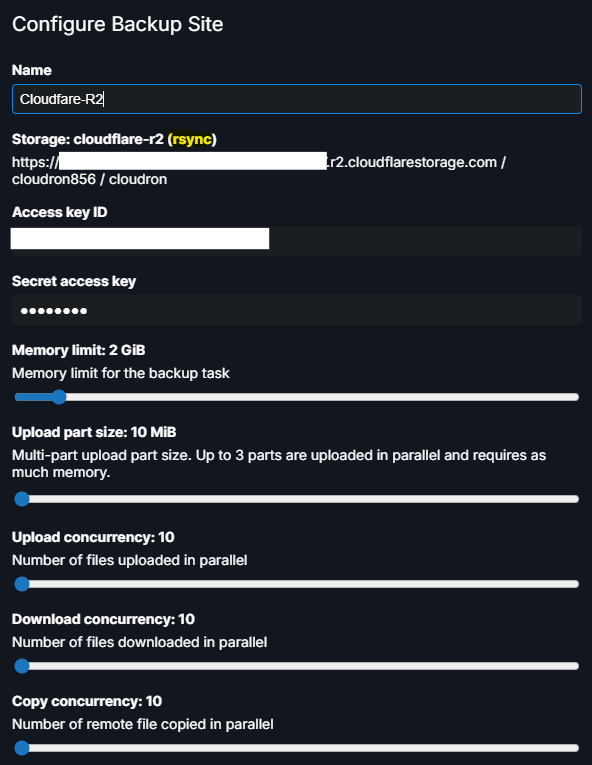
          @robi Thank you. Sorry I've just realized I was not using the Cloudron admin account so I was not able to access the backups configuration option adequately...

          Does any of these settings would help to resolve the cloning issue?

          77df7832-f6a2-415c-a9aa-92330195d366-image.png

          1 Reply Last reply
          0
          • jamesJ Offline
            jamesJ Offline
            james
            Staff
            wrote on last edited by
            #4

            Hello @osobo
            Can you please check the /home/yellowtent/platformdata/logs/box.log when this error occurs?

            osoboO 1 Reply Last reply
            0
            • jamesJ james

              Hello @osobo
              Can you please check the /home/yellowtent/platformdata/logs/box.log when this error occurs?

              osoboO Offline
              osoboO Offline
              osobo
              wrote on last edited by
              #5

              @james said in cloning issues with Cloudflare R2:

              /home/yellowtent/platformdata/logs/

              Hello @james . After cloning fails the box.log shows the following message repeating with no other indication :
              2026-01-11T00:07:50.199Z box:apphealthmonitor app health: 13 running / 0 stopped / 0 unresponsive

              1 Reply Last reply
              0
              • jamesJ Offline
                jamesJ Offline
                james
                Staff
                wrote on last edited by
                #6

                Hello @osobo
                Since cloning is a task, can you check https://my.$DOMAIN.$TLD/#/system-eventlog for that task?
                If you find it, note down the taskid.
                Then you can find the logs for that task in /home/yellowtent/platformdata/logs/tasks/$TASKID.log.
                Can you share this task log or do you see any error in that task log?

                1 Reply Last reply
                0
                • osoboO Offline
                  osoboO Offline
                  osobo
                  wrote on last edited by
                  #7

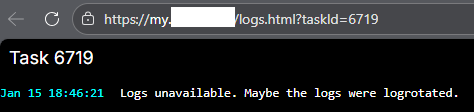
                  So the task ID was 6719
                  5a28f1f4-88c9-4074-ad60-eb7892c02541-image.png

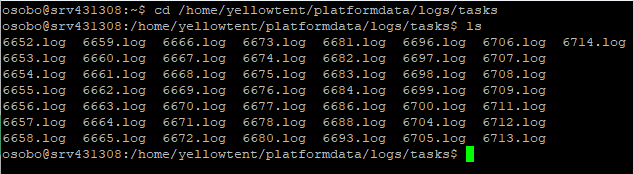
                  However when I look for that specific task log it is not recorded (?)
                  46b7e117-c1f0-401e-bc22-9557dc0910f0-image.png

                  image.png

                  Thanks for your support

                  1 Reply Last reply
                  1
                  • jamesJ Offline
                    jamesJ Offline
                    james
                    Staff
                    wrote on last edited by james
                    #8

                    Hello @osobo
                    That time, 18:46 o'clock so somewhere in the Hanoi timezone. Noting this for later. Might be a timezone issue with logrotate?

                    And there is nothing in the box.log when you while you are trying to clone an app from a backup?
                    Keep the box.log open with, and please attempt a clone.

                    osoboO 1 Reply Last reply
                    1
                    • jamesJ james

                      Hello @osobo
                      That time, 18:46 o'clock so somewhere in the Hanoi timezone. Noting this for later. Might be a timezone issue with logrotate?

                      And there is nothing in the box.log when you while you are trying to clone an app from a backup?
                      Keep the box.log open with, and please attempt a clone.

                      osoboO Offline
                      osoboO Offline
                      osobo
                      wrote on last edited by
                      #9

                      Thank you @james
                      I could not get it to work. After several attempts, I ultimately deleted the backup files and started with a new configuration. As advised, I also set the retention period to "unlimited" (it was previously set to two days).
                      Everything is working well now, and I was able to back up and clone the app without any issues.
                      Thanks again, and keep up the good work!

                      1 Reply Last reply
                      2
                      • jamesJ james has marked this topic as solved on

                      Hello! It looks like you're interested in this conversation, but you don't have an account yet.

                      Getting fed up of having to scroll through the same posts each visit? When you register for an account, you'll always come back to exactly where you were before, and choose to be notified of new replies (either via email, or push notification). You'll also be able to save bookmarks and upvote posts to show your appreciation to other community members.

                      With your input, this post could be even better 💗

                      Register Login
                      Reply
                      • Reply as topic
                      Log in to reply
                      • Oldest to Newest
                      • Newest to Oldest
                      • Most Votes


                      • Login

                      • Don't have an account? Register

                      • Login or register to search.
                      • First post
                        Last post
                      0
                      • Categories
                      • Recent
                      • Tags
                      • Popular
                      • Bookmarks
                      • Search