Cloudron makes it easy to run web apps like WordPress, Nextcloud, GitLab on your server. Find out more or install now.


Skip to content
  • Categories
  • Recent
  • Tags
  • Popular
  • Bookmarks
  • Search
Skins
  • Light
  • Brite
  • Cerulean
  • Cosmo
  • Flatly
  • Journal
  • Litera
  • Lumen
  • Lux
  • Materia
  • Minty
  • Morph
  • Pulse
  • Sandstone
  • Simplex
  • Sketchy
  • Spacelab
  • United
  • Yeti
  • Zephyr
  • Dark
  • Cyborg
  • Darkly
  • Quartz
  • Slate
  • Solar
  • Superhero
  • Vapor

  • Default (No Skin)
  • No Skin
Collapse
Brand Logo

Cloudron Forum

Apps - Status | Demo | Docs | Install
  1. Cloudron Forum
  2. Support
  3. cloning issues with Cloudflare R2

cloning issues with Cloudflare R2

Scheduled Pinned Locked Moved Solved Support
cloudflarer2backupclone
9 Posts 3 Posters 45 Views 4 Watching
  • Oldest to Newest
  • Newest to Oldest
  • Most Votes
Reply
  • Reply as topic
Log in to reply
This topic has been deleted. Only users with topic management privileges can see it.
  • osoboO Offline
    osoboO Offline
    osobo
    wrote last edited by
    #1

    Hello everyone,

    I've a cloning app issue. It used to work flawlessly. I've tried multiple times but receive this error when I try to clone one Nextcloud app from backups.

    Error - Task 6703 crashed with unknown code 1

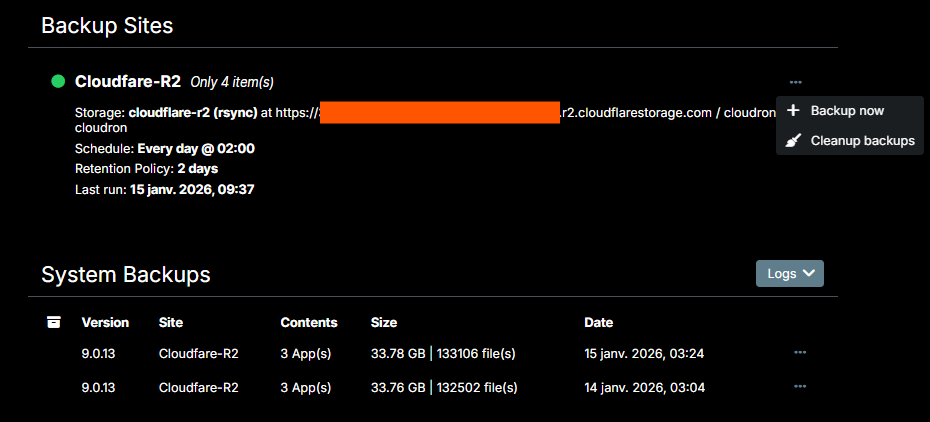
    I'm using Cloudfare R2. Location is Asia-Pacific (APAC). Cloudron version 9.0.13 . The apps backup is done once daily without problem reported.

    In addition, how to edit the backup configuration once created in Cloudron ? I cannot find the setting on the dashboard 😧 ...

    Backups.png

    Thank you for your support and meanwhile best New Year's wishes 🙂 !

    1 Reply Last reply
    0
    • jamesJ james

      Hello @osobo
      That time, 18:46 o'clock so somewhere in the Hanoi timezone. Noting this for later. Might be a timezone issue with logrotate?

      And there is nothing in the box.log when you while you are trying to clone an app from a backup?
      Keep the box.log open with, and please attempt a clone.

      osoboO Offline
      osoboO Offline
      osobo
      wrote last edited by
      #9

      Thank you @james
      I could not get it to work. After several attempts, I ultimately deleted the backup files and started with a new configuration. As advised, I also set the retention period to "unlimited" (it was previously set to two days).
      Everything is working well now, and I was able to back up and clone the app without any issues.
      Thanks again, and keep up the good work!

      1 Reply Last reply
      1
      • robiR Offline
        robiR Offline
        robi
        wrote last edited by
        #2

        You cannot edit a backup configuration.

        Only create a new one and delete the old.

        Conscious tech

        osoboO 1 Reply Last reply
        1
        • robiR robi

          You cannot edit a backup configuration.

          Only create a new one and delete the old.

          osoboO Offline
          osoboO Offline
          osobo
          wrote last edited by
          #3

          @robi Thank you. Sorry I've just realized I was not using the Cloudron admin account so I was not able to access the backups configuration option adequately...

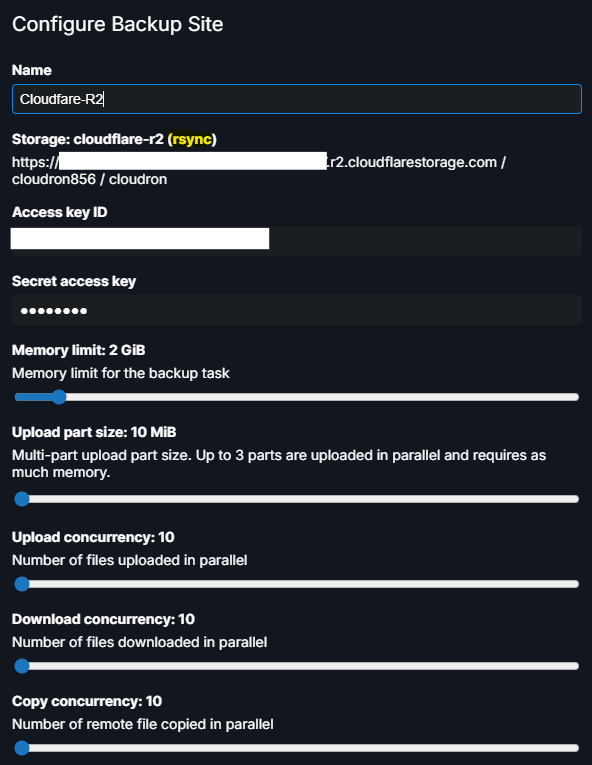
          Does any of these settings would help to resolve the cloning issue?

          77df7832-f6a2-415c-a9aa-92330195d366-image.png

          1 Reply Last reply
          0
          • jamesJ Offline
            jamesJ Offline
            james
            Staff
            wrote last edited by
            #4

            Hello @osobo
            Can you please check the /home/yellowtent/platformdata/logs/box.log when this error occurs?

            osoboO 1 Reply Last reply
            0
            • jamesJ james

              Hello @osobo
              Can you please check the /home/yellowtent/platformdata/logs/box.log when this error occurs?

              osoboO Offline
              osoboO Offline
              osobo
              wrote last edited by
              #5

              @james said in cloning issues with Cloudflare R2:

              /home/yellowtent/platformdata/logs/

              Hello @james . After cloning fails the box.log shows the following message repeating with no other indication :
              2026-01-11T00:07:50.199Z box:apphealthmonitor app health: 13 running / 0 stopped / 0 unresponsive

              1 Reply Last reply
              0
              • jamesJ Offline
                jamesJ Offline
                james
                Staff
                wrote last edited by
                #6

                Hello @osobo
                Since cloning is a task, can you check https://my.$DOMAIN.$TLD/#/system-eventlog for that task?
                If you find it, note down the taskid.
                Then you can find the logs for that task in /home/yellowtent/platformdata/logs/tasks/$TASKID.log.
                Can you share this task log or do you see any error in that task log?

                1 Reply Last reply
                0
                • osoboO Offline
                  osoboO Offline
                  osobo
                  wrote last edited by
                  #7

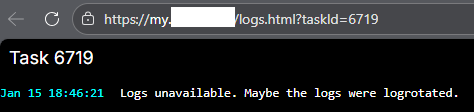
                  So the task ID was 6719
                  5a28f1f4-88c9-4074-ad60-eb7892c02541-image.png

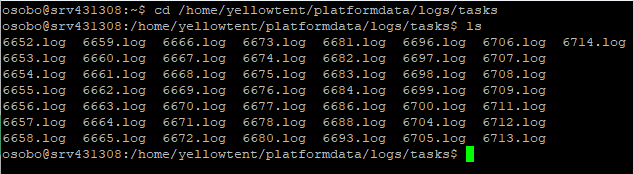
                  However when I look for that specific task log it is not recorded (?)
                  46b7e117-c1f0-401e-bc22-9557dc0910f0-image.png

                  image.png

                  Thanks for your support

                  1 Reply Last reply
                  1
                  • jamesJ Offline
                    jamesJ Offline
                    james
                    Staff
                    wrote last edited by james
                    #8

                    Hello @osobo
                    That time, 18:46 o'clock so somewhere in the Hanoi timezone. Noting this for later. Might be a timezone issue with logrotate?

                    And there is nothing in the box.log when you while you are trying to clone an app from a backup?
                    Keep the box.log open with, and please attempt a clone.

                    osoboO 1 Reply Last reply
                    1
                    • jamesJ james

                      Hello @osobo
                      That time, 18:46 o'clock so somewhere in the Hanoi timezone. Noting this for later. Might be a timezone issue with logrotate?

                      And there is nothing in the box.log when you while you are trying to clone an app from a backup?
                      Keep the box.log open with, and please attempt a clone.

                      osoboO Offline
                      osoboO Offline
                      osobo
                      wrote last edited by
                      #9

                      Thank you @james
                      I could not get it to work. After several attempts, I ultimately deleted the backup files and started with a new configuration. As advised, I also set the retention period to "unlimited" (it was previously set to two days).
                      Everything is working well now, and I was able to back up and clone the app without any issues.
                      Thanks again, and keep up the good work!

                      1 Reply Last reply
                      1
                      • jamesJ james has marked this topic as solved
                      Reply
                      • Reply as topic
                      Log in to reply
                      • Oldest to Newest
                      • Newest to Oldest
                      • Most Votes


                      • Login

                      • Don't have an account? Register

                      • Login or register to search.
                      • First post
                        Last post
                      0
                      • Categories
                      • Recent
                      • Tags
                      • Popular
                      • Bookmarks
                      • Search