
Cannot back up apps and update to the new Cloudron version
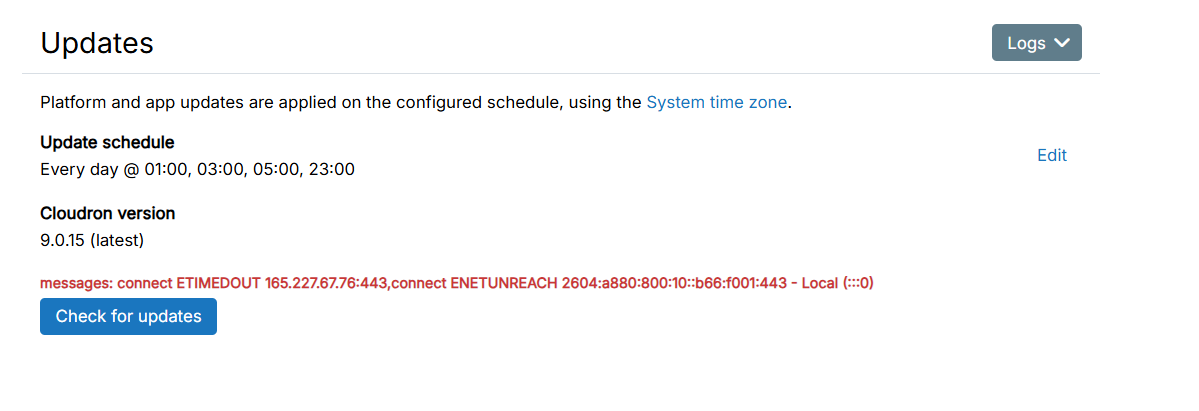
-
gelocation also works. But I am surprised that it blocks login. Let me check this internally.
$ ping geolocation.cloudron.io
PING geolocation.cloudron.io (167.99.137.196) 56(84) bytes of data.
64 bytes from my.public.cloudron.io (167.99.137.196): icmp_seq=1 ttl=56 time=18.3 ms
64 bytes from my.public.cloudron.io (167.99.137.196): icmp_seq=2 ttl=56 time=31.3 ms
64 bytes from my.public.cloudron.io (167.99.137.196): icmp_seq=3 ttl=56 time=17.2 ms -
I followed this guide and was able to log in, but I couldn’t update Cloudron to the latest version or back up the apps.
Edit
src/oidcserver.jsline 472 and wrap withsafe(), then restart the box service:# Backup cp /home/yellowtent/box/src/oidcserver.js /home/yellowtent/box/src/oidcserver.js.bak # Fix sed -i 's/await users.notifyLoginLocation(user, ip, userAgent, auditSource);/await safe(users.notifyLoginLocation(user, ip, userAgent, auditSource));/' /home/yellowtent/box/src/oidcserver.js # Restart systemctl restart box -
@zonzonzon indeed! I applied the exact change just minutes ago when I was investigating your issue - https://git.cloudron.io/platform/box/-/commit/91b8f1a4574c3b30e6fd6f996fca23a6365388dc
But regardless, do investigate why cloudron.io and geolocation.cloudron.io cannot be reached .
-
Backup Sites
Schedule: Every day @ 23:00
Retention Policy: 1 week
Last run: Feb 5, 2026, 04:07 PM
Backup endpoint is not active: Error listing objects. code: undefined message: getaddrinfo EAI_AGAIN name.sgp1.digitaloceanspaces.com HTTP: undefined -
Disk: /dev/vda1 38G
[OK] node version is correct
[OK] IPv6 is enabled in kernel. No public IPv6 address
[OK] docker is running
[OK] docker version is correct
[OK] MySQL is running
[OK] nginx is running
[OK] dashboard cert is valid
[OK] dashboard is reachable via loopback
[OK] No pending database migrations
[OK] Service 'mysql' is running and healthy
[OK] Service 'postgresql' is running and healthy
[OK] Service 'mongodb' is running and healthy
[OK] Service 'mail' is running and healthy
[OK] Service 'graphite' is running and healthy
[OK] Service 'sftp' is running and healthy
[OK] box v9.0.15 is running
[OK] netplan is good
[OK] DNS is resolving via systemd-resolved
[OK] Dashboard is reachable via domain name
[OK] unbound is runningSymptoms:
- TCP connection succeeds, but TLS handshake times out
- Both IPv4 (port 443) and IPv6 connections fail
- Outbound HTTPS to all other destinations works fine (e.g. Google, GitHub)
- All Cloudron services are running and healthy
- Error from box.log: "connect ETIMEDOUT ...prod.cloudron.io:443, connect ENETUNREACH ...IPv6 - Local (:::0)"
I've verified there are no local firewall rules blocking outbound traffic to your server. The issue appears to be on the prod.cloudron.io side — possibly our server IP is being rate-limited or blocked.
-
Disk: /dev/vda1 38G
[OK] node version is correct
[OK] IPv6 is enabled in kernel. No public IPv6 address
[OK] docker is running
[OK] docker version is correct
[OK] MySQL is running
[OK] nginx is running
[OK] dashboard cert is valid
[OK] dashboard is reachable via loopback
[OK] No pending database migrations
[OK] Service 'mysql' is running and healthy
[OK] Service 'postgresql' is running and healthy
[OK] Service 'mongodb' is running and healthy
[OK] Service 'mail' is running and healthy
[OK] Service 'graphite' is running and healthy
[OK] Service 'sftp' is running and healthy
[OK] box v9.0.15 is running
[OK] netplan is good
[OK] DNS is resolving via systemd-resolved
[OK] Dashboard is reachable via domain name
[OK] unbound is runningSymptoms:
- TCP connection succeeds, but TLS handshake times out
- Both IPv4 (port 443) and IPv6 connections fail
- Outbound HTTPS to all other destinations works fine (e.g. Google, GitHub)
- All Cloudron services are running and healthy
- Error from box.log: "connect ETIMEDOUT ...prod.cloudron.io:443, connect ENETUNREACH ...IPv6 - Local (:::0)"
I've verified there are no local firewall rules blocking outbound traffic to your server. The issue appears to be on the prod.cloudron.io side — possibly our server IP is being rate-limited or blocked.
@zonzonzon very strange, so only cloudron.io is blocked and not others. We don't really do any specific IP rate limiting or blocking on our side. Can you reach out to me on support@cloudron.io, I can take a look.
-
 J james has marked this topic as solved on


Hello! It looks like you're interested in this conversation, but you don't have an account yet.
Getting fed up of having to scroll through the same posts each visit? When you register for an account, you'll always come back to exactly where you were before, and choose to be notified of new replies (either via email, or push notification). You'll also be able to save bookmarks and upvote posts to show your appreciation to other community members.
With your input, this post could be even better 💗
Register Login